1、在项目的目录中新建一个filte的文件夹,并在文件夹下面创建format.wxs文件
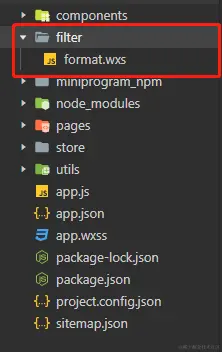
2、 在format.wxs文件中实现需要的功能,以下是时间格式化的功能
var filter = {
  formatDate: function (value, format, splitStr) {
    var getDateTmp = getDate(value);
    var month = getDateTmp.getMonth() + 1;
    var date = getDateTmp.getDate();
    var hour = getDateTmp.getHours();
    var min = getDateTmp.getMinutes();
    var second = getDateTmp.getSeconds();
    console.log(getDateTmp.getMonth() + 1);
    var o = {
      'y': getDateTmp.getFullYear(),
      'M': month > 10 ? month : '0' + month,
      'd': date > 10 ? date : '0' + date,
      'h': hour > 10 ? hour : '0' + hour,
      'm': min > 10 ? min : '0' + min,
      's': second > 10 ? second : '0' + second,
    };
    var finalValue = ""
    switch (format) {
      case 'year':
        finalValue = o.y;
        break;
      case 'month':
        finalValue = splitStr ? o.y + splitStr + o.M : o.y + '-' + o.M;
        break;
      case 'date':
        finalValue = splitStr ? o.y + splitStr + o.M + splitStr + o.d : o.y + '-' + o.M + '-' + o.d;
        break;
      case 'time':
        finalValue = splitStr ? o.y + splitStr + o.M + splitStr + o.d + " " + o.h + ':' + o.m + ':' + o.s : o.y + '-' + o.M + '-' + o.d + " " + o.h + ':' + o.m + ':' + o.s;
        break;
      default:
        finalValue = { y: o.y, M: o.M, d: o.d, h: o.h, m: o.m, s: o.s }
    }
    return finalValue;
  }
}

module.exports = {
  formatDate: filter.formatDate,
}
3、在页面中使用
<wxs module="filter" src="/filter/format.wxs"></wxs>
<view>{{filter.formatDate('2020/12/12','month','-')}}</view>



