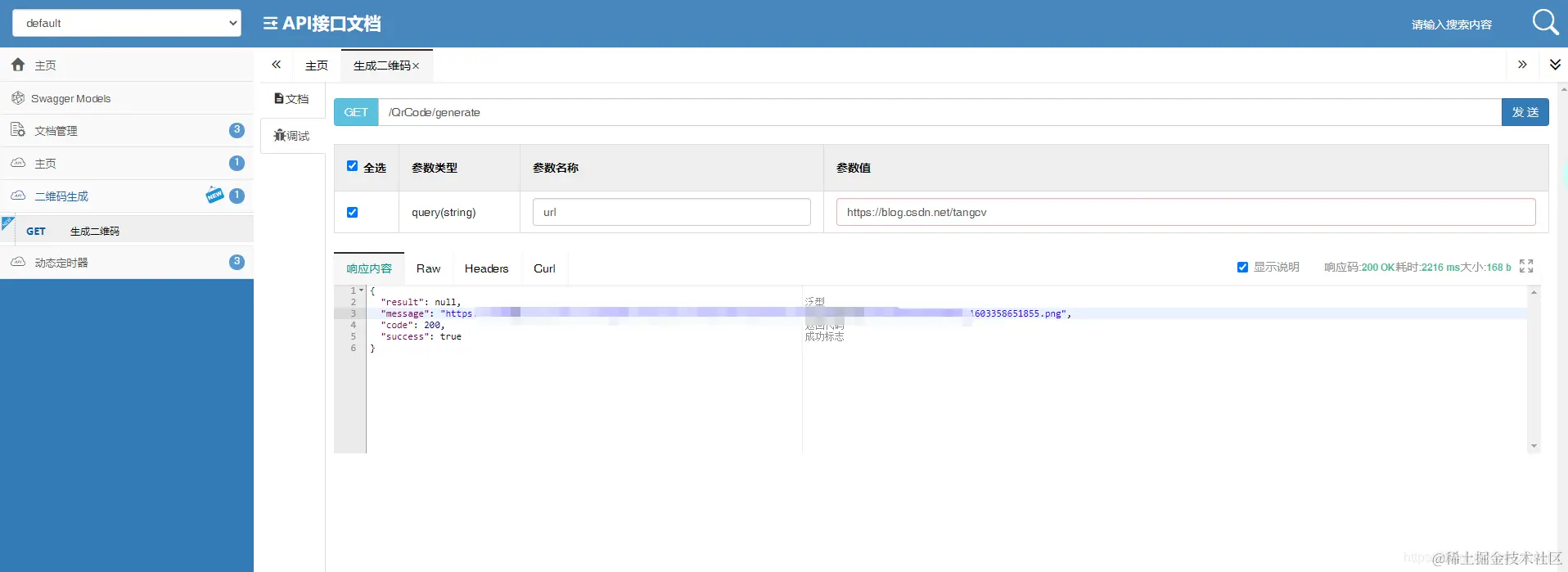
实现代码
pom.xml依赖
<dependency>
<groupId>com.google.zxing</groupId>
<artifactId>core</artifactId>
<version>3.3.0</version>
</dependency>
<dependency>
<groupId>commons-fileupload</groupId>
<artifactId>commons-fileupload</artifactId>
<version>1.4</version>
<scope>compile</scope>
</dependency>
<dependency>
<groupId>com.aliyun.oss</groupId>
<artifactId>aliyun-sdk-oss</artifactId>
<version>3.6.0</version>
</dependency>
二维码工具类
BarcodeUtils
package com.mybatisplus.utils;
import com.google.zxing.BarcodeFormat;
import com.google.zxing.EncodeHintType;
import com.google.zxing.MultiFormatWriter;
import com.google.zxing.common.BitMatrix;
import com.google.zxing.qrcode.decoder.ErrorCorrectionLevel;
import javax.imageio.ImageIO;
import java.awt.*;
import java.awt.image.BufferedImage;
import java.io.File;
import java.util.HashMap;
import java.util.Map;
public class BarcodeUtils {
private static final int QRCOLOR = 0xFF000000;
private static final int BGWHITE = 0xAABBCCDD;
private static final int WIDTH = 500;
private static final int HEIGHT = 500;
private static final int WORDHEIGHT = 540;
private static Map<EncodeHintType, Object> hints = new HashMap<EncodeHintType, Object>() {
private static final long serialVersionUID = 1L;
{
put(EncodeHintType.ERROR_CORRECTION, ErrorCorrectionLevel.H);
put(EncodeHintType.CHARACTER_SET, "utf-8");
put(EncodeHintType.MARGIN, 0);
}
};
private static void setGraphics2D(Graphics2D graphics2D){
graphics2D.setRenderingHint(RenderingHints.KEY_ANTIALIASING, RenderingHints.VALUE_ANTIALIAS_ON);
graphics2D.setRenderingHint(RenderingHints.KEY_STROKE_CONTROL, RenderingHints.VALUE_STROKE_DEFAULT);
Stroke s = new BasicStroke(1, BasicStroke.CAP_ROUND, BasicStroke.JOIN_MITER);
graphics2D.setStroke(s);
}
public static void drawLogoQRCode(String logoFile,String bgFile, File codeFile, String qrUrl, String words) {
try {
MultiFormatWriter multiFormatWriter = new MultiFormatWriter();
BitMatrix bm = multiFormatWriter.encode(qrUrl, BarcodeFormat.QR_CODE, WIDTH, HEIGHT, hints);
BufferedImage image = new BufferedImage(WIDTH, HEIGHT, BufferedImage.TYPE_INT_ARGB);
for (int x = 0; x < WIDTH; x++) {
for (int y = 0; y < HEIGHT; y++) {
image.setRGB(x, y, bm.get(x, y) ? QRCOLOR : BGWHITE);
}
}
BufferedImage qrCodeWithLogoNoBg = QrCodeUtil.addLogo(image,logoFile);
BufferedImage qrCodeAddText = QrCodeUtil.addText(qrCodeWithLogoNoBg, words, 50);
ImageIO.write(qrCodeAddText, "png", codeFile);
} catch (Exception e) {
e.printStackTrace();
}
}
}
QrCodeUtil
package com.mybatisplus.utils;
import cn.hutool.extra.qrcode.BufferedImageLuminanceSource;
import com.google.zxing.*;
import com.google.zxing.common.BitMatrix;
import com.google.zxing.common.HybridBinarizer;
import com.google.zxing.qrcode.decoder.ErrorCorrectionLevel;
import javax.imageio.ImageIO;
import java.awt.*;
import java.awt.font.FontRenderContext;
import java.awt.geom.Rectangle2D;
import java.awt.image.BufferedImage;
import java.io.File;
import java.io.IOException;
import java.util.HashMap;
import java.util.Hashtable;
import java.util.Map;
public class QrCodeUtil {
private static final int BLACK = 0xAABBCCDD;
private static final int WHITE = 0x00FFFFFF;
public static BufferedImage toBufferedImage(BitMatrix matrix) {
int width = matrix.getWidth();
int height = matrix.getHeight();
BufferedImage image = new BufferedImage(width, height, BufferedImage.TYPE_INT_ARGB);
for (int x = 0; x < width; x++) {
for (int y = 0; y < height; y++) {
image.setRGB(x, y, matrix.get(x, y) ? BLACK : WHITE);
}
}
return image;
}
public static void writeToFile(BufferedImage image, String format, String filePath) throws IOException {
File outputFile = new File(filePath);
if (!outputFile.exists()) {
outputFile.mkdirs();
}
if (!ImageIO.write(image, format, outputFile)) {
throw new IOException("不能转换成" + format );
}
}
public static BufferedImage addLogo(BufferedImage image, String logoFilePath) throws IOException {
File file = new File(logoFilePath);
if (!file.exists()) {
throw new IOException("logo文件不存在");
}
BufferedImage logo = ImageIO.read(file);
Graphics2D graph = image.createGraphics();
graph.drawImage(logo, image.getWidth() * 2 / 5, image.getHeight() * 2 / 5
, image.getWidth() * 2 / 10, image.getHeight() * 2 / 10, null);
graph.dispose();
return image;
}
public static BufferedImage addBgImg(BufferedImage image, String bgFilePath, int x, int y) throws Exception {
File file = new File(bgFilePath);
if (!file.exists()) {
throw new IOException("背景图片不存在");
}
BufferedImage bgImg = ImageIO.read(file);
if(x < 0) {
x = 0;
}
if(y < 0) {
y = 0;
}
Graphics2D graph = bgImg.createGraphics();
graph.drawImage(image, x, y, image.getWidth(), image.getHeight(), null);
graph.dispose();
return bgImg;
}
public static BufferedImage addText(BufferedImage image, String text, int fontSize) {
int outImageWidth = image.getWidth();
int outImageHeight = image.getHeight() + fontSize + 10;
BufferedImage outImage = new BufferedImage(outImageWidth, outImageHeight, BufferedImage.TYPE_INT_RGB);
Graphics2D graph = outImage.createGraphics();
graph.setColor(Color.white);
graph.fillRect(0 ,0 , outImageWidth, outImageHeight);
graph.drawImage(image, 0, 0, image.getWidth(), image.getHeight(), null);
graph.setColor(Color.black);
Font font = new Font("楷体", Font.BOLD, fontSize);
graph.setFont(font);
FontRenderContext frc =
new FontRenderContext(null, true, true);
Rectangle2D r2D = font.getStringBounds(text, frc);
int rWidth = (int) Math.round(r2D.getWidth());
int a = (outImageWidth - rWidth) / 2;
graph.drawString(text,a, outImageHeight - 5);
graph.dispose();
return outImage;
}
public static BufferedImage encodeQrCode(String text, int width, int height) throws WriterException, IOException {
Hashtable<EncodeHintType, Object> hints = new Hashtable<EncodeHintType, Object>();
hints.put(EncodeHintType.ERROR_CORRECTION, ErrorCorrectionLevel.H);
hints.put(EncodeHintType.CHARACTER_SET, "utf-8");
hints.put(EncodeHintType.MARGIN, 0);
BitMatrix bitMatrix = new MultiFormatWriter().encode(text, BarcodeFormat.QR_CODE, width, height, hints);
BufferedImage qrCodeImg = toBufferedImage(bitMatrix);
return qrCodeImg;
}
public static String decodeQrCode(BufferedImage image) {
String qrCodeContent = null;
try {
LuminanceSource source = new BufferedImageLuminanceSource(image);
Binarizer binarizer = new HybridBinarizer(source);
BinaryBitmap binaryBitmap = new BinaryBitmap(binarizer);
Map<DecodeHintType, Object> hints = new HashMap<DecodeHintType, Object>();
hints.put(DecodeHintType.CHARACTER_SET, "UTF-8");
Result result = new MultiFormatReader().decode(binaryBitmap, hints);
qrCodeContent= result.getText();
} catch (Exception e) {
e.printStackTrace();
}
return qrCodeContent;
}
private static final int QRCOLOR = 0xFF000000;
private static final int BGWHITE = 0xAABBCCDD;
private static final int WIDTH = 500;
private static final int HEIGHT = 500;
private static final int WORDHEIGHT = 540;
private static Map<EncodeHintType, Object> hints = new HashMap<EncodeHintType, Object>() {
private static final long serialVersionUID = 1L;
{
put(EncodeHintType.ERROR_CORRECTION, ErrorCorrectionLevel.H);
put(EncodeHintType.CHARACTER_SET, "utf-8");
put(EncodeHintType.MARGIN, 0);
}
};
private static void setGraphics2D(Graphics2D graphics2D){
graphics2D.setRenderingHint(RenderingHints.KEY_ANTIALIASING, RenderingHints.VALUE_ANTIALIAS_ON);
graphics2D.setRenderingHint(RenderingHints.KEY_STROKE_CONTROL, RenderingHints.VALUE_STROKE_DEFAULT);
Stroke s = new BasicStroke(1, BasicStroke.CAP_ROUND, BasicStroke.JOIN_MITER);
graphics2D.setStroke(s);
}
public static void drawLogoQRCode(String logoFile,String bgFile, File codeFile, String qrUrl, String words) {
try {
MultiFormatWriter multiFormatWriter = new MultiFormatWriter();
BitMatrix bm = multiFormatWriter.encode(qrUrl, BarcodeFormat.QR_CODE, WIDTH, HEIGHT, hints);
BufferedImage image = new BufferedImage(WIDTH, HEIGHT, BufferedImage.TYPE_INT_ARGB);
for (int x = 0; x < WIDTH; x++) {
for (int y = 0; y < HEIGHT; y++) {
image.setRGB(x, y, bm.get(x, y) ? QRCOLOR : BGWHITE);
}
}
BufferedImage qrCodeWithLogoNoBg = QrCodeUtil.addLogo(image,logoFile);
BufferedImage qrCodeNoLogoWithBg = QrCodeUtil.addBgImg(qrCodeWithLogoNoBg, bgFile, 0, 0);
BufferedImage qrCodeAddText = QrCodeUtil.addText(qrCodeNoLogoWithBg, words, 50);
ImageIO.write(qrCodeAddText, "png", codeFile);
} catch (Exception e) {
e.printStackTrace();
}
}
}
文件处理工具类
FileUtils
package com.mybatisplus.utils;
import cn.hutool.core.util.IdUtil;
import org.apache.commons.fileupload.FileItem;
import org.apache.commons.fileupload.disk.DiskFileItem;
import org.apache.tomcat.util.http.fileupload.IOUtils;
import org.springframework.web.multipart.MultipartFile;
import org.springframework.web.multipart.commons.CommonsMultipartFile;
import java.io.*;
import java.net.URL;
import java.nio.file.Files;
public class FileUtils {
public static File multipartFileToFile(MultipartFile file) throws Exception {
File toFile = null;
if (file.equals("") || file.getSize() <= 0) {
file = null;
} else {
InputStream ins = null;
ins = file.getInputStream();
toFile = new File(file.getOriginalFilename());
inputStreamToFile(ins, toFile);
ins.close();
}
return toFile;
}
public static MultipartFile FileToMultipartFile(File file) throws Exception {
FileItem fileItem = new DiskFileItem("mainFile", Files.probeContentType(file.toPath()), false, file.getName(), (int) file.length(), file.getParentFile());
InputStream input = new FileInputStream(file);
OutputStream os = fileItem.getOutputStream();
IOUtils.copy(input, os);
return new CommonsMultipartFile(fileItem);
}
private static void inputStreamToFile(InputStream ins, File file) {
try {
OutputStream os = new FileOutputStream(file);
int bytesRead = 0;
byte[] buffer = new byte[8192];
while ((bytesRead = ins.read(buffer, 0, 8192)) != -1) {
os.write(buffer, 0, bytesRead);
}
os.close();
ins.close();
} catch (Exception e) {
e.printStackTrace();
}
}
public static File toFile(MultipartFile multipartFile){
String fileName = multipartFile.getOriginalFilename();
String prefix="."+getExtensionName(fileName);
File file = null;
try {
file = File.createTempFile(IdUtil.simpleUUID(), prefix);
multipartFile.transferTo(file);
} catch (IOException e) {
e.printStackTrace();
}
return file;
}
public static String getExtensionName(String filename) {
if ((filename != null) && (filename.length() > 0)) {
int dot = filename.lastIndexOf('.');
if ((dot >-1) && (dot < (filename.length() - 1))) {
return filename.substring(dot + 1);
}
}
return filename;
}
public static File urlToFile(String fileUrl) {
String path = System.getProperty("user.dir");
File upload = new File(path, "tmp");
if (!upload.exists()) {
upload.mkdirs();
}
return urlToFile(fileUrl,upload);
}
public static File urlToFile(String fileUrl,File upload) {
String fileName = fileUrl.substring(fileUrl.lastIndexOf("/"));
FileOutputStream downloadFile = null;
InputStream openStream = null;
File savedFile = null;
try {
savedFile = new File(upload.getAbsolutePath() + fileName);
URL url = new URL(fileUrl);
java.net.HttpURLConnection connection = (java.net.HttpURLConnection) url.openConnection();
openStream = connection.getInputStream();
int index;
byte[] bytes = new byte[1024];
downloadFile = new FileOutputStream(savedFile);
while ((index = openStream.read(bytes)) != -1) {
downloadFile.write(bytes, 0, index);
downloadFile.flush();
}
} catch (Exception e) {
e.printStackTrace();
} finally {
try {
if (openStream != null) {
openStream.close();
}
if (downloadFile != null) {
downloadFile.close();
}
} catch (Exception e) {
e.printStackTrace();
}
}
return savedFile;
}
public static String getFileName(String fileName){
int unixSep = fileName.lastIndexOf('/');
int winSep = fileName.lastIndexOf('\\');
int pos = (winSep > unixSep ? winSep : unixSep);
if (pos != -1) {
fileName = fileName.substring(pos + 1);
}
fileName = fileName.replace("=","").replace(",","").replace("&","");
return fileName;
}
}
OSS工具类
OssBootUtil
endPoint、accessKeyId、accessKeySecret、bucketName、staticDomain 根据自己阿里云的参数自己配置
package com.mybatisplus.utils;
import com.aliyun.oss.ClientConfiguration;
import com.aliyun.oss.OSSClient;
import com.aliyun.oss.common.auth.DefaultCredentialProvider;
import com.aliyun.oss.model.CannedAccessControlList;
import com.aliyun.oss.model.OSSObject;
import com.aliyun.oss.model.PutObjectResult;
import lombok.Data;
import lombok.extern.slf4j.Slf4j;
import org.apache.commons.fileupload.FileItemStream;
import org.springframework.web.multipart.MultipartFile;
import java.io.BufferedInputStream;
import java.io.IOException;
import java.io.InputStream;
import java.net.URL;
import java.net.URLDecoder;
import java.util.Date;
import java.util.UUID;
@Data
@Slf4j
public class OssBootUtil {
private static String endPoint = "";
private static String accessKeyId = "";
private static String accessKeySecret = "";
private static String bucketName = "";
private static String staticDomain = "";
private static OSSClient ossClient = null;
public static String upload(MultipartFile file, String fileDir,String customBucket) {
String FILE_URL = null;
initOSS(endPoint, accessKeyId, accessKeySecret);
StringBuilder fileUrl = new StringBuilder();
String newBucket = bucketName;
if(oConvertUtils.isNotEmpty(customBucket)){
newBucket = customBucket;
}
try {
if(!ossClient.doesBucketExist(newBucket)){
ossClient.createBucket(newBucket);
}
String orgName = file.getOriginalFilename();
orgName = FileUtils.getFileName(orgName);
String fileName = orgName.substring(0, orgName.lastIndexOf(".")) + "_" + System.currentTimeMillis() + orgName.substring(orgName.indexOf("."));
if (!fileDir.endsWith("/")) {
fileDir = fileDir.concat("/");
}
fileUrl = fileUrl.append(fileDir + fileName);
if (oConvertUtils.isNotEmpty(staticDomain) && staticDomain.toLowerCase().startsWith("http")) {
FILE_URL = staticDomain + "/" + fileUrl;
} else {
FILE_URL = "https://" + newBucket + "." + endPoint + "/" + fileUrl;
}
PutObjectResult result = ossClient.putObject(newBucket, fileUrl.toString(), file.getInputStream());
ossClient.setBucketAcl(newBucket, CannedAccessControlList.PublicRead);
if (result != null) {
log.info("------OSS文件上传成功------" + fileUrl);
}
} catch (IOException e) {
e.printStackTrace();
return null;
}
return FILE_URL;
}
public static String upload(MultipartFile file, String fileDir) {
return upload(file, fileDir,null);
}
public static String upload(FileItemStream file, String fileDir) {
String FILE_URL = null;
initOSS(endPoint, accessKeyId, accessKeySecret);
StringBuilder fileUrl = new StringBuilder();
try {
String suffix = file.getName().substring(file.getName().lastIndexOf('.'));
String fileName = UUID.randomUUID().toString().replace("-", "") + suffix;
if (!fileDir.endsWith("/")) {
fileDir = fileDir.concat("/");
}
fileUrl = fileUrl.append(fileDir + fileName);
if (oConvertUtils.isNotEmpty(staticDomain) && staticDomain.toLowerCase().startsWith("http")) {
FILE_URL = staticDomain + "/" + fileUrl;
} else {
FILE_URL = "https://" + bucketName + "." + endPoint + "/" + fileUrl;
}
PutObjectResult result = ossClient.putObject(bucketName, fileUrl.toString(), file.openStream());
ossClient.setBucketAcl(bucketName, CannedAccessControlList.PublicRead);
if (result != null) {
log.info("------OSS文件上传成功------" + fileUrl);
}
} catch (IOException e) {
e.printStackTrace();
return null;
}
return FILE_URL;
}
public static void deleteUrl(String url) {
deleteUrl(url,null);
}
public static void deleteUrl(String url,String bucket) {
String newBucket = bucketName;
if(oConvertUtils.isNotEmpty(bucket)){
newBucket = bucket;
}
String bucketUrl = "";
if (oConvertUtils.isNotEmpty(staticDomain) && staticDomain.toLowerCase().startsWith("http")) {
bucketUrl = staticDomain + "/" ;
} else {
bucketUrl = "https://" + newBucket + "." + endPoint + "/";
}
url = url.replace(bucketUrl,"");
ossClient.deleteObject(newBucket, url);
}
public static void delete(String fileName) {
ossClient.deleteObject(bucketName, fileName);
}
public static InputStream getOssFile(String objectName,String bucket){
InputStream inputStream = null;
try{
String newBucket = bucketName;
if(oConvertUtils.isNotEmpty(bucket)){
newBucket = bucket;
}
initOSS(endPoint, accessKeyId, accessKeySecret);
OSSObject ossObject = ossClient.getObject(newBucket,objectName);
inputStream = new BufferedInputStream(ossObject.getObjectContent());
}catch (Exception e){
log.info("文件获取失败" + e.getMessage());
}
return inputStream;
}
public static InputStream getOssFile(String objectName){
return getOssFile(objectName,null);
}
public static String getObjectURL(String bucketName, String objectName, Date expires) {
initOSS(endPoint, accessKeyId, accessKeySecret);
try{
if(ossClient.doesObjectExist(bucketName,objectName)){
URL url = ossClient.generatePresignedUrl(bucketName,objectName,expires);
return URLDecoder.decode(url.toString(),"UTF-8");
}
}catch (Exception e){
log.info("文件路径获取失败" + e.getMessage());
}
return null;
}
private static OSSClient initOSS(String endpoint, String accessKeyId, String accessKeySecret) {
if (ossClient == null) {
ossClient = new OSSClient(endpoint,
new DefaultCredentialProvider(accessKeyId, accessKeySecret),
new ClientConfiguration());
}
return ossClient;
}
public static String upload(InputStream stream, String relativePath) {
String FILE_URL = null;
String fileUrl = relativePath;
initOSS(endPoint, accessKeyId, accessKeySecret);
if (oConvertUtils.isNotEmpty(staticDomain) && staticDomain.toLowerCase().startsWith("http")) {
FILE_URL = staticDomain + "/" + relativePath;
} else {
FILE_URL = "https://" + bucketName + "." + endPoint + "/" + fileUrl;
}
PutObjectResult result = ossClient.putObject(bucketName, fileUrl.toString(),stream);
ossClient.setBucketAcl(bucketName, CannedAccessControlList.PublicRead);
if (result != null) {
log.info("------OSS文件上传成功------" + fileUrl);
}
return FILE_URL;
}
}
Controller
package com.mybatisplus.controller;
import cn.hutool.core.io.FileUtil;
import com.mybatisplus.utils.*;
import io.swagger.annotations.Api;
import io.swagger.annotations.ApiOperation;
import org.springframework.web.bind.annotation.GetMapping;
import org.springframework.web.bind.annotation.RequestMapping;
import org.springframework.web.bind.annotation.RequestParam;
import org.springframework.web.bind.annotation.RestController;
import java.io.File;
@Api(tags="二维码生成")
@RestController
@RequestMapping("/QrCode")
public class QrCodeController {
@ApiOperation(value="生成二维码", notes="生成二维码")
@GetMapping(value = "/generate")
public ResponseEntityT<?> GenerateQrCode(@RequestParam(name="url",required=true) String url) {
try {
File bgFile = FileUtils.urlToFile("https://profile.csdnimg.cn/E/9/C/1_tangcv");
String path = System.getProperty("user.dir");
File qrCodeFile = new File(path + DateUtils.getDate().getTime() + ".png");
if (!qrCodeFile.exists()) {
qrCodeFile.mkdirs();
}
String words = "二维码下方文字";
BarcodeUtils.drawLogoQRCode(bgFile.getPath(),null, qrCodeFile, url, words);
String OssUrl = OssBootUtil.upload(FileUtils.FileToMultipartFile(qrCodeFile),"QrCode");
FileUtil.del(bgFile);
FileUtil.del(qrCodeFile);
return ResponseEntityT.OK(OssUrl);
} catch (Exception e) {
e.printStackTrace();
return ResponseEntityT.error(e.getMessage());
}
}
public static void main(String[] args) throws Exception{
File bgFile = FileUtils.urlToFile("https://profile.csdnimg.cn/E/9/C/1_tangcv");
String path = System.getProperty("user.dir");
File qrCodeFile = new File(path + DateUtils.getDate().getTime() + ".png");
if (!qrCodeFile.exists()) {
qrCodeFile.mkdirs();
}
String url = "我是二维码内容";
String words = "二维码下方文字";
BarcodeUtils.drawLogoQRCode(bgFile.getPath(),null, qrCodeFile, url, words);
String OssUrl = OssBootUtil.upload(FileUtils.FileToMultipartFile(qrCodeFile),"QrCode");
System.out.println("二维码地址>>>>>>>>>>>" + OssUrl);
FileUtil.del(bgFile);
FileUtil.del(qrCodeFile);
}
}
实现