1.实现垂直居中的方法
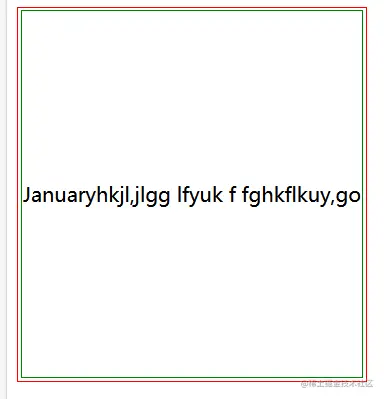
①使用table自带实现垂直居中(此处为了效果给parent设置了高度);
<style>
.parent{
border: 1px solid red;
height:300px;
}
.child{
border: 1px solid green;
}
</style>
<body>
<table class="parent">
<tr>
    <td class="child">Januaryhkjl,jlgg lfyuk f fghkflkuy,go</td>
</tr>
</table>
②使用flex布局实现。
<style>
.parent{
  height: 600px;
  border: 3px solid red;

  display: flex;
  justify-content: center;//水平居中
  align-items: center;//垂直居中
}
.child{
  border: 3px solid green;
  width: 300px;
}
</style>
<body>
  <div class="parent">
    <div class="child">
      一串文字一串文字一串文字一串文字一串文字一串文字一串文字一串文字一串文字一串文字
    </div>
  </div>
</body>
③top和left分别为50%,在使用margin-left和margin-top设置负的宽高(图片也可以使用)条件:这种方法必须设置子盒子的宽高。
<style>
  .parent{
    border: 1px solid red;
    height: 600px;
   position: relative;
  }
  .child{
    border: 1px solid green;
    height: 200px;
    width: 100px;
    position: absolute;
    top: 50%;
    left:50%;
    margin-top: -100px;
    margin-left: -50px;
  }
</style>
<body>
  <div class="parent">
    <div class="child">我曾跨国山河华硕独家是个v纳税人土豪VS率uiva,
      cfzkljfl长城股份泸沽湖v俗话v给HD发v你AJ和我就否点击</div>
  </div>
④top和left分别为50%,再使用transform:translate(-50%,-50%)(图片也可以用这种方式);条件:子盒子不需要设置宽高,缺点是兼容性不好
 .parent{
    border: 1px solid red;
    height: 600px;
   position: relative;
  }
  .child{
    border: 1px solid green;
    height: 200px;
    width: 100px;
    position: absolute;
    top: 50%;
    left:50%;
   transform: translate(-50%,-50%);
  }
</style>
<body>
  <div class="parent">
    <div class="child">我曾跨国山河华硕独家是个v纳税人土豪VS率uiva,
      cfzkljfl长城股份泸沽湖v俗话v给HD发v你AJ和我就否点击</div>
  </div>
⑤flex布局结合margin
 .parent{
    border: 1px solid red;
    display: flex;
  }
  .child{
    border: 1px solid green;
    margin: auto;
  }
</style>
<body>
  <div class="parent">
    <div class="child">我曾跨国山河华硕独家是个v纳税人土豪VS率uiva,
      cfzkljfl长城股份泸沽湖v俗话v给HD发v你AJ和我就否点击</div>
  </div>
⑥(绝对定位)—— 父元素设为相对定位,子元素为绝对定位,子元素四个方向的值设置为0,设置margin:auto属性
<style>
    .container {
        position: relative;
        width: 500px;
        height: 500px;
        background-color: pink;
    }

    .box {
        position: absolute;
        top: 0;
        left: 0;
        right: 0;
        bottom: 0;
        margin: auto;
        width: 100px;
        height: 100px;
        background-color: red;
    }
</style>

<div class="container">
    <div class="box">子元素</div>
</div>
⑦vertical-align 属性设置元素的垂直对齐方式。
  <style>
    .parent{
  border: 3px solid red;
  height: 600px;
  text-align: center;
}

.child{
  border: 3px solid black;
  display: inline-block;
  width: 300px;
  vertical-align: middle;//把此元素放在父元素的中部
}

.parent .before{
  outline: 3px solid green;
  display: inline-block;
  height: 100%;
  vertical-align: middle;
}
.parent .after{
  outline: 3px solid red;
  display: inline-block;
  height: 100%;
  vertical-align: middle;
}
</style>
<div class="parent">
    <span class=before></span><div class="child">

      一串文字一串文字一串文字一串文字一串文字一串文字一串文字一串文字一串文字一串文字一串文字一串文字一串文字一串文字一串文字一串文字一串文字一串文字一串文字一串文字一串文字一串文字一串文字一串文字一串文字一串文字一串文字一串文字一串文字一串文字一串文字一串文字一串文字一串文字一串文字一串文字一串文字一串文字一串文字一串文字一串文字一串文字一串文字一串文字一串文字一串文字一串文字一串文字一串文字一串文字一串文字一串文字一串文字一串文字一串文字一串文字一串文字一串文字一串文字一串文字一串文字一串文字一串文字一串文字一串文字一串文字一串文字一串文字一串文字一串文字

    </div><span class=after></span>
  </div>
2.实现水平居中;
① 给子元素设置margin:auto;
<style>
  .container {
      width: 500px;
      height: 500px;
      background-color: pink;
  }

  .box {
      width: 100px;
      height: 100px;
      margin:auto;
      background-color: #f00;
  }
</style>

<div class="container">
  <div class="box">子元素</div>
</div>
②text-align 属性规定元素中的文本的水平对齐方式。父元素文本对齐方式为居中对齐;子元素设置为display: inline-block;
<style>
    .container {
        width: 500px;
        height: 500px;
        text-align: center;
        background-color: pink;
    }

    .box {
    	display: inline-block;
        width: 100px;
        height: 100px;
        background-color: #f00;
    }
</style>

<div class="container">
    <div class="box">子元素</div>
</div>