先看效果
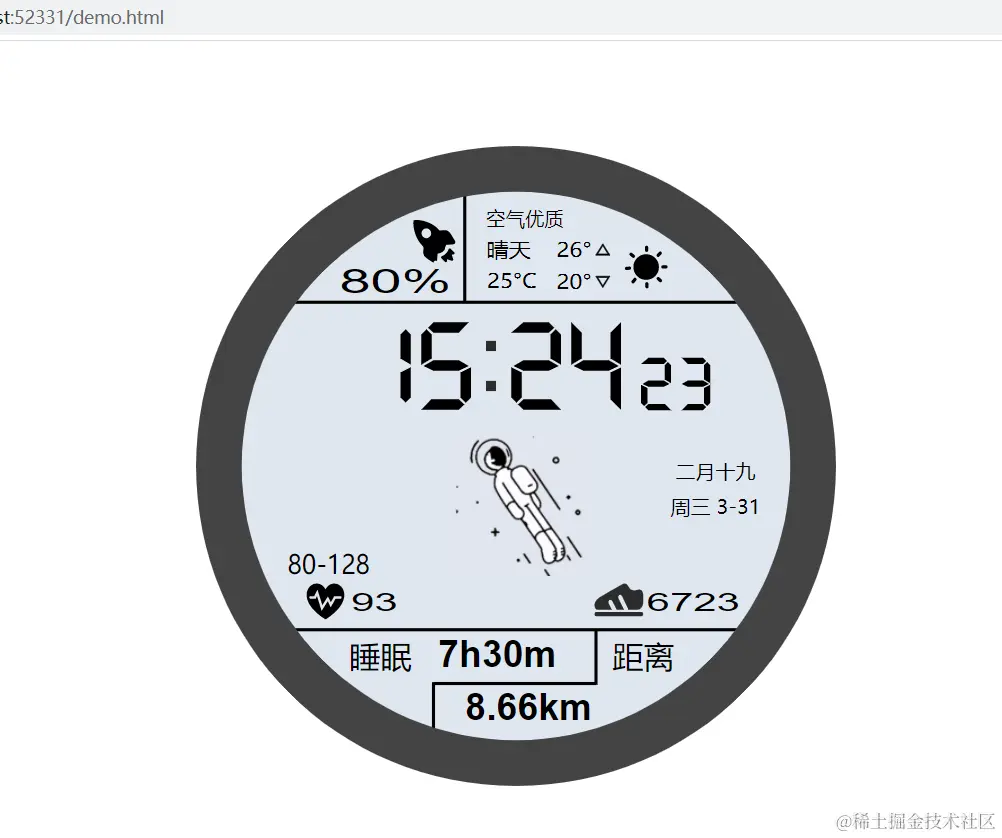
html代码
<html>
<head>
<title>太空人表盘</title>
<meta charset="UTF-8">
<link href="./assets/css/style.css" rel="stylesheet">
<script src="./assets/js/timeGeneration.js"></script>
</head>
<body>
<div class="jun-meter">
<div class="jun-time-h-h" id="hh"></div>
<div class="jun-time-h-l" id="hl"></div>
<div class="jun-time-rect"></div>
<div class="jun-human"></div>
<div class="jun-time-m-h" id="mh"></div>
<div class="jun-time-m-l" id="ml"></div>
<div class="jun-time-s-h" id="sh"></div>
<div class="jun-time-s-l" id="sl"></div>
<div class="jun-date" id="date"></div>
<div class="jun-calendar-date" id="calendarDate"></div>
</div>
</body>
<script>
function WatchMeter() {
this._initDom()
this.update()
this.date = new TimeGeneration()
}
WatchMeter.prototype = {
constructor: WatchMeter,
_initDom: function () {
this.elem = {}
this.elem.hh = document.getElementById('hh')
this.elem.hl = document.getElementById('hl')
this.elem.mh = document.getElementById('mh')
this.elem.ml = document.getElementById('ml')
this.elem.sh = document.getElementById('sh')
this.elem.sl = document.getElementById('sl')
this.elem.date = document.getElementById('date')
this.elem.calendarDate = document.getElementById('calendarDate')
},
update: function () {
var _this = this
setInterval(function () {
_this._render(_this.date.getDate(), _this.date.getCalendarDate(), _this.date.getTime())
}, 1000)
},
_render: function (date, calendarDate, time) {
this._setNumberImage(this.elem.hh, time[0])
this._setNumberImage(this.elem.hl, time[1])
this._setNumberImage(this.elem.mh, time[2])
this._setNumberImage(this.elem.ml, time[3])
this._setNumberImage(this.elem.sh, time[4])
this._setNumberImage(this.elem.sl, time[5])
this.elem.date.innerText = date[2] + " " +date[0] + "-" +date[1]
this.elem.calendarDate.innerText = calendarDate
},
_setNumberImage: function (elem, value) {
elem.style.backgroundImage = "url(./assets/img/" + value + ".svg)";
}
}
var myWatchMeter = new WatchMeter()
</script>
</html>
css代码
.jun-meter {
    position: relative;
    width: 640px;
    height: 640px;
    background-image: url("../img/ring.svg");
    background-repeat: no-repeat;
    background-size: 100%;
    margin: auto;
    margin-top: 7%;
}

.jun-time-rect {
    position: absolute;
    width: 30px;
    height: 80px;
    left: 275px;
    top: 180px;
    background-image: url("../img/rect.svg");
    background-size: 40px 40px;
}

.jun-time-h-h {
    position: absolute;
    width: 100px;
    height: 100px;
    left: 140px;
    top: 170px;
    background-image: url("../img/8.svg");
    background-repeat: no-repeat;
    background-size: 100%;
}

.jun-time-h-l {
    position: absolute;
    width: 100px;
    height: 100px;
    left: 200px;
    top: 170px;
    background-image: url("../img/8.svg");
    background-repeat: no-repeat;
    background-size: 100%;
}

.jun-time-m-h {
    position: absolute;
    width: 100px;
    height: 100px;
    left: 290px;
    top: 170px;
    background-image: url("../img/8.svg");
    background-repeat: no-repeat;
    background-size: 100%;
}

.jun-time-m-l {
    position: absolute;
    width: 100px;
    height: 100px;
    left: 350px;
    top: 170px;
    background-image: url("../img/8.svg");
    background-repeat: no-repeat;
    background-size: 100%;
}

.jun-time-s-h {
    position: absolute;
    width: 60px;
    height: 60px;
    left: 430px;
    top: 208px;
    background-image: url("../img/8.svg");
    background-repeat: no-repeat;
    background-size: 100%;
}

.jun-time-s-l {
    position: absolute;
    width: 60px;
    height: 60px;
    left: 470px;
    top: 208px;
    background-image: url("../img/8.svg");
    background-repeat: no-repeat;
    background-size: 100%;
}

.jun-calendar-date {
    position: absolute;
    width: 120px;
    height: 30px;
    left: 460px;
    top: 310px;
    line-height: 30px;
    font-size: 20px;
    text-align: center;
}

.jun-date {
    position: absolute;
    width: 120px;
    height: 30px;
    left: 460px;
    top: 345px;
    line-height: 30px;
    font-size: 20px;
    text-align: center;
}

.jun-human{
    position: absolute;
    width: 150px;
    height: 150px;
    left: 250px;
    top: 280px;
    background-image: url("../img/human.gif");
    background-repeat: no-repeat;
    background-size: 100%;
}