系列文章目录
大数据分析利器之Hive(一) 大数据分析利器之Hive(二)@TOC
前言
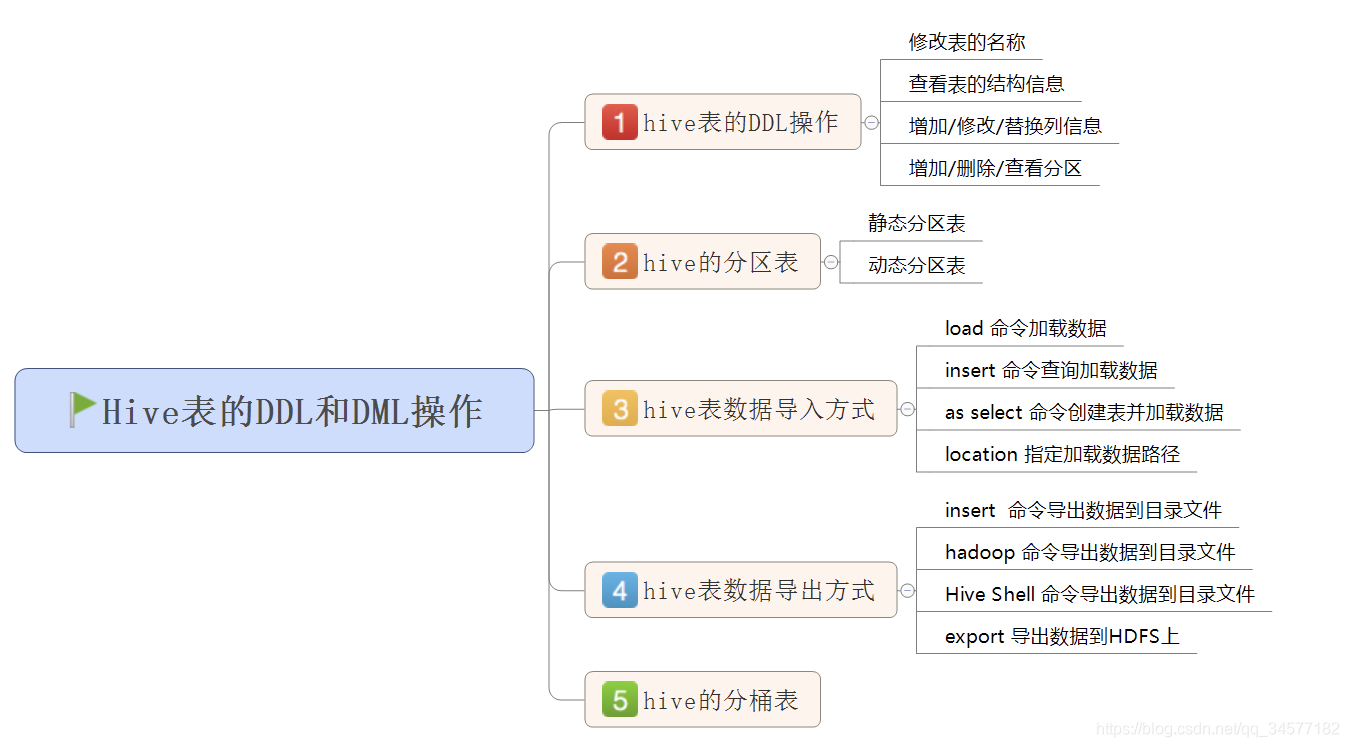
本文主要围绕hive的DDL操作和DML操作进行讲解。主要包括以下几个方面: 对Hive表的DDL和DML操作; Hive表数据导入和数据导出方式; 掌握Hive的静态分区和动态分区; 理解Hive中的分桶表作用
提示:以下是本篇文章正文内容,下面案例可供参考
1.Hive的分桶表
1.1 分桶表原理
-
分桶是相对分区进行更细粒度的划分
- Hive表或分区表可进一步的分桶
-
==分桶将整个数据内容按照某列取hash值,对桶的个数取模的方式决定该条记录存放在哪个桶当中;具有相同hash值的数据进入到同一个文件中==
-
比如按照name属性分为3个桶,就是对name属性值的hash值对3取摸,按照取模结果对数据分桶。
-
取模结果为==0==的数据记录存放到一个文件
-
取模结果为==1==的数据记录存放到一个文件
-
取模结果为==2==的数据记录存放到一个文件
-
1.2 作用
-
1、取样sampling更高效。没有分桶的话需要扫描整个数据集。
-
2、提升某些查询操作效率,例如map side join
1.3 案例演示:创建分桶表
-
在创建分桶表之前要执行的命令
-
==set hive.enforce.bucketing=true;== 开启对分桶表的支持
-
==set mapreduce.job.reduces=4;== 设置与桶相同的reduce个数(默认只有一个reduce)
-
进入hive客户端然后执行以下命令
use myhive;
set hive.enforce.bucketing=true;
set mapreduce.job.reduces=4;

-- 创建分桶表
create table myhive.user_buckets_demo(id int, name string)
clustered by(id)
into 4 buckets
row format delimited fields terminated by '\t';

-- 创建普通表
create table user_demo(id int, name string)
row format delimited fields terminated by '\t';
- 准备数据文件 buckets.txt
#在linux当中执行以下命令
cd /kkb/install/hivedatas/
vim user_bucket.txt

1	anzhulababy1
2	anzhulababy2
3	anzhulababy3
4	anzhulababy4
5	anzhulababy5
6	anzhulababy6
7	anzhulababy7
8	anzhulababy8
9	anzhulababy9
10	anzhulababy10
- 加载数据到普通表 user_demo 中
load data local inpath '/kkb/install/hivedatas/user_bucket.txt' overwrite into table user_demo;
- 4、加载数据到桶表user_buckets_demo中
insert into table user_buckets_demo select * from user_demo;
-
hdfs上查看表的数据目录
抽样查询桶表的数据
-
tablesample抽样语句语法:tablesample(bucket x out of y)
- x表示从第几个桶开始取数据
- y与进行采样的桶数的个数、每个采样桶的采样比例有关;
select * from user_buckets_demo tablesample(bucket 1 out of 2);
-- 需要采样的总桶数=4/2=2个
-- 先从第1个桶中取出数据
-- 1+2=3,再从第3个桶中取出数据
2.Hive数据导入
2.1 直接向表中插入数据(强烈不推荐使用)
hive (myhive)> create table score3 like score;
hive (myhive)> insert into table score3 partition(month ='201807') values ('001','002','100');
2.2 通过load加载数据(必须掌握)
- 语法:
hive> load data [local] inpath 'dataPath' [overwrite] into table student [partition (partcol1=val1,…)];
- 通过load方式加载数据
hive (myhive)> load data local inpath '/kkb/install/hivedatas/score.csv' overwrite into table score partition(month='201806');
2.3 通过查询加载数据(必须掌握)
- 通过查询方式加载数据
hive (myhive)> create table score5 like score;
hive (myhive)> insert overwrite table score5 partition(month = '201806') select s_id,c_id,s_score from score;
2.4 查询语句中创建表并加载数据(as select)
- 将查询的结果保存到一张表当中去
hive (myhive)> create table score6 as select * from score;
2.5 创建表时指定location
- 创建表,并指定在hdfs上的位置
hive (myhive)> create external table score7 (s_id string,c_id string,s_score int) row format delimited fields terminated by '\t' location '/myscore7';
- 上传数据到hdfs上,我们也可以直接在hive客户端下面通过dfs命令来进行操作hdfs的数据
hive (myhive)> dfs -mkdir -p /myscore7;
hive (myhive)> dfs -put /kkb/install/hivedatas/score.csv /myscore7;
2.6 export导出与import 导入 hive表数据(内部表操作)
hive (myhive)> create table teacher2 like teacher;
-- 导出到hdfs路径
hive (myhive)> export table teacher to  '/kkb/teacher';
hive (myhive)> import table teacher2 from '/kkb/teacher';
3. Hive数据导出
3.1 insert 导出
- 将查询的结果导出到本地
insert overwrite local directory '/kkb/install/hivedatas/stu' select * from stu;
- 将查询的结果格式化导出到本地
insert overwrite local directory '/kkb/install/hivedatas/stu2' row format delimited fields terminated by ',' select * from stu;
- 将查询的结果导出到HDFS上==(没有local)==
insert overwrite directory '/kkb/hivedatas/stu' row format delimited fields terminated by ',' select * from stu;
3.2 Hive Shell 命令导出
- 基本语法:
- hive -e "sql语句" > file
- hive -f sql文件 > file
hive -e 'select * from myhive.stu;' > /kkb/install/hivedatas/student1.txt
3.3 export导出到HDFS上
export table myhive.stu to '/kkb/install/hivedatas/stuexport';
4. Hive的静态分区和动态分区
4.1 静态分区
-
表的分区字段的值需要开发人员手动给定
-
创建分区表
use myhive;
create table order_partition(
order_number string,
order_price  double,
order_time string
)
partitioned BY(month string)
row format delimited fields terminated by '\t';
- 准备数据
cd /kkb/install/hivedatas
vim order.txt

10001	100	2019-03-02
10002	200	2019-03-02
10003	300	2019-03-02
10004	400	2019-03-03
10005	500	2019-03-03
10006	600	2019-03-03
10007	700	2019-03-04
10008	800	2019-03-04
10009	900	2019-03-04
- 加载数据到分区表
load data local inpath '/kkb/install/hivedatas/order.txt' overwrite into table order_partition partition(month='2019-03');
- 4、查询结果数据
select * from order_partition where month='2019-03';
结果为:

10001   100.0   2019-03-02      2019-03
10002   200.0   2019-03-02      2019-03
10003   300.0   2019-03-02      2019-03
10004   400.0   2019-03-03      2019-03
10005   500.0   2019-03-03      2019-03
10006   600.0   2019-03-03      2019-03
10007   700.0   2019-03-04      2019-03
10008   800.0   2019-03-04      2019-03
10009   900.0   2019-03-04      2019-03
4.2 动态分区
-
按照需求实现把数据自动导入到表的不同分区中,==不需要手动指定==
-
需求:根据分区字段不同的值,自动将数据导入到分区表不同的分区中
-
创建表
--创建普通表
create table t_order(
    order_number string,
    order_price  double,
    order_time   string
)row format delimited fields terminated by '\t';

--创建目标分区表
create table order_dynamic_partition(
    order_number string,
    order_price  double
)partitioned BY(order_time string)
row format delimited fields terminated by '\t';
- 准备数据
cd /kkb/install/hivedatas
vim order_partition.txt

10001	100	2019-03-02
10002	200	2019-03-02
10003	300	2019-03-02
10004	400	2019-03-03
10005	500	2019-03-03
10006	600	2019-03-03
10007	700	2019-03-04
10008	800	2019-03-04
10009	900	2019-03-04
- 向普通表t_order加载数据
load data local inpath '/kkb/install/hivedatas/order_partition.txt' overwrite into table t_order;
- 动态加载数据到分区表中
-- 要想进行动态分区,需要设置参数
-- 开启动态分区功能
hive> set hive.exec.dynamic.partition=true;
-- 设置hive为非严格模式
hive> set hive.exec.dynamic.partition.mode=nonstrict;
hive> insert into table order_dynamic_partition partition(order_time) select order_number, order_price, order_time from t_order;
- 查看分区
hive> show partitions order_dynamic_partition;
5. Hive的查询语法
HIVE的查询语法与MySQL基本一直,这里不再赘述。可以去看看我的SQL必练50题之HQL版练练手。
该处使用的url网络请求的数据。
总结
获取更多干货,请关注我的个人公众号,关注领取福利