
霓虹灯
<script>
const canvas=document.getElementById('canvas');
canvas.width=window.innerWidth;
canvas.height=window.innerHeight;
const ctx=canvas.getContext('2d');
const colors=['red','yellow'];
function draw(){
ctx.save();
ctx.translate(300,400);
ctx.beginPath();
ctx.moveTo(0,0);
ctx.bezierCurveTo(
-200,-50,
-180,-300,
0,-200
);
ctx.bezierCurveTo(180,-300,200,-50,0,0);
ctx.lineWidth=10;
ctx.setLineDash([30]);
ctx.strokeStyle=colors[0];
ctx.stroke();
ctx.strokeStyle=colors[1];
ctx.lineDashOffset=30;
ctx.stroke();
ctx.restore();
}
draw();
setInterval(function(){
colors.reverse();
draw();
},200)
</script>

霓虹灯光晕效果
<script>
const canvas=document.getElementById('canvas');
canvas.width=window.innerWidth;
canvas.height=window.innerHeight;
const ctx=canvas.getContext('2d');
const colors=['red','yellow'];
function draw(){
ctx.save();
ctx.translate(300,400);
ctx.beginPath();
ctx.moveTo(0,0);
ctx.bezierCurveTo(
-200,-50,
-180,-300,
0,-200
);
ctx.bezierCurveTo(180,-300,200,-50,0,0);
ctx.lineWidth=10;
ctx.setLineDash([30]);
ctx.strokeStyle=colors[0];
ctx.stroke();
ctx.strokeStyle=colors[1];
ctx.lineDashOffset=30;
ctx.shadowColor='orange';
for(let i=50;i>5;i-=5){
ctx.shadowBlur=i;
ctx.stroke();
}
ctx.restore();
}
draw();
setInterval(function(){
ctx.clearRect(0,0,canvas.width,canvas.height);
colors.reverse();
draw();
},200)
</script>
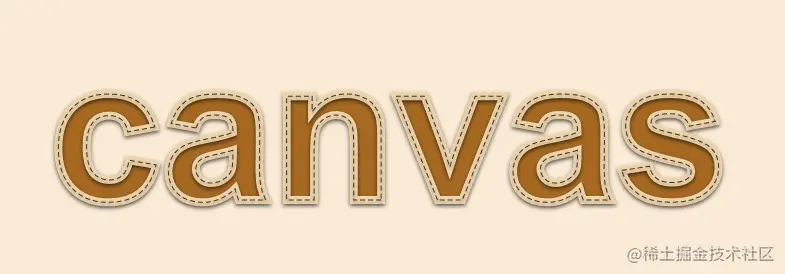
文字编辑-布艺效果
<script>
const canvas=document.getElementById('canvas');
canvas.width=window.innerWidth;
canvas.height=window.innerHeight;
const ctx=canvas.getContext('2d');
const text='canvas';
const [x,y]=[50,200];
ctx.shadowColor='rgba(0,0,0,0.6)';
ctx.shadowOffsetY=2;
ctx.shadowBlur=4;
ctx.font='bold 200px arial';
ctx.fillStyle='#a76921';
ctx.fillText(text,x,y);
ctx.strokeStyle='#f0d5ac';
ctx.lineWidth=8;
ctx.strokeText(text,x,y);
ctx.strokeStyle='#333';
ctx.lineWidth=1;
ctx.setLineDash([5,3]);
ctx.strokeText(text,x,y);
</script>
图像
像素级操作图像
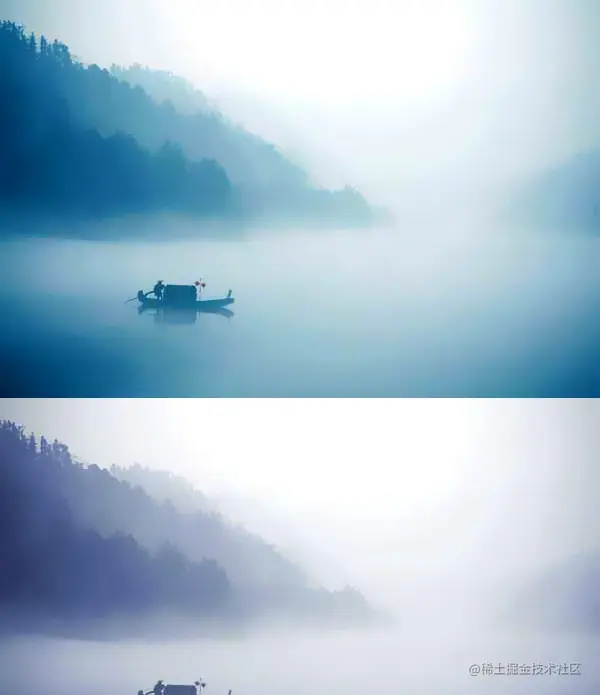
1、图像置灰
<script>
const canvas=document.getElementById('canvas');
canvas.width=window.innerWidth;
canvas.height=window.innerHeight;
const ctx=canvas.getContext('2d');
const img=new Image();
img.src='./images/river.jpg';
img.onload=draw;
function draw(){
const {width,height}=img;
ctx.drawImage(img,0,0);
const imgDt=ctx.getImageData(0,0,width,height);
const data=imgDt.data;
for(let i=0;i<data.length;i+=4){
const [r,g,b]=[
data[i],
data[i+1],
data[i+2],
]
const lm=0.299*r+0.587*g+0.114*b;
data[i]=lm;
}
ctx.putImageData(imgDt,0,height);
}
</script>
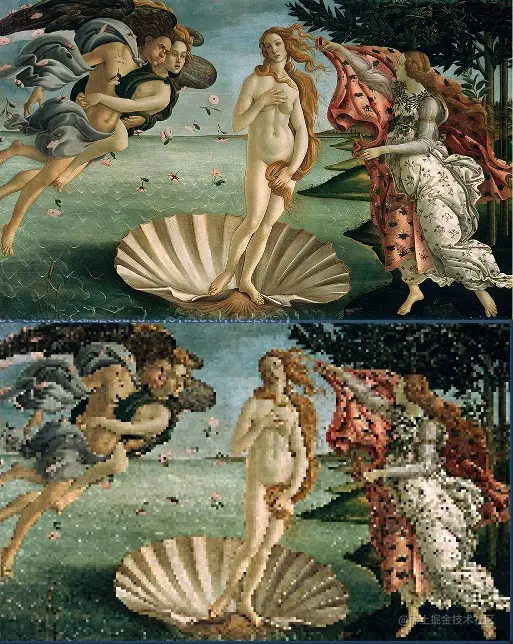
2、马赛克效果
<script>
const canvas=document.getElementById('canvas');
canvas.width=window.innerWidth;
canvas.height=window.innerHeight;
const ctx=canvas.getContext('2d');
const img=new Image();
img.src='./images/wns.jpg';
img.onload=render;
let size=0.5;
function render() {
const {width,height}=img;
ctx.drawImage(img,0,0);
const imgDt=ctx.getImageData(0,0,width,height);
const data=imgDt.data;
for(let y=0;y<height;y+=size){
for(let x=0;x<width;x+=size){
const i=(y*width+x)*4;
const [r,g,b]=[
data[i],
data[i+1],
data[i+2],
]
ctx.fillStyle=`RGB(${r},${g},${b})`;
ctx.fillRect(x,y,size,size);
}
}
}
</script>
变换
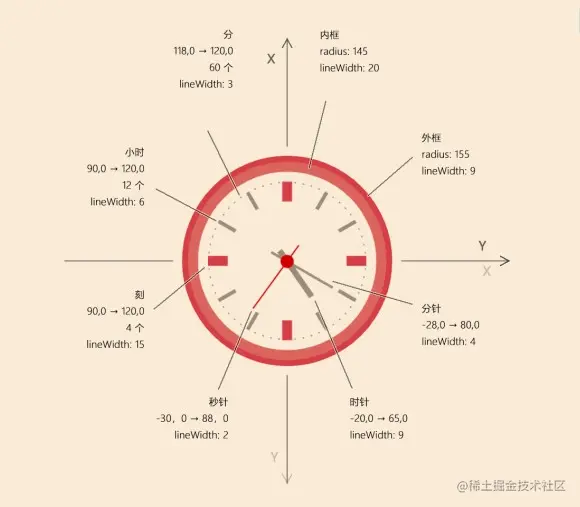
1、时钟
<!DOCTYPE html>
<html lang="en">
<head>
<meta charset="UTF-8">
<title>时钟</title>
<style>
body{margin: 0;overflow: hidden}
#canvas{background: antiquewhite;}
</style>
</head>
<body>
<canvas id="canvas"></canvas>
<script>
const canvas=document.getElementById('canvas');
canvas.width=window.innerWidth;
canvas.height=window.innerHeight;
const ctx=canvas.getContext('2d');
const [redA,redB,yellow]=['#db655c','#d63d46','#9f8d7d'];
const c=Math.PI*2;
const {width,height}=canvas;
!(function render(){
ctx.clearRect(0,0,width,height);
draw();
requestAnimationFrame(render);
})()
function draw(){
ctx.save();
ctx.translate(width/2,height/2);
ctx.rotate(-Math.PI/2);
ctx.save();
ctx.lineWidth=20;
ctx.strokeStyle=redA;
ctx.beginPath();
ctx.arc(0,0,145,0,c);
ctx.stroke();
ctx.restore();
ctx.save();
ctx.lineWidth=9;
ctx.strokeStyle=redB;
ctx.beginPath();
ctx.arc(0,0,155,0,c);
ctx.stroke();
ctx.restore();
ctx.save();
ctx.strokeStyle=redB;
ctx.lineWidth=15;
ctx.beginPath();
for(let i=0;i<4;i++){
ctx.moveTo(90,0);
ctx.lineTo(120,0);
ctx.rotate(c/4);
}
ctx.stroke();
ctx.restore();
ctx.save();
ctx.strokeStyle=yellow;
ctx.lineWidth=6;
ctx.beginPath();
for(let i=0;i<12;i++){
if(i%3){
ctx.moveTo(90,0);
ctx.lineTo(120,0);
}
ctx.rotate(c/12);
}
ctx.stroke();
ctx.restore();
ctx.save();
ctx.strokeStyle=yellow;
ctx.lineWidth=3;
ctx.beginPath();
for(let i=0;i<60;i++){
if(i%5){
ctx.moveTo(118,0);
ctx.lineTo(120,0);
}
ctx.rotate(c/60);
}
ctx.stroke();
ctx.restore();
const {rh,rm,rs}=getRadian();
ctx.save();
ctx.strokeStyle=yellow;
ctx.lineWidth=9;
ctx.rotate(rh);
ctx.beginPath();
ctx.moveTo(-20,0);
ctx.lineTo(65,0);
ctx.stroke();
ctx.restore();
ctx.save();
ctx.strokeStyle=yellow;
ctx.lineWidth=4;
ctx.rotate(rm);
ctx.beginPath();
ctx.moveTo(-28,0);
ctx.lineTo(80,0);
ctx.stroke();
ctx.restore();
ctx.save();
ctx.strokeStyle=redB;
ctx.lineWidth=2;
ctx.rotate(rs);
ctx.beginPath();
ctx.moveTo(-30,0);
ctx.lineTo(88,0);
ctx.stroke();
ctx.restore();
ctx.save();
ctx.fillStyle=redB;
ctx.beginPath();
ctx.arc(0,0,10,0,c);
ctx.fill();
ctx.restore();
ctx.restore();
}
function getRadian(){
const date=new Date();
let h=date.getHours();
if(h>12){h-=12}
let m=date.getMinutes();
let s=date.getSeconds();
const rh=c*h/12+c*m/12/60+c*s/12/60/60;
const rm=c*m/60+c*s/60/60;
const rs=c*s/60;
return {rh,rm,rs};
}
</script>
</body>
</html>


2、时钟版本-2
<!DOCTYPE html>
<html lang="en">
<head>
<meta charset="UTF-8">
<title>时钟</title>
<style>
body{margin: 0;overflow: hidden}
#canvas{background: antiquewhite;}
</style>
</head>
<body>
<canvas id="canvas"></canvas>
<script>
const canvas=document.getElementById('canvas');
canvas.width=window.innerWidth;
canvas.height=window.innerHeight;
const ctx=canvas.getContext('2d');
const [redA,redB,yellow]=['#db655c','#d63d46','#9f8d7d'];
const c=Math.PI*2;
const {width,height}=canvas;
const img=new Image();
img.src='./mat.jpg';
!(function render(){
ctx.clearRect(0,0,canvas.width,canvas.height);
draw();
requestAnimationFrame(render);
})()
function draw(){
ctx.save();
ctx.translate(width/2,height/2);
ctx.rotate(-Math.PI/2);
const pat=ctx.createPattern(img,'repeat');
ctx.save();
ctx.beginPath();
ctx.arc(0,0,145,0,c);
ctx.strokeStyle=redA;
ctx.fillStyle=pat;
ctx.lineWidth=20;
ctx.stroke();
ctx.fill();
ctx.restore();
ctx.save();
ctx.beginPath();
ctx.arc(0,0,155,0,c);
ctx.strokeStyle=redB;
ctx.lineWidth=9;
ctx.stroke();
ctx.restore();
ctx.save();
ctx.beginPath();
ctx.strokeStyle=redB;
ctx.lineWidth=15;
for(let i=0;i<4;i++){
ctx.moveTo(90,0);
ctx.lineTo(120,0);
ctx.stroke();
ctx.rotate(c/4);
}
ctx.restore();
ctx.save();
ctx.beginPath();
ctx.strokeStyle=yellow;
ctx.lineWidth=6;
for(let i=0;i<12;i++){
if(i%3){
ctx.moveTo(90,0);
ctx.lineTo(120,0);
ctx.stroke();
}
ctx.rotate(c/12);
}
ctx.restore();
ctx.save();
ctx.beginPath();
ctx.strokeStyle=yellow;
ctx.lineWidth=3;
for(let i=0;i<60;i++){
if(i%5){
ctx.moveTo(118,0);
ctx.lineTo(120,0);
ctx.stroke();
}
ctx.rotate(c/60);
}
ctx.restore();
const {rh,rm,rs,time}=getRadian();
ctx.save();
ctx.beginPath();
ctx.strokeStyle=yellow;
ctx.lineWidth=9;
ctx.rotate(rh);
ctx.moveTo(-20,0);
ctx.lineTo(65,0);
ctx.stroke();
ctx.restore();
ctx.save();
ctx.beginPath();
ctx.strokeStyle=yellow;
ctx.lineWidth=4;
ctx.rotate(rm);
ctx.moveTo(-28,0);
ctx.lineTo(80,0);
ctx.stroke();
ctx.restore();
ctx.save();
ctx.beginPath();
ctx.strokeStyle=redB;
ctx.lineWidth=2;
ctx.rotate(rs);
ctx.moveTo(-30,0);
ctx.lineTo(88,0);
ctx.stroke();
ctx.restore();
ctx.save();
ctx.beginPath();
ctx.fillStyle=redB;
ctx.arc(0,0,10,0,c);
ctx.fill();
ctx.restore();
ctx.restore();
ctx.save();
ctx.font='bold 150px Arial';
ctx.textAlign='center';
ctx.translate(width/2,50);
ctx.shadowColor='rgba(0,0,0,0.6)';
ctx.shadowOffsetY=2;
ctx.shadowBlur=4;
ctx.fillStyle='#a76921';
ctx.fillText(time,0,150);
ctx.strokeStyle='#f0d5ac';
ctx.lineWidth=6;
ctx.strokeText(time,0,150);
ctx.strokeStyle='#333';
ctx.lineWidth=1;
ctx.setLineDash([5,3]);
ctx.strokeText(time,0,150);
ctx.restore();
}
function getRadian(){
const date=new Date();
let h=date.getHours();
if(h>12){h-=12}
let m=date.getMinutes();
let s=date.getSeconds();
const rh=c*h/12+c*m/12/60+c*s/12/60/60;
const rm=c*m/60+c*s/60/60;
const rs=c*s/60;
if(h<10){h='0'+h}
if(m<10){m='0'+m}
if(s<10){s='0'+s}
const time=h+':'+m+':'+s;
return {rh,rm,rs,time};
}
</script>
</body>
</html>