扩展和优化
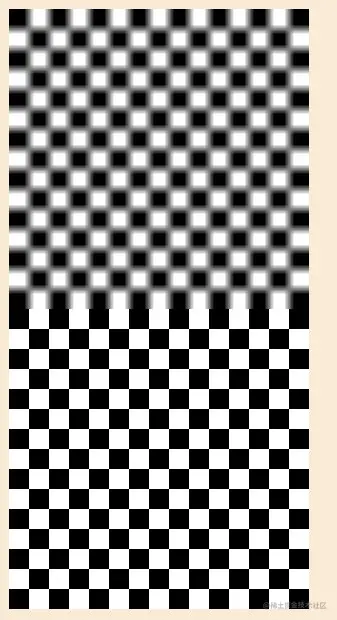
1、图像平滑
<script>
const canvas=document.getElementById('canvas');
canvas.width=window.innerWidth;
canvas.height=window.innerHeight;
const ctx=canvas.getContext('2d');
const img=new Image();
img.src='./images/chess.jpg';
img.onload=function(){
const {width,height}=img;
ctx.drawImage(img,100,100,width*10,height*10);
ctx.imageSmoothingEnabled=false;
ctx.drawImage(img,100,100+height*10,width*10,height*10);
};
</script>
2、canvas 画出一像素宽的线
<script>
const canvas=document.getElementById('canvas');
canvas.width=window.innerWidth;
canvas.height=window.innerHeight;
const ctx=canvas.getContext('2d');
ctx.beginPath();
ctx.lineWidth=1;
ctx.moveTo(50,50);
ctx.lineTo(400,50);
ctx.stroke();
ctx.beginPath();
ctx.lineWidth=1;
ctx.moveTo(50,150.5);
ctx.lineTo(400,150.5);
ctx.stroke();
ctx.translate(0.5,0.5);
ctx.beginPath();
ctx.lineWidth=1;
ctx.moveTo(50,250);
ctx.lineTo(400,250);
ctx.stroke();
</script>
3、适配设备的像素比
<script>
{
const canvas=document.getElementById('canvas2');
const ctx=canvas.getContext('2d');
const ratio=window.devicePixelRatio;
console.log('ratio',ratio);
canvas.width=width*ratio;
canvas.height=height*ratio;
ctx.scale(ratio,ratio);
canvas.style.width=width+'px';
canvas.style.height=height+'px';
ctx.font='60px arial ';
ctx.fillText('canvas',10,100);
}
</script>
4、canvas转图片
<body>
<canvas id="canvas" width="420" height="126"></canvas>
<img id="img" src="" alt="">
<script>
    const canvas=document.getElementById('canvas');
    const ctx=canvas.getContext('2d');

    const img=new Image();
    img.src='https://img.kaikeba.com/70350130700202jusm.png';
    img.setAttribute("crossOrigin",'Anonymous');

    img.onload=function(){
        ctx.drawImage(img,0,0);
        const imgURL=canvas.toDataURL();
        console.log('imgURL',imgURL);
        document.querySelector('#img').setAttribute('src',imgURL);
    }
</script>
</body>

5、小球拖尾
<script>
const canvas=document.getElementById('canvas');
const [width,height]=[window.innerWidth,window.innerHeight];
canvas.width=width;
canvas.height=height;
const ctx=canvas.getContext('2d');
class Ball{
constructor(r,color='#00acec'){
this.color=color;
this.r=r;
this.x=0;
this.y=0;
}
draw(ctx){
ctx.save();
ctx.beginPath();
ctx.fillStyle=this.color;
ctx.arc(this.x,this.y,this.r,0,Math.PI*2);
ctx.fill();
ctx.restore();
}
}
let ball=new Ball(15);
ball.y=50;
ball.x=width/2;
let time=new Date();
const gravity=0.01;
const bounding=-0.8;
let vy=0.3;
let vx=0.3;
function animate(){
let now=new Date();
let diff=now-time;
time=now;
vy+=gravity;
ball.y+=vy*diff;
ball.x+=vx*diff;
if(ball.y+ball.r>height){
ball.y=height-ball.r;
vy*=bounding;
}
if(ball.x-ball.r<0){
ball.x=ball.r;
vx*=bounding;
}
if(ball.x+ball.r>width){
ball.x=width-ball.r;
vx*=bounding;
}
}
!(function render(){
animate();
ctx.fillStyle='rgba(250,235,215,0.1)';
ctx.fillRect(0,0,width,height);
ball.draw(ctx);
window.requestAnimationFrame(render);
})()
</script>

6、指向鼠标的线三维
export default class Vector2{
constructor(x=0,y=0){
this.x=x;
this.y=y;
}
add(v){
this.x+=v.x;
this.y+=v.y;
return this;
}
sub(v){
this.x-=v.x;
this.y-=v.y;
return this;
}
angle(){
const {x,y}=this;
let dir=Math.atan2(y,x);
if(dir<0){dir+=Math.PI*2}
return dir;
}
rotate(a){
const c=Math.cos(a);
const s=Math.sin(a);
const {x,y}=this;
this.x=x*c-y*s;
this.y=x*s+y*c;
return this;
}
length(){
const {x,y}=this;
return Math.sqrt(x*x+y*y);
}
setLength(len){
const {x,y}=this;
const r=this.length();
const c=x/r;
const s=y/r;
this.x=c*len;
this.y=s*len;
return this;
}
clone(){
return new Vector2(this.x,this.y);
}
copy(v){
this.x=v.x;
this.y=v.y;
return this;
}
static polar(len,dir){
return new Vector2(
Math.cos(dir)*len,
Math.sin(dir)*len
)
}
}
<script type="module">
import Vector2 from "./jsm/Vector2.js";
const [width,height]=[window.innerWidth,window.innerHeight];
const canvas=document.getElementById('canvas');
canvas.width=width;
canvas.height=height;
const ctx=canvas.getContext('2d');
class Line{
constructor(start=new Vector2(),end=new Vector2()) {
this.start=start;
this.end=end;
}
draw(ctx){
const {start,end}=this;
ctx.save();
ctx.beginPath();
ctx.moveTo(start.x,start.y);
ctx.lineTo(end.x,end.y);
ctx.lineWidth=2;
ctx.stroke();
ctx.beginPath();
ctx.arc(end.x,end.y,6,0,Math.PI*2);
ctx.fill();
ctx.restore();
}
}
class Circle{
constructor(pos,r) {
this.pos=pos;
this.r=r;
}
draw(ctx){
const {pos,r}=this;
ctx.save();
ctx.setLineDash([6]);
ctx.beginPath();
ctx.arc(pos.x,pos.y,r,0,Math.PI*2);
ctx.stroke();
ctx.restore();
}
}
const basicPos=new Vector2(width/2,height/2);
const r1=100;
const r2=200;
const line=new Line(basicPos.clone(),new Vector2(basicPos.x+r1,basicPos.y));
const circle1=new Circle(basicPos.clone(),r1);
const circle2=new Circle(basicPos.clone(),r2);
render();
window.addEventListener('mousemove',mousemoveFn);
function mousemoveFn(event){
const mousePos=new Vector2(event.clientX,event.clientY);
const mouseSubBasic=mousePos.sub(basicPos);
let ratio=mouseSubBasic.length()/r2;
ratio=Math.min(ratio,1);
const len=r1*ratio;
const pos=mouseSubBasic.setLength(len);
pos.add(basicPos);
line.end.copy(pos);
render();
}
function render(){
ctx.clearRect(0,0,width,height);
line.draw(ctx);
circle1.draw(ctx);
circle2.draw(ctx);
}
</script>
7、404页面视线跟随
<script type="module">
import Vector2 from "./jsm/Vector2.js";
const [width,height]=[window.innerWidth,window.innerHeight];
const canvas=document.getElementById('canvas');
canvas.width=width;
canvas.height=height;
const ctx=canvas.getContext('2d');
const ImgLoader={
onload(imgs,fn){
const imgPros=imgs.map((ele)=>{
return ImgLoader.imgPro(ele);
});
Promise.all(imgPros).then((val)=>{
fn(val);
},()=>{
console.error('图片加载失败');
});
},
imgPro(img){
return new Promise((resolve)=>{
img.onload=function(){
resolve(img);
}
});
}
};
class BodyRect{
constructor(img,pos){
this.img=img;
this.pos=pos;
}
draw(ctx){
const {img,pos}=this;
ctx.save();
ctx.drawImage(img,pos.x,pos.y);
ctx.restore();
}
}
class EyeRect{
constructor(img,pos,offset){
this.img=img;
this.pos=pos;
this.offset=offset;
}
draw(ctx){
const {img,pos,offset}=this;
ctx.save();
ctx.drawImage(img,pos.x-offset,pos.y-offset);
ctx.restore();
}
}
const maxR=50;
const rimR=15;
const basicPos=[new Vector2(126,52),new Vector2(219,59)];
const eyeR=11;
let monsterBody,eyeLeft,eyeRight;
let monsterPos=getMonsterPos();
const bodyImg=new Image();
bodyImg.src='./images/404.png';
const eyeImg=new Image();
eyeImg.src='./images/eye.png';
ImgLoader.onload([bodyImg,eyeImg],loadedFn);
function loadedFn(){
monsterBody=new BodyRect(bodyImg,new Vector2(0,0));
eyeLeft=new EyeRect(eyeImg,basicPos[0].clone(),eyeR);
eyeRight=new EyeRect(eyeImg,basicPos[1].clone(),eyeR);
render();
canvas.addEventListener('mousemove',mousemoveFn);
window.addEventListener('resize',resizeFn);
}
function render(){
ctx.clearRect(0,0,width,height);
ctx.save();
ctx.translate(monsterPos.x,monsterPos.y);
monsterBody.draw(ctx);
eyeLeft.draw(ctx);
eyeRight.draw(ctx);
ctx.restore();
}
function mousemoveFn(event){
const mousePos=new Vector2(event.clientX,event.clientY).sub(monsterPos);
[eyeLeft,eyeRight].forEach((ele,ind)=>{
const mouseSubObj=mousePos.clone().sub(basicPos[ind]);
const radius=Math.min(mouseSubObj.length()/maxR,1)*rimR;
const pos=mouseSubObj.setLength(radius).add(basicPos[ind]);
ele.pos.copy(pos);
});
render();
}
function getMonsterPos(){
return new Vector2(canvas.width-500,canvas.height-500);
}
function resizeFn(){
const [width,height]=[window.innerWidth,window.innerHeight];
canvas.width=width;
canvas.height=height;
monsterPos=getMonsterPos();
render();
}
</script>

putImageData 与合成
<script>
const [width,height]=[window.innerWidth,window.innerHeight];
const canvas=document.getElementById('canvas');
canvas.width=width;
canvas.height=height;
const ctx=canvas.getContext('2d');
const imgDt=ctx.createImageData(400,400);
imgDt.data.forEach((ele,ind)=>{
imgDt.data[ind]=255;
})
ctx.putImageData(imgDt,0,0);
ctx.globalCompositeOperation='destination-in';
ctx.beginPath();
ctx.arc(400,400,200,0,Math.PI*2);
ctx.fill();
</script>
canvas绘制复杂图形
<embed id="svg"
src="./images/mount.svg"
width="300"
height="300"
type="image/svg+xml"
pluginspage="http://www.adobe.com/svg/viewer/install/" />
<canvas id="canvas"></canvas>
<script type="module">
const canvas=document.getElementById('canvas');
canvas.width=300;
canvas.height=300;
const ctx=canvas.getContext('2d');
const embed=document.querySelector('embed');
window.onload=function(){
const svgDom=embed.getSVGDocument();
const poly=svgDom.querySelector('#poly');
console.log('poly',poly);
const points=parsePoints(poly.getAttribute('points'));
console.log('points',points);
ctx.beginPath();
points.forEach(p=>{
ctx.lineTo(p[0],p[1]);
})
ctx.fill();
}
function parsePoints(points){
const vertices=[];
let arr=points.split(' ');
for(let ele of arr){
if(ele){
const vertice=ele.split(',').map((num)=>{
return Math.round(num);
});
vertices.push(vertice);
}
}
return vertices;
}
</script>