canvas-01
canvas绘图
<!DOCTYPE html>
<html lang="en">
<head>
<meta charset="UTF-8">
<title>canvas绘图</title>
<style>
#canvas{
background-color: antiquewhite;
}
</style>
</head>
<body>
<canvas id="canvas" width="600" height="700">
不兼容
</canvas>
<script>
const canvas = document.querySelector('#canvas');
const ctx=canvas.getContext('2d');
ctx.fillStyle='red';
ctx.fillRect(50,100,400,200);
</script>
</body>
</html>
canvas绘制矩形
<script>
const canvas=document.getElementById('canvas');
canvas.width=window.innerWidth;
canvas.height=window.innerHeight;
const ctx=canvas.getContext('2d');
ctx.fillStyle='maroon';
ctx.strokeStyle='yellow';
ctx.lineWidth=40;
ctx.strokeRect(50,50,200,100);
ctx.clearRect(50,50,200,100);
</script>
canvas绘制路径
1、绘制直线和弧线
<script>
const canvas=document.getElementById('canvas');
canvas.width=window.innerWidth;
canvas.height=window.innerHeight;
const ctx=canvas.getContext('2d');
ctx.beginPath();
ctx.moveTo(50,50);
ctx.arcTo(400,50,400,200,100);
ctx.stroke();
</script>
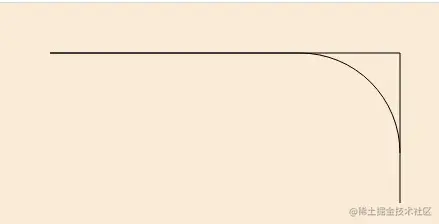
切线圆弧图
2、二次贝塞尔曲线和三次贝塞尔曲线和矩形
<script>
const canvas=document.getElementById('canvas');
canvas.width=window.innerWidth;
canvas.height=window.innerHeight;
const ctx=canvas.getContext('2d');
ctx.beginPath();
ctx.rect(50,50,400,200);
ctx.rect(50,350,400,200);
ctx.fill();
</script>
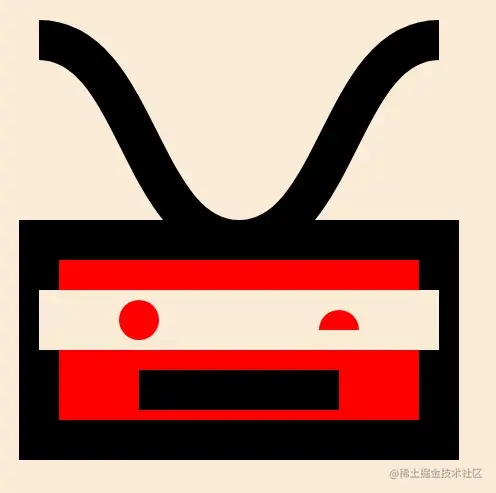
机器人
1、蛮干版本
<!DOCTYPE html>
<html lang="en">
<head>
<meta charset="UTF-8">
<title>机器人</title>
<style>
body{margin: 0;overflow: hidden;}
#canvas{background: antiquewhite;}
</style>
</head>
<body>
<canvas id="canvas"></canvas>
<script>
const canvas=document.getElementById('canvas');
canvas.width=window.innerWidth;
canvas.height=window.innerHeight;
const ctx=canvas.getContext('2d');
ctx.fillStyle='red';
ctx.lineWidth=40;
ctx.fillRect(50,250,400,200);
ctx.strokeRect(50,250,400,200);
ctx.clearRect(50,300,400,60);
ctx.beginPath();
ctx.moveTo(150,400);
ctx.lineTo(350,400);
ctx.stroke();
ctx.beginPath();
ctx.arc(150,330,20,0,Math.PI*2);
ctx.moveTo(350-20,340);
ctx.arc(350,340,20,Math.PI,Math.PI*2);
ctx.fill();
ctx.beginPath();
ctx.moveTo(50,50);
ctx.bezierCurveTo(
150,50,
150,250,
250,250
);
ctx.moveTo(450,50);
ctx.bezierCurveTo(
350,50,
350,250,
250,250
);
ctx.stroke();
</script>
</body>
</html>
2、封装版本
<script>
const canvas=document.getElementById('canvas');
canvas.width=window.innerWidth;
canvas.height=window.innerHeight;
const ctx=canvas.getContext('2d');
function render(color='red'){
ctx.fillStyle=color;
ctx.lineWidth=40;
ctx.fillRect(50,250,400,200);
ctx.strokeRect(50,250,400,200);
ctx.clearRect(50,300,400,60);
ctx.beginPath();
ctx.moveTo(150,400);
ctx.lineTo(350,400);
ctx.stroke();
ctx.beginPath();
ctx.arc(150,330,20,0,Math.PI*2);
ctx.fill();
ctx.beginPath();
ctx.arc(350,340,20,-Math.PI,0);
ctx.fill();
ctx.beginPath();
ctx.moveTo(50,50);
ctx.bezierCurveTo(150,50,150,250,250,250);
ctx.moveTo(450,50);
ctx.bezierCurveTo(350,50,350,250,250,250);
ctx.stroke();
}
let color='red';
render(color);
canvas.addEventListener('mousemove',function(event){
const {left,top}=canvas.getBoundingClientRect();
const x=event.clientX-left;
const y=event.clientY-top;
let curColor='red';
if(x>30&&x<470&&y>230&&y<470){
curColor='black';
}else{
curColor='red';
}
if(color!==curColor){
color=curColor;
ctx.clearRect(0,0,canvas.width,canvas.height);
render(color);
}
})
</script>