常见定位方案
1.普通流 2.浮动 3.绝对定位
BFC 属于上述定位方案的普通流, 可以解释为 块格式化上下文(全称 Block Formatting Context)是一个独立的渲染区域 这个区域不受外部影响也不会影响外部元素
规则
BFC内部的盒子Box会在垂直方向,一个接一个地放置。
Box垂直方向的距离由margin决定。属于同一个BFC的两个相邻Box的垂直margin会发生重叠。
每个元素的margin box的左边, 与包含块border box的左边相接触(对于从左往右的格式化,否则相反)。即使存在浮动也是如此。
BFC的区域不会与浮动盒子float box重叠。
BFC就是页面上的一个隔离的独立容器,容器里面的子元素不会影响到外面的元素。反之也如此。 计算BFC的高度时,浮动元素也参与计算。
触发 BFC
根元素(html就是根元素,整个html就是一个独立的BFC)
float属性不为none(如:left | right)
overflow的值不为visible(如:hidden | auto | scroll)
display属性值为inline-block | flex | inline-flex | table-cell | table-caption position为absolute或fixed
contain 值为 layout、content、paint的元素
多列容器 (元素的 column-count或column-widtn 不为auto,包括 column-count为1)
BFC 特性及应用
1.避免外边距重叠
<style>
  .box{
    width: 100px;
    height: 100px;
    background-color: black;
    margin: 100px;
  }
</style>
<body>
  <div class="box"></div>
  <div class="box"></div>
</body>
上方代码 理论上 A和B之间 间距应为200px, 但实际只有100px,原因是因为规范定义,块的上外边距和下外边距会合并为单个边距,大小为单个边距的最大值,这就是外边距重叠现象
解决 将两个div放置于不同的BFC中
加上 overflow: hidden;属性触发BFC
<style>
  .box{
    width: 100px;
    height: 100px;
    background-color: black;
    margin: 100px;
  }
  .bfc{
    overflow: hidden;
  }
</style>
<body>
  <div class="bfc">
    <div class="box"></div>
  </div>
  <div class="bfc">
    <div class="box"></div>
  </div>
</body>
2. 清除浮动
<style>
.box{
width: 100px;
height: 100px;
background-color: black;
margin: 100px;
float: left;
}
.bfc{
border: 1px solid red;
}
</style>
<body>
<div class="bfc">
<div class="box"></div>
</div>
</body>
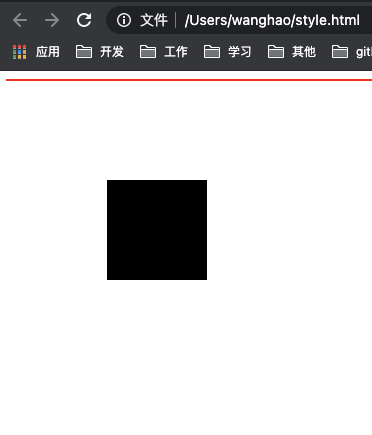
上方代码 理论上 样式 应该是黑色框外面包裹着一层红色边框 ,但红线却只有2px高度,原因浮动元素 脱离了文档流,
解决方法 通过overflow 属性触发 父级容器的BFC 这样 父容器将会包裹子容器
<style>
  .box{
    width: 100px;
    height: 100px;
    background-color: black;
    margin: 100px;
    float: left;
  }
  .bfc{
    border: 1px solid red;
    overflow: hidden;
  }
</style>
<body>
  <div class="bfc">
    <div class="box"></div>
  </div>
</body>
3.阻止元素被浮动元素覆盖
<style>
  .box1{
    width: 100px;
    height: 100px;
    background-color: red;
    margin: 100px;
    float: left;
  }
  .box2{
    width: 200px;
    height: 200px;
    background-color: black;
  }
</style>
<body>
  <div class="box1"></div>
  <div class="box2"></div>
</body>
同样利用overflow
<style>
  .box1{
    width: 100px;
    height: 100px;
    background-color: red;
    margin: 100px;
    float: left;
  }
  .box2{
    width: 200px;
    height: 200px;
    background-color: black;
    overflow: hidden;
  }
</style>
<body>
  <div class="box1"></div>
  <div class="box2"></div>
</body>
欢迎关注我的公众号:前端技术战(注意,战斗的战呦)
如果可以