【js插件】原生js实现一个日历类
最近有个需求要弄个日历显示下,虽然网上有现成的,但还是想自己实现一个。对于这个小插件,我的想法是把操作权限给用户,插件只提供业务逻辑,实现业务逻辑与UI层分离。同时也能兼容所有框架。
写之前先考虑提供给用户哪些操作函数,我随便列了以下几条:
- 日历上翻一个月(prevMonth)
- 日历下翻一个月(nextMonth)
- 日历上翻一年(prevYear)
- 日历下翻一年(nextYear)
- 日历渲染(render)
- 其它(自由发挥...)
就这么多,开撸,先定义一个类:
class Calendar {
constructor(option) {
}
prevMonth() {
}
nextMonth() {
}
prevYear() {
}
nextYear() {
}
render() {
}
}
接下来就是定义一些属性:
constructor(option) {
this.currentMonth = 0;
this.currentYear = 1996;
this.currentFirstWeekDay = 1;
this.renderCallback = null;
this.allDay = 31;
}
把改变这些属性值的操作放在init函数中,定义一个init函数:
init(date) {
this.currentYear = date.getFullYear();
this.currentMonth = date.getMonth();
this.currentFirstWeekDay = new Date(date.getFullYear(), date.getMonth(), 1).getDay();
this.allDay = new Date( date.getFullYear(), date.getMonth() + 1, 0).getDate();
}
类执行时先调用一遍:
constructor(option) {
this.currentMonth = 0;
this.currentYear = 1996;
this.currentFirstWeekDay = 1;
this.allDay = 31;
this.renderCallback = null;
this.init(new Date());
}
日历的重点就是数据,我采用常见的 6 * 7 的二维数组展示,也就是说每月显示42条信息,包含如下:
- 本月需要展示的天数
- 上月需要展示的天数
- 下月需要展示的天数
因此再建立3个工具函数,返回每个需要显示的天数:
checknowDay(year, month, day) {
let date = new Date();
let nowYear = date.getFullYear();
let nowMonth = date.getMonth();
let nowDay = date.getDate();
if (nowYear === year && nowMonth === month && nowDay === day) {
return true;
}else {
return false;
}
}
getPrevMonthDay() {
let date = new Date(this.currentYear, this.currentMonth, 0);
let day = date.getDate();
let days = this.currentFirstWeekDay;
let weeks = [];
while (days > 0) {
weeks.push({
year: date.getFullYear(),
month: date.getMonth() + 1,
day: day --,
type: 'prev',
});
days --;
}
return weeks.sort((a, b) => a.day - b.day);
}
getNowMonthDay() {
let days = this.allDay;
let weeks = [];
let day = 1;
while (days > 0) {
let check = this.checknowDay(this.currentYear, this.currentMonth, day);
weeks.push({
year: this.currentYear,
month: this.currentMonth + 1,
day: day ++,
type: check ? 'current' : '',
});
days --;
}
return weeks;
}
getNextMonthDay() {
let days = 42 - this.currentFirstWeekDay - this.allDay;
let date = new Date(this.currentYear, this.currentMonth + 1, 1);
let weeks = [];
let day = 1;
while (days > 0) {
weeks.push({
year: date.getFullYear(),
month: date.getMonth() + 1,
day: day ++,
type: 'next',
});
days --;
}
return weeks;
}
这几个方法写好后就是对外暴露操作函数了:
prevMonth() {
if (this.currentMonth === 0) {
this.currentMonth = 11;
this.currentYear --;
}else {
this.currentMonth --;
}
this.init(new Date(this.currentYear, this.currentMonth));
this.render(this.renderCallback);
}
nextMonth() {
if (this.currentMonth === 11) {
this.currentMonth = 0;
this.currentYear ++;
}else {
this.currentMonth ++;
}
this.init(new Date(this.currentYear, this.currentMonth));
this.render(this.renderCallback);
}
prevYear() {
this.currentYear --;
this.init(new Date(this.currentYear, this.currentMonth));
this.render(this.renderCallback);
}
nextYear() {
this.currentYear ++;
this.init(new Date(this.currentYear, this.currentMonth));
this.render(this.renderCallback);
}
render(fn) {
if (typeof fn !== 'function') {
throw new Error('参数必须是个函数');
}
let weeks = [...this.getPrevMonthDay(), ...this.getNowMonthDay(), ...this.getNextMonthDay()];
let data = [];
let count = [];
for (let i = 0; i < weeks.length; i++) {
if (count.length === 6) {
count.push(weeks[i]);
data.push(count);
count = [];
}
else {
count.push(weeks[i]);
}
}
fn(data);
if (!this.renderCallback) {
this.renderCallback = fn;
}
}
基本大功告成了,建一个html跑起来先:
<!DOCTYPE html>
<html lang="en">
<head>
<meta charset="UTF-8">
<meta name="viewport" content="width=device-width, initial-scale=1.0">
<title>日历</title>
<link rel="stylesheet" href="./Calendar.css">
</head>
<body>
<div class="calendar-wrap">
<div class="show-text">
<h1>当前日历:</h1>
<h2 id="date" style="text-align: center;"></h2>
</div>
<table id="calendar1">
<thead>
<tr>
<th><div class="calendar-wrap-header-item">周日</div></th>
<th><div class="calendar-wrap-header-item">周一</div></th>
<th><div class="calendar-wrap-header-item">周二</div></th>
<th><div class="calendar-wrap-header-item">周三</div></th>
<th><div class="calendar-wrap-header-item">周四</div></th>
<th><div class="calendar-wrap-header-item">周五</div></th>
<th><div class="calendar-wrap-header-item">周六</div></th>
</tr>
</thead>
</table>
<div class="calendar-wrap-tools">
<div id="prevYear" class="prev-year">上翻一年</div>
<div id="prevMonth" class="prev-month">上翻一月</div>
<div id="nextMonth" class="next-month">下翻一月</div>
<div id="nextYear" class="next-year">下翻一年</div>
</div>
</div>
<script src="./Calendar.js"></script>
<script>
let table = document.getElementById('calendar1');
let date = document.getElementById('date');
let prevMonth = document.getElementById('prevMonth');
let nextMonth = document.getElementById('nextMonth');
let prevYear = document.getElementById('prevYear');
let nextYear = document.getElementById('nextYear');
let calendar1 = new Calendar();
calendar1.render((data) => {
let tbody = document.createElement('tbody');
for (let i = 0; i < data.length; i++) {
let tr = document.createElement('tr');
for (let j = 0; j < data[i].length; j++) {
let td = document.createElement('td');
let inner = `<div class="calendar-wrap-body-item ${data[i][j].type}"><span>${data[i][j].day}</span></div>`;
td.innerHTML = inner;
tr.appendChild(td);
}
tbody.appendChild(tr);
}
if (table.getElementsByTagName('tbody')[0]) {
table.removeChild(table.getElementsByTagName('tbody')[0]);
}
table.appendChild(tbody);
date.innerHTML = `${calendar1.currentYear} 年 ${calendar1.currentMonth + 1} 月`;
})
prevMonth.addEventListener('click', (e) => {
calendar1.prevMonth();
})
nextMonth.addEventListener('click', (e) => {
calendar1.nextMonth();
})
prevYear.addEventListener('click', (e) => {
calendar1.prevYear();
})
nextYear.addEventListener('click', (e) => {
calendar1.nextYear();
})
</script>
</body>
</html>
我的css,瞎写的:
*{
padding: 0;
margin: 0;
}
.calendar-wrap{
}
.calendar-wrap table{
table-layout: fixed;
width: 100%;
border-collapse: collapse;
}
.calendar-wrap table thead th{
border: 1px solid rgb(202, 202, 202);
}
.calendar-wrap table tbody td{
border: 1px solid rgb(202, 202, 202);
}
.calendar-wrap .calendar-wrap-header-item{
background-color: bisque;
padding: 15px;
}
.calendar-wrap .calendar-wrap-body-item{
padding: 15px;
text-align: center;
background-color: rgb(255, 255, 255);
}
.calendar-wrap .calendar-wrap-body-item span{
border-radius: 50%;
display: inline-block;
width: 40px;
height: 40px;
text-align: center;
line-height: 40px;
color: #888;
}
.calendar-wrap .calendar-wrap-body-item.prev span{
background: rgb(216, 216, 216);
color: #fff;
}
.calendar-wrap .calendar-wrap-body-item.current span{
background: rgb(255, 3, 3);
color: #fff;
}
.calendar-wrap .calendar-wrap-body-item.next span{
background: rgb(216, 216, 216);
color: #fff;
}
.calendar-wrap .calendar-wrap-tools{
display: flex;
align-items: center;
height: 50px;
background: cornsilk;
}
.prev-year, .prev-month, .next-month, .next-year{
width: 100px;
height: 30px;
margin: 0 5px;
line-height: 30px;
border: 1px solid rgb(17, 108, 212);
background-color: rgb(17, 108, 212);
color: #fff;
font-family:'Franklin Gothic Medium', 'Arial Narrow', Arial, sans-serif;
text-align: center;
}
插件类:
class Calendar {
constructor(option) {
this.currentMonth = 0;
this.currentYear = 1996;
this.currentFirstWeekDay = 1;
this.renderCallback = null;
this.allDay = 31;
this.init(new Date());
}
init(date) {
this.currentYear = date.getFullYear();
this.currentMonth = date.getMonth();
this.currentFirstWeekDay = new Date(date.getFullYear(), date.getMonth(), 1).getDay();
this.allDay = new Date( date.getFullYear(), date.getMonth() + 1, 0).getDate();
}
checknowDay(year, month, day) {
let date = new Date();
let nowYear = date.getFullYear();
let nowMonth = date.getMonth();
let nowDay = date.getDate();
if (nowYear === year && nowMonth === month && nowDay === day) {
return true;
}else {
return false;
}
}
getPrevMonthDay() {
let date = new Date(this.currentYear, this.currentMonth, 0);
let day = date.getDate();
let days = this.currentFirstWeekDay;
let weeks = [];
while (days > 0) {
weeks.push({
year: date.getFullYear(),
month: date.getMonth() + 1,
day: day --,
type: 'prev',
});
days --;
}
return weeks.sort((a, b) => a.day - b.day);
}
getNowMonthDay() {
let days = this.allDay;
let weeks = [];
let day = 1;
while (days > 0) {
let check = this.checknowDay(this.currentYear, this.currentMonth, day);
weeks.push({
year: this.currentYear,
month: this.currentMonth + 1,
day: day ++,
type: check ? 'current' : '',
});
days --;
}
return weeks;
}
getNextMonthDay() {
let days = 42 - this.currentFirstWeekDay - this.allDay;
let date = new Date(this.currentYear, this.currentMonth + 1, 1);
let weeks = [];
let day = 1;
while (days > 0) {
weeks.push({
year: date.getFullYear(),
month: date.getMonth() + 1,
day: day ++,
type: 'next',
});
days --;
}
return weeks;
}
prevMonth() {
if (this.currentMonth === 0) {
this.currentMonth = 11;
this.currentYear --;
}else {
this.currentMonth --;
}
this.init(new Date(this.currentYear, this.currentMonth));
this.render(this.renderCallback);
}
nextMonth() {
if (this.currentMonth === 11) {
this.currentMonth = 0;
this.currentYear ++;
}else {
this.currentMonth ++;
}
this.init(new Date(this.currentYear, this.currentMonth));
this.render(this.renderCallback);
}
prevYear() {
this.currentYear --;
this.init(new Date(this.currentYear, this.currentMonth));
this.render(this.renderCallback);
}
nextYear() {
this.currentYear ++;
this.init(new Date(this.currentYear, this.currentMonth));
this.render(this.renderCallback);
}
render(fn) {
if (typeof fn !== 'function') {
throw new Error('参数必须是个函数');
}
let weeks = [...this.getPrevMonthDay(), ...this.getNowMonthDay(), ...this.getNextMonthDay()];
let data = [];
let count = [];
for (let i = 0; i < weeks.length; i++) {
if (count.length === 6) {
count.push(weeks[i]);
data.push(count);
count = [];
}
else {
count.push(weeks[i]);
}
}
fn(data);
if (!this.renderCallback) {
this.renderCallback = fn;
}
}
}
弄完长这样:
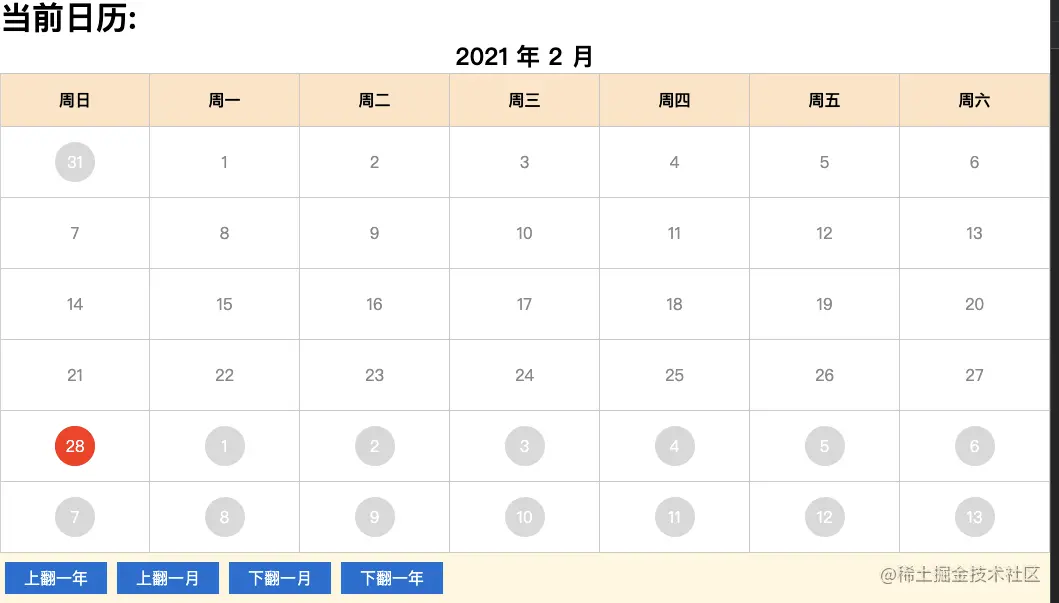
到此结束,一个简单的日历就完成了。这样写的好处在于逻辑封装,插件不进行渲染,能适应各种应用场景(例如弄的日历好不好看全看个人水平,与插件无关)。需要其它定制化功能也可以在此基础上扩展。写的不好敬请见谅,原创不易,点个赞先。



