1/什么是multiprocessing模块
multiprocessing模块,即multiprocessing.py代码文件。
multiprocessing模块是python中的多进程管理模块。
(与之相对应的是多线程:threading.Thread类似(threading.py中的Thread类))

本文主要讲解该模块中的2个类,及Process()类和Pool()类

可以利用multiprocessing.Process对象来实例化一个进程对象。
该进程可以允许放在Python程序内部编写的函数中。
该Process实例化对象与Thread实例化对象的用法相同,拥有is_alive()、join([timeout])、run()、start()、terminate()等方法。
属性有:authkey、daemon(要通过start()设置)、exitcode(进程在运行时为None、如果为–N,表示被信号N结束)、name、pid。
此外multiprocessing模块中也有Lock/Event/Semaphore/Condition类,用来同步进程,其用法也与threading包中的同名类一样。

multiprocessing的很大一部份与threading使用同一套API,只不过换到了多进程的情境。

multiprocessing模块中Process类的构造方法:
multiprocessing.py
class Process:
    def __init__(self,group=None,target=None,name=None,args=(),kwargs={})
        参数说明:
        group:进程所属组。基本不用
        target:表示调用对象。
        name:别名
        args:表示调用对象的位置参数元组。
        kwargs:表示调用对象的字典。
2/使用Process()类创建多进程
import multiprocessing
def funcs(n) :
name = multiprocessing.current_process().name
print(name, 'starting')
print("worker ", n)
if __name__ == '__main__' :
for i in range(5) :
p = multiprocessing.Process(target=funcs, args=(i,))
p.start()
p.join()
print("Process end!!!")
print('主进程')
Process-1 starting
worker 0
Process end!!!
Process-2 starting
worker 1
Process end!!!
Process-3 starting
worker 2
Process end!!!
Process-4 starting
worker 3
Process end!!!
Process-5 starting
worker 4
Process end!!!
主进程
创建子进程时,只需要传入一个执行函数和函数的参数,创建一个Process进程实例,并用其start()方法启动,这样创建进程比fork()还要简单。
join()方法表示等待子进程结束以后再继续往下运行,通常用于进程间的同步。
如果join(timeout)中有一个时间阈值,则表示主进程要等待子进程timeout时间,在该时间结束后,再往下执行(不管子进程有没有执行完毕)。
如果没有该参数,则一直等待子进程。

注意:
    在Windows上要想使用进程模块,就必须把有关进程的代码写在当前.py文件的if __name__ == ‘__main__’ :语句的下面, 才能正常使用Windows下的进程模块。Unix/Linux下则不需要。
3/使用Pool类创建多个子进程
在使用Python进行系统管理时,特别是同时操作多个文件目录或者远程控制多台主机,并行操作可以节约大量的时间。
如果操作的对象数目不大时,还可以直接使用Process类动态的生成多个进程,十几个还好,但是如果上百个甚至更多,那手动去限制进程数量就显得特别的繁琐,此时进程池就派上用场了。
Pool类可以提供指定数量的进程供用户调用,当有新的请求提交到Pool中时,如果池子还没有满,就会创建一个新的进程来执行请求。
如果池子已经满了,请求就会告知先等待,直到池子中有进程结束,才会创建新的进程来执行这些请求。
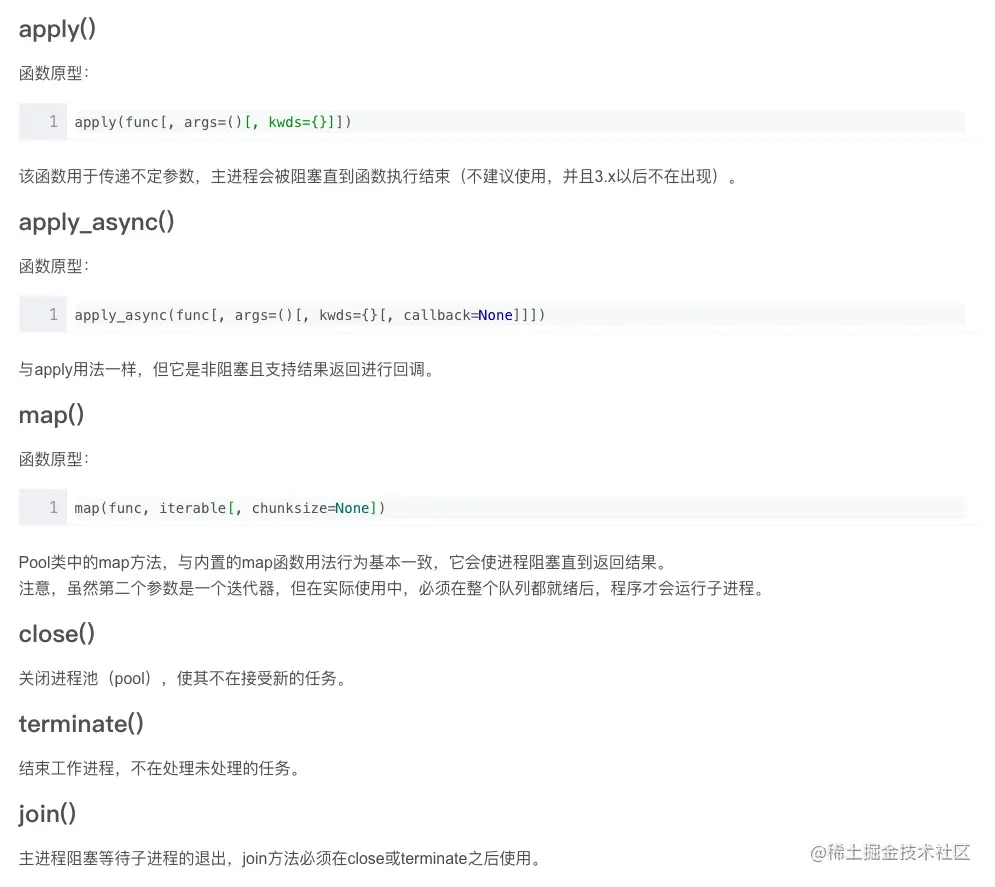
下面介绍一下multiprocessing 模块下的Pool类下的几个方法:
apply()  # 不建议使用,并且在python3.x之后不再使用
apply_async() # 异步非堵塞,一般需要使用join()方法来堵塞主进程。
map()
close()
terminate()
join()
import time
from multiprocessing import Pool
def func(i):
time.sleep(1)
print( i*i )
if __name__ == "__main__":
testFL = [1,2,3,4,5,6]
print('顺序执行:')
start_time1 = time.time()
for i in testFL:
func(i)
end_time1 = time.time()
print("顺序执行时间:", int(end_time1 - start_time1) )
print( '多进程执行' )
start_time2 = time.time()
pool = Pool(5)
rl = pool.map(func, testFL)
pool.close()
pool.join()
end_time2 = time.time()
print "并行执行时间:", int(end_time2-end-time2)
print( rl )
顺序执行:
顺序执行时间: 6
多进程执行:
并行执行时间: 2
[1, 4, 9, 16, 25, 36]
上例是一个创建多个进程并发处理与顺序执行处理同一数据,所用时间的差别。
从结果可以看出,并发执行的时间明显比顺序执行要快很多,但是进程是要耗资源的,所以平时工作中,进程数也不能开太大。
程序中的r1表示全部进程执行结束后全局的返回结果集,run函数有返回值,所以一个进程对应一个返回结果,
这个结果存在一个列表中,也就是一个结果堆中,实际上是用了队列的原理,等待所有进程都执行完毕,就返回这个列表(列表的顺序不定)。
对Pool对象调用join()方法会等待所有子进程执行完毕,调用join()之前必须先调用close(),让进程池不再接受新的Process进程。
<1>apply()
堵塞主进程,并且一个一个按照顺序执行子进程,等到所有的子进程都执行完毕之后,继续执行apply()之后的主进程的代码。
import time
import multiprocessing
def doIt(num):
print("Process num is : %s" % num)
time.sleep(1)
print('process %s end' % num)
if __name__ == '__main__':
print('mainProcess start')
start_time = time.time()
pool = multiprocessing.Pool(3)
print('Child start')
for i in range(3):
pool.apply(doIt,[i])
print('mainProcess done time:%s s' % (time.time() - start_time))
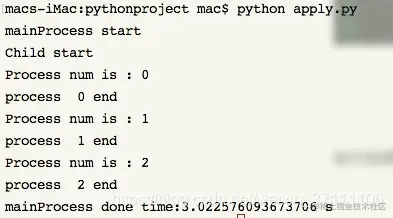
执行结果如下所示:
我们可以看到, 主进程开始执行之后, 创建的三个子进程也随即开始执行, 主进程被阻塞,, 而且接下来三个子进程是一个接一个按顺序地执行, 等到子进程全部执行完毕之后, 主进程就会继续执行, 打印出最后一句
<2>apply_async()
import time
import multiprocessing
def doIt(num):
print("Process num is : %s" % num)
time.sleep(1)
print('process %s end' % num)
if __name__ == '__main__':
print('mainProcess start')
start_time = time.time()
pool = multiprocessing.Pool(3)
print('Child start')
for i in range(3):
pool.apply_async(doIt,[i])
print('mainProcess done time:%s s' % (time.time() - start_time))
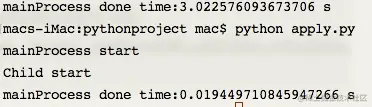
我们来看看运行结果, 可以看出来, 截图的第一句是上一个程序的执行消耗时间, 最后一句是使用apply_async() 所消耗的时间, 在这里, 主进程没有被阻塞, 验证了他是非阻塞的, 子进程没有执行, 验证了他是根据系统调度完成的, 为什么会这样呢?
原因是, 进程的切换时操作系统控制的, 我们首先运行的是主进程, 而CPU运行得又很快, 快到还没等系统调度到子线程, 主线程就已经运行完毕了, 并且退出程序. 所以子进程就没有运行了.
那么 调用了apply_async() 是不是就不能运行子进程了呢, 肯定可以呀!!小老弟,想啥呢??
只要用pool.close() 和pool.join()就可以堵塞了。
4/其他demo
import time
import multiprocessing
def func(i) :
time.sleep(2)
print( i )
if __name__ == "__main__" :
startTime = time.time()
testFL = [1,2,3,4,5]
pool = multiprocessing.Pool(10)
pool.map(func, testFL)
pool.close()
pool.join()
endTime = time.time()
print "time :", endTime - startTime
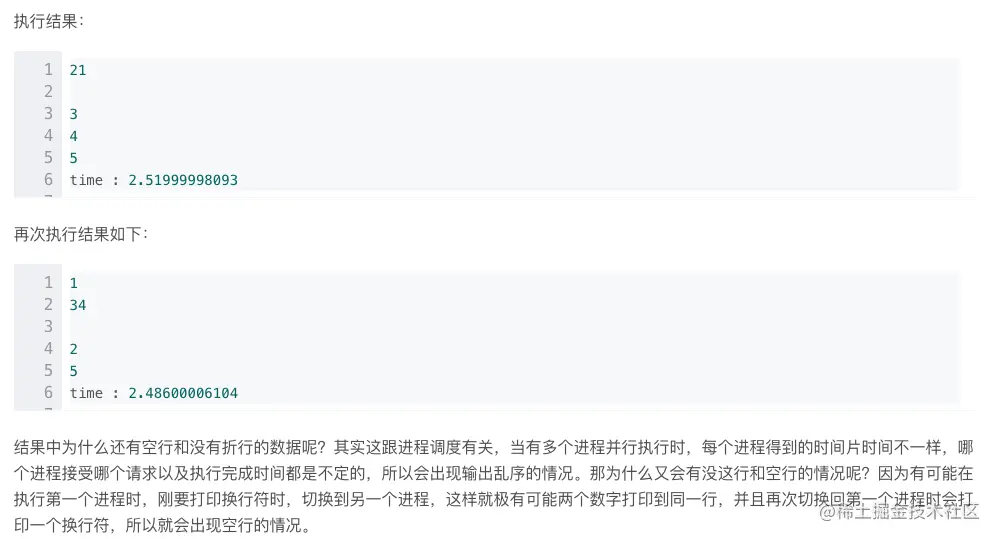
执行结果:
进程实战实例:
import os
import time
import multiprocessing
def getFile(path) :
fileList = []
for root, dirs, files in list(os.walk(path)) :
for i in files :
if i.endswith('.txt') or i.endswith('.10w') :
fileList.append(root + "\\" + i)
return fileList
def operFile(filePath) :
filePath = filePath
fp = open(filePath)
content = fp.readlines()
fp.close()
lines = len(content)
alphaNum = 0
for i in content :
alphaNum += len(i.strip('\n'))
return lines,alphaNum,filePath
def out(list1, writeFilePath) :
fileLines = 0
charNum = 0
fp = open(writeFilePath,'a')
for i in list1 :
fp.write(i[2] + " 行数:"+ str(i[0]) + " 字符数:"+str(i[1]) + "\n")
fileLines += i[0]
charNum += i[1]
fp.close()
print fileLines, charNum
if __name__ == "__main__":
startTime = time.time()
filePath = "C:\\wcx\\a"
fileList = getFile(filePath)
pool = multiprocessing.Pool(5)
resultList = pool.map(operFile, fileList)
pool.close()
pool.join()
writeFilePath = "c:\\wcx\\res.txt"
print( resultList )
out(resultList, writeFilePath)
endTime = time.time()
print "used time is ", endTime - startTime
执行结果
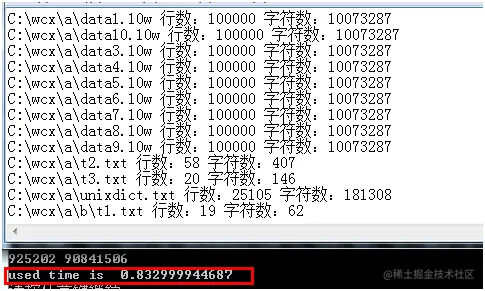
耗时不到1秒,可见多进程并发执行速度是很快的。
5/总结
multiprocessing是进行多进程管理的一个模块,
其中Process()类和Pool()类是最常用的类。
如果操作的对象数目不大时,还可以直接使用Process类动态的生成多个进程,十几个还好,但是如果上百个甚至更多,那手动去限制进程数量就显得特别的繁琐,此时进程池就派上用场了。