贪吃蛇游戏
- 游戏的目的是用来体会 JavaScript 高级语法的使用,暂时不需要具备抽象对象的能力。使用面向对象的方式分析问题,需要一个漫长的积累过程。
搭建页面
- 一个容器盛放游戏场景 div#stage,设置样式.
分析对象
- 食物对象 Food
- 蛇对象 Snake
- 游戏对象 Game
创建工具类
创建食物对象
- 创建 Food 的构造函数,并设置属性
- 位置 x、y(实际位置)
- 宽度和高度 width、height
- 颜色
- 食物集合
- 定位:绝对定位
- 通过原型设置方法
- render 随机渲染一个食物对象,并添加到stage上
- 通过自调用函数,进行封装,并通过window暴露Food构造函数。
创建蛇对象
- 创建 Snake 的构造函数,并设置属性
- 宽度和高度 width、height
- body 数组,蛇的头部和身体,第一个位置是蛇头
- direction 蛇运动的方向
- 定位:绝对定位
- 通过原型设置方法
- render 随机创建一个蛇对象,并添加到stage上
- 通过自调用函数,进行封装。并通过window暴露Snake构造函数。
创建游戏对象
- 创建 Game 的构造函数,并设置属性
- 通过原型设置方法
- start 开始游戏(绘制所有游戏对象,渲染食物对象和蛇对象)
- 通过自调用函数,进行封装,通过 window 暴露 Game 构造函数
游戏逻辑
游戏逻辑1
- 蛇的move方法
- 在蛇对象 (snake.js) 中,在 Snake 的原型上新增 move 方法
- 1.让蛇移动起来,把蛇身体的每一部分往前移动一下
- 2.蛇头部分根据不同的方向决定 往哪里移动(+1)
游戏逻辑2
- 让蛇自己动起来
- 在 snake 中添加删除蛇的私有方法,在 render 中调用。
- 在 game.js 中添加 runSnake 的私有方法,开启定时器调用蛇的 move 和 render 方法,让蛇动起来。
- 判断蛇是否撞墙。
- 在 game.js 中添加 bindKey 的私有方法,通过键盘控制蛇的移动方向,在 start 方法中调用 bindKey。
游戏逻辑3
- 判断蛇是否吃到食物
- 在 Snake 的 move 方法中判断在移动的过程中蛇是否吃到食物。
- 如果蛇头和食物的位置重合代表吃到食物。
- 食物的坐标是像素,蛇的坐标是几个宽度,需要进行转换
- 吃到食物,往蛇节的最后加一节
- 最后把现在的食物对象删除,并重新随机渲染一个食物对象
- 升级为多个食物时,需要循环遍历查看是否重合,再随机渲染一个食物对象
其他处理
其他处理1
- 将测试执行的代码,整合到main.js文件中,并设置其为自调用函数,使js脱离html。
- 注意:引用js文件名的时候,要注意顺序,后引用的可以使用之前引用的文件,反之不行。
其他处理2
- 运行游戏后,在控制台network下可以看到HTTP向服务器请求的文件数
- 如下图(其中有5次js请求文件)
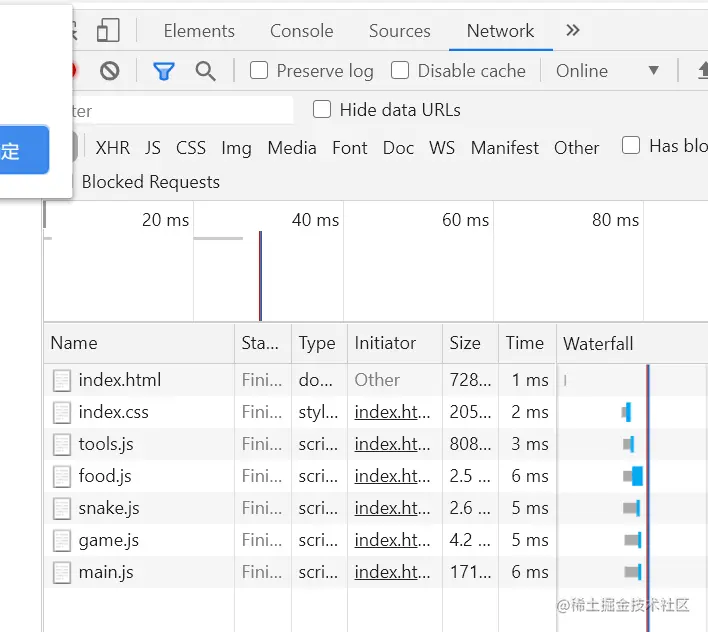
- 浏览器的性能优化中,包含一个减少发送http请求的条数,每多发送一个http请求,就要多在服务器里面请求一条数据,然后再去返回。
- 解决方法:将所有的js文件整合到一个js文件中,命名为:index.js
- 再次运行查看,如图(只请求了1次js文件)
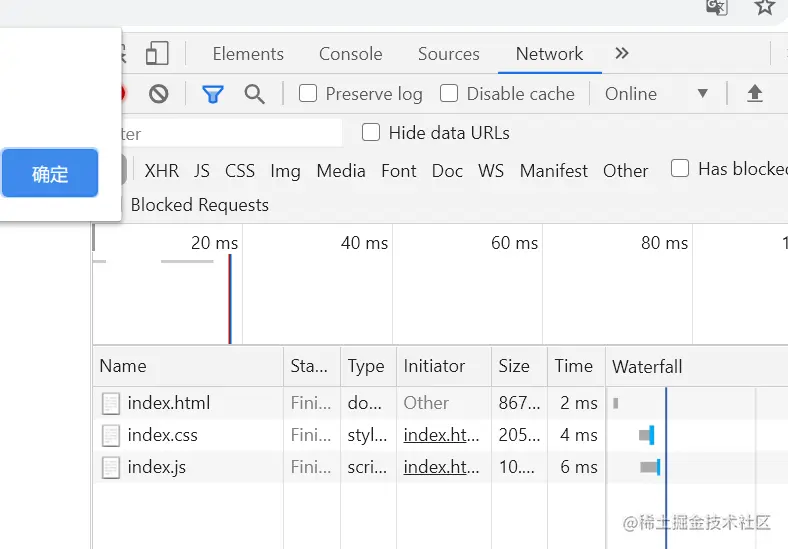
- 注意:在将js文件整合时,需要注意:每个js文件的先后顺序
其他处理3
- js代码压缩优化,可以使传输时效率更快
- 搜索:代码压缩
- 压缩后文件命名:index.min.js
- 在vscode中,查看选项卡 -> 自动切换换行
其他处理4
其他处理5
其他处理6
- 在遍历数组时,如果正向遍历,循环删除数组中的值,会出错
- 解决方法,如下
for(var i = this.elements.length - 1; i >= 0; i--){
stage.removeChild(this.elements[i]);
}
this.elements = [];
源码
index.html文件
<!DOCTYPE html>
<html lang="en">
<head>
    <meta charset="UTF-8">
    <meta http-equiv="X-UA-Compatible" content="IE=edge">
    <meta name="viewport" content="width=device-width, initial-scale=1.0">
    <title>贪吃蛇游戏</title>
    <link rel="stylesheet" href="css/index.css">
</head>
<body>
    <div class="stage" id = "stage"></div>
    <!-- js文件书写的位置:后面可以用前面引用的文件内容 -->
    <!-- <script src="js/tools.js"></script>
    <script src="js/food.js"></script>
    <script src="js/snake.js"></script>
    <script src="js/game.js"></script>
    <script src="js/main.js"></script> -->
    <!-- 简化http向服务器请求文件数,将其他的整合到一个文件中 -->
    <script src="js/index.min.js"></script>
</body>
</html>
<!-- 疑问:为什么清除定时器之后,还会往前走一格 -->
index.css文件
* {
margin: 0;
padding: 0;
}
.stage {
width: 800px;
height: 600px;
background-color: lightgray;
position: relative;
}
index.js文件
(function (window,undefined){
var Tools = {
getRandom: function (min,max){
min = Math.ceil(min);
max = Math.floor(max);
return Math.floor(Math.random() * (max - min + 1)) + min;
},
getColor : function (){
var r = this.getRandom(0,255);
var g = this.getRandom(0,255);
var b = this.getRandom(0,255);
var rgb = "rgb(" + r + "," + g + "," + b + ")";
return rgb;
}
}
window.Tools = Tools;
})(window,undefined);
(function (window,undefined){
function Food(option){
option = option instanceof Object ? option : {};
this.x = option.x || 0;
this.y = option.y || 0;
this.width = option.width || 20;
this.height = option.height || 20;
this.color = option.color || "blue";
this.elements = [];
}
var bs = "absolute";
Food.prototype.render = function(stage){
var ele = document.createElement("div");
this.x = Tools.getRandom(0,stage.clientWidth / this.width - 1) * this.width;
this.y = Tools.getRandom(0,stage.clientHeight / this.height - 1) * this.height;
ele.style.left = this.x + "px";
ele.style.top = this.y + "px";
ele.style.width = this.width + "px";
ele.style.height = this.height + "px";
ele.style.backgroundColor = Tools.getColor();
ele.style.position = bs;
stage.appendChild(ele);
this.elements.push(ele);
}
Food.prototype.remove = function (stage,i){
stage.removeChild(this.elements[i]);
this.elements.splice(i,1);
}
window.Food = Food;
})(window,undefined);
(function (window,undefined){
var bs = "absolute";
function Snake(option){
option = option instanceof Object ? option : {};
this.width = option.width || 20;
this.height = option.height || 20;
this.body = [
{x:3,y:2,color:"red"},
{x:2,y:2,color:"blue"},
{x:1,y:2,color:"blue"}
];
this.position = bs;
this.direction = "right";
this.elements = [];
}
Snake.prototype.render = function (stage){
for(var i = 0,len = this.body.length;i < len; i++){
var ele = document.createElement("div");
ele.style.width = this.width + "px";
ele.style.height = this.height + "px";
ele.style.left = this.body[i].x * this.width + "px";
ele.style.top = this.body[i].y * this.height + "px";
ele.style.backgroundColor = this.body[i].color;
ele.style.position = this.position;
stage.appendChild(ele);
this.elements.push(ele);
}
}
Snake.prototype.move = function (){
for(var i = this.body.length - 1;i > 0; i--){
this.body[i].x = this.body[i - 1].x;
this.body[i].y = this.body[i - 1].y;
}
var head = this.body[0];
switch(this.direction){
case "right":
head.x++;
break;
case "left":
head.x--;
break;
case "top":
head.y--;
break;
case "bottom":
head.y++;
break;
}
}
Snake.prototype.remove = function (stage){
for(var i = this.elements.length - 1; i >= 0; i--){
stage.removeChild(this.elements[i]);
}
this.elements = [];
}
window.Snake = Snake;
})(window,undefined);
(function (window,undefined){
var that;
function Game(stage){
this.food = new Food();
this.snake = new Snake();
this.stage = stage;
that = this;
}
Game.prototype.start = function (){
this.food.render(this.stage);
this.food.render(this.stage);
this.food.render(this.stage);
this.snake.render(this.stage);
snakeRun();
bindKey();
}
function bindKey() {
document.onkeydown = function (e){
switch(e.keyCode){
case 38:
that.snake.direction = "top";
break;
case 40:
that.snake.direction = "bottom";
break;
case 39:
that.snake.direction = "right";
break;
case 37:
that.snake.direction = "left";
break;
}
};
}
function snakeRun(){
var timer = setInterval(function (){
that.snake.move();
that.snake.remove(that.stage);
that.snake.render(that.stage);
var maxX = that.stage.offsetWidth / that.snake.width;
var maxY = that.stage.offsetHeight / that.snake.height;
var headX = that.snake.body[0].x;
var headY = that.snake.body[0].y;
var hX = headX * that.snake.width;
var hY = headY * that.snake.height;
for(var i = 0; i < that.food.elements.length; i++){
if(that.food.elements[i].offsetLeft == hX && that.food.elements[i].offsetTop == hY){
that.food.remove(that.stage,i);
that.food.render(that.stage);
var last = that.snake.body[that.snake.body.length - 1];
that.snake.body.push({
x:last.x,
y:last.y,
color:last.color
});
}
}
if(headX < 0 || headX >= maxX || headY < 0 || headY >= maxY){
clearInterval(timer);
alert("Game over");
}
},150);
}
window.Game = Game;
})(window,undefined);
(function (window,undefined){
var stage = document.getElementById("stage");
var game = new Game(stage);
game.start();
})(window,undefined);