体验面向过程和面向对象
var std1 = {name:"王五",score:79};
var std2 = {name:"李四",score:88};
function printScore(student){
console.log(student.name + ":" + student.score);
}
printScore(std1);
printScore(std2);
function Student(name,score){
this.name = name;
this.score = score;
this.printScore = function (){
console.log(this.name + ":" + this.score;
}
}
var std1 = new Student("李华",23);
var std2 = new Student("美丽",18);
std1.printScore();
std2.printScore();
面向对象的设计思想
- 抽象出class(构造函数)
- 根据 Class(构造函数) 创建 Instance(实例)
- 指挥 Instance 得结果
创建对象的四种方式
var std1 = new Object();
std1.name = "梨花";
std1.score = 99;
std1.printScore = function (){
console.log(std1.name + ":" + std1.score);
}
std1.printScore();
var std1 = {
name:"梨花",
age:18,
sayName:function(){
console.log(this.name);
}
};
std1.sayName();
function createStudent(name,score){
var std = new Object();
std.name = name;
std.score = score;
std.printScore = function (){
console.log(std.name + ":" + std.score);
}
return std;
}
var std1 = createStudent("老四",99);
std1.printScore();
var arr = [1,2];
console.log(arr instanceof Array);
console.log(std1 instanceof createStudent); false
console.log(std1 instanceof Object);
function Student(name,score){
this.name = name;
this.score = score;
this.printScore = function (){
console.log(this.name + ":" + this.score;
}
}
var std1 = new Student("周五",78);
std1.printScore();
console.log(std1 instanceof Student);
构造函数和实例对象的关系
静态成员和实例成员
- 使用构造函数方法创建对象时,可以给构造函数和创建的实例对象添加属性和方法,这些属性和方法都叫做成员。
- 实例成员:在构造函数内部添加给 this 的成员,属于实例对象的成员,在创建实例对象后必须由对象调用。
- 静态成员:添加给构造函数自身的成员,只能使用构造函数(函数本身也是一个对象)调用,不能使用生成的实例对象调用。
function Student(name,score){
this.name = name;
this.score = score;
this.printScore = function (){
console.log(this.name + ":" + thiscore);
}
}
var std1 = new Student("周五",78);
std1.printScore();
Student.num = 1000;
console.log(Student.num);
- 拓展:Math不是一个构造器。Math的所有属性和方法都是静态的。
构造函数的问题
function Student(name,score){
this.name = name;
this.score = score;
this.printScore = function (){
console.log(this.name + ":" + thi score);
}
}
var std1 = new Student("周五",78);
var std2 = new Student("周日",99);
console.log(std1.printScore === std printScore);
- 解决方法1:引用唯一的函数地址避免内存浪费,但是这样好像不太符合面向对象的思想->所有的属性和方法都封装在一个对象中执行
function Student(name,score){
this.name = name;
this.score = score;
this.printScore = printScore;
}
function printScore(){
console.log(this.name + ":" + thi score);
}
var std1 = new Student("周五",78);
var std2 = new Student("周日",99);
console.log(std1.printScore === std printScore);
- 解决方法2:将多个公共的函数封装到一个对象字面量中
var fns = {
printScore : function (){
console.log(this.name + ":" + this.score);
}
}
function Student(name,score){
this.name = name;
this.score = score;
this.printScore = fns.printScore;
}
var std1 = new Student("周五",78);
var std2 = new Student("周日",99);
console.log(std1.printScore === std2.printScore);
原型
- 使用原型对象可以更好的解决构造函数的内存浪费问题。
prototype原型对象
- 任何函数都具有一个prototype属性,该属性是一个对象。
- 可以在原型对象上添加属性和方法。
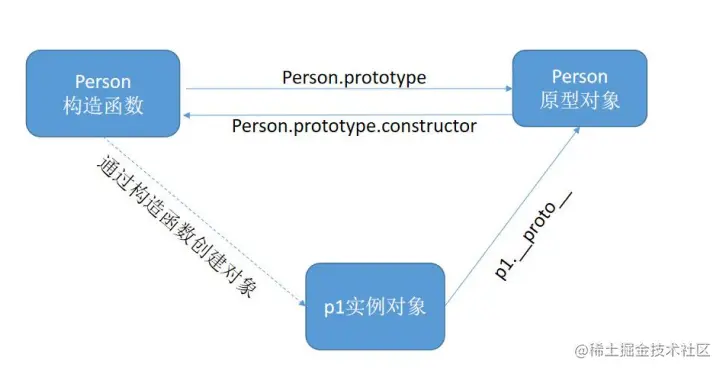
- 构造函数的prototype对象默认都有一个constructor属性,指向prototype对象所在的函数。
- 通过构造函数得到的实例对象内部会包含一个指向构造函数的prototype对象的指针__proto__。
- 实例对象可以直接访问原型对象的成员。
function Person(name,age){
this.name = name;
this.age = age;
}
Person.prototype.sayName = function (){
console.log(this.name);
}
var person1 = new Person("梨花",33);
console.dir(Person.prototype);
person1.__proto__.sayName();
person1.sayName();
console.dir(Person.prototype.constructor);
console.dir(person1.__proto__);
console.log(Person.prototype.constructor);
console.log(person1.constructor);
构造函数、实例、原型对象三者之间的关系
- 见下图
续接上次:构造函数浪费内存问题 之 更好的解决方法
- JavaScript 规定,每一个构造函数都有一个prototype 属性,指向构造函数的原型对象。
- 这个原型对象的所有属性和方法,都会被构造函数的实例对象所拥有。
- 因此,我们可以把所有对象实例需要共享的属性和方法直接定义在 prototype 对象上。
function Person(name,age){
this.name = name;
this.age = age;
}
Person.prototype.sayName = function (){
console.log(this.name);
}
var person1 = new Person("梨花",33);
var person2 = new Person("梅花",13);
person1.sayName();
console.log(person1.sayName === person2.sayName);
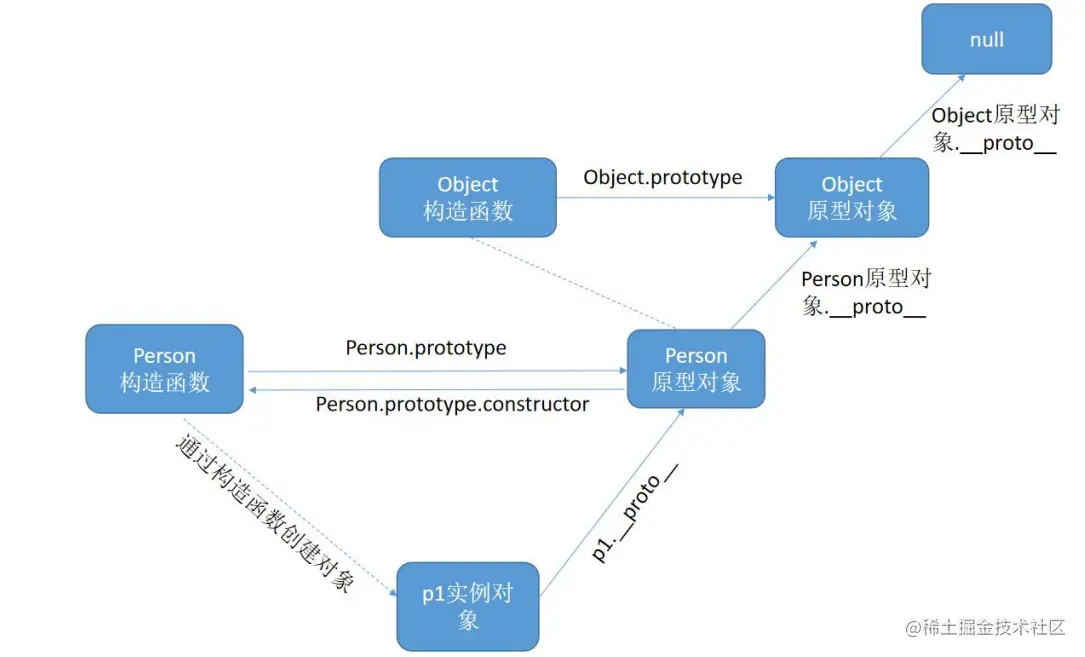
原型链
- 思考:为什么实例对象可以调用构造函数的 prototype 原型对象
的属性和方法?
- 如下图
原型链查找机制
- 每当代码读取某个对象的某个属性时,都会执行一次搜索,目标是具有给定名字的属性。
- 1.搜索首先从对象实例本身开始。
- 2.如果在实例中找到了具有给定名字的属性,则返回该属性的值。
- 3.如果没有找到,则继续搜索指针指向的原型对象,在原型对象中查找具有给定名字的属性。
- 4.如果在原型对象中找到了这个属性,则返回属性的值。
实例对象读写原型对象成员
读取
- 先在自己身上找,找到即返回
- 自己身上找不到,则沿着原型链向上查找,找到即返回
- 如果一直到原型链的末端还没有找到,则返回undefined
- 展示代码
console.log(person1.city);
console.log(person1.sayAge());
值类型成员写入(实例对象.值类型成员 = xx)
- 当实例期望重写原型对象中的某个普通数据成员时,实际上会把该成员添加到自己身上。
- 也就是说该行为实际上会屏蔽掉对原型对象成员的访问
引用类型成员写入(实例对象.引用类型成员 = xx)
复杂类型成员修改(实例对象.成员.xx = xx)
- 同样会先在自己身上找该成员,如果自己身上找到则直接修改
- 如果找不到,则沿着原型链继续查找,如果找到则修改
- 如果一直到原型链的末端还没有找到该成员,则报错(实例对象.undefined.xx = xx)
更简单的原型语法
- 前面在原型对象每添加一个属性和方法就要书写一遍 Person.prototype。
- 为减少不必要的输入,更常见的做法是用一个包含所有属性和方法的对象字面量来重写整个原型对象,将Person.prototype重置到一个新的对象。
- 注意:原型对象会丢失 constructor 成员,所以需要手动将 constructor 指向正确的构造函数。
原型对象使用建议
- 在定义构造函数时,可以根据成员的功能不同,分别进行设置:
- 私有成员(一般就是非函数成员)放到构造函数中
- 共享成员(一般就是函数)放到原型对象中
- 如果重置了prototype记得修正constructor的指向
原生构造函数的原型对象
JS原生构造函数的原型对象
- 所有函数都有 prototype 属性对象。
- JavaScript中的内置构造函数也有 prototype 原型对象属性:
- Object.prototype
- Function.prototype
- Array.prototype
- String.prototype
- Number.prototype
练习
随机方块案例