如何删除GitHub不需要的仓库
针对如何删除 GitHub 不需要的仓库步骤记录如下:
主要目的:记录,防止日后踩坑,以及有需要的朋友
1 进入需要删除的 GitHub 仓库,选中右侧的 Settings :

2 选中 Settings 后,进入下个界面,拉到最下面 Danger Zone 中,选中最下面的 Delete this repository:
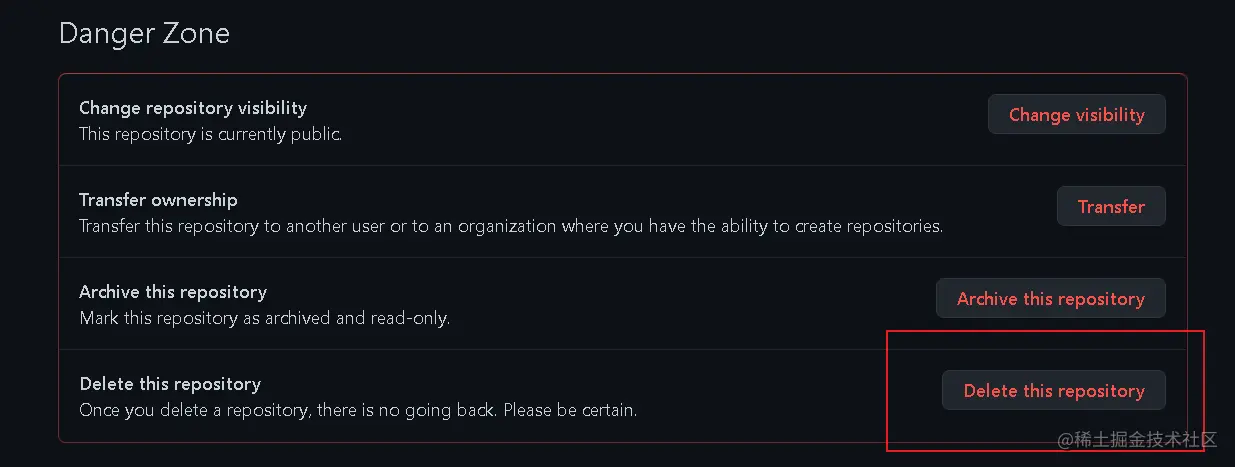
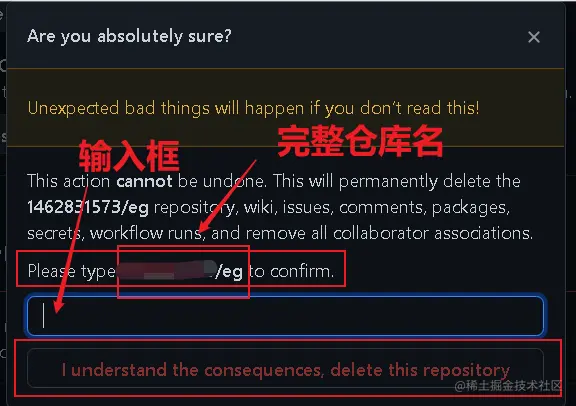
3 选中 Delete this repository 后,进入下个界面,在输入框中输入仓库的完整名称(此处输入具体仓库名称:xxxxxx/eg)然后点击最下面按钮 I understand the consequences,delete this repository : *(提醒一下,我就踩过这个坑:写具体仓库名称时,请注意是否有多余空格,如果有多余空格,请删除,否则无法点击最下面的按钮 I understand the consequences,delete this repository )
4 恭喜你,完成删除GitHub不需要的仓库,加油,继续努力!(定期断舍离,你会有更好的感受!!!)