前言
vue-router官方使用说明文档vue-router源码地址- 本文主要讲
vue-router二种获取路径模式history和hash
- 路由守卫的实现原理(这里主要以beforeEach为例)
router-link和router-view实现原理- 大致实现的思想
- 将用户填写的路由表 变成扁平化的映射表
- 在根组件初始化响应劫持, 当前路径的映射表(用的是
Vue.util.defineReactive内部响应式API)
- 监听路径变化, 在
router-view去渲染当前路径的所有组件
项目的目录结构
* 基于vue2项目开发的vue-router
├── public
│   └── index.html
├── src
│   ├── router
│   │   └── index.js
│   ├── views
│   │   ├── About.vue
│   │   └── Home.vue
│   ├── vue-router
│   │   ├── components
│   │   │   ├── link.js
│   │   │   └── view.js
│   │   └── history
│   │   │   ├── base.js
│   │   │   ├── hash.js
│   │   │   └── html5.js
│   │   ├── create-matcher.js
│   │   ├── create-router-map.js
│   │   ├── index.js
│   │   └── install.js
├── App.vue
└── main.js
示例
src/router/index.js
import Vue from 'vue'
import VueRouter from '@/vue-router'
import Home from '../views/Home.vue'
import About from '../views/About.vue'
Vue.use(VueRouter)
const routes = [
{
path: '/',
name: 'Home',
component: Home
},
{
path: '/about',
name: 'About',
component: About,
children:[
{
path:'a',
component: {
render: (h) => <h1>about a page</h1>
}
},
{
path:'b',
component: {
render: (h) => <h1>about b page</h1>
}
}
]
}
]
const router = new VueRouter({
mode:'history',
routes
})
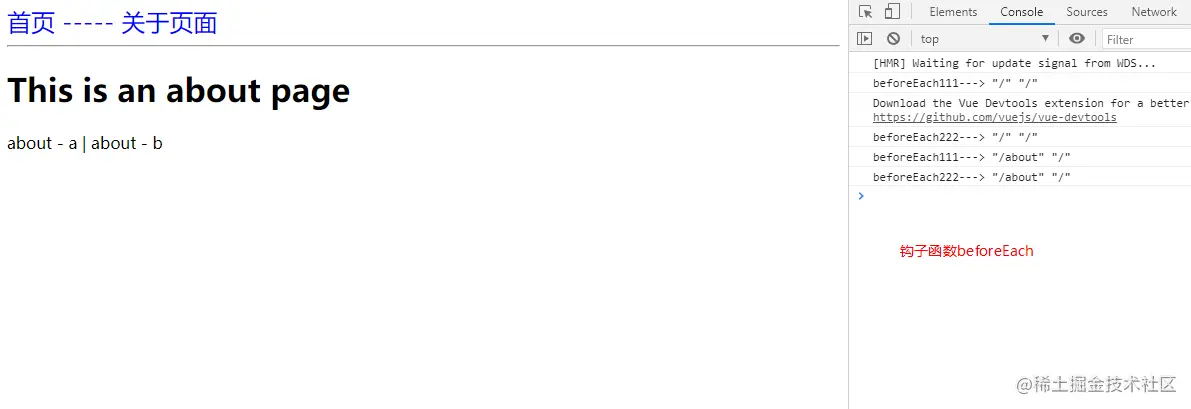
router.beforeEach((to, from, next)=>{
console.log('beforeEach111--->', JSON.stringify(to.path), JSON.stringify(from.path))
setTimeout(() => { next() }, 1000)
})
router.beforeEach((to, from, next) => {
console.log('beforeEach222--->', JSON.stringify(to.path), JSON.stringify(from.path))
next()
})
export default router
.vue文件
src/App.vue
src/views/About.vue
src/views/Home.vue
<template>
<div id="app">
<div id="nav">
<router-link to="/">首页</router-link>
-----
<router-link to="/about">关于页面</router-link>
</div>
<hr>
<router-view />
</div>
</template>
<style>
#app #nav {
color:blue;
font-size: 24px;
}
</style>
<template>
  <div class="about">
    <h1>This is an about page</h1>


    <router-link to="/about/a">about - a</router-link>  |
    <router-link to="/about/b">about - b</router-link>
    <router-view></router-view>

  </div>
</template>
<template>
  <div class="home">
   <h1>This is a home page</h1>
  </div>
</template>
正题
install和main文件
src/main.js
src/vue-router/install.js
安装router和注入store实例
let vm = new Vue({
name: 'root',
router,
render: h => h(App)
}).$mount('#app')
import RouterLink from './components/link'
import RouterView from './components/view'
export let Vue
export default function install(_Vue) {
Vue = _Vue
Vue.mixin({
beforeCreate() {
if (this.$options.router) {
this._router = this.$options.router
this._routerRoot = this
this._router.init(this)
Vue.util.defineReactive(this, '_route', this._router.history.current)
} else {
this._routerRoot = this.$parent && this.$parent._routerRoot
}
},
})
Object.defineProperty(Vue.prototype, '$router', {
get() {
return this._routerRoot._router
}
})
Object.defineProperty(Vue.prototype, '$route', {
get() {
return this._routerRoot._route
}
})
Vue.component('router-link', RouterLink)
Vue.component('router-view', RouterView)
}
创建VueRouter实例
src/vue-router/index.js
import install, { Vue } from './install'
import { createMatcher } from './create-matcher'
import Hash from './history/hash'
import HTML5History from './history/html5'
class VueRouter {
constructor(options = {}) {
const routes = options.routes
this.mode = options.mode || 'hash'
this.beforeHooks = []
this.matcher = createMatcher(options.routes || [])
switch(this.mode) {
case 'hash':
this.history = new Hash(this)
break
case 'history':
this.history = new HTML5History(this)
break
}
}
match(location) {
return this.matcher.match(location)
}
push(location) {
this.history.transitionTo(location, () => {
this.history.pushState(location)
})
}
init(app) {
const history = this.history
const setUpListener = () => {
history.setUpListener()
}
history.transitionTo(
history.getCurrentLocation(),
setUpListener
)
history.listen((route) => {
app._route = route
})
}
beforeEach(fn){
this.beforeHooks.push(fn);
}
}
VueRouter.install = install
export default VueRouter
扁平化路由表
src/vue-router/create-matcher.js
src/vue-router/create-route-map.js
import { createRouteMap } from './create-route-map'
export function createMatcher(routes) {
const { pathMap } = createRouteMap(routes)
function match(path) {
return pathMap[path]
}
function addRoutes(newRoutes) {
return createRouteMap(newRoutes, pathMap)
}
return {
match,
addRoutes,
}
}
export function createRouteMap(routes, oldPathMap) {
let pathMap = oldPathMap || {}
routes.forEach(route => {
addRouteRecord(route, pathMap)
})
return { pathMap }
}
function addRouteRecord(route, pathMap, parent) {
let path = parent ? `${parent.path}/${route.path}` : route.path
let record = {
path,
component: route.component,
props: route.props || {},
parent
}
pathMap[path] = record
route.children && route.children.forEach(childRoute => {
addRouteRecord(childRoute, pathMap, record)
})
}
hash和hsitory路径处理方式
src/vue-router/history/base.js
src/vue-router/history/html5.js
src/vue-router/history/hash.js
通过路径的不同去匹配当前路径的映射表
在将映射表赋予_route让其响应式发生变化从而更新组件(就是router-view获取的$route)
有些方法是一致 放在base.js文件
主要的方法是base.js里的transitionTo方法
function createRoute(record, location) {
const matched = []
if (record) {
while(record) {
matched.unshift(record)
record = record.parent
}
}
return {
...location,
matched
}
}
function runQueue(queue, iterator, cb) {
const step = index => {
if (index >= queue.length) {
cb()
} else {
if (queue[index]) {
iterator(queue[index], () => { step(index + 1) })
} else {
step(index + 1)
}
}
}
step(0)
}
export default class History {
constructor(router) {
this.router = router
this.current = createRoute(null, {path: '/'})
}
listen(cb) {
this.cb = cb
}
transitionTo(path, onComplete) {
let record = this.router.match(path)
let route = createRoute(record, { path })
if (path === this.current.path && route.matched.length === this.current.matched.length) {
return
}
const iterator = (hook, next) => {
hook(route, this.current, next)
}
let queue = this.router.beforeHooks
runQueue(queue,iterator,() => {
this.updateRoute(route)
onComplete && onComplete()
})
}
updateRoute(route) {
this.current = route
this.cb && this.cb(route)
}
}
import History from './base'
function ensureHash() {
if(!window.location.hash) {
window.location.hash = '/'
}
}
function getHash() {
return window.location.hash.slice(1)
}
export default class Hash extends History {
constructor(router) {
super(router)
ensureHash()
}
getCurrentLocation() {
return getHash()
}
setUpListener() {
window.addEventListener('hashchange', () => {
this.transitionTo(getHash())
})
}
pushState(location) {
window.location.hash = location
}
}
import History from './base'
export default class HTML5History extends History {
constructor(router) {
super(router)
}
getCurrentLocation() {
return window.location.pathname
}
setUpListener() {
window.addEventListener('popstate', () => {
this.transitionTo(this.getCurrentLocation())
})
}
pushState(location) {
history.pushState({}, null, location)
}
}
router-link和router-view实现
src/vue-router/components/link.js
src/vue-router/components/view.js
export default {
functional: true,
props: {
to: {
type: String,
required: true
}
},
render(h, { props, slots, parent }) {
const click = () => {
parent.$router.push(props.to)
}
return <a onClick = { click }>{ slots().default }</a>
},
}
export default {
functional: true,
render(h, { parent,data }) {
let route = parent.$route
let depth = 0
while (parent) {
if(parent.$vnode && parent.$vnode.data.routerView ){
depth++
}
parent = parent.$parent
}
let record = route.matched[depth]
if(!record){
return h()
}
data.routerView = true
return h(record.component, data)
},
}
完