

由于pipline是响应式的,数据是异步的,于是一般的调试手段就很难有效,为此,Combine提供了几个专门用于调试的Operator。
breakpoint
由上图可以看出,breakpoint的主要作用是暂停进程,注意,不是终止进程。
let publisher = PassthroughSubject<Int, Never>()

cancellable = publisher
    .breakpoint(receiveSubscription: { _ in
        return false
    }, receiveOutput: { someValue in
        return someValue == -1
    }, receiveCompletion: { _ in
        return false
    })
    .sink(receiveValue: { print($0) })

publisher.send(1)
publisher.send(-1)
breakpoint接收3个闭包参数,这3个参数分别监听3个事件:
- receiveSubscription: 收到订阅后触发
- receiveOutput: 收到输出后触发
- receiveCompletion: 收到完成事件后触发
这3个闭包任何一个返回了true,就会触发断点,程序暂停。当程序暂停后,我们就可以非常方便的进行调试了。这种通过闭包操纵的断点跟直接用IDE打断点还是有很大不一样的,最大的便捷之处在于,我们可以控制断点触发的条件。
当然,如果闭包返回值为false,数据则正常在pipline中流动。
breakpointOnError
如上图所示,breakpointOnError在收到错误的时候就触发断点,暂停程序。如果说breakpoint是主动断点,那么breakpointOnError就是被动断点。
enum MyError: Error {
    case custom
}

let publisher = PassthroughSubject<Int, Error>()

cancellable = publisher
    .breakpointOnError()
    .sink(receiveCompletion: {
        print($0)
    }, receiveValue: {
        print($0)
    })

publisher.send(1)
publisher.send(completion: Subscribers.Completion.failure(MyError.custom))
handleEvents
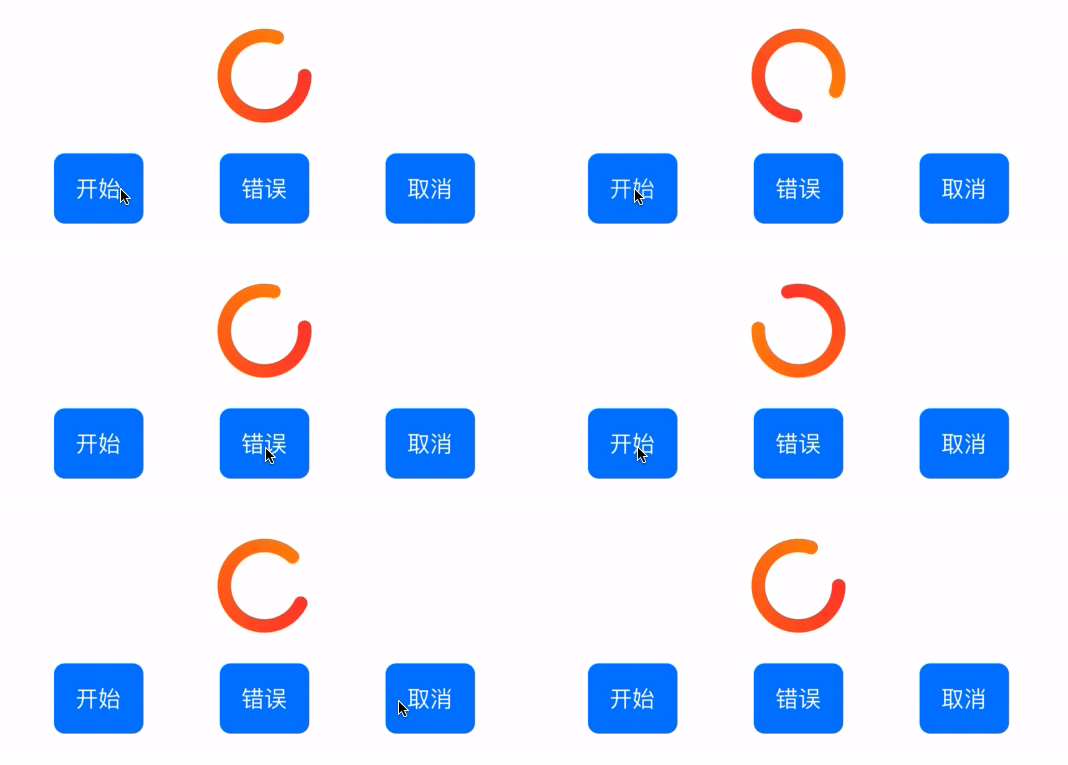
上图演示的效果正是利用handleEvents实现的:
- 点击开始,publsiher收到订阅信息,开始加载动画
- 点击错误,publisher收到错误信息,pipline终止,停止动画
- 点击取消,publsiher收到取消信息,pipline终止,停止动画
也就是说,我们实现了实时监听pipline的事件过程,这一功能在处理loading的时候,还是很有用的。
代码如下:
enum MyError: Error {
    case custom
}

class HandleEventsViewObservableObject: ObservableObject {
    @Published var loading = false

    var cancellable: AnyCancellable?
    var publisher: PassthroughSubject<Int, Error>?

    init() {

    }

    func startLoading() {
        publisher = PassthroughSubject<Int, Error>()

        cancellable = publisher!
            .handleEvents(receiveSubscription: { _ in
                DispatchQueue.main.async {
                    self.loading = true
                }
            }, receiveOutput: { _ in

            }, receiveCompletion: { _ in
                DispatchQueue.main.async {
                    self.loading = false
                }
            }, receiveCancel: {
                DispatchQueue.main.async {
                    self.loading = false
                }
            }, receiveRequest: { _ in

            })
            .sink(receiveCompletion: {
                print($0)
            }, receiveValue: {
                print($0)
            })
    }

    func sendError() {
        publisher?.send(completion: Subscribers.Completion.failure(MyError.custom))
    }

    func sendCancel() {
        cancellable?.cancel()
    }
}
上边代码是ObservableObject的实现,下边是动画的代码实现,我省略了一些重复的代码:
struct HandleEventsView: View {
    @StateObject private var object = HandleEventsViewObservableObject()

    var animation: Animation {
        Animation.easeInOut(duration: 0.8).repeatForever(autoreverses: false)
    }

    var body: some View {
        ScrollView {
            VStack(spacing: 30) {
                VStack {
                    Circle()
                        .trim(from: 0, to: 0.8)
                        .stroke(AngularGradient(gradient: Gradient(colors: [.red, .orange]), center: .center, angle: .degrees(-10)), style: StrokeStyle(lineWidth: 10, lineCap: .round))
                        .padding(20)
                        .rotationEffect(object.loading ? .degrees(360) : .degrees(0))
                        .animation(object.loading ? animation : .easeInOut(duration: 0))
                        .frame(width: 100, height: 100)

                    HStack {
                        Button("开始") {
                            self.object.startLoading()
                        }
                        .foregroundColor(Color.white)
                        .padding()
                        .background(Color.blue)
                        .cornerRadius(8)

                        Spacer()

                        Button("错误") {
                            self.object.sendError()
                        }
                        .foregroundColor(Color.white)
                        .padding()
                        .background(Color.blue)
                        .cornerRadius(8)

                        Spacer()

                        Button("取消") {
                            self.object.sendCancel()
                        }
                        .foregroundColor(Color.white)
                        .padding()
                        .background(Color.blue)
                        .cornerRadius(8)
                    }
                }
                .padding(.horizontal, 50)

                MarkdownText(text: markdown, textHeight: $markdownTextHeight)
                    .frame(height: markdownTextHeight)
                    .padding(0)
            }
        }
        .navigationBarTitle("handleEvents")
    }
总结一下handleEvents监听哪些事件:
- receiveSubscription: 当publisher收到订阅事件时调用
- receiveOutput: 当收到publisher发送的数据时调用
- receiveCompletion: 当收到
.finished或.failure时调用 - receiveCancel: 当收到取消时调用
- receiveRequest: 当收到请求时调用
print可以认为是handleEvents的极简写法,它会打印出pipline中的详细信息,它可以不接收任何参数,一旦我们传入一个字符串作为参数,则会在打印结果前拼接上这个参数。
.print("打印:")
我们简单讲一下print的第二个参数stream:
public func print(_ prefix: String = "", to stream: TextOutputStream? = nil) -> Publishers.Print<Self>
从上边的代码可以看出,stream需要实现TextOutputStream,为什么print要提供这样一个参数呢?可以理解为,当提供了stream后,就相当于增加了一个中间过程,我们看下边这个例子:
struct ASCIILogger: TextOutputStream {
   mutating func write(_ string: String) {
        let ascii = string.unicodeScalars.lazy.map { scalar in
           scalar == "\n"
           ? "\n"
              : scalar.escaped(asASCII: true)
       }
        print(ascii.joined(separator: ""), terminator: "")
    }
 }
该代码实现了TextOutputStream协议,目的是把输入的字符串转成ASCII码。运行下边的代码:
cancellable = publisher
    .print("打印:", to: ASCIILogger())
    .sink(receiveCompletion: {
        print($0)
    }, receiveValue: {
        print($0)
    })

publisher.send(1)
打印结果为:
\u{6253}\u{5370}\u{FF1A}: receive subscription: (PassthroughSubject)
\u{6253}\u{5370}\u{FF1A}: request unlimited
\u{6253}\u{5370}\u{FF1A}: receive value: (1)
