<!DOCTYPE html>
<html>
<head lang="en">
<meta charset="UTF-8">
<title></title>
<style>
* {
margin: 0;
padding: 0;
}
.nav {
height: 30px;
background: #036663;
border-bottom: 1px solid #369;
line-height: 30px;
padding-left: 30px;
}
.nav a {
color: #fff;
text-align: center;
font-size: 14px;
text-decoration: none;
}
.d-box {
width: 400px;
height: 300px;
border: 5px solid #eee;
box-shadow: 2px 2px 2px 2px #666;
position: absolute;
top: 40%;
left: 40%;
background-color: white;
-webkit-user-select:none;
-moz-user-select:none;
-ms-user-select:none;
user-select:none;
}
.hd {
width: 100%;
height: 25px;
background-color: #7c9299;
border-bottom: 1px solid #369;
line-height: 25px;
color: white;
cursor: move;
}
#box_close {
float: right;
cursor: pointer;
}
</style>
</head>
<body>
<div class="nav">
<a href="javascript:;" id="register">注册信息</a>
</div>
<div class="d-box" id="d_box">
<div class="hd" id="drop">注册信息 (可以拖拽)
<span id="box_close">【关闭】</span>
</div>
<div class="bd"></div>
</div>
<script src="common.js"></script>
<script>
var box = document.getElementById("d_box");
var drop = document.getElementById("drop");
var close = document.getElementById("box_close");
drop.onmousedown = function (e) {
e = e || window.event;
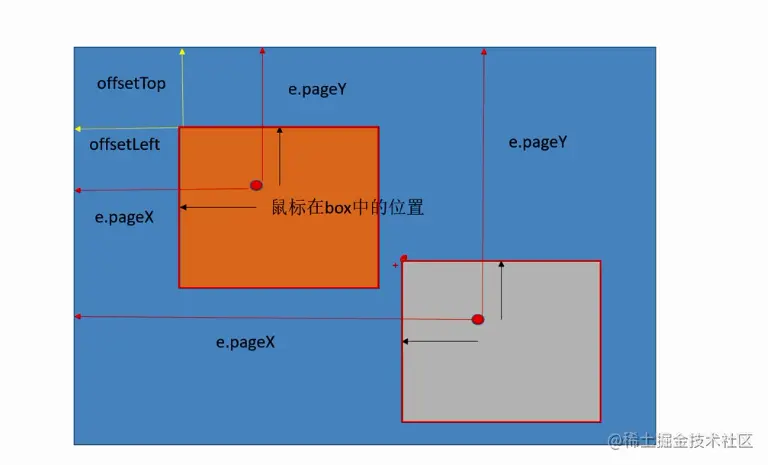
var l = e.pageX - box.offsetLeft;
var t = e.pageY - box.offsetTop;
drop.onmousemove = function (e) {
e = e || window.event;
var nowleft = e.pageX - l;
var nowtop = e.pageY - t;
box.style.left = nowleft + "px";
box.style.top = nowtop + "px";
};
};
drop.onmouseup = function () {
drop.onmousemove = null;
};
close.onclick = function () {
box.style.display = "none";
};
</script>
</body>
</html>