系统:CentOS 8.2
工具:GitLab 社区版
官网:about.gitlab.com/
1.备轿
- 安装postfix用来发送邮件
yum install postfix
curl -s https://packages.gitlab.com/install/repositories/gitlab/gitlab-ce/script.rpm.sh | sudo bash
- 设置系统编码
vi ~/.bashrc
export LC_ALL=en_US.UTF-8
export LANG=en_US.UTF-8
export LANGUAGE=en_US.UTF-8
使用source ~/.bashrc
- 安装GitLab
sudo yum install -y gitlab-ce
- 安装完成后,配置(
vi /etc/gitlab/gitlab.rb)外网访问地址等
external_url 'http://101.37.245.158:8888'
nginx['listen_port'] = 8888
puma['listen'] = '101.37.245.158'
puma['port'] = 8889
puma['socket'] = '/var/opt/gitlab/gitlab-rails/sockets/gitlab.socket'
puma['somaxconn'] = 1024

puma['pidfile'] = '/opt/gitlab/var/puma/puma.pid'
puma['state_path'] = '/opt/gitlab/var/puma/puma.state'
gitlab_workhorse['auth_backend'] = "http://101.37.245.158:8889"
说明:gitlab.rb中没放开的配置,说明它即是默认配置
- 启动
gitlab-ctl reconfigure
gitlab-ctl start
运行后,启动服务如下:
ok: run: alertmanager: (pid 2211) 17s
ok: run: gitaly: (pid 2235) 1s
ok: run: gitlab-exporter: (pid 2248) 0s
ok: run: gitlab-workhorse: (pid 2250) 0s
ok: run: grafana: (pid 2223) 17s
ok: run: logrotate: (pid 2259) 1s
ok: run: nginx: (pid 2272) 0s
ok: run: node-exporter: (pid 2277) 1s
ok: run: postgres-exporter: (pid 2218) 19s
ok: run: postgresql: (pid 2287) 0s
ok: run: prometheus: (pid 2198) 21s
ok: run: puma: (pid 2291) 1s
ok: run: redis: (pid 2302) 0s
ok: run: redis-exporter: (pid 2307) 1s
ok: run: sidekiq: (pid 2312) 0s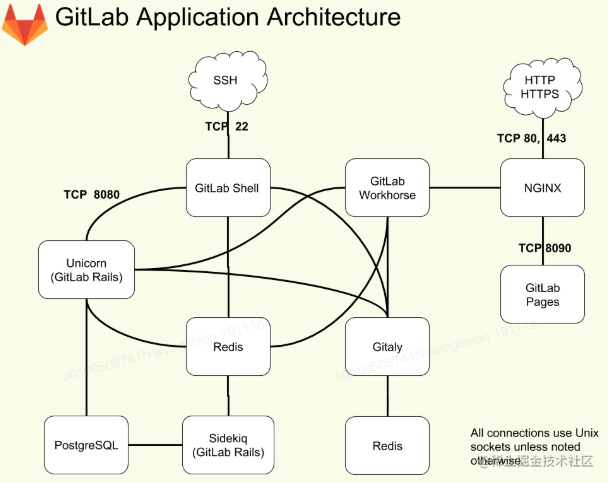
- 系统内存、CPU配置跟不上了,欲放弃? 配置使用swap分区来减少内存消耗
[root@iZbp14i2x6mftryyx3l5wcZ ~]# dd if=/dev/zero of=/mnt/swap bs=512 count=8388616 #创建swap
8388616+0 records in
8388616+0 records out
4294971392 bytes (4.3 GB, 4.0 GiB) copied, 63.5657 s, 67.6 MB/s
[root@iZbp14i2x6mftryyx3l5wcZ ~]# mkswap /mnt/swap #通过mkswap命令将上面新建出的文件做成swap分区
mkswap: /mnt/swap: insecure permissions 0644, 0600 suggested.
Setting up swapspace version 1, size = 4 GiB (4294967296 bytes)
no label, UUID=5b45d945-dec6-4499-a8ed-3c638455af90
[root@iZbp14i2x6mftryyx3l5wcZ ~]# vi /etc/sysctl.conf #调整vm.swappiness为60
[root@iZbp14i2x6mftryyx3l5wcZ ~]# swapon /mnt/swap #启用分区
swapon: /mnt/swap: insecure permissions 0644, 0600 suggested.
[root@iZbp14i2x6mftryyx3l5wcZ ~]# echo "/data/swap swap swap defaults 0 0" >> /etc/fstab
[root@iZbp14i2x6mftryyx3l5wcZ ~]# cat /proc/swaps #查看swap分区是否启动
Filename				Type		Size	Used	Priority
/mnt/swap                               file		4194304	0	-2
注意,在新版GitLab中,已使用puma取代unicorn
偶遇
- 运行configure命令报错
execute[/opt/gitlab/embedded/bin/initdb -D /var/opt/gitlab/postgresql/data -E UTF8] (postgresql::enable line 75) had an error: Mixlib::ShellOut::ShellCommandFailed: Expected process to exit with [0], but received '1'
---- Begin output of /opt/gitlab/embedded/bin/initdb -D /var/opt/gitlab/postgresql/data -E UTF8 ----
STDOUT: The files belonging to this database system will be owned by user "gitlab-psql".
This user must also own the server process.
STDERR: initdb: error: invalid locale settings; check LANG and LC_* environment variables
---- End output of /opt/gitlab/embedded/bin/initdb -D /var/opt/gitlab/postgresql/data -E UTF8 ----
Ran /opt/gitlab/embedded/bin/initdb -D /var/opt/gitlab/postgresql/data -E UTF8 returned 1
这是由于系统编码问题造成的,解决方法如下:
export LC_ALL=en_US.UTF-8
export LANG=en_US.UTF-8
export LANGUAGE=en_US.UTF-8
- 打开http://101.37.245.158:8888/,提示502错误
Whoops, GitLab is taking too much time to respond.
查询实时日志发现(在访问前运行命令
gitlab-ctl tail)
{"correlation_id":"01EVZZVSEVE7NX8XEHRMXX4NWF","duration_ms":0,"error":"badgateway: failed to receive response: dial unix /var/opt/gitlab/gitlab-rails/sockets/gitlab.socket: connect: connection refused","level":"error","method":"GET","msg":"error","time":"2021-01-14T16:23:18+08:00","uri":"/-/metrics"}
在/etc/gitlab/gitlab.rb中配置如下即可:
gitlab_workhorse['auth_backend'] = "http://101.37.245.158:8888"
- gitlab-shell自动检查失败
gitlab-shell self-check failed
  Try fixing it:
  Make sure GitLab is running;
  Check the gitlab-shell configuration file:
  sudo -u git -H editor /opt/gitlab/embedded/service/gitlab-shell/config.yml
  Please fix the error above and rerun the checks.
- 400 Bad Request Request Header Or Cookie Too Large puma['port']和gitlab_workhorse['auth_backend']对应的端口号不能跟external_url对应的端口号一致,修改为不同的即可
/var/opt/gitlab/nginx/conf/nginx.conf
参考资料:
[1].版本管理工具Git(二)GitLab部署和配置
[2].Linux—gitlab访问出现502问题
[3].我所遇到的GitLab 502问题的解决
[4].Gitlab之设定数据库-yellowcong
[5].Converting Unicorn settings to Puma
[6].GitLab 是什么?
[7].CentOS 7搭建GitLab服务器踩坑——解决nginx 400 Bad Request Request Header Or Cookie Too Large问题