前言
本章项目地址- 为什么异步更新,拿data中的属性举例,如果某个数据多次的去赋值,每次都去重新编译、比较vnode、渲染Dom 耗费性能
- 我们把更新视图的数据行为收集起来,去重,防抖 通过异步行为实现(如
setTimeout, Ajax...)
- 本次拿data举例
示例
<div id="app">{{ name }}</div>
<script>
var vm = new Vue({
data: {
name: 'one'
}
})
vm.$mount('#app')
setTimeout(() => {
vm.name = 'two'
vm.name = 'three'
vm.name = 'four'
vm.name = 'five'
vm.$nextTick(()=>{
console.log(vm.$el)
})
}, 1000)
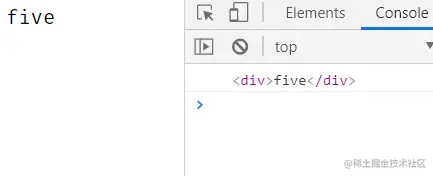
正题
Vue.nextTick方法(重点)
import { nextTick } from './utils'

Vue.prototype.$nextTick = nextTick
let callbacks = []
let waiting = false
function flushCallbacks() {
callbacks.forEach(cb => cb())
waiting = false
callbacks = []
}
function timer(flushCallbacks) {
let timerFn = () => {}
if (Promise) {
timerFn = () => { Promise.resolve().then(flushCallbacks) }
} else if (MutationObserver) {
let textNode = document.createTextNode(1)
let observe = new MutationObserver(flushCallbacks)
observe.observe(textNode, { characterData: true })
timerFn = () => { textNode.textContent = 3 }
} else if (setImmediate) {
timerFn = () => { setImmediate(flushCallbacks) }
} else {
timerFn = () => { setTimeout(flushCallbacks) }
}
timerFn()
}
export function nextTick(cb) {
callbacks.push(cb)
if (!waiting) {
timer(flushCallbacks)
waiting = true
}
}
scheduler Watcher里update中调度的方法
import { nextTick } from '../utils'
let queue = []
let has = {}
let pending = false
function flushSchedulerQueue() {
for (let i = 0; i < queue.length; i++) {
queue[i].run()
}
queue = []
has = {}
pending = false
}
export function queueWatcher(watcher) {
const id = watcher.id
if (has[id] == null) {
queue.push(watcher)
has[id] = true
if (!pending) {
nextTick(flushSchedulerQueue)
pending = true
}
}
}
new Wacther文件
import { popTarget, pushTarget } from './dep'
import { queueWatcher } from './scheduler'
let id = 0
class Watcher {
constructor(vm,exprOrFn,cb,options){
this.vm = vm
this.exprOrFn = exprOrFn
this.cb = cb
this.options = options
this.id = id++
this.getter = exprOrFn
this.deps = []
this.depsId = new Set()
this.get()
}
get(){
pushTarget(this)
this.getter()
popTarget()
}
update(){
queueWatcher(this)
}
run(){
this.get()
}
addDep(dep){
let id = dep.id;
if(!this.depsId.has(id)){
this.depsId.add(id);
this.deps.push(dep);
dep.addSub(this)
}
}
}
export default Watcher
完
下一章
vue2核心原理(简易)-watch笔记