前言
函数式编程对我来说是一次大开眼界的旅程。这篇文章,以及类似的文章,是我在探索新的函数式编程领域时,尝试分享我的见解和观点。
Ramda一直是我常用的FP库,因为它让JavaScript的函数式编程变得更加简单。我强烈推荐它。

Pipe
pipe(管道)的概念是很简单的——它组合了几个函数。pipe 是一个从左到右流动的管道,用上一个函数的输出调用每个函数。
getName = (person) => person.name
getName({ name: 'Buckethead' })
// 'Buckethead'
让我们写一个函数,让字符串变为大写。
uppercase = (string) => string.toUpperCase()
uppercase('Buckethead')
// 'BUCKETHEAD'
如果我们想得到person对象的name,并且将其转为大写,我们可以这样写:
name = getName({ name: 'Buckethead' })
uppercase(name)
// 'BUCKETHEAD'
这很好,但我们还是去掉那个中间变量名吧。
uppercase(getName({ name: 'Buckethead' }))
很多了,但不喜欢这种嵌套的方式。如果我们想添加一个获取字符串前6个字符的函数呢?
get6Characters = (string) => string.substring(0, 6)
get6Characters('Buckethead')
// 'Bucket'
结果是这样的:
get6Characters(uppercase(getName({ name: 'Buckethead' })))
'BUCKET'
让我们再添加一个函数来反转字符串。
reverse = (string) => string
  .split('')
  .reverse()
  .join('')
reverse('Buckethead')
// 'daehtekcuB'
现在我们看到的是这个样子:
reverse(get6Characters(uppercase(getName({ name: 'Buckethead' }))))
// 'TEKCUB'
它可能会变得有点太...多。
用pipe来拯救我们!
取代嵌套函数或者创造一连串的中间变量吧,用pipe可以做到所有的事情!
pipe(
  getName,
  uppercase,
  get6Characters,
  reverse
)({ name: 'Buckethead' })
// 'TEKCUB'
简约的艺术。看起来就像一个待办事项列表!
让我们一步步走过去。
出于演示的目的,我将使用使用Eric Elliott写的functional programming articles文章中的管道实现。
pipe = (...fns) => x => fns.reduce((v, f) => f(v), x)
我喜欢这简短的一行代码。
我们将使用rest参数(剩余参数),可以看我的这篇文章,我们会使用pipe组合n个函数。每一个函数都会取前一个函数的输出,并且都会简化为一个值。
你可以像我们上面这样使用它。
pipe(
  getName,
  uppercase,
  get6Characters,
  reverse
)({ name: 'Buckethead' })
// 'TEKCUB'
我将扩展pipe,并且打几个断点,一行一行的看。
pipe = (...functions) => (value) => {
  debugger;
  return functions
    .reduce((currentValue, currentFunction) => {
       debugger;
       return currentFunction(currentValue);
    }, value)
}

用我们的例子调用pipe,让奇妙的事情发生。
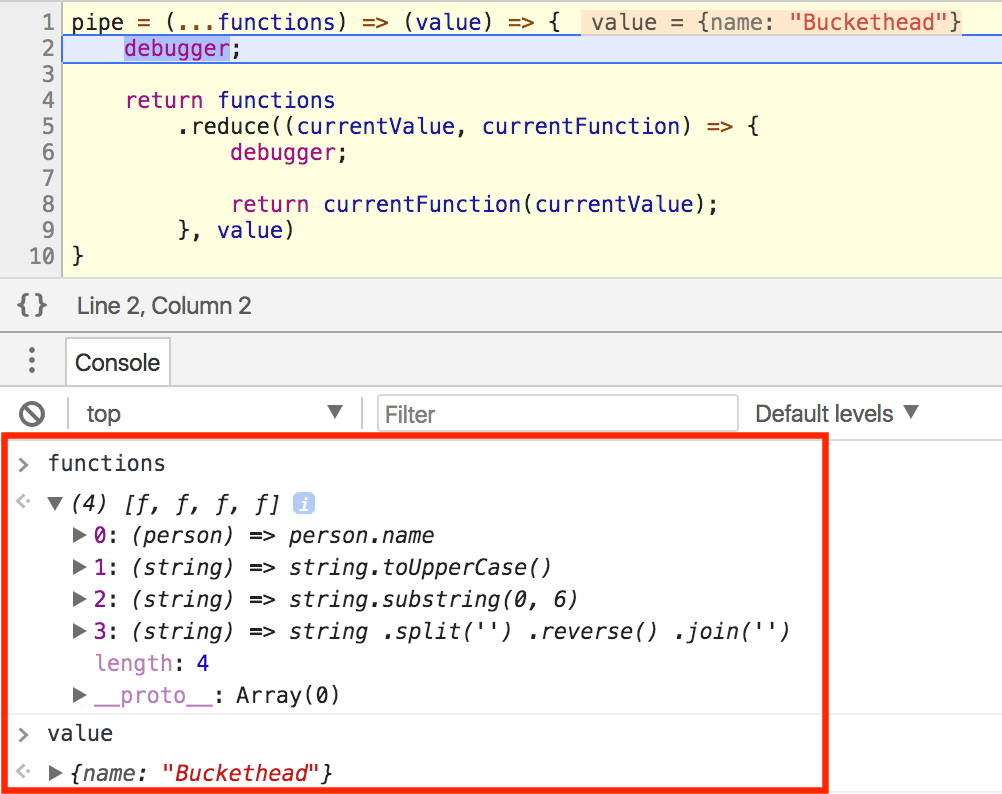
查看本地变量,functions是包含四个函数的数组,value的值是{ name: 'Buckethead' }。
现在使用rest参数(再说一次, 这里 😁可以看我相关的文章哈),pipe允许我们使用任意数量的函数,它将循环调用每一个。
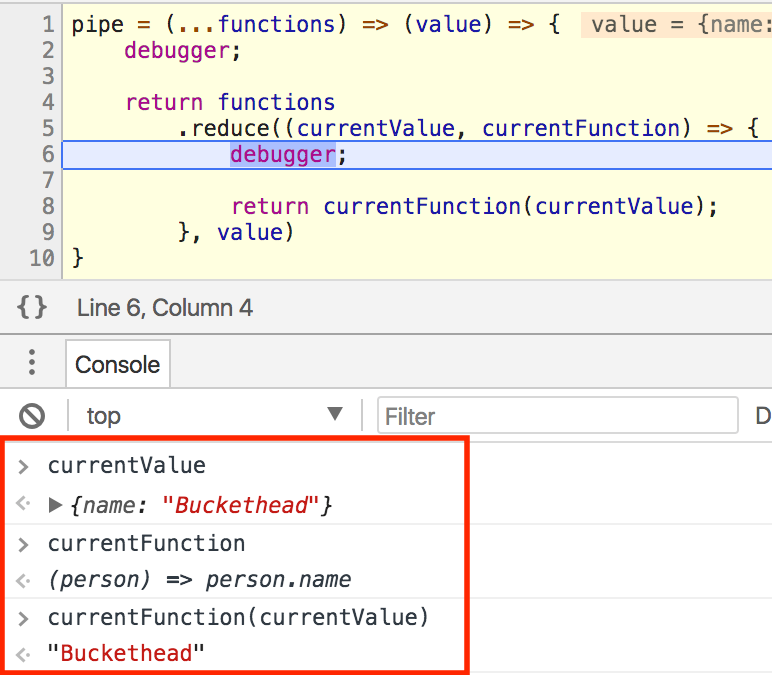
下一个断点中,我们内部使用了reduce,在这个函数中,currentValue传入currentFunction中并且返回。
我们看到结果是Buckethead,因为当前的currentFunction(getName)返回的是任意对象的name属性。这个值将会reduce中返回,下次会变成新的currentValue。让我们继续打断点看一下。
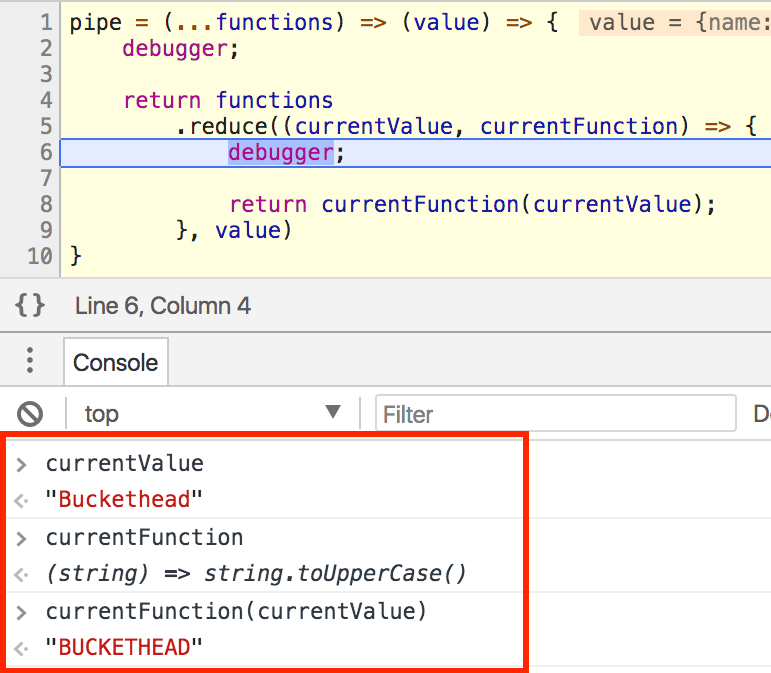
现在currentValues是Buckethead,因为上次返回的就是这个值。当前currentFunction是uppercase,所以BUCKETHEAD将会成为下一个currentValue。
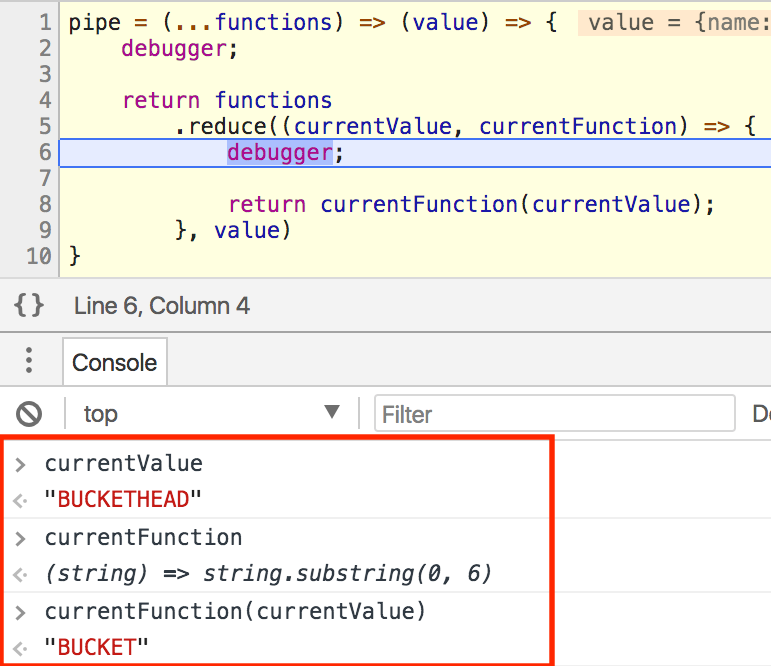
类似的,截取BUCKETHEAD的前六个字母,并将他们放入下一个函数中。
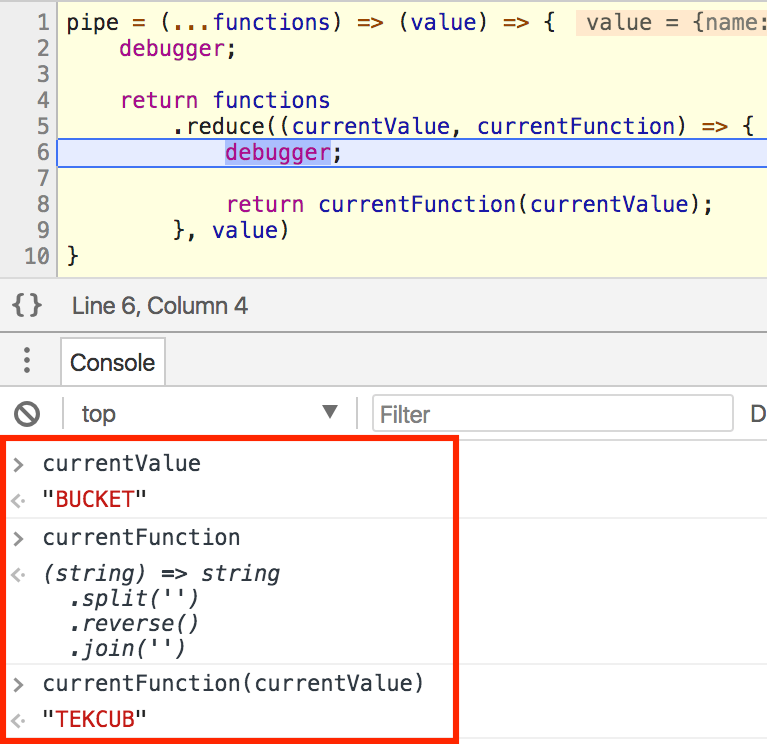
reverse(‘.aedi emaS’)
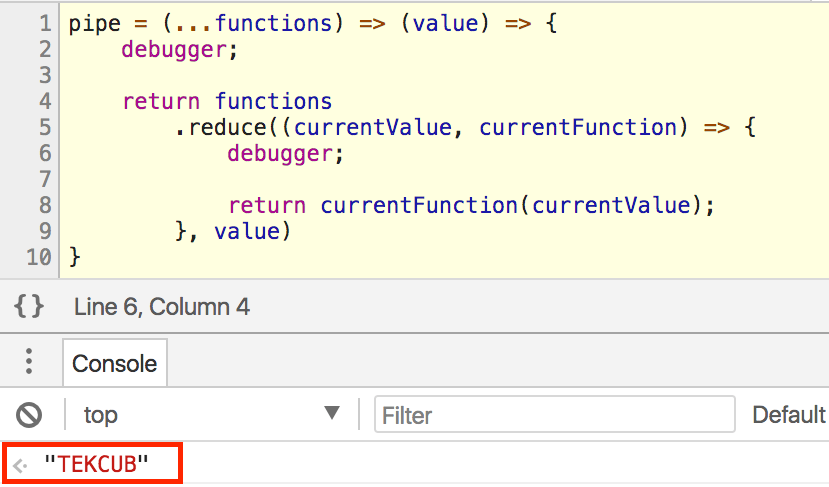
你已经完成了!
什么是compose()呢?
区别只是与pipe的方向不同。
所以如果你想和上面的pipe一样得到相同的结果,你应该将函数的顺序反过来。
compose(
  reverse,
  get6Characters,
  uppercase,
  getName,
)({ name: 'Buckethead' })
注意到getName是在链中的最后一个而reverse是在第一个了吗?
这里有一个componse的快速实现,同样出自神奇的Eric Elliott的 同一篇文章.
compose = (...fns) => x => fns.reduceRight((v, f) => f(v), x);
这个扩展的函数断点练习留给你,玩一玩,用一用,欣赏一下。最重要的,乐在其中!