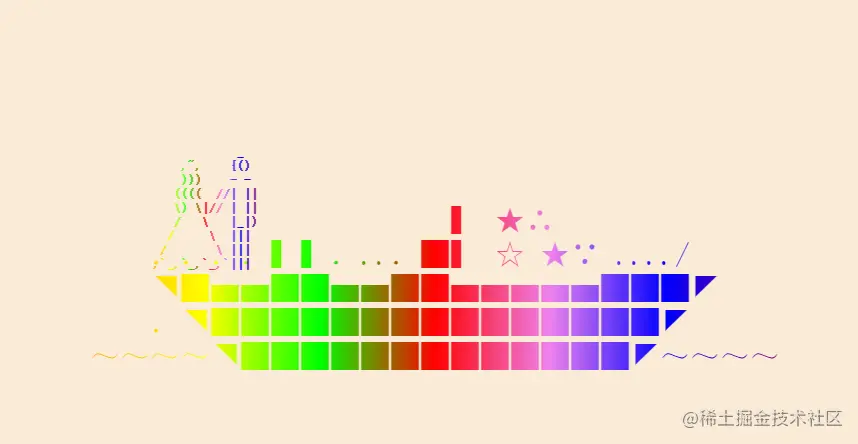
代码
<html>
 <head>
  <title>彩色的可以拖动的船和人</title>
 </head>
 <body style="background: antiquewhite;">
  <div style="background: -webkit-linear-gradient(left, orange, yellow, lime, red, violet, blue, purple); background-clip: text;-webkit-background-clip: text; width: fit-content; position: absolute; left: 337px; top: 195px;" id="chuan">
   <div style="-webkit-text-fill-color:transparent;text-fill-color:transparent;">
    <pre style="
    font-size: 30px;
">                        ▍ ★∴
    ....▍▍....█▍ ☆ ★∵ ..../
    ◥█▅▅██▅▅██▅▅▅▅▅███◤
    .◥███████████████◤
~~~~◥█████████████◤~~~~
</pre>
   </div>
  </div>
  <div style="background: -webkit-linear-gradient(left, orange, yellow, lime, red, violet, blue, purple); background-clip: text;-webkit-background-clip: text; width: fit-content; position: absolute; left: 400px; top: 166px;" id="ren">
   <div style="-webkit-text-fill-color:transparent;text-fill-color:transparent;">
    <strong> <pre style="
    font-size: 1px;
">            _
    ,~,    {()
    )))    - -
   ((((  //| ||
   \) \|// | ||
   /   \   |_|)
  /     \  |||
 /       \ |||
,`_,`_,`_,`|||
  </pre></strong>
   </div>
  </div>
  <script>
function dragable(id){var d=document,o=d.getElementById(id),s=o.style,x,y,p='onmousemove';o.onmousedown=function(e){e=e||event;x=e.clientX-o.offsetLeft;y=e.clientY-o.offsetTop;d[p]=function(e){e=e||event;s.left=e.clientX-x+'px';s.top=e.clientY-y+'px'};d.onmouseup=function(){d[p]=null}}}
dragable("chuan");
dragable("ren");
</script>
 </body>
</html>