一、获得当前定位(无路线显示)
1、map.xml
1< map longitude= '{{longitudes}}' latitude= '{{latitudes}}' scale= '14'
2show-location style= "width: 100%; height: 400px;" >
-
注释: longitude:
-
中心经度(number),因是实时定位,具体值在js文件中定义
-
latitude : 中心纬度(number)
-
scale : 缩放级别(number)
-
默认:16 取值范围:5-18
-
markers :标记点用于在地图上显示标记的位置(数组)
-
show-location-style:显示带有方向的当前定位点
2、map.js
1Page({
2
4 data: {},
5
6 onLoad: function (options) {
7 console.log('mapload...');
8 var that = this
9 wx.getLocation({
10 type: 'wgs84',
11 success: function (res) {
12 console.log('纬度' + res.latitude);
13 console.log('经度' + res.longitude);
14 that.setData({
15 latitudes: res.latitude,
16 longitudes: res.longitude,
17 })
18 },
19 })
20 },
21})
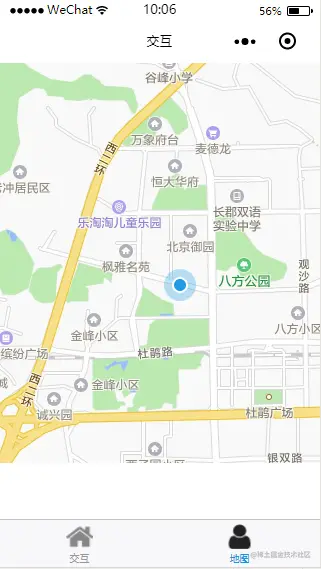
3、效果图
二、获得当前定位(有路线显示)
1、map.xml
1< map longitude= '{{longitudes}}'
2latitude= '{{latitudes}}' scale= '14' show-location style= "width: 100%; height:
3400px;" polyline ='{{polyline}}' >
-
注释: longitude:
-
中心经度(number),因是实时定位,具体值在js文件中定义
-
latitude : 中心纬度(number)
-
scale : 缩放级别(number) 默认:16 取值范围:5-18
-
markers :标记点用于在地图上显示标记的位置(数组)
-
show-location-style:显示带有方向的当前定位点
-
polyline: 路线(数组)
2、map.js
1Page({
2
3 data: {},
4
5 onLoad: function (options) {
6 console.log('mapload...');
7 var that = this
8 wx.getLocation({
9 type: 'wgs84',
10 success: function (res) {
11 console.log('纬度' + res.latitude);
12 console.log('经度' + res.longitude);
13 that.setData({
14 latitudes: res.latitude,
15 longitudes: res.longitude,
16 polyline: [{
17 points: [{
18 longitude: res.longitude, // 起始点经度
19 latitude: res.latitude // 起始点纬度
20 }, {
21 longitude: 112.9388700000, //目标地点经度
22 latitude: 28.2269300000 //目标地点纬度
23 // 可搜索网站 在线经纬度查询:http://www.gpsspg.com/maps.htm
24 //在此网站输入自己的目标地址即可得到此地址的经度和纬度
25 }],
26 color: "#000000AA", //线的颜色
27 width: 2, //线的宽度
28 dottedLine: true //是否为虚线
29 }],
30 })
31 },
32 })
33 }
34})
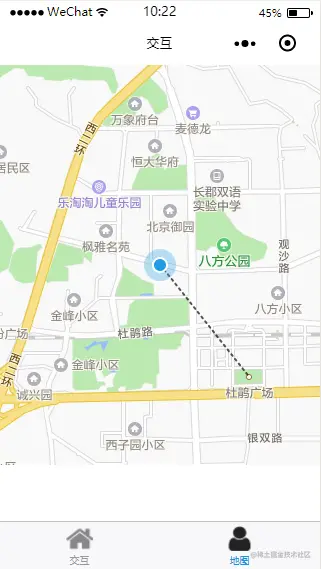
3、效果图
三、地图高度怎么满屏
-
在对地图进行控制显示区域大小时想将地图全屏显示在手机上,
-
使用平时的px或者直接使用百分比对于高度全屏无效,这时候可以通过vh这个单位,
-
整个屏幕默认满屏为100vh;
-
所以将地图的高度设置为100vh宽度设置为100%,就可以!
原文网址
blog.csdn.net/weixin_4158…