一、配置生效的顺序
- 下面配置优先级从低到高,也就是说某个属性都没有配置,那么使用全局默认配置
- 下图是某一个配置的多种配置方式,具有不同优先级
1、全局默认配置
- 比如超时时间(execution.isolation.thread.timeoutInMilliseconds)默认1000ms,优先级最低
- 当以下方式都未配置执行超时时间时,那么这个默认配置生效
- 相当于上图的Default Value
2、使用properties文件定义全局配置
相当于上图的Default Property
hystrix.command.default.execution.isolation.strategy
=1000
3、实例配置
三种实例配置的方式
HystrixCommandProperties.Setter()
   .withExecutionTimeoutInMilliseconds(int value)

public HystrixCommandInstance(int id) {
    super(Setter.withGroupKey(HystrixCommandGroupKey.Factory.asKey("ExampleGroup"))
        .andCommandPropertiesDefaults(HystrixCommandProperties.Setter()
               .withExecutionTimeoutInMilliseconds(500)));
    this.id = id;
}

public HystrixCommandInstance(int id) {
    super(HystrixCommandGroupKey.Factory.asKey("ExampleGroup"), 500);
    this.id = id;
}
4、实例的动态配置
- 针对特定的hystrix的command进行配置,例如以下配置hystrix.command.SubscriberGetAccount.execution.isolation.thread.timeoutInMilliseconds
- 优先级最高
- 相当于上图的Instance Property
二、hystrix配置
1、command配置
1.1 execution
用来控制hystrixCommand.run()如何执行
1.1.1 execution.isolation.strategy
- hystrix的隔离策略
- 可选THREAD、SEMAPHORE,底层实现不同,默认是THREAD
- THREAD是指使用线程池中线程运行command,SEMAPHORE使用用户线程运行command命令
1.1.2 execution.isolation.thread.timeoutInMilliseconds
超时时间,默认1000ms
1.1.3 execution.timeout.enabled
是否command会超时,默认true
1.1.4 execution.isolation.thread.interruptOnTimeout
设置当线程timeout时是否允许被打断,默认true
1.1.5 execution.isolation.thread.interruptOnCancel
设置当线程被打断时是否能取消,默认true
1.1.6 execution.isolation.semaphore.maxConcurrentRequests
- 当隔离策略是SEMAPHORE时生效
- 设置同时运行的线程数大小,默认10
1.2 Fallback
这个配置是用来控制getFallback方法的运行
1.2.1 fallback.isolation.semaphore.maxConcurrentRequests
配置getFallback方法被调用最大并发,默认10
1.2.2 fallback.enabled
是否允许失败转移,默认true
1.3 断路器
1.3.1 circuitBreaker.enabled
是否开启断路器,默认true
1.3.2 circuitBreaker.requestVolumeThreshold
设置在一个滚动窗口(默认10秒)中最大的请求量,大于该值断路器就会开启,该值默认是20
1.3.3 circuitBreaker.sleepWindowInMilliseconds
设置断路器打开后重新发起请求的睡眠时间,默认5000ms
1.3.4 circuitBreaker.errorThresholdPercentage
设置在一个滚动窗口(默认10秒)中最大的错误占比,大于该值断路器就会开启,该值默认是50%
1.3.5 circuitBreaker.forceOpen
是否强制打开断路器,默认false
1.3.6 circuitBreaker.forceClosed
是否强制关闭断路器,默认false
1.4 Metrics
这部分配置和命令执行的指标捕获有关系
1.4.1 metrics.rollingStats.timeInMilliseconds
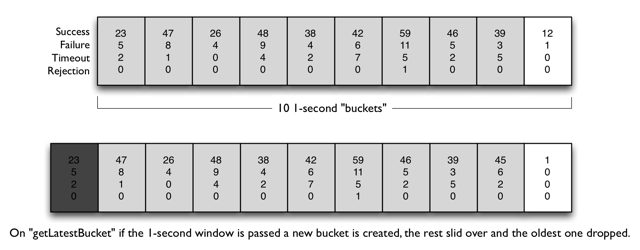
- 设置指标计算的滚动窗口的时间,默认是10s
- 也就是说计算最大请求数、错误占比都是按照这个滚动窗口来计算的
- 滚动窗口是分bucket来进行存储的,比如10秒默认有10个桶,超过滚动窗口的bucket会被失效掉
1.4.2 metrics.rollingStats.numBuckets
设置滚动窗口计算时的bucket数量,默认是10
1.4.3 metrics.rollingPercentile.enabled
设置是否计算command的调用延迟,默认true
1.4.4 metrics.rollingPercentile.timeInMilliseconds
- 设置计算延迟时的滚动窗口的大小,默认60000ms
- 他也是分桶来进行计算的,类似最大请求量的计算
1.4.5 metrics.rollingPercentile.numBuckets
设置计算延迟时的滚动窗口的bucket数量,默认6
1.4.6 metrics.rollingPercentile.bucketSize
设置计算延迟时的滚动窗口中bucket的最大值,默认100
1.4.7 metrics.healthSnapshot.intervalInMilliseconds
计算目前断路器健康状态的间隔时间,默认500ms
1.5 Request Context
1.5.1 requestCache.enabled
配置是否开启request缓存,默认true
1.5.2 requestLog.enabled
配置是否记录日志到HystrixRequestLog中,默认true
2、Collapser配置
2.1 maxRequestsInBatch
配置一次可以合并发送的最大请求数,默认Integer.MAX_VALUE
2.2 timerDelayInMilliseconds
配置合并发送请求的间隔,默认是10ms
2.3 requestCache.enabled
配置Collapser的缓存是否生效
3、线程池配置
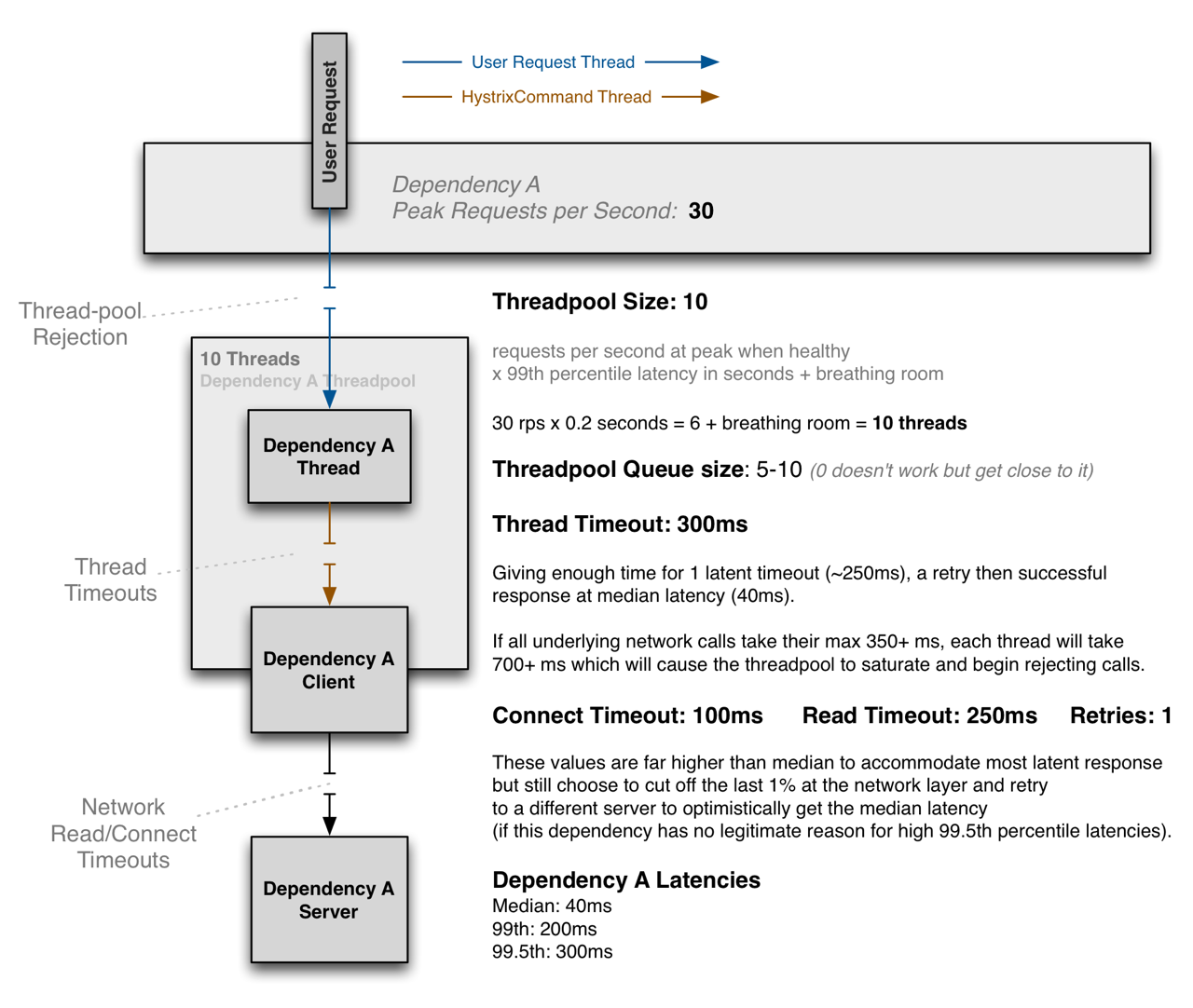
- hystrix中线程池大小建议设置为(99th*0.2+空闲线程),例如以下线程设置为10
- 下面的配置其实就是java中线程池的配置
3.1 coreSize
核心线程数,默认10
3.2 maximumSize
最大线程数,默认10
3.3 maxQueueSize
队列最大值,这个配置只能被初始化一次
3.4 queueSizeRejectionThreshold
线程池拒绝请求的最小值,默认5
3.5 keepAliveTimeMinutes
线程保持空闲的时间,默认1分钟
3.6 allowMaximumSizeToDivergeFromCoreSize
是否允许最大线程大于核心线程,也就是使最大线程生效,默认是false