using System
using System.Collections.Generic
using System.ComponentModel
using System.Data
using System.Drawing
using System.Linq
using System.Text
using System.Threading.Tasks
using System.Windows.Forms
using System.Data.SqlClient
namespace WindowsFormsApplication20
{
public partial class Form1 : Form
{
public Form1()
{
InitializeComponent()
}
private void Form1_Load(object sender, EventArgs e)
{
// 连接字符串
String connStr = "Data Source=.;Initial Catalog=dbok;Persist Security Info=True;User ID=sa;Password=root123123"
// 连接对象
SqlConnection conn = new SqlConnection(connStr)
// 小卡车
String sql = "select * from sanguo"
SqlDataAdapter adapter = new SqlDataAdapter(sql, conn)
// 小仓库
DataSet ds = new DataSet()
// 小车填库
adapter.Fill(ds, "test")
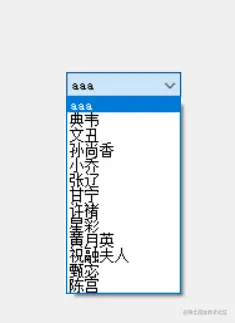
// 新建一个行
DataRow row = ds.Tables["test"].NewRow()
row["name"] = "aaa"
row["attack"] = 66
row["country"] = "其他"
row["gender"] = 1
row["id"] = 999
// 把这个行插入到表中
ds.Tables["test"].Rows.InsertAt(row, 0)
// 关联combobox
cbName.DataSource = ds.Tables["test"]
cbName.DisplayMember = "name"
cbName.ValueMember = "id"
}
private void button1_Click(object sender, EventArgs e)
{
MessageBox.Show(cbName.SelectedValue.ToString())
}
private void button2_Click(object sender, EventArgs e)
{
MessageBox.Show(comboBox1.ValueMember)
}
}
}