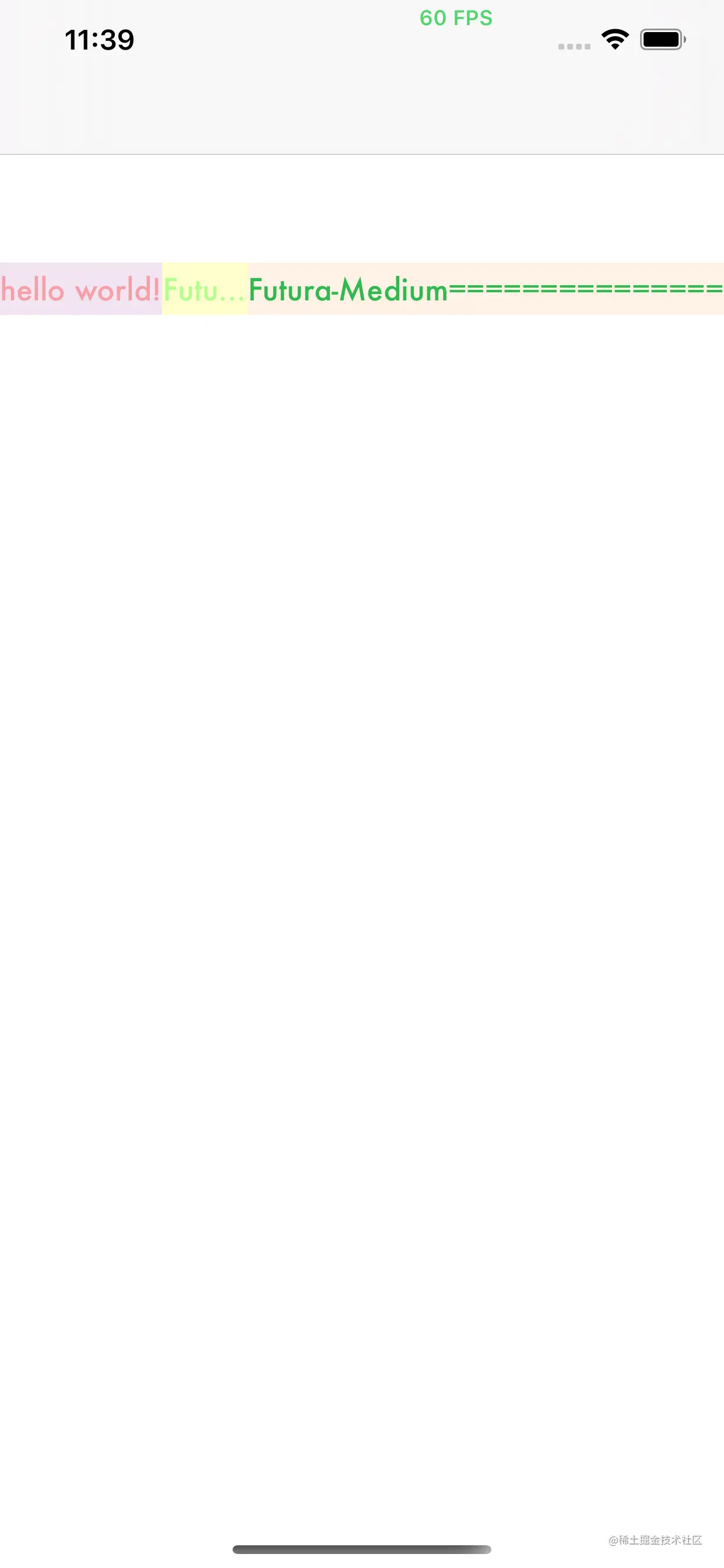
@interface ViewController ()
@property (nonatomic,strong) UILabel *leftLabel
@property (nonatomic,strong) UILabel *middleLabel
@property (nonatomic,strong) UILabel *rightLabel
@end
@implementation ViewController
- (void)viewDidLoad {
[super viewDidLoad]
[self.view addSubview:self.leftLabel]
[self.view addSubview:self.middleLabel]
[self.view addSubview:self.rightLabel]
[self p_addMasonry]
}
- (void)p_addMasonry {
[self.leftLabel mas_makeConstraints:^(MASConstraintMaker *make) {
make.top.mas_equalTo(150);
make.left.mas_equalTo(0);
make.height.mas_equalTo(30);
}]
[self.middleLabel mas_makeConstraints:^(MASConstraintMaker *make) {
make.top.mas_equalTo(150);
make.left.mas_equalTo(self.leftLabel.mas_right);
make.height.mas_equalTo(30);
make.right.mas_lessThanOrEqualTo(self.rightLabel.mas_left);
}]
[self.rightLabel mas_makeConstraints:^(MASConstraintMaker *make) {
make.top.mas_equalTo(150);
make.right.mas_equalTo(0);
make.height.mas_equalTo(30);
make.left.mas_greaterThanOrEqualTo(self.leftLabel.mas_right);
}]
[_middleLabel setContentCompressionResistancePriority:UILayoutPriorityDefaultLow forAxis:UILayoutConstraintAxisHorizontal]
}
- (UILabel *)leftLabel {
if (!_leftLabel) {
_leftLabel = [[UILabel alloc] init]
_leftLabel.textAlignment = NSTextAlignmentCenter
_leftLabel.textColor = [[UIColor redColor] colorWithAlphaComponent:0.3]
_leftLabel.backgroundColor = [[UIColor purpleColor] colorWithAlphaComponent:0.1]
_leftLabel.font = [UIFont fontWithName:@"Futura-Medium" size:17]
_leftLabel.text = @"hello world!"
}
return _leftLabel
}
- (UILabel *)middleLabel {
if (!_middleLabel) {
_middleLabel = [[UILabel alloc] init]
_middleLabel.textAlignment = NSTextAlignmentCenter
_middleLabel.textColor = [[UIColor greenColor] colorWithAlphaComponent:0.3]
_middleLabel.backgroundColor = [[UIColor yellowColor] colorWithAlphaComponent:0.2]
_middleLabel.font = [UIFont fontWithName:@"Futura-Medium" size:17]
_middleLabel.text = @"Futura-Medium"
}
return _middleLabel
}
- (UILabel *)rightLabel {
if (!_rightLabel) {
_rightLabel = [[UILabel alloc] init]
_rightLabel.textAlignment = NSTextAlignmentCenter
_rightLabel.textColor = [UIColor colorWithRed:49.0/255.0 green:186.0/255.0 blue:81.0/255.0 alpha:1]
_rightLabel.backgroundColor = [[UIColor orangeColor] colorWithAlphaComponent:0.1]
_rightLabel.font = [UIFont fontWithName:@"Futura-Medium" size:17]
_rightLabel.text = @"Futura-Medium==============="
}
return _rightLabel
}
@end
理论
约束优先级: 在Autolayout中每个约束都有一个优先级, 优先级的范围是1 ~ 1000。创建一个约束,默认的优先级是最高的1000
Content Hugging Priority: 该优先级表示一个控件抗被拉伸的优先级。优先级越高,越不容易被拉伸,默认是251。
Content Compression Resistance Priority: 该优先级和上面那个优先级相对应,表示一个控件抗压缩的优先级。优先级越高,越不容易被压缩,默认是750


所以默认情况下两边的label的 Content Hugging和 Content Compression优先级都是一样的,为了让右边的label完全显示,那么我们需要增大右边label的抗压缩级,或者减小左边label的抗压缩级,总之是得让右边的抗压缩级大于左边的label,这样才能让右边的label内容优先显示。


所以默认情况下两边的label的Content Hugging和Content Compression优先级都是一样的,为了让右边的label完全显示,那么我们需要增大右边label的抗压缩级,或者减小左边label的抗压缩级,总之是得让右边的抗压缩级大于左边的label,这样才能让右边的label内容优先显示。

UIView中关于Content Hugging 和 Content Compression Resistance的方法有:

- (UILayoutPriority)contentHuggingPriorityForAxis:(UILayoutConstraintAxis)axis NS_AVAILABLE_IOS(6_0);
- (void)setContentHuggingPriority:(UILayoutPriority)priority forAxis:(UILayoutConstraintAxis)axis NS_AVAILABLE_IOS(6_0);

- (UILayoutPriority)contentCompressionResistancePriorityForAxis:(UILayoutConstraintAxis)axis NS_AVAILABLE_IOS(6_0);
- (void)setContentCompressionResistancePriority:(UILayoutPriority)priority forAxis:(UILayoutConstraintAxis)axis NS_AVAILABLE_IOS(6_0);
在初始化label里面添加代码:

[leftLabel setContentCompressionResistancePriority:UILayoutPriorityDefaultLow forAxis:UILayoutConstraintAxisHorizontal];
或者

[rightLabel setContentCompressionResistancePriority:UILayoutPriorityRequired forAxis:UILayoutConstraintAxisHorizontal];