3. KSCrash 的使用包装
然后再封装自己的 Crash 处理逻辑。比如要做的事情就是:
-
继承自 KSCrashInstallation 这个抽象类,设置初始化工作(抽象类比如 NSURLProtocol 必须继承后使用),实现抽象类中的
sink方法。/** * Crash system installation which handles backend-specific details. * * Only one installation can be installed at a time. * * This is an abstract class. */ @interface KSCrashInstallation : NSObject#import "APMCrashInstallation.h" #import <KSCrash/KSCrashInstallation+Private.h> #import "APMCrashReporterSink.h" @implementation APMCrashInstallation + (instancetype)sharedInstance { static APMCrashInstallation *sharedInstance = nil; static dispatch_once_t onceToken; dispatch_once(&onceToken, ^{ sharedInstance = [[APMCrashInstallation alloc] init]; }); return sharedInstance; } - (id)init { return [super initWithRequiredProperties: nil]; } - (id<KSCrashReportFilter>)sink { APMCrashReporterSink *sink = [[APMCrashReporterSink alloc] init]; return [sink defaultCrashReportFilterSetAppleFmt]; } @end -
sink方法内部的APMCrashReporterSink类,遵循了 KSCrashReportFilter 协议,声明了公有方法defaultCrashReportFilterSetAppleFmt// .h #import <Foundation/Foundation.h> #import <KSCrash/KSCrashReportFilter.h> @interface APMCrashReporterSink : NSObject<KSCrashReportFilter> - (id <KSCrashReportFilter>) defaultCrashReportFilterSetAppleFmt; @end // .m #pragma mark - public Method - (id <KSCrashReportFilter>) defaultCrashReportFilterSetAppleFmt { return [KSCrashReportFilterPipeline filterWithFilters: [APMCrashReportFilterAppleFmt filterWithReportStyle:KSAppleReportStyleSymbolicatedSideBySide], self, nil]; }其中
defaultCrashReportFilterSetAppleFmt方法内部返回了一个KSCrashReportFilterPipeline类方法filterWithFilters的结果。APMCrashReportFilterAppleFmt是一个继承自KSCrashReportFilterAppleFmt的类,遵循了KSCrashReportFilter协议。协议方法允许开发者处理 Crash 的数据格式。/** Filter the specified reports. * * @param reports The reports to process. * @param onCompletion Block to call when processing is complete. */ - (void) filterReports:(NSArray*) reports onCompletion:(KSCrashReportFilterCompletion) onCompletion;#import <KSCrash/KSCrashReportFilterAppleFmt.h> @interface APMCrashReportFilterAppleFmt : KSCrashReportFilterAppleFmt<KSCrashReportFilter> @end // .m - (void) filterReports:(NSArray*)reports onCompletion:(KSCrashReportFilterCompletion)onCompletion { NSMutableArray* filteredReports = [NSMutableArray arrayWithCapacity:[reports count]]; for(NSDictionary *report in reports){ if([self majorVersion:report] == kExpectedMajorVersion){ id monitorInfo = [self generateMonitorInfoFromCrashReport:report]; if(monitorInfo != nil){ [filteredReports addObject:monitorInfo]; } } } kscrash_callCompletion(onCompletion, filteredReports, YES, nil); } /** @brief 获取Crash JSON中的crash时间、mach name、signal name和apple report */ - (NSDictionary *)generateMonitorInfoFromCrashReport:(NSDictionary *)crashReport { NSDictionary *infoReport = [crashReport objectForKey:@"report"]; // ... id appleReport = [self toAppleFormat:crashReport]; NSMutableDictionary *info = [NSMutableDictionary dictionary]; [info setValue:crashTime forKey:@"crashTime"]; [info setValue:appleReport forKey:@"appleReport"]; [info setValue:userException forKey:@"userException"]; [info setValue:userInfo forKey:@"custom"]; return [info copy]; }/** * A pipeline of filters. Reports get passed through each subfilter in order. * * Input: Depends on what's in the pipeline. * Output: Depends on what's in the pipeline. */ @interface KSCrashReportFilterPipeline : NSObject <KSCrashReportFilter> -
APM 能力中为 Crash 模块设置一个启动器。启动器内部设置 KSCrash 的初始化工作,以及触发 Crash 时候监控所需数据的组装。比如:SESSION_ID、App 启动时间、App 名称、崩溃时间、App 版本号、当前页面信息等基础信息。
/** C Function to call during a crash report to give the callee an opportunity to
 * add to the report. NULL = ignore.
 *
 * WARNING: Only call async-safe functions from this function! DO NOT call
 * Objective-C methods!!!
 */
@property(atomic,readwrite,assign) KSReportWriteCallback onCrash;
+ (instancetype)sharedInstance { static APMCrashMonitor *_sharedManager = nil; static dispatch_once_t onceToken; dispatch_once(&onceToken, ^{ _sharedManager = [[APMCrashMonitor alloc] init]; }); return _sharedManager; } #pragma mark - public Method - (void)startMonitor { APMMLog(@"crash monitor started"); #ifdef DEBUG BOOL _trackingCrashOnDebug = [APMMonitorConfig sharedInstance].trackingCrashOnDebug; if (_trackingCrashOnDebug) { [self installKSCrash]; } #else [self installKSCrash]; #endif } #pragma mark - private method static void onCrash(const KSCrashReportWriter* writer) { NSString *sessionId = [NSString stringWithFormat:@"\"%@\"", ***]]; writer->addJSONElement(writer, "SESSION_ID", [sessionId UTF8String], true); NSString *appLaunchTime = ***; writer->addJSONElement(writer, "USER_APP_START_DATE", [[NSString stringWithFormat:@"\"%@\"", appLaunchTime] UTF8String], true); // ... } - (void)installKSCrash { [[APMCrashInstallation sharedInstance] install]; [[APMCrashInstallation sharedInstance] sendAllReportsWithCompletion:nil]; [APMCrashInstallation sharedInstance].onCrash = onCrash; dispatch_after(dispatch_time(DISPATCH_TIME_NOW, (int64_t)(5.f * NSEC_PER_SEC)), dispatch_get_main_queue(), ^{ _isCanAddCrashCount = NO; }); }在
installKSCrash方法中调用了[[APMCrashInstallation sharedInstance] sendAllReportsWithCompletion: nil],内部实现如下- (void) sendAllReportsWithCompletion:(KSCrashReportFilterCompletion) onCompletion { NSError* error = [self validateProperties]; if(error != nil) { if(onCompletion != nil) { onCompletion(nil, NO, error); } return; } id<KSCrashReportFilter> sink = [self sink]; if(sink == nil) { onCompletion(nil, NO, [NSError errorWithDomain:[[self class] description] code:0 description:@"Sink was nil (subclasses must implement method \"sink\")"]); return; } sink = [KSCrashReportFilterPipeline filterWithFilters:self.prependedFilters, sink, nil]; KSCrash* handler = [KSCrash sharedInstance]; handler.sink = sink; [handler sendAllReportsWithCompletion:onCompletion]; }方法内部将
KSCrashInstallation的sink赋值给KSCrash对象。 内部还是调用了KSCrash的sendAllReportsWithCompletion方法,实现如下- (void) sendAllReportsWithCompletion:(KSCrashReportFilterCompletion) onCompletion { NSArray* reports = [self allReports]; KSLOG_INFO(@"Sending %d crash reports", [reports count]); [self sendReports:reports onCompletion:^(NSArray* filteredReports, BOOL completed, NSError* error) { KSLOG_DEBUG(@"Process finished with completion: %d", completed); if(error != nil) { KSLOG_ERROR(@"Failed to send reports: %@", error); } if((self.deleteBehaviorAfterSendAll == KSCDeleteOnSucess && completed) || self.deleteBehaviorAfterSendAll == KSCDeleteAlways) { kscrash_deleteAllReports(); } kscrash_callCompletion(onCompletion, filteredReports, completed, error); }]; }该方法内部调用了对象方法
sendReports: onCompletion:,如下所示- (void) sendReports:(NSArray*) reports onCompletion:(KSCrashReportFilterCompletion) onCompletion { if([reports count] == 0) { kscrash_callCompletion(onCompletion, reports, YES, nil); return; } if(self.sink == nil) { kscrash_callCompletion(onCompletion, reports, NO, [NSError errorWithDomain:[[self class] description] code:0 description:@"No sink set. Crash reports not sent."]); return; } [self.sink filterReports:reports onCompletion:^(NSArray* filteredReports, BOOL completed, NSError* error) { kscrash_callCompletion(onCompletion, filteredReports, completed, error); }]; }方法内部的
[self.sink filterReports: onCompletion: ]实现其实就是APMCrashInstallation中设置的sinkgetter 方法,内部返回了APMCrashReporterSink对象的defaultCrashReportFilterSetAppleFmt方法的返回值。内部实现如下- (id <KSCrashReportFilter>) defaultCrashReportFilterSetAppleFmt { return [KSCrashReportFilterPipeline filterWithFilters: [APMCrashReportFilterAppleFmt filterWithReportStyle:KSAppleReportStyleSymbolicatedSideBySide], self, nil]; }可以看到这个函数内部设置了多个 filters,其中一个就是 self,也就是
APMCrashReporterSink对象,所以上面的[self.sink filterReports: onCompletion:],也就是调用APMCrashReporterSink内的数据处理方法。完了之后通过kscrash_callCompletion(onCompletion, reports, YES, nil);告诉KSCrash本地保存的 Crash 日志已经处理完毕,可以删除了。- (void)filterReports:(NSArray *)reports onCompletion:(KSCrashReportFilterCompletion)onCompletion { for (NSDictionary *report in reports) { // 处理 Crash 数据,将数据交给统一的数据上报组件处理... } kscrash_callCompletion(onCompletion, reports, YES, nil); }至此,概括下 KSCrash 做的事情,提供各种 crash 的监控能力,在 crash 后将进程信息、基本信息、异常信息、线程信息等用 c 高效转换为 json 写入文件,App 下次启动后读取本地的 crash 文件夹中的 crash 日志,让开发者可以自定义 key、value 然后去上报日志到 APM 系统,然后删除本地 crash 文件夹中的日志。
4. 符号化
应用 crash 之后,系统会生成一份崩溃日志,存储在设置中,应用的运行状态、调用堆栈、所处线程等信息会记录在日志中。但是这些日志是地址,并不可读,所以需要进行符号化还原。
4.1 .DSYM 文件
.DSYM (debugging symbol)文件是保存十六进制函数地址映射信息的中转文件,调试信息(symbols)都包含在该文件中。Xcode 工程每次编译运行都会生成新的 .DSYM 文���。默认情况下 debug 模式时不生成 .DSYM ,可以在 Build Settings -> Build Options -> Debug Information Format 后将值 DWARF 修改为 DWARF with DSYM File,这样再次编译运行就可以生成 .DSYM 文件。
所以每次 App 打包的时候都需要保存每个版本的 .DSYM 文件。
.DSYM 文件中包含 DWARF 信息,打开文件的包内容 Test.app.DSYM/Contents/Resources/DWARF/Test 保存的就是 DWARF 文件。
.DSYM 文件是从 Mach-O 文件中抽取调试信息而得到的文件目录,发布的时候为了安全,会把调试信息存储在单独的文件,.DSYM 其实是一个文件目录,结构如下:
4.2 DWARF 文件
DWARF is a debugging file format used by many compilers and debuggers to support source level debugging. It addresses the requirements of a number of procedural languages, such as C, C++, and Fortran, and is designed to be extensible to other languages. DWARF is architecture independent and applicable to any processor or operating system. It is widely used on Unix, Linux and other operating systems, as well as in stand-alone environments.
DWARF 是一种调试文件格式,它被许多编译器和调试器所广泛使用以支持源代码级别的调试。它满足许多过程语言(C、C++、Fortran)的需求,它被设计为支持拓展到其他语言。DWARF 是架构独立的,适用于其他任何的处理器和操作系统。被广泛使用在 Unix、Linux 和其他的操作系统上,以及独立环境上。
DWARF 全称是 Debugging With Arbitrary Record Formats,是一种使用属性化记录格式的调试文件。
DWARF 是可执行程序与源代码关系的一个紧凑表示。
大多数现代编程语言都是块结构:每个实体(一个类、一个函数)被包含在另一个实体中。一个 c 程序,每个文件可能包含多个数据定义、多个变量、多个函数,所以 DWARF 遵循这个模型,也是块结构。DWARF 里基本的描述项是调试信息项 DIE(Debugging Information Entry)。一个 DIE 有一个标签,表示这个 DIE 描述了什么以及一个填入了细节并进一步描述该项的属性列表(类比 html、xml 结构)。一个 DIE(除了最顶层的)被一个父 DIE 包含,可能存在兄弟 DIE 或者子 DIE,属性可能包含各种值:常量(比如一个函数名),变量(比如一个函数的起始地址),或对另一个DIE的引用(比如一个函数的返回值类型)。
DWARF 文件中的数据如下:
| 数据列 | 信息说明 |
|---|---|
| .debug_loc | 在 DW_AT_location 属性中使用的位置列表 |
| .debug_macinfo | 宏信息 |
| .debug_pubnames | 全局对象和函数的查找表 |
| .debug_pubtypes | 全局类型的查找表 |
| .debug_ranges | 在 DW_AT_ranges 属性中使用的地址范围 |
| .debug_str | 在 .debug_info 中使用的字符串表 |
| .debug_types | 类型描述 |
常用的标记与属性如下:
| 数据列 | 信息说明 |
|---|---|
| DW_TAG_class_type | 表示类名称和类型信息 |
| DW_TAG_structure_type | 表示结构名称和类型信息 |
| DW_TAG_union_type | 表示联合名称和类型信息 |
| DW_TAG_enumeration_type | 表示枚举名称和类型信息 |
| DW_TAG_typedef | 表示 typedef 的名称和类型信息 |
| DW_TAG_array_type | 表示数组名称和类型信息 |
| DW_TAG_subrange_type | 表示数组的大小信息 |
| DW_TAG_inheritance | 表示继承的类名称和类型信息 |
| DW_TAG_member | 表示类的成员 |
| DW_TAG_subprogram | 表示函数的名称信息 |
| DW_TAG_formal_parameter | 表示函数的参数信息 |
| DW_TAG_name | 表示名称字符串 |
| DW_TAG_type | 表示类型信息 |
| DW_TAG_artifical | 在创建时由编译程序设置 |
| DW_TAG_sibling | 表示兄弟位置信息 |
| DW_TAG_data_memver_location | 表示位置信息 |
| DW_TAG_virtuality | 在虚拟时设置 |
简单看一个 DWARF 的例子:将测试工程的 .DSYM 文件夹下的 DWARF 文件用下面命令解析
dwarfdump -F --debug-info Test.app.DSYM/Contents/Resources/DWARF/Test > debug-info.txt
打开如下
Test.app.DSYM/Contents/Resources/DWARF/Test:	file format Mach-O arm64

.debug_info contents:
0x00000000: Compile Unit: length = 0x0000004f version = 0x0004 abbr_offset = 0x0000 addr_size = 0x08 (next unit at 0x00000053)

0x0000000b: DW_TAG_compile_unit
              DW_AT_producer [DW_FORM_strp]	("Apple clang version 11.0.3 (clang-1103.0.32.62)")
              DW_AT_language [DW_FORM_data2]	(DW_LANG_ObjC)
              DW_AT_name [DW_FORM_strp]	("_Builtin_stddef_max_align_t")
              DW_AT_stmt_list [DW_FORM_sec_offset]	(0x00000000)
              DW_AT_comp_dir [DW_FORM_strp]	("/Users/lbp/Desktop/Test")
              DW_AT_APPLE_major_runtime_vers [DW_FORM_data1]	(0x02)
              DW_AT_GNU_dwo_id [DW_FORM_data8]	(0x392b5344d415340c)

0x00000027:   DW_TAG_module
                DW_AT_name [DW_FORM_strp]	("_Builtin_stddef_max_align_t")
                DW_AT_LLVM_config_macros [DW_FORM_strp]	("\"-DDEBUG=1\" \"-DOBJC_OLD_DISPATCH_PROTOTYPES=1\"")
                DW_AT_LLVM_include_path [DW_FORM_strp]	("/Applications/Xcode.app/Contents/Developer/Toolchains/XcodeDefault.xctoolchain/usr/lib/clang/11.0.3/include")
                DW_AT_LLVM_isysroot [DW_FORM_strp]	("/Applications/Xcode.app/Contents/Developer/Platforms/iPhoneOS.platform/Developer/SDKs/iPhoneOS13.5.sdk")

0x00000038:     DW_TAG_typedef
                  DW_AT_type [DW_FORM_ref4]	(0x0000004b "long double")
                  DW_AT_name [DW_FORM_strp]	("max_align_t")
                  DW_AT_decl_file [DW_FORM_data1]	("/Applications/Xcode.app/Contents/Developer/Toolchains/XcodeDefault.xctoolchain/usr/lib/clang/11.0.3/include/__stddef_max_align_t.h")
                  DW_AT_decl_line [DW_FORM_data1]	(16)

0x00000043:     DW_TAG_imported_declaration
                  DW_AT_decl_file [DW_FORM_data1]	("/Applications/Xcode.app/Contents/Developer/Toolchains/XcodeDefault.xctoolchain/usr/lib/clang/11.0.3/include/__stddef_max_align_t.h")
                  DW_AT_decl_line [DW_FORM_data1]	(27)
                  DW_AT_import [DW_FORM_ref_addr]	(0x0000000000000027)

0x0000004a:     NULL

0x0000004b:   DW_TAG_base_type
                DW_AT_name [DW_FORM_strp]	("long double")
                DW_AT_encoding [DW_FORM_data1]	(DW_ATE_float)
                DW_AT_byte_size [DW_FORM_data1]	(0x08)

0x00000052:   NULL
0x00000053: Compile Unit: length = 0x000183dc version = 0x0004 abbr_offset = 0x0000 addr_size = 0x08 (next unit at 0x00018433)

0x0000005e: DW_TAG_compile_unit
              DW_AT_producer [DW_FORM_strp]	("Apple clang version 11.0.3 (clang-1103.0.32.62)")
              DW_AT_language [DW_FORM_data2]	(DW_LANG_ObjC)
              DW_AT_name [DW_FORM_strp]	("Darwin")
              DW_AT_stmt_list [DW_FORM_sec_offset]	(0x000000a7)
              DW_AT_comp_dir [DW_FORM_strp]	("/Users/lbp/Desktop/Test")
              DW_AT_APPLE_major_runtime_vers [DW_FORM_data1]	(0x02)
              DW_AT_GNU_dwo_id [DW_FORM_data8]	(0xa4a1d339379e18a5)

0x0000007a:   DW_TAG_module
                DW_AT_name [DW_FORM_strp]	("Darwin")
                DW_AT_LLVM_config_macros [DW_FORM_strp]	("\"-DDEBUG=1\" \"-DOBJC_OLD_DISPATCH_PROTOTYPES=1\"")
                DW_AT_LLVM_include_path [DW_FORM_strp]	("/Applications/Xcode.app/Contents/Developer/Platforms/iPhoneOS.platform/Developer/SDKs/iPhoneOS13.5.sdk/usr/include")
                DW_AT_LLVM_isysroot [DW_FORM_strp]	("/Applications/Xcode.app/Contents/Developer/Platforms/iPhoneOS.platform/Developer/SDKs/iPhoneOS13.5.sdk")

0x0000008b:     DW_TAG_module
                  DW_AT_name [DW_FORM_strp]	("C")
                  DW_AT_LLVM_config_macros [DW_FORM_strp]	("\"-DDEBUG=1\" \"-DOBJC_OLD_DISPATCH_PROTOTYPES=1\"")
                  DW_AT_LLVM_include_path [DW_FORM_strp]	("/Applications/Xcode.app/Contents/Developer/Platforms/iPhoneOS.platform/Developer/SDKs/iPhoneOS13.5.sdk/usr/include")
                  DW_AT_LLVM_isysroot [DW_FORM_strp]	("/Applications/Xcode.app/Contents/Developer/Platforms/iPhoneOS.platform/Developer/SDKs/iPhoneOS13.5.sdk")

0x0000009c:       DW_TAG_module
                    DW_AT_name [DW_FORM_strp]	("fenv")
                    DW_AT_LLVM_config_macros [DW_FORM_strp]	("\"-DDEBUG=1\" \"-DOBJC_OLD_DISPATCH_PROTOTYPES=1\"")
                    DW_AT_LLVM_include_path [DW_FORM_strp]	("/Applications/Xcode.app/Contents/Developer/Platforms/iPhoneOS.platform/Developer/SDKs/iPhoneOS13.5.sdk/usr/include")
                    DW_AT_LLVM_isysroot [DW_FORM_strp]	("/Applications/Xcode.app/Contents/Developer/Platforms/iPhoneOS.platform/Developer/SDKs/iPhoneOS13.5.sdk")

0x000000ad:         DW_TAG_enumeration_type
                      DW_AT_type [DW_FORM_ref4]	(0x00017276 "unsigned int")
                      DW_AT_byte_size [DW_FORM_data1]	(0x04)
                      DW_AT_decl_file [DW_FORM_data1]	("/Applications/Xcode.app/Contents/Developer/Platforms/iPhoneOS.platform/Developer/SDKs/iPhoneOS13.5.sdk/usr/include/fenv.h")
                      DW_AT_decl_line [DW_FORM_data1]	(154)

0x000000b5:           DW_TAG_enumerator
                        DW_AT_name [DW_FORM_strp]	("__fpcr_trap_invalid")
                        DW_AT_const_value [DW_FORM_udata]	(256)

0x000000bc:           DW_TAG_enumerator
                        DW_AT_name [DW_FORM_strp]	("__fpcr_trap_divbyzero")
                        DW_AT_const_value [DW_FORM_udata]	(512)

0x000000c3:           DW_TAG_enumerator
                        DW_AT_name [DW_FORM_strp]	("__fpcr_trap_overflow")
                        DW_AT_const_value [DW_FORM_udata]	(1024)

0x000000ca:           DW_TAG_enumerator
                        DW_AT_name [DW_FORM_strp]	("__fpcr_trap_underflow")
// ......
0x000466ee:   DW_TAG_subprogram
                DW_AT_name [DW_FORM_strp]	("CFBridgingRetain")
                DW_AT_decl_file [DW_FORM_data1]	("/Applications/Xcode.app/Contents/Developer/Platforms/iPhoneOS.platform/Developer/SDKs/iPhoneOS13.5.sdk/System/Library/Frameworks/Foundation.framework/Headers/NSObject.h")
                DW_AT_decl_line [DW_FORM_data1]	(105)
                DW_AT_prototyped [DW_FORM_flag_present]	(true)
                DW_AT_type [DW_FORM_ref_addr]	(0x0000000000019155 "CFTypeRef")
                DW_AT_inline [DW_FORM_data1]	(DW_INL_inlined)

0x000466fa:     DW_TAG_formal_parameter
                  DW_AT_name [DW_FORM_strp]	("X")
                  DW_AT_decl_file [DW_FORM_data1]	("/Applications/Xcode.app/Contents/Developer/Platforms/iPhoneOS.platform/Developer/SDKs/iPhoneOS13.5.sdk/System/Library/Frameworks/Foundation.framework/Headers/NSObject.h")
                  DW_AT_decl_line [DW_FORM_data1]	(105)
                  DW_AT_type [DW_FORM_ref4]	(0x00046706 "id")

0x00046705:     NULL

0x00046706:   DW_TAG_typedef
                DW_AT_type [DW_FORM_ref4]	(0x00046711 "objc_object*")
                DW_AT_name [DW_FORM_strp]	("id")
                DW_AT_decl_file [DW_FORM_data1]	("/Users/lbp/Desktop/Test/Test/NetworkAPM/NSURLResponse+apm_FetchStatusLineFromCFNetwork.m")
                DW_AT_decl_line [DW_FORM_data1]	(44)

0x00046711:   DW_TAG_pointer_type
                DW_AT_type [DW_FORM_ref4]	(0x00046716 "objc_object")

0x00046716:   DW_TAG_structure_type
                DW_AT_name [DW_FORM_strp]	("objc_object")
                DW_AT_byte_size [DW_FORM_data1]	(0x00)

0x0004671c:     DW_TAG_member
                  DW_AT_name [DW_FORM_strp]	("isa")
                  DW_AT_type [DW_FORM_ref4]	(0x00046727 "objc_class*")
                  DW_AT_data_member_location [DW_FORM_data1]	(0x00)
// ......
这里就不粘贴全部内容了(太长了)。可以看到 DIE 包含了函数开始地址、结束地址、函数名、文件名、所在行数,对于给定的地址,找到函数开始地址、结束地址之间包含该地址的 DIE,则可以还原函数名和文件名信息。
debug_line 可以还原文件行数等信息
dwarfdump -F --debug-line Test.app.DSYM/Contents/Resources/DWARF/Test > debug-inline.txt
贴部分信息
Test.app.DSYM/Contents/Resources/DWARF/Test:	file format Mach-O arm64

.debug_line contents:
debug_line[0x00000000]
Line table prologue:
    total_length: 0x000000a3
         version: 4
 prologue_length: 0x0000009a
 min_inst_length: 1
max_ops_per_inst: 1
 default_is_stmt: 1
       line_base: -5
      line_range: 14
     opcode_base: 13
standard_opcode_lengths[DW_LNS_copy] = 0
standard_opcode_lengths[DW_LNS_advance_pc] = 1
standard_opcode_lengths[DW_LNS_advance_line] = 1
standard_opcode_lengths[DW_LNS_set_file] = 1
standard_opcode_lengths[DW_LNS_set_column] = 1
standard_opcode_lengths[DW_LNS_negate_stmt] = 0
standard_opcode_lengths[DW_LNS_set_basic_block] = 0
standard_opcode_lengths[DW_LNS_const_add_pc] = 0
standard_opcode_lengths[DW_LNS_fixed_advance_pc] = 1
standard_opcode_lengths[DW_LNS_set_prologue_end] = 0
standard_opcode_lengths[DW_LNS_set_epilogue_begin] = 0
standard_opcode_lengths[DW_LNS_set_isa] = 1
include_directories[  1] = "/Applications/Xcode.app/Contents/Developer/Toolchains/XcodeDefault.xctoolchain/usr/lib/clang/11.0.3/include"
file_names[  1]:
           name: "__stddef_max_align_t.h"
      dir_index: 1
       mod_time: 0x00000000
         length: 0x00000000

Address            Line   Column File   ISA Discriminator Flags
------------------ ------ ------ ------ --- ------------- -------------
0x0000000000000000      1      0      1   0             0  is_stmt end_sequence
debug_line[0x000000a7]
Line table prologue:
    total_length: 0x0000230a
         version: 4
 prologue_length: 0x00002301
 min_inst_length: 1
max_ops_per_inst: 1
 default_is_stmt: 1
       line_base: -5
      line_range: 14
     opcode_base: 13
standard_opcode_lengths[DW_LNS_copy] = 0
standard_opcode_lengths[DW_LNS_advance_pc] = 1
standard_opcode_lengths[DW_LNS_advance_line] = 1
standard_opcode_lengths[DW_LNS_set_file] = 1
standard_opcode_lengths[DW_LNS_set_column] = 1
standard_opcode_lengths[DW_LNS_negate_stmt] = 0
standard_opcode_lengths[DW_LNS_set_basic_block] = 0
standard_opcode_lengths[DW_LNS_const_add_pc] = 0
standard_opcode_lengths[DW_LNS_fixed_advance_pc] = 1
standard_opcode_lengths[DW_LNS_set_prologue_end] = 0
standard_opcode_lengths[DW_LNS_set_epilogue_begin] = 0
standard_opcode_lengths[DW_LNS_set_isa] = 1
include_directories[  1] = "/Applications/Xcode.app/Contents/Developer/Platforms/iPhoneOS.platform/Developer/SDKs/iPhoneOS13.5.sdk/usr/include"
include_directories[  2] = "/Applications/Xcode.app/Contents/Developer/Toolchains/XcodeDefault.xctoolchain/usr/lib/clang/11.0.3/include"
include_directories[  3] = "/Applications/Xcode.app/Contents/Developer/Platforms/iPhoneOS.platform/Developer/SDKs/iPhoneOS13.5.sdk/usr/include/sys"
include_directories[  4] = "/Applications/Xcode.app/Contents/Developer/Platforms/iPhoneOS.platform/Developer/SDKs/iPhoneOS13.5.sdk/usr/include/mach"
include_directories[  5] = "/Applications/Xcode.app/Contents/Developer/Platforms/iPhoneOS.platform/Developer/SDKs/iPhoneOS13.5.sdk/usr/include/libkern"
include_directories[  6] = "/Applications/Xcode.app/Contents/Developer/Platforms/iPhoneOS.platform/Developer/SDKs/iPhoneOS13.5.sdk/usr/include/architecture"
include_directories[  7] = "/Applications/Xcode.app/Contents/Developer/Platforms/iPhoneOS.platform/Developer/SDKs/iPhoneOS13.5.sdk/usr/include/sys/_types"
include_directories[  8] = "/Applications/Xcode.app/Contents/Developer/Platforms/iPhoneOS.platform/Developer/SDKs/iPhoneOS13.5.sdk/usr/include/_types"
include_directories[  9] = "/Applications/Xcode.app/Contents/Developer/Platforms/iPhoneOS.platform/Developer/SDKs/iPhoneOS13.5.sdk/usr/include/arm"
include_directories[ 10] = "/Applications/Xcode.app/Contents/Developer/Platforms/iPhoneOS.platform/Developer/SDKs/iPhoneOS13.5.sdk/usr/include/sys/_pthread"
include_directories[ 11] = "/Applications/Xcode.app/Contents/Developer/Platforms/iPhoneOS.platform/Developer/SDKs/iPhoneOS13.5.sdk/usr/include/mach/arm"
include_directories[ 12] = "/Applications/Xcode.app/Contents/Developer/Platforms/iPhoneOS.platform/Developer/SDKs/iPhoneOS13.5.sdk/usr/include/libkern/arm"
include_directories[ 13] = "/Applications/Xcode.app/Contents/Developer/Platforms/iPhoneOS.platform/Developer/SDKs/iPhoneOS13.5.sdk/usr/include/uuid"
include_directories[ 14] = "/Applications/Xcode.app/Contents/Developer/Platforms/iPhoneOS.platform/Developer/SDKs/iPhoneOS13.5.sdk/usr/include/netinet"
include_directories[ 15] = "/Applications/Xcode.app/Contents/Developer/Platforms/iPhoneOS.platform/Developer/SDKs/iPhoneOS13.5.sdk/usr/include/netinet6"
include_directories[ 16] = "/Applications/Xcode.app/Contents/Developer/Platforms/iPhoneOS.platform/Developer/SDKs/iPhoneOS13.5.sdk/usr/include/net"
include_directories[ 17] = "/Applications/Xcode.app/Contents/Developer/Platforms/iPhoneOS.platform/Developer/SDKs/iPhoneOS13.5.sdk/usr/include/pthread"
include_directories[ 18] = "/Applications/Xcode.app/Contents/Developer/Platforms/iPhoneOS.platform/Developer/SDKs/iPhoneOS13.5.sdk/usr/include/mach_debug"
include_directories[ 19] = "/Applications/Xcode.app/Contents/Developer/Platforms/iPhoneOS.platform/Developer/SDKs/iPhoneOS13.5.sdk/usr/include/os"
include_directories[ 20] = "/Applications/Xcode.app/Contents/Developer/Platforms/iPhoneOS.platform/Developer/SDKs/iPhoneOS13.5.sdk/usr/include/malloc"
include_directories[ 21] = "/Applications/Xcode.app/Contents/Developer/Platforms/iPhoneOS.platform/Developer/SDKs/iPhoneOS13.5.sdk/usr/include/bsm"
include_directories[ 22] = "/Applications/Xcode.app/Contents/Developer/Platforms/iPhoneOS.platform/Developer/SDKs/iPhoneOS13.5.sdk/usr/include/machine"
include_directories[ 23] = "/Applications/Xcode.app/Contents/Developer/Platforms/iPhoneOS.platform/Developer/SDKs/iPhoneOS13.5.sdk/usr/include/mach/machine"
include_directories[ 24] = "/Applications/Xcode.app/Contents/Developer/Platforms/iPhoneOS.platform/Developer/SDKs/iPhoneOS13.5.sdk/usr/include/secure"
include_directories[ 25] = "/Applications/Xcode.app/Contents/Developer/Platforms/iPhoneOS.platform/Developer/SDKs/iPhoneOS13.5.sdk/usr/include/xlocale"
include_directories[ 26] = "/Applications/Xcode.app/Contents/Developer/Platforms/iPhoneOS.platform/Developer/SDKs/iPhoneOS13.5.sdk/usr/include/arpa"
file_names[  1]:
           name: "fenv.h"
      dir_index: 1
       mod_time: 0x00000000
         length: 0x00000000
file_names[  2]:
           name: "stdatomic.h"
      dir_index: 2
       mod_time: 0x00000000
         length: 0x00000000
file_names[  3]:
           name: "wait.h"
      dir_index: 3
       mod_time: 0x00000000
         length: 0x00000000
// ......
Address            Line   Column File   ISA Discriminator Flags
------------------ ------ ------ ------ --- ------------- -------------
0x000000010000b588     14      0      2   0             0  is_stmt
0x000000010000b5b4     16      5      2   0             0  is_stmt prologue_end
0x000000010000b5d0     17     11      2   0             0  is_stmt
0x000000010000b5d4      0      0      2   0             0
0x000000010000b5d8     17      5      2   0             0
0x000000010000b5dc     17     11      2   0             0
0x000000010000b5e8     18      1      2   0             0  is_stmt
0x000000010000b608     20      0      2   0             0  is_stmt
0x000000010000b61c     22      5      2   0             0  is_stmt prologue_end
0x000000010000b628     23      5      2   0             0  is_stmt
0x000000010000b644     24      1      2   0             0  is_stmt
0x000000010000b650     15      0      1   0             0  is_stmt
0x000000010000b65c     15     41      1   0             0  is_stmt prologue_end
0x000000010000b66c     11      0      2   0             0  is_stmt
0x000000010000b680     11     17      2   0             0  is_stmt prologue_end
0x000000010000b6a4     11     17      2   0             0  is_stmt end_sequence
debug_line[0x0000def9]
Line table prologue:
    total_length: 0x0000015a
         version: 4
 prologue_length: 0x000000eb
 min_inst_length: 1
max_ops_per_inst: 1
 default_is_stmt: 1
       line_base: -5
      line_range: 14
     opcode_base: 13
standard_opcode_lengths[DW_LNS_copy] = 0
standard_opcode_lengths[DW_LNS_advance_pc] = 1
standard_opcode_lengths[DW_LNS_advance_line] = 1
standard_opcode_lengths[DW_LNS_set_file] = 1
standard_opcode_lengths[DW_LNS_set_column] = 1
standard_opcode_lengths[DW_LNS_negate_stmt] = 0
standard_opcode_lengths[DW_LNS_set_basic_block] = 0
standard_opcode_lengths[DW_LNS_const_add_pc] = 0
standard_opcode_lengths[DW_LNS_fixed_advance_pc] = 1
standard_opcode_lengths[DW_LNS_set_prologue_end] = 0
standard_opcode_lengths[DW_LNS_set_epilogue_begin] = 0
standard_opcode_lengths[DW_LNS_set_isa] = 1
include_directories[  1] = "Test"
include_directories[  2] = "Test/NetworkAPM"
include_directories[  3] = "/Applications/Xcode.app/Contents/Developer/Platforms/iPhoneOS.platform/Developer/SDKs/iPhoneOS13.5.sdk/usr/include/objc"
file_names[  1]:
           name: "AppDelegate.h"
      dir_index: 1
       mod_time: 0x00000000
         length: 0x00000000
file_names[  2]:
           name: "JMWebResourceURLProtocol.h"
      dir_index: 2
       mod_time: 0x00000000
         length: 0x00000000
file_names[  3]:
           name: "AppDelegate.m"
      dir_index: 1
       mod_time: 0x00000000
         length: 0x00000000
file_names[  4]:
           name: "objc.h"
      dir_index: 3
       mod_time: 0x00000000
         length: 0x00000000
// ......
可以看到 debug_line 里包含了每个代码地址对应的行数。上面贴了 AppDelegate 的部分。
4.3 symbols
在链接中,我们将函数和变量统称为符合(Symbol),函数名或变量名就是符号名(Symbol Name),我们可以将符号看成是链接中的粘合剂,整个链接过程正是基于符号才能正确完成的。
上述文字来自《程序员的自我修养》。所以符号就是函数、变量、类的统称。
按照类型划分,符号可以分为三类:
- 全局符号:目标文件外可见的符号,可以被其他目标文件所引用,或者需要其他目标文件定义
- 局部符号:只在目标文件内可见的符号,指只在目标文件内可见的函数和变量
- 调试符号:包括行号信息的调试符号信息,行号信息记录了函数和变量对应的文件和文件行号。
符号表(Symbol Table):是内存地址与函数名、文件名、行号的映射表。每个定义的符号都有一个对应的值得,叫做符号值(Symbol Value),对于变量和函数来说,符号值就是地址,符号表组成如下
<起始地址> <结束地址> <函数> [<文件名:行号>]
4.4 如何获取地址?
image 加载的时候会进行相对基地址进行重定位,并且每次加载的基地址都不一样,函数栈 frame 的地址是重定位后的绝对地址,我们要的是重定位前的相对地址。
Binary Images
拿测试工程的 crash 日志举例子,打开贴部分 Binary Images 内容
// ...
Binary Images:
0x102fe0000 - 0x102ff3fff Test arm64  <37eaa57df2523d95969e47a9a1d69ce5> /var/containers/Bundle/Application/643F0DFE-A710-4136-A278-A89D780B7208/Test.app/Test
0x1030e0000 - 0x1030ebfff libobjc-trampolines.dylib arm64  <181f3aa866d93165ac54344385ac6e1d> /usr/lib/libobjc-trampolines.dylib
0x103204000 - 0x103267fff dyld arm64  <6f1c86b640a3352a8529bca213946dd5> /usr/lib/dyld
0x189a78000 - 0x189a8efff libsystem_trace.dylib arm64  <b7477df8f6ab3b2b9275ad23c6cc0b75> /usr/lib/system/libsystem_trace.dylib
// ...
可以看到 Crash 日志的 Binary Images 包含每个 Image 的加载开始地址、结束地址、image 名称、arm 架构、uuid、image 路径。
crash 日志中的信息
Last Exception Backtrace:
// ...
5   Test                          	0x102fe592c -[ViewController testMonitorCrash] + 22828 (ViewController.mm:58)
Binary Images:
0x102fe0000 - 0x102ff3fff Test arm64  <37eaa57df2523d95969e47a9a1d69ce5> /var/containers/Bundle/Application/643F0DFE-A710-4136-A278-A89D780B7208/Test.app/Test
所以 frame 5 的相对地址为 0x102fe592c - 0x102fe0000 。再使用 命令可以还原符号信息。
使用 atos 来解析,0x102fe0000 为 image 加载的开始地址,0x102fe592c 为 frame 需要还原的地址。
atos -o Test.app.DSYM/Contents/Resources/DWARF/Test-arch arm64 -l 0x102fe0000 0x102fe592c
4.5 UUID
-
crash 文件的 UUID
grep --after-context=2 "Binary Images:" *.crashTest 5-28-20, 7-47 PM.crash:Binary Images: Test 5-28-20, 7-47 PM.crash-0x102fe0000 - 0x102ff3fff Test arm64 <37eaa57df2523d95969e47a9a1d69ce5> /var/containers/Bundle/Application/643F0DFE-A710-4136-A278-A89D780B7208/Test.app/Test Test 5-28-20, 7-47 PM.crash-0x1030e0000 - 0x1030ebfff libobjc-trampolines.dylib arm64 <181f3aa866d93165ac54344385ac6e1d> /usr/lib/libobjc-trampolines.dylib -- Test.crash:Binary Images: Test.crash-0x102fe0000 - 0x102ff3fff Test arm64 <37eaa57df2523d95969e47a9a1d69ce5> /var/containers/Bundle/Application/643F0DFE-A710-4136-A278-A89D780B7208/Test.app/Test Test.crash-0x1030e0000 - 0x1030ebfff libobjc-trampolines.dylib arm64 <181f3aa866d93165ac54344385ac6e1d> /usr/lib/libobjc-trampolines.dylibTest App 的 UUID 为
37eaa57df2523d95969e47a9a1d69ce5. -
.DSYM 文件的 UUID
dwarfdump --uuid Test.app.DSYM结果为
UUID: 37EAA57D-F252-3D95-969E-47A9A1D69CE5 (arm64) Test.app.DSYM/Contents/Resources/DWARF/Test -
app 的 UUID
dwarfdump --uuid Test.app/Test结果为
UUID: 37EAA57D-F252-3D95-969E-47A9A1D69CE5 (arm64) Test.app/Test
4.6 符号化(解析 Crash 日志)
上述篇幅分析了如何捕获各种类型的 crash,App 在用户手中我们通过技术手段可以获取 crash 案发现场信息并结合一定的机制去上报,但是这种堆栈是十六进制的地址,无法定位问题,所以需要做符号化处理。
上面也说明了.DSYM 文件 的作用,通过符号地址结合 DSYM 文件来还原文件名、所在行、函数名,这个过程叫符号化。但是 .DSYM 文件必须和 crash log 文件的 bundle id、version 严格对应。
获取 Crash 日志可以通过 Xcode -> Window -> Devices and Simulators 选择对应设备,找到 Crash 日志文件,根据时间和 App 名称定位。
app 和 .DSYM 文件可以通过打包的产物得到,路径为 ~/Library/Developer/Xcode/Archives。
解析方法一般有2种:
-
使用 symbolicatecrash
symbolicatecrash 是 Xcode 自带的 crash 日志分析工具,先确定所在路径,在终端执行下面的命令
find /Applications/Xcode.app -name symbolicatecrash -type f会返回几个路径,找到
iPhoneSimulator.platform所在那一行/Applications/Xcode.app/Contents/Developer/Platforms/iPhoneSimulator.platform/Developer/Library/PrivateFrameworks/DVTFoundation.framework/symbolicatecrash将 symbolicatecrash 拷贝到指定文件夹下(保存了 app、DSYM、crash 文件的文件夹)
执行命令
./symbolicatecrash Test.crash Test.DSYM > Test.crash第一次做这事儿应该会报错
Error: "DEVELOPER_DIR" is not defined at ./symbolicatecrash line 69.,解决方案:在终端执行下面命令export DEVELOPER_DIR=/Applications/Xcode.app/Contents/Developer -
使用 atos
区别于 symbolicatecrash,atos 较为灵活,只要
.crash和.DSYM或者.crash和.app文件对应即可。用法如下,-l 最后跟得是符号地址
xcrun atos -o Test.app.DSYM/Contents/Resources/DWARF/Test -arch armv7 -l 0x1023c592c也可以解析 .app 文件(不存在 .DSYM 文件),其中xxx为段地址,xx为偏移地址
atos -arch architecture -o binary -l xxx xx
因为我们的 App 可能有很多,每个 App 在用户手中可能是不同的版本,所以在 APM 拦截之后需要符号化的时候需要将 crash 文件和 .DSYM 文件一一对应,才能正确符号化,对应的原则就是 UUID 一致。
4.7 系统库符号化解析
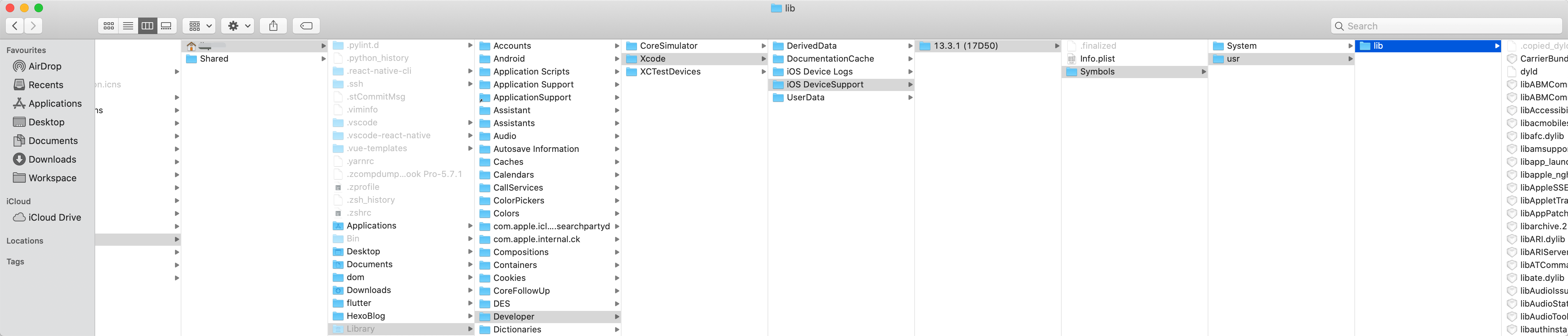
我们每次真机连接 Xcode 运行程序,会提示等待,其实系统为了堆栈解析,都会把当前版本的系统符号库自动导入到 /Users/你自己的用户名/Library/Developer/Xcode/iOS DeviceSupport 目录下安装了一大堆系统库的符号化文件。你可以访问下面目录看看
/Users/你自己的用户名/Library/Developer/Xcode/iOS DeviceSupport/
5. 服务端处理
5.1 ELK 日志系统
业界设计日志监控系统一般会采用基于 ELK 技术。ELK 是 Elasticsearch、Logstash、Kibana 三个开源框架缩写。Elasticsearch 是一个分布式、通过 Restful 方式进行交互的近实时搜索的平台框架。Logstash 是一个中央数据流引擎,用于从不同目标(文件/数据存储/MQ)收集不同格式的数据,经过过滤后支持输出到不同目的地(文件/MQ/Redis/ElasticsSearch/Kafka)。Kibana 可以将 Elasticserarch 的数据通过友好的页面展示出来,提供可视化分析功能。所以 ELK 可以搭建一个高效、企业级的日志分析系统。
早期单体应用时代,几乎应用的所有功能都在一台机器上运行,出了问题,运维人员打开终端输入命令直接查看系统日志,进而定位问题、解决问题。随着系统的功能越来越复杂,用户体量越来越大,单体应用几乎很难满足需求,所以技术架构迭代了,通过水平拓展来支持庞大的用户量,将单体应用进行拆分为多个应用,每个应用采用集群方式部署,负载均衡控制调度,假如某个子模块发生问题,去找这台服务器上终端找日志分析吗?显然台落后,所以日志管理平台便应运而生。通过 Logstash 去收集分析每台服务器的日志文件,然后按照定义的正则模版过滤后传输到 Kafka 或 Redis,然后由另一个 Logstash 从 Kafka 或 Redis 上读取日志存储到 ES 中创建索引,最后通过 Kibana 进行可视化分析。此外可以将收集到的数据进行数据分析,做更进一步的维护和决策。
上图展示了一个 ELK 的日志架构图。简单说明下:
- Logstash 和 ES 之前存在一个 Kafka 层,因为 Logstash 是架设在数据资源服务器上,将收集到的数据进行实时过滤,过滤需要消耗时间和内存,所以存在 Kafka,起到了数据缓冲存储作用,因为 Kafka 具备非常出色的读写性能。
- 再一步就是 Logstash 从 Kafka 里面进行读取数据,将数据过滤、处理,将结果传输到 ES
- 这个设计不但性能好、耦合低,还具备可拓展性。比如可以从 n 个不同的 Logstash 上读取传输到 n 个 Kafka 上,再由 n 个 Logstash 过滤处理。日志来源可以是 m 个,比如 App 日志、Tomcat 日志、Nginx 日志等等
下图贴一个 Elasticsearch 社区分享的一个 “Elastic APM 动手实战”主题的内容截图。
5.2 服务侧
Crash log 统一入库 Kibana 时是没有符号化的,所以需要符号化处理,以方便定位问题、crash 产生报表和后续处理。
所以整个流程就是:客户端 APM SDK 收集 crash log -> Kafka 存储 -> Mac 机执行定时任务符号化 -> 数据回传 Kafka -> 产品侧(显示端)对数据进行分类、报表、报警等操作。
因为公司的产品线有多条,相应的 App 有多个,用户使用的 App 版本也各不相同,所以 crash 日志分析必须要有正确的 .DSYM 文件,那么多 App 的不同版本,自动化就变得非常重要了。
自动化有2种手段,规模小一点的公司或者图省事,可以在 Xcode中 添加 runScript 脚本代码来自动在 release 模式下上传DSYM)。
因为我们大前端有一套体系,可以同时管理 iOS SDK、iOS App、Android SDK、Android App、Node、React、React Native 工程项目的初始化、依赖管理、构建(持续集成、Unit Test、Lint、统跳检测)、测试、打包、部署、动态能力(热更新、统跳路由下发)等能力于一身。可以基于各个阶段做能力的插入,所以可以在打包系统中,当调用打包后在打包机上传 .DSYM 文件到七牛云存储(规则可以是以 AppName + Version 为 key,value 为 .DSYM 文件)。
现在很多架构设计都是微服务,至于为什么选微服务,不在本文范畴。所以 crash 日志的符号化被设计为一个微服务。架构图如下
说明:
-
Symbolication Service 作为整个监控系统的一个组成部分,是专注于 crash report 符号化的微服务。
-
接收来自任务调度框架的包含预处理过的 crash report 和 DSYM index 的请求,从七牛拉取对应的 DSYM,对 crash report 做符号化解析,计算 hash,并将 hash 响应给「数据处理和任务调度框架」。
-
接收来自 APM 管理系统的包含原始 crash report 和 DSYM index 的请求,从七牛拉取对应的 DSYM,对crash report 做符号化解析,并将符号化的 crash report 响应给 APM 管理系统。
-
脚手架 cli 有个能力就是调用打包系统的打包构建能力,会根据项目的特点,选择合适的打包机(打包平台是维护了多个打包任务,不同任务根据特点被派发到不同的打包机上,任务详情页可以看到依赖的下载、编译、运行过程等,打包好的产物包括二进制包、下载二维码等等)
其中符号化服务是大前端背景下大前端团队的产物,所以是 NodeJS 实现的(单线程,所以为了提高机器利用率,就要开启多进程能力)。iOS 的符号化机器是 双核的 Mac mini,这就需要做实验测评到底需要开启几个 worker 进程做符号化服务。结果是双进程处理 crash log,比单进程效率高近一倍,而四进程比双进程效率提升不明显,符合双核 mac mini 的特点。所以开启两个 worker 进程做符号化处理。
下图是完整设计图
简单说明下,符号化流程是一个主从模式,一台 master 机,多个 slave 机,master 机读取 .DSYM 和 crash 结果的 cache。「数据处理和任务调度框架」调度符号化服务(内部2个 symbolocate worker)同时从七牛云上获取 .DSYM 文件。
系统架构图如下
文章内容过长,拆分为多个篇章,请自行点击查看,如果想整体连贯查看,请访问这里