移动网络环境一直很复杂,WIFI、2G、3G、4G、5G 等,用户使用 App 的过程中可能在这几种类型之间切换,这也是移动网络和传统网络间的一个区别,被称为「Connection Migration」。此外还存在 DNS 解析缓慢、失败率高、运营商劫持等问题。用户在使用 App 时因为某些原因导致体验很差,要想针对网络情况进行改善,必须有清晰的监控手段。
1. App 网络请求过程
App 发送一次网络请求一般会经历下面几个关键步骤:
-
DNS 解析
Domain Name system,网络域名名称系统,本质上就是将
域名和IP 地址相互映射的一个分布式数据库,使人们更方便的访问互联网。首先会查询本地的 DNS 缓存,查找失败就去 DNS 服务器查询,这其中可能会经过非常多的节点,涉及到递归查询和迭代查询的过程。运营商可能不干人事:一种情况就是出现运营商劫持的现象,表现为你在 App 内访问某个网页的时候会看到和内容不相关的广告;另一种可能的情况就是把你的请求丢给非常远的基站去做 DNS 解析,导致我们 App 的 DNS 解析时间较长,App 网络效率低。一般做 HTTPDNS 方案去自行解决 DNS 的问题。 -
TCP 3次握手
关于 TCP 握手过程中为什么是3次握手而不是2次、4次,可以查看这篇文章。
-
TLS 握手
对于 HTTPS 请求还需要做 TLS 握手,也就是密钥协商的过程。
-
发送请求
连接建立好之后就可以发送 request,此时可以记录下 request start 时间
-
等待回应
等待服务器返回响应。这个时间主要取决于资源大小,也是网络请求过程中最为耗时的一个阶段。
-
返回响应
服务端返回响应给客户端,根据 HTTP header 信息中的状态码判断本次请求是否成功、是否走缓存、是否需要重定向。
2. 监控原理
| 名称 | 说明 |
|---|---|
| NSURLConnection | 已经被废弃。用法简单 |
| NSURLSession | iOS7.0 推出,功能更强大 |
| CFNetwork | NSURL 的底层,纯 C 实现 |
iOS 网络框架层级关系如下:
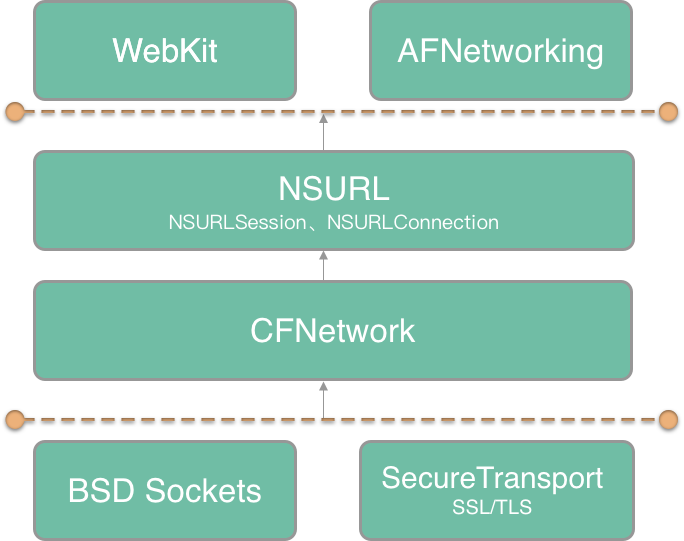
iOS 网络现状是由4层组成的:最底层的 BSD Sockets、SecureTransport;次级底层是 CFNetwork、NSURLSession、NSURLConnection、WebView 是用 Objective-C 实现的,且调用 CFNetwork;应用层框架 AFNetworking 基于 NSURLSession、NSURLConnection 实现。
目前业界对于网络监控主要有2种:一种是通过 NSURLProtocol 监控、一种是通过 Hook 来监控。下面介绍几种办法来监控网络请求,各有优缺点。
2.1 方案一:NSURLProtocol 监控 App 网络请求
NSURLProtocol 作为上层接口,使用较为简单,但 NSURLProtocol 属于 URL Loading System 体系中。应用协议的支持程度有限,支持 FTP、HTTP、HTTPS 等几个应用层协议,对于其他的协议则无法监控,存在一定的局限性。如果监控底层网络库 CFNetwork 则没有这个限制。
对于 NSURLProtocol 的具体做法在这篇文章中讲过,继承抽象类并实现相应的方法,自定义去发起网络请求来实现监控的目的。
iOS 10 之后,NSURLSessionTaskDelegate 中增加了一个新的代理方法:
/*
 * Sent when complete statistics information has been collected for the task.
 */
- (void)URLSession:(NSURLSession *)session task:(NSURLSessionTask *)task didFinishCollectingMetrics:(NSURLSessionTaskMetrics *)metrics API_AVAILABLE(macosx(10.12), ios(10.0), watchos(3.0), tvos(10.0));
可以从 NSURLSessionTaskMetrics 中获取到网络情况的各项指标。各项参数如下
@interface NSURLSessionTaskMetrics : NSObject

/*
 * transactionMetrics array contains the metrics collected for every request/response transaction created during the task execution.
 */
@property (copy, readonly) NSArray<NSURLSessionTaskTransactionMetrics *> *transactionMetrics;

/*
 * Interval from the task creation time to the task completion time.
 * Task creation time is the time when the task was instantiated.
 * Task completion time is the time when the task is about to change its internal state to completed.
 */
@property (copy, readonly) NSDateInterval *taskInterval;

/*
 * redirectCount is the number of redirects that were recorded.
 */
@property (assign, readonly) NSUInteger redirectCount;

- (instancetype)init API_DEPRECATED("Not supported", macos(10.12,10.15), ios(10.0,13.0), watchos(3.0,6.0), tvos(10.0,13.0));
+ (instancetype)new API_DEPRECATED("Not supported", macos(10.12,10.15), ios(10.0,13.0), watchos(3.0,6.0), tvos(10.0,13.0));

@end
其中:taskInterval 表示任务从创建到完成话费的总时间,任务的创建时间是任务被实例化时的时间,任务完成时间是任务的内部状态将要变为完成的时间;redirectCount 表示被重定向的次数;transactionMetrics 数组包含了任务执行过程中每个请求/响应事务中收集的指标,各项参数如下:
/*
 * This class defines the performance metrics collected for a request/response transaction during the task execution.
 */
API_AVAILABLE(macosx(10.12), ios(10.0), watchos(3.0), tvos(10.0))
@interface NSURLSessionTaskTransactionMetrics : NSObject

/*
 * Represents the transaction request. 请求事务
 */
@property (copy, readonly) NSURLRequest *request;

/*
 * Represents the transaction response. Can be nil if error occurred and no response was generated. 响应事务
 */
@property (nullable, copy, readonly) NSURLResponse *response;

/*
 * For all NSDate metrics below, if that aspect of the task could not be completed, then the corresponding “EndDate” metric will be nil.
 * For example, if a name lookup was started but the name lookup timed out, failed, or the client canceled the task before the name could be resolved -- then while domainLookupStartDate may be set, domainLookupEndDate will be nil along with all later metrics.
 */

/*
 * 客户端开始请求的时间,无论是从服务器还是从本地缓存中获取
 * fetchStartDate returns the time when the user agent started fetching the resource, whether or not the resource was retrieved from the server or local resources.
 *
 * The following metrics will be set to nil, if a persistent connection was used or the resource was retrieved from local resources:
 *
 *   domainLookupStartDate
 *   domainLookupEndDate
 *   connectStartDate
 *   connectEndDate
 *   secureConnectionStartDate
 *   secureConnectionEndDate
 */
@property (nullable, copy, readonly) NSDate *fetchStartDate;

/*
 * domainLookupStartDate returns the time immediately before the user agent started the name lookup for the resource. DNS 开始解析的时间
 */
@property (nullable, copy, readonly) NSDate *domainLookupStartDate;

/*
 * domainLookupEndDate returns the time after the name lookup was completed. DNS 解析完成的时间
 */
@property (nullable, copy, readonly) NSDate *domainLookupEndDate;

/*
 * connectStartDate is the time immediately before the user agent started establishing the connection to the server.
 *
 * For example, this would correspond to the time immediately before the user agent started trying to establish the TCP connection. 客户端与服务端开始建立 TCP 连接的时间
 */
@property (nullable, copy, readonly) NSDate *connectStartDate;

/*
 * If an encrypted connection was used, secureConnectionStartDate is the time immediately before the user agent started the security handshake to secure the current connection. HTTPS 的 TLS 握手开始的时间
 *
 * For example, this would correspond to the time immediately before the user agent started the TLS handshake.
 *
 * If an encrypted connection was not used, this attribute is set to nil.
 */
@property (nullable, copy, readonly) NSDate *secureConnectionStartDate;

/*
 * If an encrypted connection was used, secureConnectionEndDate is the time immediately after the security handshake completed. HTTPS 的 TLS 握手结束的时间
 *
 * If an encrypted connection was not used, this attribute is set to nil.
 */
@property (nullable, copy, readonly) NSDate *secureConnectionEndDate;

/*
 * connectEndDate is the time immediately after the user agent finished establishing the connection to the server, including completion of security-related and other handshakes. 客户端与服务器建立 TCP 连接完成的时间,包括 TLS 握手时间
 */
@property (nullable, copy, readonly) NSDate *connectEndDate;

/*
 * requestStartDate is the time immediately before the user agent started requesting the source, regardless of whether the resource was retrieved from the server or local resources.
 客户端请求开始的时间,可以理解为开始传输 HTTP 请求的 header 的第一个字节时间
 *
 * For example, this would correspond to the time immediately before the user agent sent an HTTP GET request.
 */
@property (nullable, copy, readonly) NSDate *requestStartDate;

/*
 * requestEndDate is the time immediately after the user agent finished requesting the source, regardless of whether the resource was retrieved from the server or local resources.
 客户端请求结束的时间,可以理解为 HTTP 请求的最后一个字节传输完成的时间
 *
 * For example, this would correspond to the time immediately after the user agent finished sending the last byte of the request.
 */
@property (nullable, copy, readonly) NSDate *requestEndDate;

/*
 * responseStartDate is the time immediately after the user agent received the first byte of the response from the server or from local resources.
 客户端从服务端接收响应的第一个字节的时间
 *
 * For example, this would correspond to the time immediately after the user agent received the first byte of an HTTP response.
 */
@property (nullable, copy, readonly) NSDate *responseStartDate;

/*
 * responseEndDate is the time immediately after the user agent received the last byte of the resource. 客户端从服务端接收到最后一个请求的时间
 */
@property (nullable, copy, readonly) NSDate *responseEndDate;

/*
 * The network protocol used to fetch the resource, as identified by the ALPN Protocol ID Identification Sequence [RFC7301].
 * E.g., h2, http/1.1, spdy/3.1.
 网络协议名,比如 http/1.1, spdy/3.1
 *
 * When a proxy is configured AND a tunnel connection is established, then this attribute returns the value for the tunneled protocol.
 *
 * For example:
 * If no proxy were used, and HTTP/2 was negotiated, then h2 would be returned.
 * If HTTP/1.1 were used to the proxy, and the tunneled connection was HTTP/2, then h2 would be returned.
 * If HTTP/1.1 were used to the proxy, and there were no tunnel, then http/1.1 would be returned.
 *
 */
@property (nullable, copy, readonly) NSString *networkProtocolName;

/*
 * This property is set to YES if a proxy connection was used to fetch the resource.
	该连接是否使用了代理
 */
@property (assign, readonly, getter=isProxyConnection) BOOL proxyConnection;

/*
 * This property is set to YES if a persistent connection was used to fetch the resource.
 是否复用了现有连接
 */
@property (assign, readonly, getter=isReusedConnection) BOOL reusedConnection;

/*
 * Indicates whether the resource was loaded, pushed or retrieved from the local cache.
 获取资源来源
 */
@property (assign, readonly) NSURLSessionTaskMetricsResourceFetchType resourceFetchType;

/*
 * countOfRequestHeaderBytesSent is the number of bytes transferred for request header.
 请求头的字节数
 */
@property (readonly) int64_t countOfRequestHeaderBytesSent API_AVAILABLE(macos(10.15), ios(13.0), watchos(6.0), tvos(13.0));

/*
 * countOfRequestBodyBytesSent is the number of bytes transferred for request body.
 请求体的字节数
 * It includes protocol-specific framing, transfer encoding, and content encoding.
 */
@property (readonly) int64_t countOfRequestBodyBytesSent API_AVAILABLE(macos(10.15), ios(13.0), watchos(6.0), tvos(13.0));

/*
 * countOfRequestBodyBytesBeforeEncoding is the size of upload body data, file, or stream.
 上传体数据、文件、流的大小
 */
@property (readonly) int64_t countOfRequestBodyBytesBeforeEncoding API_AVAILABLE(macos(10.15), ios(13.0), watchos(6.0), tvos(13.0));

/*
 * countOfResponseHeaderBytesReceived is the number of bytes transferred for response header.
 响应头的字节数
 */
@property (readonly) int64_t countOfResponseHeaderBytesReceived API_AVAILABLE(macos(10.15), ios(13.0), watchos(6.0), tvos(13.0));

/*
 * countOfResponseBodyBytesReceived is the number of bytes transferred for response body.
 响应体的字节数
 * It includes protocol-specific framing, transfer encoding, and content encoding.
 */
@property (readonly) int64_t countOfResponseBodyBytesReceived API_AVAILABLE(macos(10.15), ios(13.0), watchos(6.0), tvos(13.0));

/*
 * countOfResponseBodyBytesAfterDecoding is the size of data delivered to your delegate or completion handler.
给代理方法或者完成后处理的回调的数据大小

 */
@property (readonly) int64_t countOfResponseBodyBytesAfterDecoding API_AVAILABLE(macos(10.15), ios(13.0), watchos(6.0), tvos(13.0));

/*
 * localAddress is the IP address string of the local interface for the connection.
  当前连接下的本地接口 IP 地址
 *
 * For multipath protocols, this is the local address of the initial flow.
 *
 * If a connection was not used, this attribute is set to nil.
 */
@property (nullable, copy, readonly) NSString *localAddress API_AVAILABLE(macos(10.15), ios(13.0), watchos(6.0), tvos(13.0));

/*
 * localPort is the port number of the local interface for the connection.
 当前连接下的本地端口号

 *
 * For multipath protocols, this is the local port of the initial flow.
 *
 * If a connection was not used, this attribute is set to nil.
 */
@property (nullable, copy, readonly) NSNumber *localPort API_AVAILABLE(macos(10.15), ios(13.0), watchos(6.0), tvos(13.0));

/*
 * remoteAddress is the IP address string of the remote interface for the connection.
 当前连接下的远端 IP 地址
 *
 * For multipath protocols, this is the remote address of the initial flow.
 *
 * If a connection was not used, this attribute is set to nil.
 */
@property (nullable, copy, readonly) NSString *remoteAddress API_AVAILABLE(macos(10.15), ios(13.0), watchos(6.0), tvos(13.0));

/*
 * remotePort is the port number of the remote interface for the connection.
  当前连接下的远端端口号
 *
 * For multipath protocols, this is the remote port of the initial flow.
 *
 * If a connection was not used, this attribute is set to nil.
 */
@property (nullable, copy, readonly) NSNumber *remotePort API_AVAILABLE(macos(10.15), ios(13.0), watchos(6.0), tvos(13.0));

/*
 * negotiatedTLSProtocolVersion is the TLS protocol version negotiated for the connection.
  连接协商用的 TLS 协议版本号
 * It is a 2-byte sequence in host byte order.
 *
 * Please refer to tls_protocol_version_t enum in Security/SecProtocolTypes.h
 *
 * If an encrypted connection was not used, this attribute is set to nil.
 */
@property (nullable, copy, readonly) NSNumber *negotiatedTLSProtocolVersion API_AVAILABLE(macos(10.15), ios(13.0), watchos(6.0), tvos(13.0));

/*
 * negotiatedTLSCipherSuite is the TLS cipher suite negotiated for the connection.
 连接协商用的 TLS 密码套件
 * It is a 2-byte sequence in host byte order.
 *
 * Please refer to tls_ciphersuite_t enum in Security/SecProtocolTypes.h
 *
 * If an encrypted connection was not used, this attribute is set to nil.
 */
@property (nullable, copy, readonly) NSNumber *negotiatedTLSCipherSuite API_AVAILABLE(macos(10.15), ios(13.0), watchos(6.0), tvos(13.0));

/*
 * Whether the connection is established over a cellular interface.
 是否是通过蜂窝网络建立的连接
 */
@property (readonly, getter=isCellular) BOOL cellular API_AVAILABLE(macos(10.15), ios(13.0), watchos(6.0), tvos(13.0));

/*
 * Whether the connection is established over an expensive interface.
 是否通过昂贵的接口建立的连接
 */
@property (readonly, getter=isExpensive) BOOL expensive API_AVAILABLE(macos(10.15), ios(13.0), watchos(6.0), tvos(13.0));

/*
 * Whether the connection is established over a constrained interface.
 是否通过受限接口建立的连接
 */
@property (readonly, getter=isConstrained) BOOL constrained API_AVAILABLE(macos(10.15), ios(13.0), watchos(6.0), tvos(13.0));

/*
 * Whether a multipath protocol is successfully negotiated for the connection.
 是否为了连接成功协商了多路径协议
 */
@property (readonly, getter=isMultipath) BOOL multipath API_AVAILABLE(macos(10.15), ios(13.0), watchos(6.0), tvos(13.0));


- (instancetype)init API_DEPRECATED("Not supported", macos(10.12,10.15), ios(10.0,13.0), watchos(3.0,6.0), tvos(10.0,13.0));
+ (instancetype)new API_DEPRECATED("Not supported", macos(10.12,10.15), ios(10.0,13.0), watchos(3.0,6.0), tvos(10.0,13.0));

@end
网络监控简单代码
// 监控基础信息
@interface  NetworkMonitorBaseDataModel : NSObject
// 请求的 URL 地址
@property (nonatomic, strong) NSString *requestUrl;
//请求头
@property (nonatomic, strong) NSArray *requestHeaders;
//响应头
@property (nonatomic, strong) NSArray *responseHeaders;
//GET方法 的请求参数
@property (nonatomic, strong) NSString *getRequestParams;
//HTTP 方法, 比如 POST
@property (nonatomic, strong) NSString *httpMethod;
//协议名,如http1.0 / http1.1 / http2.0
@property (nonatomic, strong) NSString *httpProtocol;
//是否使用代理
@property (nonatomic, assign) BOOL useProxy;
//DNS解析后的 IP 地址
@property (nonatomic, strong) NSString *ip;
@end

// 监控信息模型
@interface  NetworkMonitorDataModel : NetworkMonitorBaseDataModel
//客户端发起请求的时间
@property (nonatomic, assign) UInt64 requestDate;
//客户端开始请求到开始dns解析的等待时间,单位ms
@property (nonatomic, assign) int waitDNSTime;
//DNS 解析耗时
@property (nonatomic, assign) int dnsLookupTime;
//tcp 三次握手耗时,单位ms
@property (nonatomic, assign) int tcpTime;
//ssl 握手耗时
@property (nonatomic, assign) int sslTime;
//一个完整请求的耗时,单位ms
@property (nonatomic, assign) int requestTime;
//http 响应码
@property (nonatomic, assign) NSUInteger httpCode;
//发送的字节数
@property (nonatomic, assign) UInt64 sendBytes;
//接收的字节数
@property (nonatomic, assign) UInt64 receiveBytes;


// 错误信息模型
@interface  NetworkMonitorErrorModel : NetworkMonitorBaseDataModel
//错误码
@property (nonatomic, assign) NSInteger errorCode;
//错误次数
@property (nonatomic, assign) NSUInteger errCount;
//异常名
@property (nonatomic, strong) NSString *exceptionName;
//异常详情
@property (nonatomic, strong) NSString *exceptionDetail;
//异常堆栈
@property (nonatomic, strong) NSString *stackTrace;
@end


// 继承自 NSURLProtocol 抽象类,实现响应方法,代理网络请求
@interface CustomURLProtocol () <NSURLSessionTaskDelegate>

@property (nonatomic, strong) NSURLSessionDataTask *dataTask;
@property (nonatomic, strong) NSOperationQueue *sessionDelegateQueue;
@property (nonatomic, strong) NetworkMonitorDataModel *dataModel;
@property (nonatomic, strong) NetworkMonitorErrorModel *errModel;

@end

//使用NSURLSessionDataTask请求网络
- (void)startLoading {
    NSURLSessionConfiguration *configuration = [NSURLSessionConfiguration defaultSessionConfiguration];
  	NSURLSession *session = [NSURLSession sessionWithConfiguration:configuration
                                                          delegate:self
                                                     delegateQueue:nil];
    NSURLSession *session = [NSURLSession sessionWithConfiguration:configuration delegate:self delegateQueue:nil];
  	self.sessionDelegateQueue = [[NSOperationQueue alloc] init];
    self.sessionDelegateQueue.maxConcurrentOperationCount = 1;
    self.sessionDelegateQueue.name = @"com.networkMonitor.session.queue";
    self.dataTask = [session dataTaskWithRequest:self.request];
    [self.dataTask resume];
}

#pragma mark - NSURLSessionTaskDelegate
- (void)URLSession:(NSURLSession *)session task:(NSURLSessionTask *)task didCompleteWithError:(NSError *)error {
    if (error) {
        [self.client URLProtocol:self didFailWithError:error];
    } else {
        [self.client URLProtocolDidFinishLoading:self];
    }
    if (error) {
        NSURLRequest *request = task.currentRequest;
        if (request) {
            self.errModel.requestUrl  = request.URL.absoluteString;
            self.errModel.httpMethod = request.HTTPMethod;
            self.errModel.requestParams = request.URL.query;
        }
        self.errModel.errorCode = error.code;
        self.errModel.exceptionName = error.domain;
        self.errModel.exceptionDetail = error.description;
      // 上传 Network 数据到数据上报组件,数据上报会在 [打造功能强大、灵活可配置的数据上报组件](https://github.com/FantasticLBP/knowledge-kit/blob/master/Chapter1%20-%20iOS/1.80.md) 讲
    }
    self.dataTask = nil;
}


- (void)URLSession:(NSURLSession *)session task:(NSURLSessionTask *)task didFinishCollectingMetrics:(NSURLSessionTaskMetrics *)metrics {
       if (@available(iOS 10.0, *) && [metrics.transactionMetrics count] > 0) {
        [metrics.transactionMetrics enumerateObjectsUsingBlock:^(NSURLSessionTaskTransactionMetrics *_Nonnull obj, NSUInteger idx, BOOL *_Nonnull stop) {
            if (obj.resourceFetchType == NSURLSessionTaskMetricsResourceFetchTypeNetworkLoad) {
                if (obj.fetchStartDate) {
                    self.dataModel.requestDate = [obj.fetchStartDate timeIntervalSince1970] * 1000;
                }
                if (obj.domainLookupStartDate && obj.domainLookupEndDate) {
                    self.dataModel. waitDNSTime = ceil([obj.domainLookupStartDate timeIntervalSinceDate:obj.fetchStartDate] * 1000);
                    self.dataModel. dnsLookupTime = ceil([obj.domainLookupEndDate timeIntervalSinceDate:obj.domainLookupStartDate] * 1000);
                }
                if (obj.connectStartDate) {
                    if (obj.secureConnectionStartDate) {
                        self.dataModel. waitDNSTime = ceil([obj.secureConnectionStartDate timeIntervalSinceDate:obj.connectStartDate] * 1000);
                    } else if (obj.connectEndDate) {
                        self.dataModel.tcpTime = ceil([obj.connectEndDate timeIntervalSinceDate:obj.connectStartDate] * 1000);
                    }
                }
                if (obj.secureConnectionEndDate && obj.secureConnectionStartDate) {
                    self.dataModel.sslTime = ceil([obj.secureConnectionEndDate timeIntervalSinceDate:obj.secureConnectionStartDate] * 1000);
                }

                if (obj.fetchStartDate && obj.responseEndDate) {
                    self.dataModel.requestTime = ceil([obj.responseEndDate timeIntervalSinceDate:obj.fetchStartDate] * 1000);
                }

                self.dataModel.httpProtocol = obj.networkProtocolName;

                NSHTTPURLResponse *response = (NSHTTPURLResponse *)obj.response;
                if ([response isKindOfClass:NSHTTPURLResponse.class]) {
                    self.dataModel.receiveBytes = response.expectedContentLength;
                }

                if ([obj respondsToSelector:@selector(_remoteAddressAndPort)]) {
                    self.dataModel.ip = [obj valueForKey:@"_remoteAddressAndPort"];
                }

                if ([obj respondsToSelector:@selector(_requestHeaderBytesSent)]) {
                    self.dataModel.sendBytes = [[obj valueForKey:@"_requestHeaderBytesSent"] unsignedIntegerValue];
                }
                if ([obj respondsToSelector:@selector(_responseHeaderBytesReceived)]) {
                    self.dataModel.receiveBytes = [[obj valueForKey:@"_responseHeaderBytesReceived"] unsignedIntegerValue];
                }

               self.dataModel.requestUrl = [obj.request.URL absoluteString];
                self.dataModel.httpMethod = obj.request.HTTPMethod;
                self.dataModel.useProxy = obj.isProxyConnection;
            }
        }];
				// 上传 Network 数据到数据上报组件,数据上报会在 [打造功能强大、灵活可配置的数据上报组件](https://github.com/FantasticLBP/knowledge-kit/blob/master/Chapter1%20-%20iOS/1.80.md) 讲
    }
}
2.2 方案二:NSURLProtocol 监控 App 网络请求之黑魔法篇
文章上面 2.1 分析到了 NSURLSessionTaskMetrics 由于兼容性问题,对于网络监控来说似乎不太完美,但是自后在搜资料的时候看到了一篇文章。文章在分析 WebView 的网络监控的时候分析 Webkit 源码的时候发现了下面代码
#if !HAVE(TIMINGDATAOPTIONS)
void setCollectsTimingData()
{
    static dispatch_once_t onceToken;
    dispatch_once(&onceToken, ^{
        [NSURLConnection _setCollectsTimingData:YES];
        ...
    });
}
#endif
也就是说明 NSURLConnection 本身有一套 TimingData 的收集 API,只是没有暴露给开发者,苹果自己在用而已。在 runtime header 中找到了 NSURLConnection 的 _setCollectsTimingData: 、_timingData 2个 api(iOS8 以后可以使用)。
NSURLSession 在 iOS9 之前使用 _setCollectsTimingData: 就可以使用 TimingData 了。
注意:
- 因为是私有 API,所以在使用的时候注意混淆。比如
[[@"_setC" stringByAppendingString:@"ollectsT"] stringByAppendingString:@"imingData:"]。 - 不推荐私有 API,一般做 APM 的属于公共团队,你想想看虽然你做的 SDK 达到网络监控的目的了,但是万一给业务线的 App 上架造成了问题,那就得不偿失了。一般这种投机取巧,不是百分百确定的事情可以在玩具阶段使用。
@interface _NSURLConnectionProxy : DelegateProxy

@end

@implementation _NSURLConnectionProxy

- (BOOL)respondsToSelector:(SEL)aSelector
{
    if ([NSStringFromSelector(aSelector) isEqualToString:@"connectionDidFinishLoading:"]) {
        return YES;
    }
    return [self.target respondsToSelector:aSelector];
}

- (void)forwardInvocation:(NSInvocation *)invocation
{
    [super forwardInvocation:invocation];
    if ([NSStringFromSelector(invocation.selector) isEqualToString:@"connectionDidFinishLoading:"]) {
        __unsafe_unretained NSURLConnection *conn;
        [invocation getArgument:&conn atIndex:2];
        SEL selector = NSSelectorFromString([@"_timin" stringByAppendingString:@"gData"]);
        NSDictionary *timingData = [conn performSelector:selector];
        [[NTDataKeeper shareInstance] trackTimingData:timingData request:conn.currentRequest];
    }
}

@end

@implementation NSURLConnection(tracker)

+ (void)load
{
    static dispatch_once_t onceToken;
    dispatch_once(&onceToken, ^{
        Class class = [self class];

        SEL originalSelector = @selector(initWithRequest:delegate:);
        SEL swizzledSelector = @selector(swizzledInitWithRequest:delegate:);

        Method originalMethod = class_getInstanceMethod(class, originalSelector);
        Method swizzledMethod = class_getInstanceMethod(class, swizzledSelector);
        method_exchangeImplementations(originalMethod, swizzledMethod);

        NSString *selectorName = [[@"_setC" stringByAppendingString:@"ollectsT"] stringByAppendingString:@"imingData:"];
        SEL selector = NSSelectorFromString(selectorName);
        [NSURLConnection performSelector:selector withObject:@(YES)];
    });
}

- (instancetype)swizzledInitWithRequest:(NSURLRequest *)request delegate:(id<NSURLConnectionDelegate>)delegate
{
    if (delegate) {
        _NSURLConnectionProxy *proxy = [[_NSURLConnectionProxy alloc] initWithTarget:delegate];
        objc_setAssociatedObject(delegate ,@"_NSURLConnectionProxy" ,proxy, OBJC_ASSOCIATION_RETAIN_NONATOMIC);
        return [self swizzledInitWithRequest:request delegate:(id<NSURLConnectionDelegate>)proxy];
    }else{
        return [self swizzledInitWithRequest:request delegate:delegate];
    }
}

@end
2.3 方案三:Hook
iOS 中 hook 技术有2类,一种是 NSProxy,一种是 method swizzling(isa swizzling)
2.3.1 方法一
写 SDK 肯定不可能手动侵入业务代码(你没那个权限提交到线上代码 😂),所以不管是 APM 还是无痕埋点都是通过 Hook 的方式。
面向切面程序设计(Aspect-oriented Programming,AOP)是计算机科学中的一种程序设计范型,将横切关注点与业务主体进一步分离,以提高程序代码的模块化程度。在不修改源代码的情况下给程序动态增加功能。其核心思想是将业务逻辑(核心关注点,系统主要功能)与公共功能(横切关注点,比如日志系统)进行分离,降低复杂性,保持系统模块化程度、可维护性、可重用性。常被用在日志系统、性能统计、安全控制、事务处理、异常处理等场景下。
在 iOS 中 AOP 的实现是基于 Runtime 机制,目前由3种方式:Method Swizzling、NSProxy、FishHook(主要用用于 hook c 代码)。
文章上面 2.1 讨论了满足大多数的需求的场景,NSURLProtocol 监控了 NSURLConnection、NSURLSession 的网络请求,自身代理后可以发起网络请求并得到诸如请求开始时间、请求结束时间、header 信息等,但是无法得到非常详细的网络性能数据,比如 DNS 开始解析时间、DNS 解析用了多久、reponse 开始返回的时间、返回了多久等。 iOS10 之后 NSURLSessionTaskDelegate 增加了一个代理方法 - (void)URLSession:(NSURLSession *)session task:(NSURLSessionTask *)task didFinishCollectingMetrics:(NSURLSessionTaskMetrics *)metrics API_AVAILABLE(macosx(10.12), ios(10.0), watchos(3.0), tvos(10.0));,可以获取到精确的各项网络数据。但是具有兼容性。文章上面 2.2 讨论了从 Webkit 源码中得到的信息,通过私有方法 _setCollectsTimingData: 、_timingData 可以获取到 TimingData。
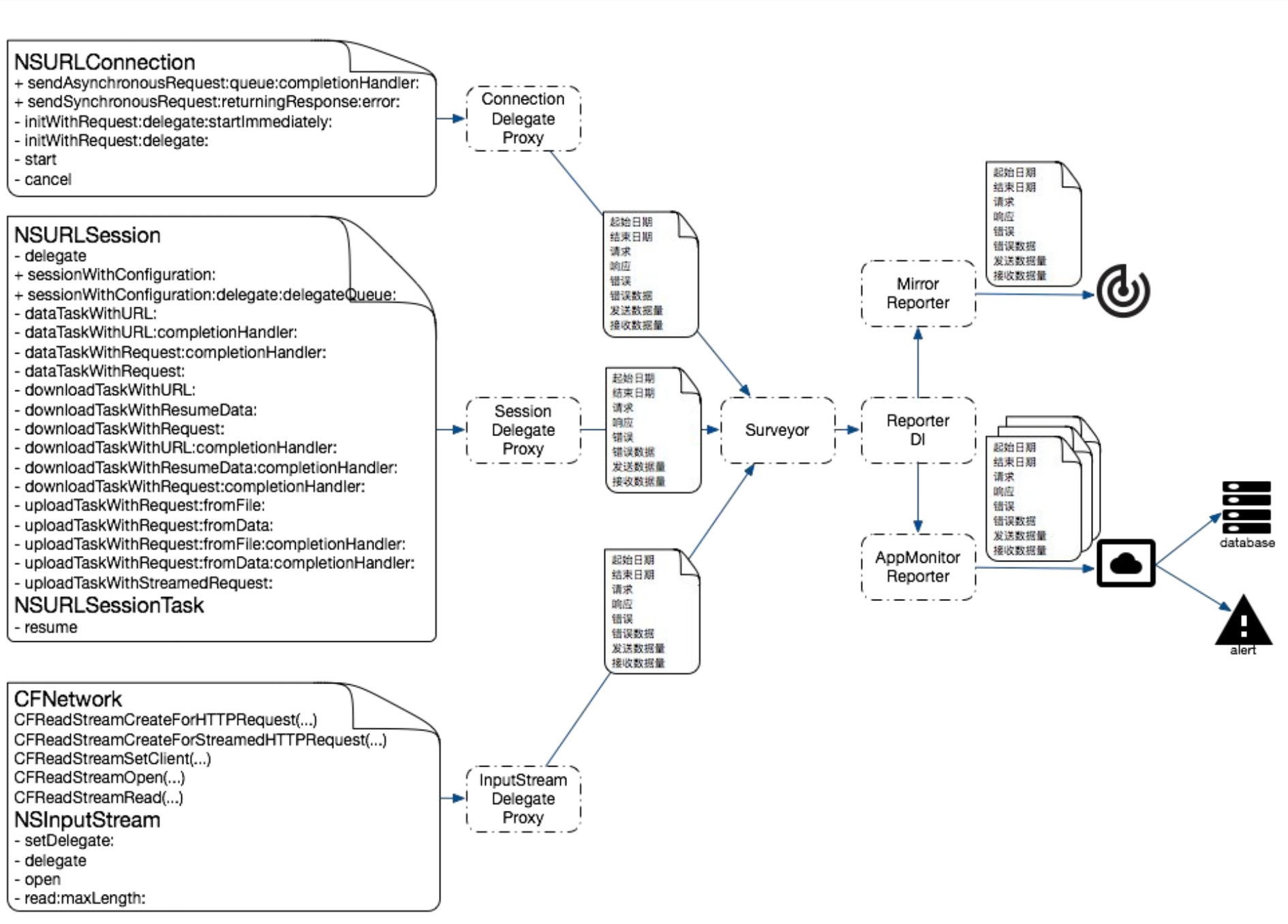
但是如果需要监全部的网络请求就不能满足需求了,查阅资料后发现了阿里百川有 APM 的解决方案,于是有了方案3,对于网络监控需要做如下的处理
可能对于 CFNetwork 比较陌生,可以看一下 CFNetwork 的层级和简单用法
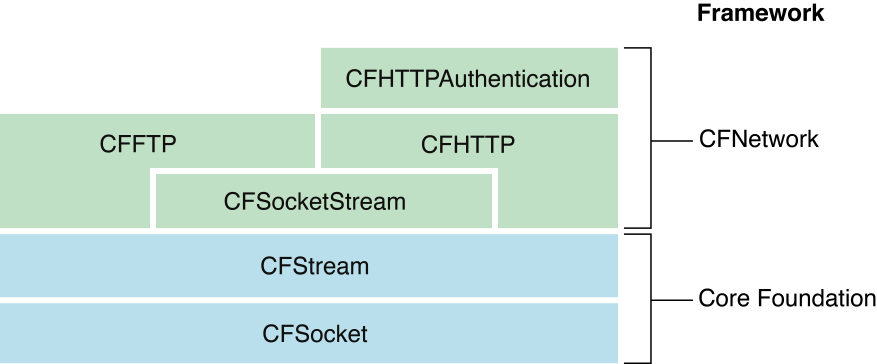
CFNetwork 的基础是 CFSocket 和 CFStream。
CFSocket:Socket 是网络通信的底层基础,可以让2个 socket 端口互发数据,iOS 中最常用的 socket 抽象是 BSD socket。而 CFSocket 是 BSD socket 的 OC 包装,几乎实现了所有的 BSD 功能,此外加入了 RunLoop。
CFStream:提供了与设备无关的读写数据方法,使用它可以为内存、文件、网络(使用 socket)的数据建立流,使用 stream 可以不必将所有数据写入到内存中。CFStream 提供 API 对2种 CFType 对象提供抽象:CFReadStream、CFWriteStream。同时也是 CFHTTP、CFFTP 的基础。
简单 Demo
- (void)testCFNetwork
{
    CFURLRef urlRef = CFURLCreateWithString(kCFAllocatorDefault, CFSTR("https://httpbin.org/get"), NULL);
    CFHTTPMessageRef httpMessageRef = CFHTTPMessageCreateRequest(kCFAllocatorDefault, CFSTR("GET"), urlRef, kCFHTTPVersion1_1);
    CFRelease(urlRef);

    CFReadStreamRef readStream = CFReadStreamCreateForHTTPRequest(kCFAllocatorDefault, httpMessageRef);
    CFRelease(httpMessageRef);

    CFReadStreamScheduleWithRunLoop(readStream, CFRunLoopGetCurrent(), kCFRunLoopCommonModes);

    CFOptionFlags eventFlags = (kCFStreamEventHasBytesAvailable | kCFStreamEventErrorOccurred | kCFStreamEventEndEncountered);
    CFStreamClientContext context = {
        0,
        NULL,
        NULL,
        NULL,
       NULL
    } ;
    // Assigns a client to a stream, which receives callbacks when certain events occur.
    CFReadStreamSetClient(readStream, eventFlags, CFNetworkRequestCallback, &context);
    // Opens a stream for reading.
    CFReadStreamOpen(readStream);
}
// callback
void CFNetworkRequestCallback (CFReadStreamRef _Null_unspecified stream, CFStreamEventType type, void * _Null_unspecified clientCallBackInfo) {
    CFMutableDataRef responseBytes = CFDataCreateMutable(kCFAllocatorDefault, 0);
    CFIndex numberOfBytesRead = 0;
    do {
        UInt8 buffer[2014];
        numberOfBytesRead = CFReadStreamRead(stream, buffer, sizeof(buffer));
        if (numberOfBytesRead > 0) {
            CFDataAppendBytes(responseBytes, buffer, numberOfBytesRead);
        }
    } while (numberOfBytesRead > 0);


    CFHTTPMessageRef response = (CFHTTPMessageRef)CFReadStreamCopyProperty(stream, kCFStreamPropertyHTTPResponseHeader);
    if (responseBytes) {
        if (response) {
            CFHTTPMessageSetBody(response, responseBytes);
        }
        CFRelease(responseBytes);
    }

    // close and cleanup
    CFReadStreamClose(stream);
    CFReadStreamUnscheduleFromRunLoop(stream, CFRunLoopGetCurrent(), kCFRunLoopCommonModes);
    CFRelease(stream);

    // print response
    if (response) {
        CFDataRef reponseBodyData = CFHTTPMessageCopyBody(response);
        CFRelease(response);

        printResponseData(reponseBodyData);
        CFRelease(reponseBodyData);
    }
}

void printResponseData (CFDataRef responseData) {
    CFIndex dataLength = CFDataGetLength(responseData);
    UInt8 *bytes = (UInt8 *)malloc(dataLength);
    CFDataGetBytes(responseData, CFRangeMake(0, CFDataGetLength(responseData)), bytes);
    CFStringRef responseString = CFStringCreateWithBytes(kCFAllocatorDefault, bytes, dataLength, kCFStringEncodingUTF8, TRUE);
    CFShow(responseString);
    CFRelease(responseString);
    free(bytes);
}
// console
{
  "args": {},
  "headers": {
    "Host": "httpbin.org",
    "User-Agent": "Test/1 CFNetwork/1125.2 Darwin/19.3.0",
    "X-Amzn-Trace-Id": "Root=1-5e8980d0-581f3f44724c7140614c2564"
  },
  "origin": "183.159.122.102",
  "url": "https://httpbin.org/get"
}
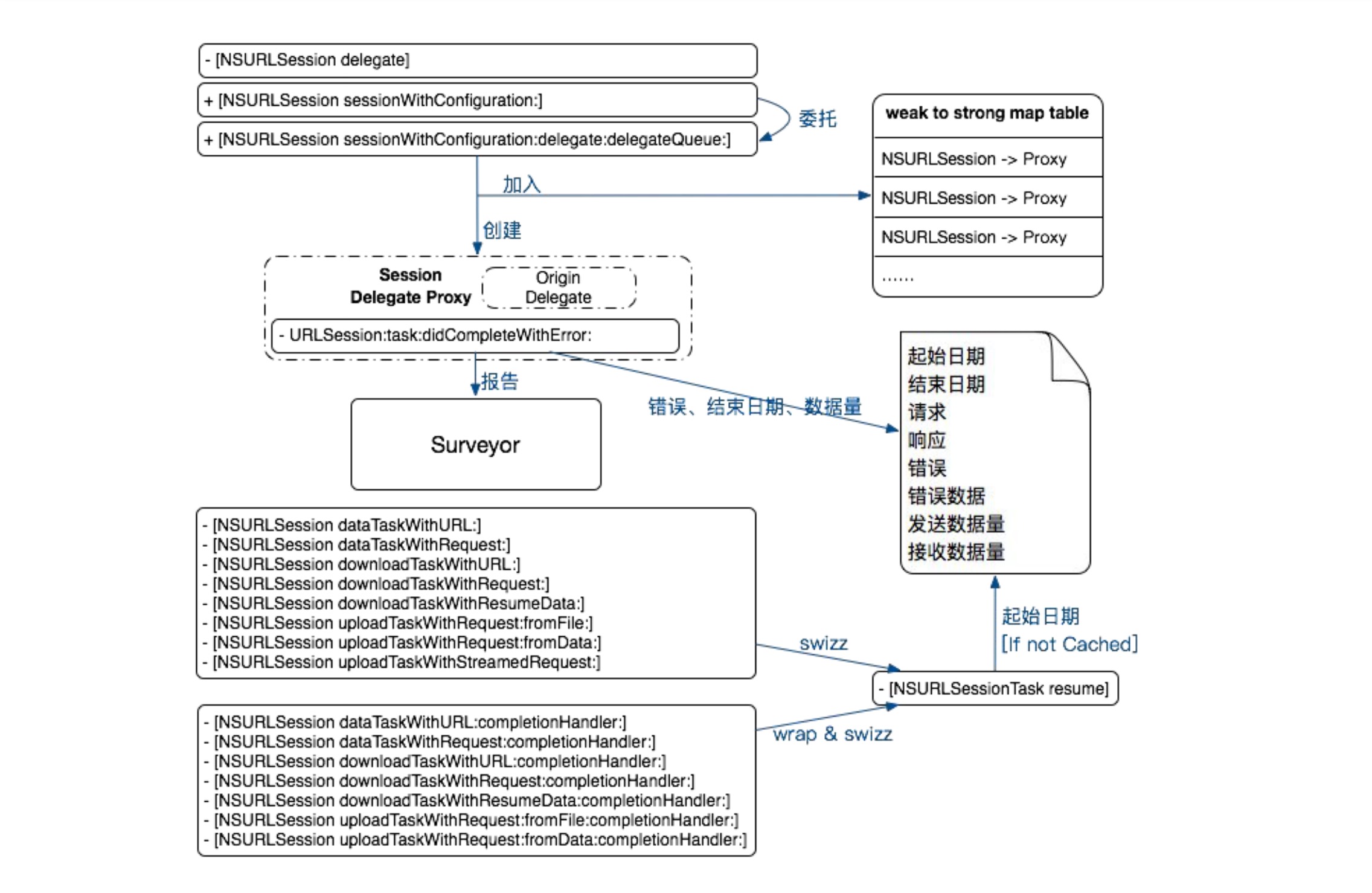
我们知道 NSURLSession、NSURLConnection、CFNetwork 的使用都需要调用一堆方法进行设置然后需要设置代理对象,实现代理方法。所以针对这种情况进行监控首先想到的是使用 runtime hook 掉方法层级。但是针对设置的代理对象的代理方法没办法 hook,因为不知道代理对象是哪个类。所以想办法可以 hook 设置代理对象这个步骤,将代理对象替换成我们设计好的某个类,然后让这个类去实现 NSURLConnection、NSURLSession、CFNetwork 相关的代理方法。然后在这些方法的内部都去调用一下原代理对象的方法实现。所以我们的需求得以满足,我们在相应的方法里面可以拿到监控数据,比如请求开始时间、结束时间、状态码、内容大小等。
NSURLSession、NSURLConnection hook 如下。
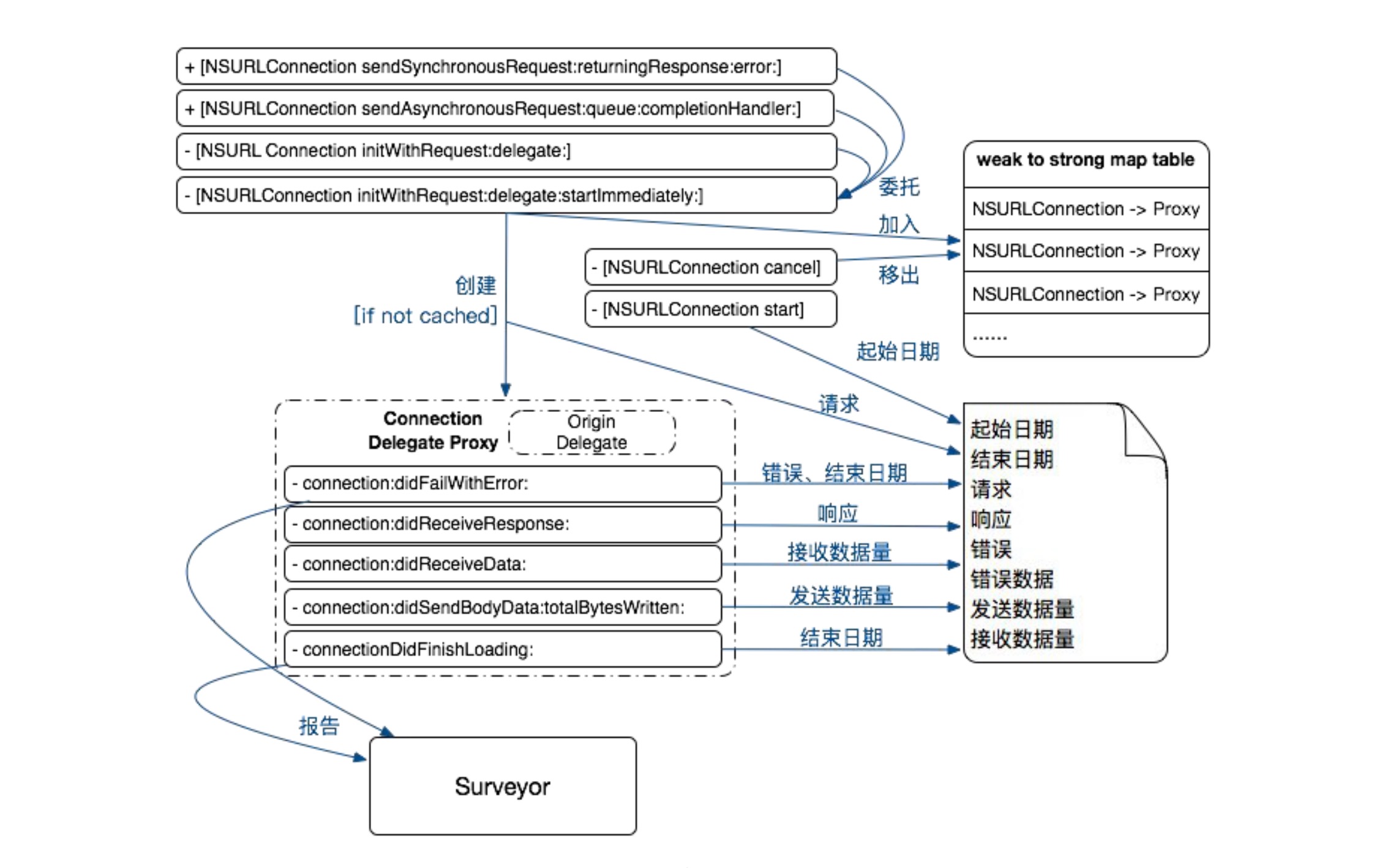
业界有 APM 针对 CFNetwork 的方案,整理描述下:
CFNetwork 是 c 语言实现的,要对 c 代码进行 hook 需要使用 Dynamic Loader Hook 库 - fishhook。
Dynamic Loader(dyld)通过更新 Mach-O 文件中保存的指针的方法来绑定符号。借用它可以在 Runtime 修改 C 函数调用的函数指针。fishhook 的实现原理:遍历
__DATA segment里面__nl_symbol_ptr、__la_symbol_ptr两个 section 里面的符号,通过 Indirect Symbol Table、Symbol Table 和 String Table 的配合,找到自己要替换的函数,达到 hook 的目的。
/* Returns the number of bytes read, or -1 if an error occurs preventing any
bytes from being read, or 0 if the stream's end was encountered.
It is an error to try and read from a stream that hasn't been opened first.
This call will block until at least one byte is available; it will NOT block
until the entire buffer can be filled. To avoid blocking, either poll using
CFReadStreamHasBytesAvailable() or use the run loop and listen for the
kCFStreamEventHasBytesAvailable event for notification of data available. */
CF_EXPORT
CFIndex CFReadStreamRead(CFReadStreamRef _Null_unspecified stream, UInt8 * _Null_unspecified buffer, CFIndex bufferLength);
CFNetwork 使用 CFReadStreamRef 来传递数据,使用回调函数的形式来接受服务器的响应。当回调函数受到
具体步骤及其关键代码如下,以 NSURLConnection 举例
-
因为要 Hook 挺多地方,所以写一个 method swizzling 的工具类
#import <Foundation/Foundation.h> NS_ASSUME_NONNULL_BEGIN @interface NSObject (hook) /** hook对象方法 @param originalSelector 需要hook的原始对象方法 @param swizzledSelector 需要替换的对象方法 */ + (void)apm_swizzleMethod:(SEL)originalSelector swizzledSelector:(SEL)swizzledSelector; /** hook类方法 @param originalSelector 需要hook的原始类方法 @param swizzledSelector 需要替换的类方法 */ + (void)apm_swizzleClassMethod:(SEL)originalSelector swizzledSelector:(SEL)swizzledSelector; @end NS_ASSUME_NONNULL_END + (void)apm_swizzleMethod:(SEL)originalSelector swizzledSelector:(SEL)swizzledSelector { class_swizzleInstanceMethod(self, originalSelector, swizzledSelector); } + (void)apm_swizzleClassMethod:(SEL)originalSelector swizzledSelector:(SEL)swizzledSelector { //类方法实际上是储存在类对象的类(即元类)中,即类方法相当于元类的实例方法,所以只需要把元类传入,其他逻辑和交互实例方法一样。 Class class2 = object_getClass(self); class_swizzleInstanceMethod(class2, originalSelector, swizzledSelector); } void class_swizzleInstanceMethod(Class class, SEL originalSEL, SEL replacementSEL) { Method originMethod = class_getInstanceMethod(class, originalSEL); Method replaceMethod = class_getInstanceMethod(class, replacementSEL); if(class_addMethod(class, originalSEL, method_getImplementation(replaceMethod),method_getTypeEncoding(replaceMethod))) { class_replaceMethod(class,replacementSEL, method_getImplementation(originMethod), method_getTypeEncoding(originMethod)); }else { method_exchangeImplementations(originMethod, replaceMethod); } } -
建立一个继承自 NSProxy 抽象类的类,实现相应方法。
#import <Foundation/Foundation.h> NS_ASSUME_NONNULL_BEGIN // 为 NSURLConnection、NSURLSession、CFNetwork 代理设置代理转发 @interface NetworkDelegateProxy : NSProxy + (instancetype)setProxyForObject:(id)originalTarget withNewDelegate:(id)newDelegate; @end NS_ASSUME_NONNULL_END // .m @interface NetworkDelegateProxy () { id _originalTarget; id _NewDelegate; } @end @implementation NetworkDelegateProxy #pragma mark - life cycle + (instancetype)sharedInstance { static NetworkDelegateProxy *_sharedInstance = nil; static dispatch_once_t onceToken; dispatch_once(&onceToken, ^{ _sharedInstance = [NetworkDelegateProxy alloc]; }); return _sharedInstance; } #pragma mark - public Method + (instancetype)setProxyForObject:(id)originalTarget withNewDelegate:(id)newDelegate { NetworkDelegateProxy *instance = [NetworkDelegateProxy sharedInstance]; instance->_originalTarget = originalTarget; instance->_NewDelegate = newDelegate; return instance; } - (void)forwardInvocation:(NSInvocation *)invocation { if ([_originalTarget respondsToSelector:invocation.selector]) { [invocation invokeWithTarget:_originalTarget]; [((NSURLSessionAndConnectionImplementor *)_NewDelegate) invoke:invocation]; } } - (nullable NSMethodSignature *)methodSignatureForSelector:(SEL)sel { return [_originalTarget methodSignatureForSelector:sel]; } @end -
创建一个对象,实现 NSURLConnection、NSURLSession、NSIuputStream 代理方法
// NetworkImplementor.m #pragma mark-NSURLConnectionDelegate - (void)connection:(NSURLConnection *)connection didFailWithError:(NSError *)error { NSLog(@"%s", __func__); } - (nullable NSURLRequest *)connection:(NSURLConnection *)connection willSendRequest:(NSURLRequest *)request redirectResponse:(nullable NSURLResponse *)response { NSLog(@"%s", __func__); return request; } #pragma mark-NSURLConnectionDataDelegate - (void)connection:(NSURLConnection *)connection didReceiveResponse:(NSURLResponse *)response { NSLog(@"%s", __func__); } - (void)connection:(NSURLConnection *)connection didReceiveData:(NSData *)data { NSLog(@"%s", __func__); } - (void)connection:(NSURLConnection *)connection didSendBodyData:(NSInteger)bytesWritten totalBytesWritten:(NSInteger)totalBytesWritten totalBytesExpectedToWrite:(NSInteger)totalBytesExpectedToWrite { NSLog(@"%s", __func__); } - (void)connectionDidFinishLoading:(NSURLConnection *)connection { NSLog(@"%s", __func__); } #pragma mark-NSURLConnectionDownloadDelegate - (void)connection:(NSURLConnection *)connection didWriteData:(long long)bytesWritten totalBytesWritten:(long long)totalBytesWritten expectedTotalBytes:(long long) expectedTotalBytes { NSLog(@"%s", __func__); } - (void)connectionDidResumeDownloading:(NSURLConnection *)connection totalBytesWritten:(long long)totalBytesWritten expectedTotalBytes:(long long) expectedTotalBytes { NSLog(@"%s", __func__); } - (void)connectionDidFinishDownloading:(NSURLConnection *)connection destinationURL:(NSURL *) destinationURL { NSLog(@"%s", __func__); } // 根据需求自己去写需要监控的数据项 -
给 NSURLConnection 添加 Category,专门设置 hook 代理对象、hook NSURLConnection 对象方法
// NSURLConnection+Monitor.m
@implementation NSURLConnection (Monitor)

+ (void)load
{
    static dispatch_once_t onceToken;
    dispatch_once(&onceToken, ^{
        @autoreleasepool {
            [[self class] apm_swizzleMethod:@selector(apm_initWithRequest:delegate:) swizzledSelector:@selector(initWithRequest: delegate:)];
        }
    });
}

- (_Nonnull instancetype)apm_initWithRequest:(NSURLRequest *)request delegate:(nullable id)delegate
{
    /*
     1. 在设置 Delegate 的时候替换 delegate。
     2. 因为要在每个代理方法里面,监控数据,所以需要将代理方法都 hook 下
     3. 在原代理方法执行的时候,让新的代理对象里面,去执行方法的转发,
     */
    NSString *traceId = @"traceId";
    NSMutableURLRequest *rq = [request mutableCopy];
    NSString *preTraceId = [request.allHTTPHeaderFields valueForKey:@"head_key_traceid"];
    if (preTraceId) {
        // 调用 hook 之前的初始化方法,返回 NSURLConnection
        return [self apm_initWithRequest:rq delegate:delegate];
    } else {
        [rq setValue:traceId forHTTPHeaderField:@"head_key_traceid"];

        NSURLSessionAndConnectionImplementor *mockDelegate = [NSURLSessionAndConnectionImplementor new];
        [self registerDelegateMethod:@"connection:didFailWithError:" originalDelegate:delegate newDelegate:mockDelegate flag:"v@:@@"];

        [self registerDelegateMethod:@"connection:didReceiveResponse:" originalDelegate:delegate newDelegate:mockDelegate flag:"v@:@@"];
        [self registerDelegateMethod:@"connection:didReceiveData:" originalDelegate:delegate newDelegate:mockDelegate flag:"v@:@@"];
        [self registerDelegateMethod:@"connection:didFailWithError:" originalDelegate:delegate newDelegate:mockDelegate flag:"v@:@@"];

        [self registerDelegateMethod:@"connectionDidFinishLoading:" originalDelegate:delegate newDelegate:mockDelegate flag:"v@:@"];
        [self registerDelegateMethod:@"connection:willSendRequest:redirectResponse:" originalDelegate:delegate newDelegate:mockDelegate flag:"@@:@@"];
        delegate = [NetworkDelegateProxy setProxyForObject:delegate withNewDelegate:mockDelegate];

        // 调用 hook 之前的初始化方法,返回 NSURLConnection
        return [self apm_initWithRequest:rq delegate:delegate];
    }
}

- (void)registerDelegateMethod:(NSString *)methodName originalDelegate:(id<NSURLConnectionDelegate>)originalDelegate newDelegate:(NSURLSessionAndConnectionImplementor *)newDelegate flag:(const char *)flag
{
    if ([originalDelegate respondsToSelector:NSSelectorFromString(methodName)]) {
        IMP originalMethodImp = class_getMethodImplementation([originalDelegate class], NSSelectorFromString(methodName));
        IMP newMethodImp = class_getMethodImplementation([newDelegate class], NSSelectorFromString(methodName));
        if (originalMethodImp != newMethodImp) {
            [newDelegate registerSelector: methodName];
            NSLog(@"");
        }
    } else {
        class_addMethod([originalDelegate class], NSSelectorFromString(methodName), class_getMethodImplementation([newDelegate class], NSSelectorFromString(methodName)), flag);
    }
}

@end
这样下来就是可以监控到网络信息了,然后将数据交给数据上报 SDK,按照下发的数据上报策略去上报数据。
2.3.2 方法二
其实,针对上述的需求还有另一种方法一样可以达到目的,那就是 isa swizzling。
顺道说一句,上面针对 NSURLConnection、NSURLSession、NSInputStream 代理对象的 hook 之后,利用 NSProxy 实现代理对象方法的转发,有另一种方法可以实现,那就是 isa swizzling。
-
Method swizzling 原理
struct old_method {
    SEL method_name;
    char *method_types;
    IMP method_imp;
};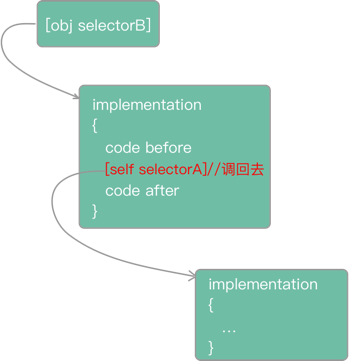
method swizzling 改进版如下
Method originalMethod = class_getInstanceMethod(aClass, aSEL); IMP originalIMP = method_getImplementation(originalMethod); char *cd = method_getTypeEncoding(originalMethod); IMP newIMP = imp_implementationWithBlock(^(id self) { void (*tmp)(id self, SEL _cmd) = originalIMP; tmp(self, aSEL); }); class_replaceMethod(aClass, aSEL, newIMP, cd); -
isa swizzling
/// Represents an instance of a class.
struct objc_object {
    Class _Nonnull isa  OBJC_ISA_AVAILABILITY;
};

/// A pointer to an instance of a class.
typedef struct objc_object *id;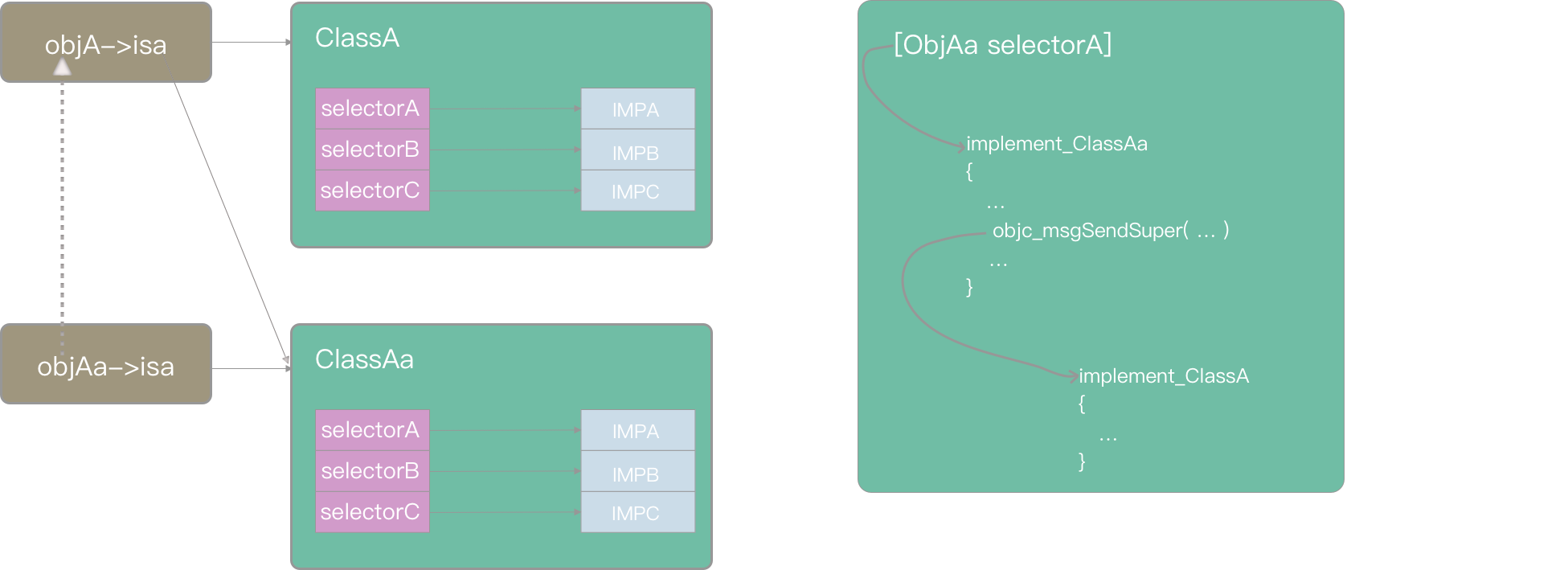
我们来分析一下为什么修改 isa 可以实现目的呢?
- 写 APM 监控的人没办法确定业务代码
- 不可能为了方便监控 APM,写某些类,让业务线开发者别使用系统 NSURLSession、NSURLConnection 类
想想 KVO 的实现原理?结合上面的图
- 创建监控对象子类
- 重写子类中属性的 getter、seeter
- 将监控对象的 isa 指针指向新创建的子类
- 在子类的 getter、setter 中拦截值的变化,通知监控对象值的变化
- 监控完之后将监控对象的 isa 还原回去
按照这个思路,我们也可以对 NSURLConnection、NSURLSession 的 load 方法中动态创建子类,在子类中重写方法,比如 - (**nullable** **instancetype**)initWithRequest:(NSURLRequest *)request delegate:(**nullable** **id**)delegate startImmediately:(**BOOL**)startImmediately; ,然后将 NSURLSession、NSURLConnection 的 isa 指向动态创建的子类。在这些方法处理完之后还原本身的 isa 指针。
不过 isa swizzling 针对的还是 method swizzling,代理对象不确定,还是需要 NSProxy 进行动态处理。
至于如何修改 isa,我写一个简单的 Demo 来模拟 KVO
- (void)lbpKVO_addObserver:(NSObject *)observer forKeyPath:(NSString *)keyPath options:(NSKeyValueObservingOptions)options context:(nullable void *)context {
    //生成自定义的名称
    NSString *className = NSStringFromClass(self.class);
    NSString *currentClassName = [@"LBPKVONotifying_" stringByAppendingString:className];
    //1. runtime 生成类
    Class myclass = objc_allocateClassPair(self.class, [currentClassName UTF8String], 0);
    // 生成后不能马上使用,必须先注册
    objc_registerClassPair(myclass);

    //2. 重写 setter 方法
    class_addMethod(myclass,@selector(say) , (IMP)say, "v@:@");

//    class_addMethod(myclass,@selector(setName:) , (IMP)setName, "v@:@");
    //3. 修改 isa
    object_setClass(self, myclass);

    //4. 将观察者保存到当前对象里面
    objc_setAssociatedObject(self, "observer", observer, OBJC_ASSOCIATION_ASSIGN);

    //5. 将传递的上下文绑定到当前对象里面
    objc_setAssociatedObject(self, "context", (__bridge id _Nullable)(context), OBJC_ASSOCIATION_RETAIN);
}


void say(id self, SEL _cmd)
{
   // 调用父类方法一
    struct objc_super superclass = {self, [self superclass]};
    ((void(*)(struct objc_super *,SEL))objc_msgSendSuper)(&superclass,@selector(say));
    NSLog(@"%s", __func__);
// 调用父类方法二
//    Class class = [self class];
//    object_setClass(self, class_getSuperclass(class));
//    objc_msgSend(self, @selector(say));
}

void setName (id self, SEL _cmd, NSString *name) {
    NSLog(@"come here");
    //先切换到当前类的父类,然后发送消息 setName,然后切换当前子类
    //1. 切换到父类
    Class class = [self class];
    object_setClass(self, class_getSuperclass(class));
    //2. 调用父类的 setName 方法
    objc_msgSend(self, @selector(setName:), name);

    //3. 调用观察
    id observer = objc_getAssociatedObject(self, "observer");
    id context = objc_getAssociatedObject(self, "context");
    if (observer) {
        objc_msgSend(observer, @selector(observeValueForKeyPath:ofObject:change:context:), @"name", self, @{@"new": name, @"kind": @1 } , context);
    }
    //4. 改回子类
    object_setClass(self, class);
}

@end
2.4 方案四:监控 App 常见网络请求
本着成本的原因,由于现在大多数的项目的网络能力都是通过 AFNetworking 完成的,所以本文的网络监控可以快速完成。
AFNetworking 在发起网络的时候会有相应的通知。AFNetworkingTaskDidResumeNotification 和 AFNetworkingTaskDidCompleteNotification。通过监听通知携带的参数获取网络情况信息。
 self.didResumeObserver = [[NSNotificationCenter defaultCenter] addObserverForName:AFNetworkingTaskDidResumeNotification object:nil queue:self.queue usingBlock:^(NSNotification * _Nonnull note) {
    // 开始
    __strong __typeof(weakSelf)strongSelf = weakSelf;
    NSURLSessionTask *task = note.object;
    NSString *requestId = [[NSUUID UUID] UUIDString];
    task.apm_requestId = requestId;
    [strongSelf.networkRecoder recordStartRequestWithRequestID:requestId task:task];
}];

self.didCompleteObserver = [[NSNotificationCenter defaultCenter] addObserverForName:AFNetworkingTaskDidCompleteNotification object:nil queue:self.queue usingBlock:^(NSNotification * _Nonnull note) {

    __strong __typeof(weakSelf)strongSelf = weakSelf;

    NSError *error = note.userInfo[AFNetworkingTaskDidCompleteErrorKey];
    NSURLSessionTask *task = note.object;
    if (!error) {
        // 成功
        [strongSelf.networkRecoder recordFinishRequestWithRequestID:task.apmn_requestId task:task];
    } else {
        // 失败
        [strongSelf.networkRecoder recordResponseErrorWithRequestID:task.apmn_requestId task:task error:error];
    }
}];
在 networkRecoder 的方法里面去组装数据,交给数据上报组件,等到合适的时机策略去上报。
因为网络是一个异步的过程,所以当网络请求开始的时候需要为每个网络设置唯一标识,等到网络请求完成后再根据每个请求的标识,判断该网络耗时多久、是否成功等。所以措施是为 NSURLSessionTask 添加分类,通过 runtime 增加一个属性,也就是唯一标识。
这里插一嘴,为 Category 命名、以及内部的属性和方法命名的时候需要注意下。假如不注意会怎么样呢?假如你要为 NSString 类增加身份证号码中间位数隐藏的功能,那么写代码久了的老司机 A,为 NSString 增加了一个方法名,叫做 getMaskedIdCardNumber,但是他的需求是从 [9, 12] 这4位字符串隐藏掉。过了几天同事 B 也遇到了类似的需求,他也是一位老司机,为 NSString 增加了一个也叫 getMaskedIdCardNumber 的方法,但是他的需求是从 [8, 11] 这4位字符串隐藏,但是他引入工程后发现输出并不符合预期,为该方法写的单测没通过,他以为自己写错了截取方法,检查了几遍才发现工程引入了另一个 NSString 分类,里面的方法同名 😂 真坑。
下面的例子是 SDK,但是日常开发也是一样。
- Category 类名:建议按照当前 SDK 名称的简写作为前缀,再加下划线,再加当前分类的功能,也就是
类名+SDK名称简写_功能名称。比如当前 SDK 叫 JuhuaSuanAPM,那么该 NSURLSessionTask Category 名称就叫做NSURLSessionTask+JuHuaSuanAPM_NetworkMonitor.h - Category 属性名:建议按照当前 SDK 名称的简写作为前缀,再加下划线,再加属性名,也就是
SDK名称简写_属性名称。比如 JuhuaSuanAPM_requestId` - Category 方法名:建议按照当前 SDK 名称的简写作为前缀,再加下划线,再加方法名,也就是
SDK名称简写_方法名称。比如-(BOOL)JuhuaSuanAPM__isGzippedData
例子如下:
#import <Foundation/Foundation.h>

@interface NSURLSessionTask (JuhuaSuanAPM_NetworkMonitor)

@property (nonatomic, copy) NSString* JuhuaSuanAPM_requestId;

@end

#import "NSURLSessionTask+JuHuaSuanAPM_NetworkMonitor.h"
#import <objc/runtime.h>

@implementation NSURLSessionTask (JuHuaSuanAPM_NetworkMonitor)

- (NSString*)JuhuaSuanAPM_requestId
{
    return objc_getAssociatedObject(self, _cmd);
}

- (void)setJuhuaSuanAPM_requestId:(NSString*)requestId
{
    objc_setAssociatedObject(self, @selector(JuhuaSuanAPM_requestId), requestId, OBJC_ASSOCIATION_COPY_NONATOMIC);
}
@end