

前言
本文的文字及图片来源于网络,仅供学习、交流使用,不具有任何商业用途,如有问题请及时联系我们以作处理。
以下文章来源于APython ,作者铝

1.Requests简介
请求是唯一适用于Python的Non-GMO HTTP库,可供人类安全使用。
Python爬虫中绕过不开的就是requests库。而Requests引用urllib在使用方面上引起开发者感到更加人性化,更加简洁,更加舒适。以下摘自Requests官方文档中的功能特性:
- 保持活力和连接池
- 国际化域名和URL
- 带永久Cookie的会话
- 浏览器式的SSL认证
- 自动内容解码
- 基本/摘要式的身份认证
- 优雅的键/值Cookie
- 自动解压
- Unicode响应体
- HTTP(S)代理支持
- 文件分块上传
- 流下载
- 连接超时
- 分块请求
- 支持.netrc
2.要求安装
请求是python的三方库,所以我们需要使用pip安装
pip install requests
或者通过二进制安装
git clone git://github.com/kennethreitz/requests.git
cd <requests目录>
python setup.py install
3.要求用例
常用的HTTP操作为GET和POST,其他不常用的操作可以参考官方文档或串口调用相应方法即可。
import requests

# GET 请求
response = requests.get("https://getman.cn/echo")
print(response.text)

# GET 构造header,cookie,参数请求
headers = {
    'user-agent': 'Mozilla/5.0 (Windows NT 10.0; Win64; x64) AppleWebKit/537.36 (KHTML, like Gecko) Chrome/86.0.4240.198 Safari/537.36',
    'accept': 'text/html,application/xhtml+xml,application/xml;q=0.9,image/avif,image/webp,image/apng,*/*;q=0.8,application/signed-exchange;v=b3;q=0.9',
}
cookie = {"user":"APython"}
params  = {'my_name':'AL','name':'APython'}
response=requests.get("https://getman.cn/echo",headers=headers,cookies=cookie,params=params)
print(response.text)

#POST 请求
data = {'name': 'APython-post','age': 24,}
response = requests.post("https://getman.cn/echo", data=data)
print(response.text)
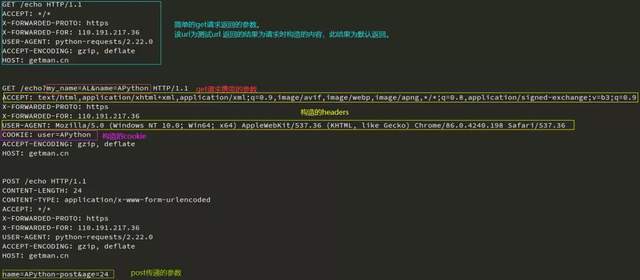
返回值response是一个Response对象,它的常用属性和方法如下:
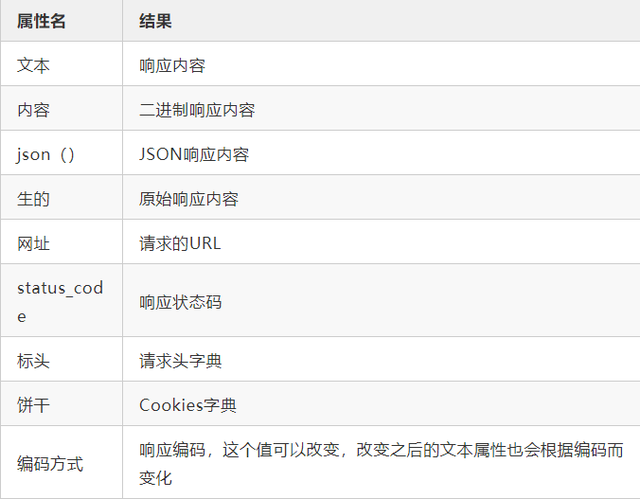
4.请求更多示例
import requests

# 下载文件(一)小文件
url = 'https://raw.githubusercontent.com/psf/requests/master/ext/ss.png'
response = requests.get(url)
with open('demo.png', 'wb') as f:
    f.write(response.content)

# 下载文件(二)大文件
file_url = "https://readthedocs.org/projects/python-guide/downloads/pdf/latest/"
response = requests.get(file_url)
with open("python.dpf", "wb") as pdf:
    for chunk in response.iter_content(chunk_size=1024):
        if chunk:
            pdf.write(chunk)

# POST 提交数据返回结果
url = 'https://api.github.com/some/endpoint'
data = {'some': 'APython'}
response = requests.post(url, data=data)
print(response.text)

#session 会话保持(会话对象可以跨请求保持某些参数)
session = requests.session()
session.get(url)
session.post(url,data)
