先让我们来看看效果图
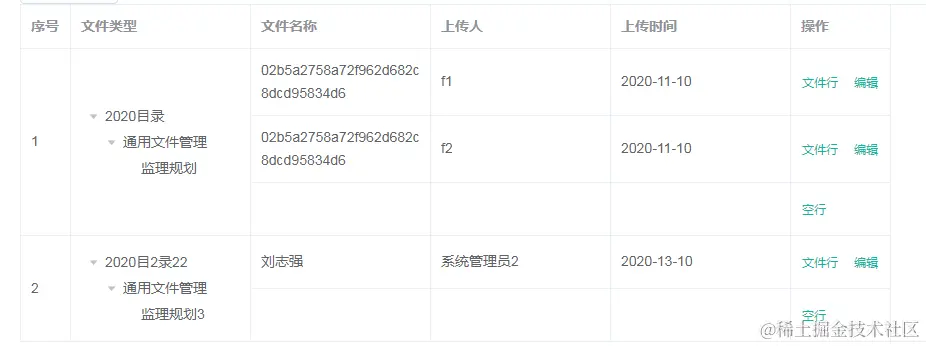
再来看看数据,如果是你,会怎么写, === 建议自己拿到数据看下能否写成这样的效果,或者复制最下方源码,到文件中做单元测试,回过头来看这篇文章===
文件类型要渲染的就是这颗树, => [initData[i]]
文件名 =>  files: [name:"0022295b408642c38975f04a19507d0e"]
上传人 =>  files: [uploadName:"f1"]
上传时间 =>  files: [uploadDate:"2020-11-10"]
点击查看
  data() {
    return {
      initData: [
        {
          id: "775389133345390593",
          parentId: "0",
          name: "2020目录",
          children: [
            {
              id: "775389133580271617",
              parentId: "775389133345390593",
              name: "通用文件管理",
              children: [
                {
                  id: "775389133827735553",
                  parentId: "775389133580271617",
                  name: "监理规划",
                  children: null,
                  files: [
                    {
                      id: "0022295b408642c38975f04a19507d0e",
                      parentId: "775389133827735553",
                      name: "02b5a2758a72f962d682c8dcd95834d6",
                      uploadName: "f1",
                      uploadDate: "2020-11-10",
                      filePath:
                        "group1/M00/00/02/rBLyvl1fo0SAXeSXAAET80aDviI824.jpg",
                      department: null,
                    },
                    {
                      id: "0022295b408642c38975f04a19507d0e",
                      parentId: "775389133827735553",
                      name: "02b5a2758a72f962d682c8dcd95834d6",
                      uploadName: "f2",
                      uploadDate: "2020-11-10",
                      filePath:
                        "group1/M00/00/02/rBLyvl1fo0SAXeSXAAET80aDviI824.jpg",
                      department: null,
                    },
                  ],
                  level: 3,
                },
              ],
              files: [],
              level: 2,
            },
          ],
          files: null,
          level: 1,
        },
        {
          id: "775389133345390593",
          parentId: "3",
          name: "2020目2录22",
          children: [
            {
              id: "775389133580271617",
              parentId: "775389133345390593",
              name: "通用文件管理",
              children: [
                {
                  id: "775389133827735553",
                  parentId: "775389133580271617",
                  name: "监理规划3",
                  children: null,
                  files: [
                    {
                      id: "0022295b408642c38975f04a19507d0e",
                      parentId: "775389133827735553",
                      name: "刘志强",
                      uploadName: "系统管理员2",
                      uploadDate: "2020-13-10",
                      filePath:
                        "group1/M00/00/02/rBLyvl1fo0SAXeSXAAET80aDviI824.jpg",
                      department: null,
                    },
                  ],
                  level: 3,
                },
              ],
              files: [],
              level: 2,
            },
          ],
          files: null,
          level: 1,
        },
      ],
      defaultProps: {
        children: "children",
        label: "name",
      },
      tableData: [],
      spanArr: [],
    };
  },
现在我们要渲染的是,最内层里面那个树的files,所以这时候必须把每个树的files拿到手
// 拿到当前树的files
getfiles(tableData) {
let files = []
function getChildren(tableData) {
if (tableData[0].children == null) {
files = tableData[0]
} else {
getChildren(tableData[0].children)
}
}
getChildren(tableData)
return files
},
单个树的files能拿到,那么就要组成我们想要渲染的数据了
getData(initData) {
this.tableData = []
initData.map((item, index) => {
let getfiles = this.getfiles([item])
//根据每个类型的文件数组长度去push数据row,实现每一条文件已一行
for (let i = 0
let obj = {
// treeId: item.id,
index: index + 1, //index作为数据字段,亦作为文件类型标识key
tree: [item],
...getfiles.files[i],
type: "file", //type字段作操作按钮判断用
}
this.tableData.push(obj)
}
this.tableData.push({ index: index + 1, type: "empty" })
})
},
现在的效果
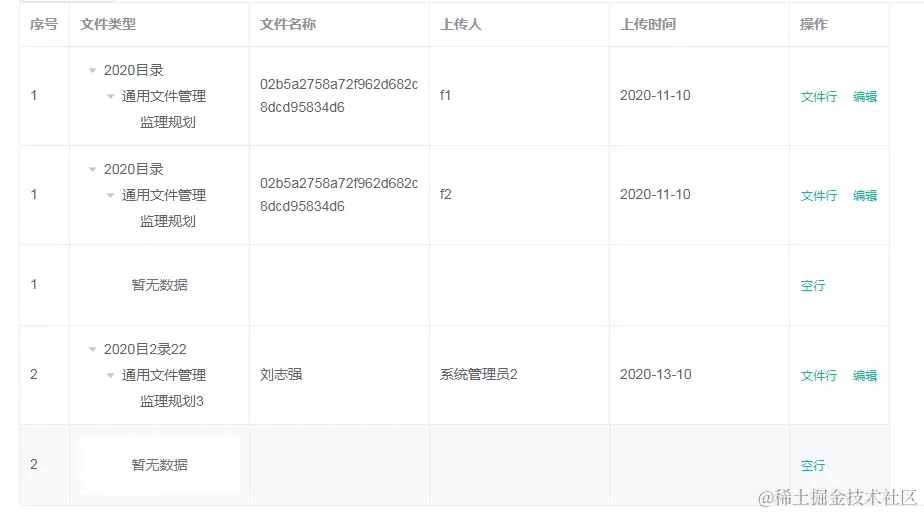
这时候就该想想,该怎么去合并,这个行数都是不确定的
// 通过对文件类型标识字段(该数据为index),得出rowspan规律数组,实现相同类型合并
// this.spanArr = [3, 0, 0, 2, 0]
dealBeforeSpan() {
let contactDot = 0
this.tableData.forEach((item, k) => {
if (k === 0) {
this.spanArr.push(1)
} else {
if (item.index === this.tableData[k - 1].index) {
this.spanArr[contactDot] += 1
this.spanArr.push(0)
} else {
contactDot = k
this.spanArr.push(1)
}
}
})
}
table 的:span-method="objectSpanMethod"
objectSpanMethod({ row, column, rowIndex, columnIndex }) {
if (columnIndex <= 1) {
console.log(this.spanArr[rowIndex]);
if (this.spanArr[rowIndex]) {
return {
rowspan: this.spanArr[rowIndex],
colspan: 1,
};
} else {
return {
rowspan: 0,
colspan: 0,
};
}
}
},
最后附上源码
源码
<template>
<div class="demo">
<el-button @click="getData(initData)">获取数据</el-button>
<el-table
:span-method="objectSpanMethod"
:data="tableData"
style="width: 100%"
border
>
<el-table-column prop="index" label="序号" width="50"> </el-table-column>
<el-table-column prop="tree" label="文件类型" width="180">
<template slot-scope="scope">
<el-tree
:data="scope.row.tree"
:props="defaultProps"
node-key="id"
default-expand-all
></el-tree>
</template>
</el-table-column>
<el-table-column label="文件名称" width="180" prop="name">
</el-table-column>
<el-table-column label="上传人" width="180" prop="uploadName">
</el-table-column>
<el-table-column label="上传时间" width="180" prop="uploadDate">
</el-table-column>
<el-table-column label="操作" width="100">
<template slot-scope="scope">
<template v-if="scope.row.type === 'file'">
<el-button @click="handleClick(scope.row)" type="text" size="small"
>文件行</el-button
>
<el-button type="text" size="small">编辑</el-button>
</template>
<template v-else>
<el-button type="text" size="small" @click="handle(scope.$index)"
>空行</el-button
>
</template>
</template>
</el-table-column>
</el-table>
</div>
</template>
<script>
export default {
data() {
return {
defaultProps: {
children: "children",
label: "name",
},
initData: [
{
id: "775389133345390593",
parentId: "0",
name: "2020目录",
children: [
{
id: "775389133580271617",
parentId: "775389133345390593",
name: "通用文件管理",
children: [
{
id: "775389133827735553",
parentId: "775389133580271617",
name: "监理规划",
children: null,
files: [
{
id: "0022295b408642c38975f04a19507d0e",
parentId: "775389133827735553",
name: "02b5a2758a72f962d682c8dcd95834d6",
uploadName: "f1",
uploadDate: "2020-11-10",
filePath:
"group1/M00/00/02/rBLyvl1fo0SAXeSXAAET80aDviI824.jpg",
department: null,
},
{
id: "0022295b408642c38975f04a19507d0e",
parentId: "775389133827735553",
name: "02b5a2758a72f962d682c8dcd95834d6",
uploadName: "f2",
uploadDate: "2020-11-10",
filePath:
"group1/M00/00/02/rBLyvl1fo0SAXeSXAAET80aDviI824.jpg",
department: null,
},
],
level: 3,
},
],
files: [],
level: 2,
},
],
files: null,
level: 1,
},
{
id: "775389133345390593",
parentId: "3",
name: "2020目2录22",
children: [
{
id: "775389133580271617",
parentId: "775389133345390593",
name: "通用文件管理",
children: [
{
id: "775389133827735553",
parentId: "775389133580271617",
name: "监理规划3",
children: null,
files: [
{
id: "0022295b408642c38975f04a19507d0e",
parentId: "775389133827735553",
name: "刘志强",
uploadName: "系统管理员2",
uploadDate: "2020-13-10",
filePath:
"group1/M00/00/02/rBLyvl1fo0SAXeSXAAET80aDviI824.jpg",
department: null,
},
],
level: 3,
},
],
files: [],
level: 2,
},
],
files: null,
level: 1,
},
],
tableData: [],
spanArr: [],
};
},
mounted() {
this.getData(this.initData);
this.dealBeforeSpan();
},
methods: {
getfiles(tableData) {
let files = [];
function getChildren(tableData) {
if (tableData[0].children == null) {
files = tableData[0];
} else {
getChildren(tableData[0].children);
}
}
getChildren(tableData);
return files;
},
getData(initData) {
this.tableData = [];
initData.map((item, index) => {
let getfiles = this.getfiles([item]);
for (let i = 0; i < getfiles.files.length; i++) {
let obj = {
index: index + 1,
tree: [item],
...getfiles.files[i],
type: "file",
};
this.tableData.push(obj);
}
this.tableData.push({ index: index + 1, type: "empty" });
});
console.log(this.tableData);
},
dealBeforeSpan() {
let contactDot = 0;
this.tableData.forEach((item, k) => {
if (k === 0) {
this.spanArr.push(1);
} else {
if (item.index === this.tableData[k - 1].index) {
this.spanArr[contactDot] += 1;
this.spanArr.push(0);
} else {
contactDot = k;
this.spanArr.push(1);
}
}
});
console.log(this.spanArr);
},
objectSpanMethod({ row, column, rowIndex, columnIndex }) {
if (columnIndex <= 1) {
console.log(this.spanArr[rowIndex]);
if (this.spanArr[rowIndex]) {
return {
rowspan: this.spanArr[rowIndex],
colspan: 1,
};
} else {
return {
rowspan: 0,
colspan: 0,
};
}
}
},
handleClick(row) {
console.log(row);
},
handle(index) {
console.log(this.tableData[index - 1]);
},
},
};
</script>
<style scoped>
.demo{
padding:0 20px;
}
</style>