1. 示例
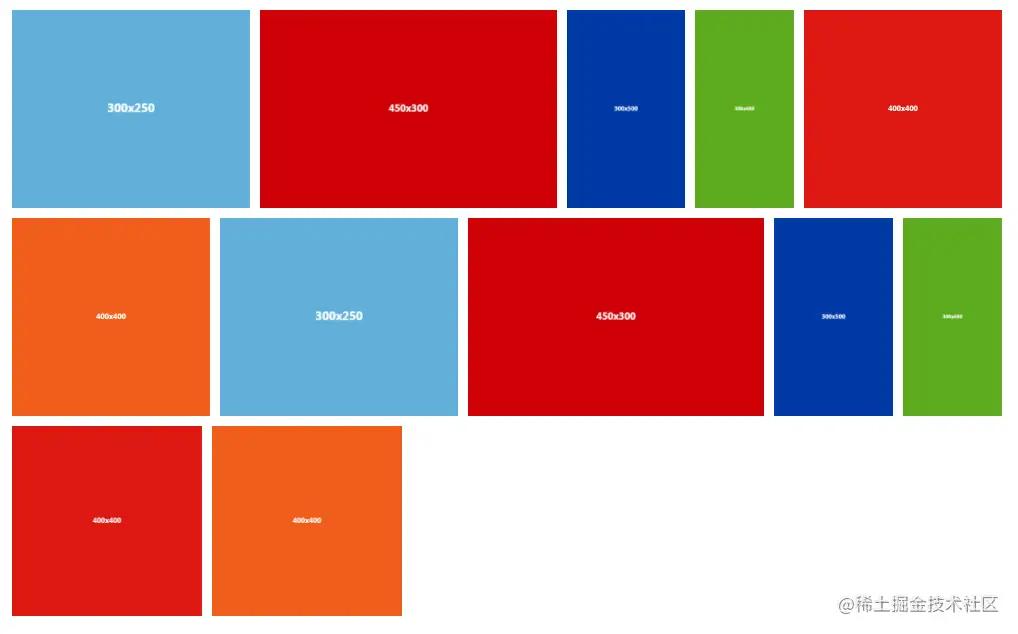
2.代码实现
import React, { useState, useEffect } from 'react';
import { Empty, Row } from 'antd';
import { ImageComponent } from '@components/index';
import { ImageData } from '@utils/CommonInterface';
const wishHeight: number = 200;
interface ImageDataWithViewContainer extends ImageData {
viewWidth: number,
viewHeight: number,
imageRatio: number
}
interface IProps {
imagePropList: Array<ImageData>,
listChange?: boolean,
containerWidth?: number
}
const ImageList = (props: IProps) => {
const { imagePropList, containerWidth = 1200 } = props;
const [imageList, setImageList] = useState<Array<ImageDataWithViewContainer>>([]);
const [isInit, setIsInit] = useState<boolean>(false);
useEffect(() => {
setIsInit(true);
initImageList(imagePropList);
}, [imagePropList]);
useEffect(() => {
if (isInit) {
lazyLoad();
}
}, [imageList]);
const initImageList = (imagePropList: Array<ImageData>) => {
if (imagePropList.length > 0) {
let imageTempList: Array<ImageDataWithViewContainer> = imagePropList.map((item: ImageData) => {
return {
...item,
viewHeight: wishHeight,
viewWidth: wishHeight,
imageRatio: item.width / item.height
};
});
imageTempList = getImageView(imageTempList);
setImageList(imageTempList);
} else {
setImageList([]);
}
};
const handleWheel = (e: any) => {
let deltaY = e.deltaY;
if (deltaY > 0) {
lazyLoad();
}
};
const lazyLoad = () => {
const tempImageList: Array<ImageDataWithViewContainer> = [...imageList];
let availHeight: number = window.screen.availHeight;
let scrollHeight: number = document.documentElement.scrollTop;
let diff = 100;
for (let i = 0; i < tempImageList.length; i++) {
let reactObj = document.getElementById(tempImageList[i].id).getBoundingClientRect();
let contentTop = reactObj.top;
if (scrollHeight + diff > contentTop - availHeight) {
tempImageList[i].thumbnailTrueUrl = tempImageList[i].thumbnailUrl;
}
}
setImageList(tempImageList);
setIsInit(false);
};
const getImageView = (imageTempList: Array<ImageDataWithViewContainer>) => {
const allRatio: number = containerWidth / wishHeight;
let rowList: Array<any> = [];
let rowIndex: number = 1;
let rowTotalRatio: number = 0;
let lastRowIndex: number = 0;
let rowTotal: number = 0;
for (let index: number = 0; index < imageTempList.length; index++) {
rowTotalRatio = rowTotalRatio + imageTempList[index].imageRatio;
if (rowTotalRatio > allRatio) {
const spaceWidth: number = rowTotal * 10;
const restWidth = containerWidth - spaceWidth;
const height: number = restWidth / (rowTotalRatio - imageTempList[index].imageRatio);
rowList.push({
row: rowIndex,
endIndex: index - 1,
height
});
lastRowIndex = index - 1;
rowIndex = rowIndex + 1;
rowTotalRatio = imageTempList[index].imageRatio;
rowTotal = 1;
} else {
rowTotal = rowTotal + 1;
}
}
if (lastRowIndex < (imageTempList.length - 1) || lastRowIndex === 0) {
rowList.push({
row: rowIndex,
endIndex: imageTempList.length - 1,
height: wishHeight - 10
});
}
for (let j: number = 0; j < rowList.length; j++) {
let startIndex: number = -1;
let endIndex: number = rowList[j].endIndex;
if (j > 0) {
startIndex = rowList[j - 1].endIndex;
}
for (let i: number = 0; i < imageTempList.length; i++) {
if (i > startIndex && i <= endIndex) {
imageTempList[i].viewHeight = rowList[j].height;
imageTempList[i].viewWidth = imageTempList[i].imageRatio * imageTempList[i].viewHeight;
}
}
}
return imageTempList;
};
let imageHtml: any = <Row justify="center" style={{ width: '100%' }}><Empty description="暂无图片" /></Row>;
if (imageList.length > 0) {
imageHtml = imageList.map((item: ImageDataWithViewContainer, index: number) => (
<div id={item.id} key={item.id}>
<ImageComponent
index={index}
image={item}
height={item.viewHeight}
width={item.viewWidth}
onClick={() => {}}
/>
</div>
));
}
return (
<div
style={{
width: containerWidth,
display: 'flex',
flexWrap: 'wrap',
minWidth: containerWidth + 1
}}
onWheel={handleWheel}
>
{imageHtml}
</div>
);
};
export default ImageList;
3.参数


4. 更多组件请查看我司的 github 项目:
地址: github.com/MeehooCN/co…