前言
作为 Google 主推 Jetpack 组件的一员大将,LiveData 一经推出便获得广大程序员的喜爱,拥有可观察、生命周期感知的特点,LiveData 是一种可观察的数据存储器类。与常规的可观察类不同,LiveData 具有生命周期感知能力,意指它遵循其他应用组件(如 Activity、Fragment 或 Service)的生命周期。这种感知能力可确保 LiveData 仅更新处于活跃生命周期状态的应用组件观察者。
优势:
- 确保界面符合数据状态
LiveData 遵循观察者模式。当生命周期状态发生变化时,LiveData 会通知 Observer 对象。您可以整合代码以在这些 Observer 对象中更新界面。观察者可以在每次发生更改时更新界面,而不是在每次应用数据发生更改时更新界面。 - 不会发生内存泄漏
观察者会绑定到 Lifecycle 对象,并在其关联的生命周期遭到销毁后进行自我清理。 - 不会因 Activity 停止而导致崩溃
如果观察者的生命周期处于非活跃状态(如返回栈中的 Activity),则它不会接收任何 LiveData 事件。 - 不再需要手动处理生命周期
界面组件只是观察相关数据,不会停止或恢复观察。LiveData 将自动管理所有这些操作,因为它在观察时可以感知相关的生命周期状态变化。 - 数据始终保持最新状态
如果生命周期变为非活跃状态,它会在再次变为活跃状态时接收最新的数据。例如,曾经在后台的 Activity 会在返回前台后立即接收最新的数据。 - 适当的配置更改
如果由于配置更改(如设备旋转)而重新创建了 Activity 或 Fragment,它会立即接收最新的可用数据。 - 共享资源
您可以使用单一实例模式扩展 LiveData 对象以封装系统服务,以便在应用中共享它们。LiveData 对象连接到系统服务一次,然后需要相应资源的任何观察者只需观察 LiveData 对象。
踩坑及原理详解:
LiveData 不允许在子线程中订阅和移除观察者,如果在子线程中订阅则会抛出异常,关键代码如下:
 @MainThread
    public void observe(@NonNull LifecycleOwner owner, @NonNull Observer<? super T> observer) {
        assertMainThread("observe");
        if (owner.getLifecycle().getCurrentState() == DESTROYED) {
            // ignore
            return;
        }
        LifecycleBoundObserver wrapper = new LifecycleBoundObserver(owner, observer);
        ObserverWrapper existing = mObservers.putIfAbsent(observer, wrapper);
        if (existing != null && !existing.isAttachedTo(owner)) {
            throw new IllegalArgumentException("Cannot add the same observer"
                    + " with different lifecycles");
        }
        if (existing != null) {
            return;
        }
        owner.getLifecycle().addObserver(wrapper);
    }
    @MainThread
    public void observeForever(@NonNull Observer<? super T> observer) {
        assertMainThread("observeForever");
        AlwaysActiveObserver wrapper = new AlwaysActiveObserver(observer);
        ObserverWrapper existing = mObservers.putIfAbsent(observer, wrapper);
        if (existing instanceof LiveData.LifecycleBoundObserver) {
            throw new IllegalArgumentException("Cannot add the same observer"
                    + " with different lifecycles");
        }
        if (existing != null) {
            return;
        }
        wrapper.activeStateChanged(true);
    }

    @MainThread
    public void removeObserver(@NonNull final Observer<? super T> observer) {
        assertMainThread("removeObserver");
        ObserverWrapper removed = mObservers.remove(observer);
        if (removed == null) {
            return;
        }
        removed.detachObserver();
        removed.activeStateChanged(false);
    }

    static void assertMainThread(String methodName) {
        if (!ArchTaskExecutor.getInstance().isMainThread()) {
            throw new IllegalStateException("Cannot invoke " + methodName + " on a background"
                    + " thread");
        }
    }
可以发现每个方法都调用了 assertMainThread 方法,判断当前线程不是主线程时抛出 IllegalStateException 异常。
2. LiveData 的 setValue 方法只能在主线程中使用
LiveData 不允许在子线程中使用 setValue 方法,否则会抛异常。代码如下:
    @MainThread
    protected void setValue(T value) {
        assertMainThread("setValue");
        mVersion++;
        mData = value;
        dispatchingValue(null);
    }
由于 LiveData 数据始终保持最新状态的特性,LiveData 只会保留最新一条数据到缓存中,在平时开发过程中,常常发现数据丢失的情况。下面编写伪代码来验证一下:
package com.example.jetpack;

import androidx.annotation.NonNull;
import androidx.appcompat.app.AppCompatActivity;
import androidx.lifecycle.LiveData;
import androidx.lifecycle.MutableLiveData;
import androidx.lifecycle.Observer;
import androidx.lifecycle.ViewModel;
import androidx.lifecycle.ViewModelProvider;

import android.os.Bundle;
import android.util.Log;

public class MainActivity extends AppCompatActivity {
    private static final String TAG = "MainActivity";
    private MyViewModel viewModel;
    @Override
    protected void onCreate(Bundle savedInstanceState) {
        super.onCreate(savedInstanceState);
        setContentView(R.layout.activity_main);
        viewModel = new ViewModelProvider(this).get(MyViewModel.class);
        viewModel.getLiveData().observe(this, new Observer<String>() {
            @Override
            public void onChanged(String data) {
                Log.d(TAG, "接收 data : " + data);
            }
        });
    }
    @Override
    protected void onStart() {
        super.onStart();
        Log.d(TAG, "恢复界面");
    }

    @Override
    protected void onStop() {
        super.onStop();
        Log.d(TAG, "离开界面");
    }
}
class MyViewModel extends ViewModel {
    private MutableLiveData<String> liveData = new MutableLiveData<String>();

    public LiveData<String> getLiveData() {
        return liveData;
    }

    public void setValue(String value) {
        liveData.setValue(value);
    }

    public void postValue(String value) {
        liveData.postValue(value);
    }
}
-
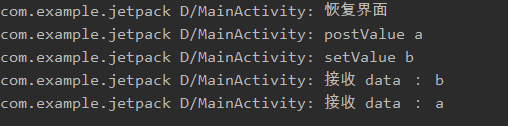
在UI可见时,调用
liveData.postValue(“a”);
liveData.setValue(“b”);
会先收到"b",后收到"a"
-
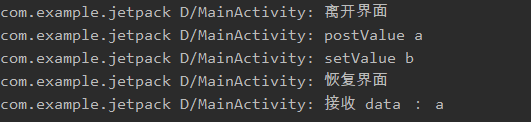
在UI不可见时,调用
liveData.postValue(“a”);
liveData.setValue(“b”);
当UI可见时,只会收到"a",因为setValue先执行,之后被postValue更新掉
-
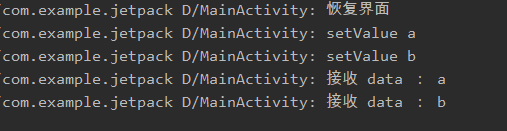
在UI可见时,调用
liveData.setValue(“a”);
liveData.setValue(“b”);
会按顺序收到"a","b"
-
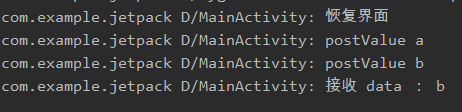
在UI可见时,调用
liveData.postValue(“a”);
liveData.postValue(“b”);
只会收到 "b"
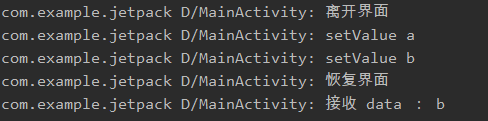
-
在UI不可见时,调用
liveData.setValue(“a”);
liveData.setValue(“b”);
当UI可见之后,只会收到 "b"
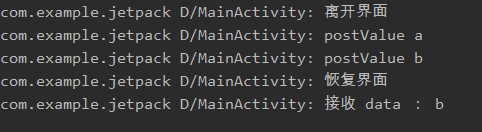
-
在UI不可见时,调用
liveData.postValue(“a”);
liveData.postValue(“b”);
当UI可见之后,只会收到 "b"
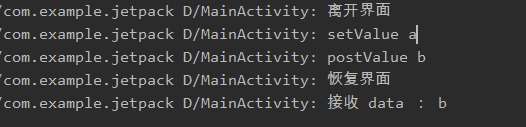
-
在UI不可见时,调用
liveData.setValue("a);
liveData.postValue(“b”);
当UI可见之后,只会收到 "b"
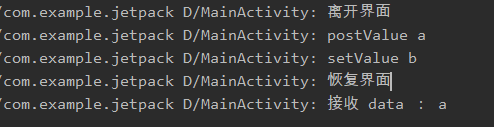
-
在UI不可见时,调用
liveData.postValue(“a”);
liveData.setValue(“b”);
当UI可见之后,只会收到"a"
看了这些执行结果,发现了很多数据丢失的情形,下面我们就从源码入手,分析出现这些现象的原因。
接下来就从 LiveData 的 postValue 的源码开始:
    protected void postValue(T value) {
        boolean postTask;
        synchronized (mDataLock) {
            postTask = mPendingData == NOT_SET;
            mPendingData = value;
        }
        if (!postTask) {
            return;
        }
        ArchTaskExecutor.getInstance().postToMainThread(mPostValueRunnable);
    }

    private final Runnable mPostValueRunnable = new Runnable() {
        @SuppressWarnings("unchecked")
        @Override
        public void run() {
            Object newValue;
            synchronized (mDataLock) {
                newValue = mPendingData;
                mPendingData = NOT_SET;
            }
            setValue((T) newValue);
        }
    };
通过源码发现 postValue 执行了 postToMainThread 方法,实际上调用的是 handler.post 实现的线程切换,我们都知道线程切换需要几十毫秒的时间开销,当连续发送多条数据时,由于第一条数据的 mPostValueRunnable 未执行完成,postTask 为 false ,后面的 postValue 只会执行 mPendingData = value 赋值操作,当mPostValueRunnable 的 run 方法执行后会拿到最新的 mPendingData 调用 setValue 进行数据分发,因此只会发送最后一条数据,导致前面几条数据丢失。
接下来继续跟踪 setValue 方法:
    @MainThread
    protected void setValue(T value) {
        assertMainThread("setValue");
        mVersion++;
        mData = value;
        dispatchingValue(null);
    }

    void dispatchingValue(@Nullable ObserverWrapper initiator) {
        if (mDispatchingValue) {
            mDispatchInvalidated = true;
            return;
        }
        mDispatchingValue = true;
        do {
            mDispatchInvalidated = false;
            if (initiator != null) {
                considerNotify(initiator);
                initiator = null;
            } else {
                for (Iterator<Map.Entry<Observer<? super T>, ObserverWrapper>> iterator =
                        mObservers.iteratorWithAdditions(); iterator.hasNext(); ) {
                    considerNotify(iterator.next().getValue());
                    if (mDispatchInvalidated) {
                        break;
                    }
                }
            }
        } while (mDispatchInvalidated);
        mDispatchingValue = false;
    }
    private void considerNotify(ObserverWrapper observer) {
        if (!observer.mActive) {
            return;
        }
        // Check latest state b4 dispatch. Maybe it changed state but we didn't get the event yet.
        //
        // we still first check observer.active to keep it as the entrance for events. So even if
        // the observer moved to an active state, if we've not received that event, we better not
        // notify for a more predictable notification order.
        if (!observer.shouldBeActive()) {
            observer.activeStateChanged(false);
            return;
        }
        if (observer.mLastVersion >= mVersion) {
            return;
        }
        observer.mLastVersion = mVersion;
        observer.mObserver.onChanged((T) mData);
    }
划重点,可以看到发送的值通过全局变量 mData 保存,在 considerNotify 方法中,当 observer 不处于活跃状态时,不进行数据分发,否则调用 onChanged 方法回调 mData 数据,这就避免了出现内存泄漏的情况。继续跟踪源码,看看 mActive 活跃状态的来源,因为和生命周期绑定,所以我们来看 Activity 的代码:
   public class ComponentActivity extends Activity implements
        LifecycleOwner,
        KeyEventDispatcher.Component {

    /**
     * This is only used for apps that have not switched to Fragments 1.1.0, where this
     * behavior is provided by <code>androidx.activity.ComponentActivity</code>.
     */
    private LifecycleRegistry mLifecycleRegistry = new LifecycleRegistry(this);

    @SuppressLint("RestrictedApi")
    @Override
    protected void onCreate(@Nullable Bundle savedInstanceState) {
        super.onCreate(savedInstanceState);
        ReportFragment.injectIfNeededIn(this);
    }
     @NonNull
    @Override
    public Lifecycle getLifecycle() {
        return mLifecycleRegistry;
    }
}
在 Activity 中注入了一个 ReportFragment , 接着看 ReportFragment 代码:
@RestrictTo(RestrictTo.Scope.LIBRARY_GROUP_PREFIX)
public class ReportFragment extends Fragment {
    private static final String REPORT_FRAGMENT_TAG = "androidx.lifecycle"
            + ".LifecycleDispatcher.report_fragment_tag";

    public static void injectIfNeededIn(Activity activity) {
        if (Build.VERSION.SDK_INT >= 29) {
            // On API 29+, we can register for the correct Lifecycle callbacks directly
            activity.registerActivityLifecycleCallbacks(
                    new LifecycleCallbacks());
        }
        // Prior to API 29 and to maintain compatibility with older versions of
        // ProcessLifecycleOwner (which may not be updated when lifecycle-runtime is updated and
        // need to support activities that don't extend from FragmentActivity from support lib),
        // use a framework fragment to get the correct timing of Lifecycle events
        android.app.FragmentManager manager = activity.getFragmentManager();
        if (manager.findFragmentByTag(REPORT_FRAGMENT_TAG) == null) {
            manager.beginTransaction().add(new ReportFragment(), REPORT_FRAGMENT_TAG).commit();
            // Hopefully, we are the first to make a transaction.
            manager.executePendingTransactions();
        }
    }

    @SuppressWarnings("deprecation")
    static void dispatch(@NonNull Activity activity, @NonNull Lifecycle.Event event) {
        if (activity instanceof LifecycleRegistryOwner) {
            ((LifecycleRegistryOwner) activity).getLifecycle().handleLifecycleEvent(event);
            return;
        }

        if (activity instanceof LifecycleOwner) {
            Lifecycle lifecycle = ((LifecycleOwner) activity).getLifecycle();
            if (lifecycle instanceof LifecycleRegistry) {
                ((LifecycleRegistry) lifecycle).handleLifecycleEvent(event);
            }
        }
    }

    static ReportFragment get(Activity activity) {
        return (ReportFragment) activity.getFragmentManager().findFragmentByTag(
                REPORT_FRAGMENT_TAG);
    }

    private ActivityInitializationListener mProcessListener;

    private void dispatchCreate(ActivityInitializationListener listener) {
        if (listener != null) {
            listener.onCreate();
        }
    }

    private void dispatchStart(ActivityInitializationListener listener) {
        if (listener != null) {
            listener.onStart();
        }
    }

    private void dispatchResume(ActivityInitializationListener listener) {
        if (listener != null) {
            listener.onResume();
        }
    }

    @Override
    public void onActivityCreated(Bundle savedInstanceState) {
        super.onActivityCreated(savedInstanceState);
        dispatchCreate(mProcessListener);
        dispatch(Lifecycle.Event.ON_CREATE);
    }

    @Override
    public void onStart() {
        super.onStart();
        dispatchStart(mProcessListener);
        dispatch(Lifecycle.Event.ON_START);
    }

    @Override
    public void onResume() {
        super.onResume();
        dispatchResume(mProcessListener);
        dispatch(Lifecycle.Event.ON_RESUME);
    }

    @Override
    public void onPause() {
        super.onPause();
        dispatch(Lifecycle.Event.ON_PAUSE);
    }

    @Override
    public void onStop() {
        super.onStop();
        dispatch(Lifecycle.Event.ON_STOP);
    }

    @Override
    public void onDestroy() {
        super.onDestroy();
        dispatch(Lifecycle.Event.ON_DESTROY);
        // just want to be sure that we won't leak reference to an activity
        mProcessListener = null;
    }

    private void dispatch(@NonNull Lifecycle.Event event) {
        if (Build.VERSION.SDK_INT < 29) {
            // Only dispatch events from ReportFragment on API levels prior
            // to API 29\. On API 29+, this is handled by the ActivityLifecycleCallbacks
            // added in ReportFragment.injectIfNeededIn
            dispatch(getActivity(), event);
        }
    }

    void setProcessListener(ActivityInitializationListener processListener) {
        mProcessListener = processListener;
    }

    interface ActivityInitializationListener {
        void onCreate();

        void onStart();

        void onResume();
    }

    // this class isn't inlined only because we need to add a proguard rule for it. (b/142778206)
    static class LifecycleCallbacks implements Application.ActivityLifecycleCallbacks {
        @Override
        public void onActivityCreated(@NonNull Activity activity,
                @Nullable Bundle bundle) {
        }

        @Override
        public void onActivityPostCreated(@NonNull Activity activity,
                @Nullable Bundle savedInstanceState) {
            dispatch(activity, Lifecycle.Event.ON_CREATE);
        }

        @Override
        public void onActivityStarted(@NonNull Activity activity) {
        }

        @Override
        public void onActivityPostStarted(@NonNull Activity activity) {
            dispatch(activity, Lifecycle.Event.ON_START);
        }

        @Override
        public void onActivityResumed(@NonNull Activity activity) {
        }

        @Override
        public void onActivityPostResumed(@NonNull Activity activity) {
            dispatch(activity, Lifecycle.Event.ON_RESUME);
        }

        @Override
        public void onActivityPrePaused(@NonNull Activity activity) {
            dispatch(activity, Lifecycle.Event.ON_PAUSE);
        }

        @Override
        public void onActivityPaused(@NonNull Activity activity) {
        }

        @Override
        public void onActivityPreStopped(@NonNull Activity activity) {
            dispatch(activity, Lifecycle.Event.ON_STOP);
        }

        @Override
        public void onActivityStopped(@NonNull Activity activity) {
        }

        @Override
        public void onActivitySaveInstanceState(@NonNull Activity activity,
                @NonNull Bundle bundle) {
        }

        @Override
        public void onActivityPreDestroyed(@NonNull Activity activity) {
            dispatch(activity, Lifecycle.Event.ON_DESTROY);
        }

        @Override
        public void onActivityDestroyed(@NonNull Activity activity) {
        }
    }
}
可以看到在 Activity 中添加了一个空的 Fragment ,如果 Android SDK 版本 >= 29 时分发 Activity 的生命周期,小于 29 时分发 Fragment 的生命周期事件,并通过 LifecycleRegistry 处理事件的分发,接着查看 LifecycleRegistry 类:
    public void handleLifecycleEvent(@NonNull Lifecycle.Event event) {
        State next = getStateAfter(event);
        moveToState(next);
    }
    static State getStateAfter(Event event) {
        switch (event) {
            case ON_CREATE:
            case ON_STOP:
                return CREATED;
            case ON_START:
            case ON_PAUSE:
                return STARTED;
            case ON_RESUME:
                return RESUMED;
            case ON_DESTROY:
                return DESTROYED;
            case ON_ANY:
                break;
        }
        throw new IllegalArgumentException("Unexpected event value " + event);
    }

    @NonNull
    @Override
    public State getCurrentState() {
        return mState;
    }

    private void moveToState(State next) {
       if (mState == next) {
            return;
        }
        mState = next;
        if (mHandlingEvent || mAddingObserverCounter != 0) {
            mNewEventOccurred = true;
            // we will figure out what to do on upper level.
            return;
        }
        mHandlingEvent = true;
        sync();
        mHandlingEvent = false;
    }
    private void sync() {
        LifecycleOwner lifecycleOwner = mLifecycleOwner.get();
            ...
            if (mState.compareTo(mObserverMap.eldest().getValue().mState) < 0) {
                backwardPass(lifecycleOwner);
            }
               ...
                forwardPass(lifecycleOwner);
               ...
        }
        mNewEventOccurred = false;
    }
   private void forwardPass(LifecycleOwner lifecycleOwner) {
        Iterator<Entry<LifecycleObserver, ObserverWithState>> ascendingIterator =
                mObserverMap.iteratorWithAdditions();
        while (ascendingIterator.hasNext() && !mNewEventOccurred) {
            Entry<LifecycleObserver, ObserverWithState> entry = ascendingIterator.next();
            ObserverWithState observer = entry.getValue();
            while ((observer.mState.compareTo(mState) < 0 && !mNewEventOccurred
                    && mObserverMap.contains(entry.getKey()))) {
                pushParentState(observer.mState);
                observer.dispatchEvent(lifecycleOwner, upEvent(observer.mState));
                popParentState();
            }
        }
    }

    private void backwardPass(LifecycleOwner lifecycleOwner) {
        Iterator<Entry<LifecycleObserver, ObserverWithState>> descendingIterator =
                mObserverMap.descendingIterator();
        while (descendingIterator.hasNext() && !mNewEventOccurred) {
            Entry<LifecycleObserver, ObserverWithState> entry = descendingIterator.next();
            ObserverWithState observer = entry.getValue();
            //遍历 observer 集合
            while ((observer.mState.compareTo(mState) > 0 && !mNewEventOccurred
                    && mObserverMap.contains(entry.getKey()))) {
                Event event = downEvent(observer.mState);
                pushParentState(getStateAfter(event));
                //分发事件
                observer.dispatchEvent(lifecycleOwner, event);
                popParentState();
            }
        }
    }
    static class ObserverWithState {
        State mState;
        LifecycleEventObserver mLifecycleObserver;
        ObserverWithState(LifecycleObserver observer, State initialState) {
            mLifecycleObserver = Lifecycling.lifecycleEventObserver(observer);
            mState = initialState;
        }
        void dispatchEvent(LifecycleOwner owner, Event event) {
            State newState = getStateAfter(event);
            mState = min(mState, newState);
            mLifecycleObserver.onStateChanged(owner, event);
            mState = newState;
        }
    }
代码最终是通过 遍历 mObserverMap 集合拿到 Observer 包装类 ObserverWithState ,调用 dispatchEvent 进行事件分发,接着跟踪 mObserverMap 的数据源,既然是观察者集合,那就要从注册观察者的地方入手,观察者是通过 LiveData 注册的。
    @MainThread
    public void observe(@NonNull LifecycleOwner owner, @NonNull Observer<? super T> observer) {
        assertMainThread("observe");
        if (owner.getLifecycle().getCurrentState() == DESTROYED) {
            // ignore
            return;
        }
        LifecycleBoundObserver wrapper = new LifecycleBoundObserver(owner, observer);
        ObserverWrapper existing = mObservers.putIfAbsent(observer, wrapper);
        if (existing != null && !existing.isAttachedTo(owner)) {
            throw new IllegalArgumentException("Cannot add the same observer"
                    + " with different lifecycles");
        }
        if (existing != null) {
            return;
        }
        owner.getLifecycle().addObserver(wrapper);
    }
看到最后一行 owner.getLifecycle().addObserver(wrapper) ,Activity 实现了 LifecycleOwner 接口,回到 Activity 的代码:
    final LifecycleRegistry mFragmentLifecycleRegistry = new LifecycleRegistry(this);
    @NonNull
    @Override
    public Lifecycle getLifecycle() {
        return mLifecycleRegistry;
    }
最终调用的是 LifecycleRegistry 的 addObserver 方法:
    @Override
    public void addObserver(@NonNull LifecycleObserver observer) {
        ...
        State initialState = mState == DESTROYED ? DESTROYED : INITIALIZED;
        ObserverWithState statefulObserver = new ObserverWithState(observer, initialState);
        ObserverWithState previous = mObserverMap.putIfAbsent(observer, statefulObserver);
        ...
    }
通过 ObserverWithState 包装了 observer 对象并保存到 mObserverMap 集合中,和上面对应起来了,而 addObserver 方法传入的是 LifecycleBoundObserver 对象,继续看 LifecycleBoundObserver 代码:
  class LifecycleBoundObserver extends ObserverWrapper implements LifecycleEventObserver {
        @NonNull
        final LifecycleOwner mOwner;

        LifecycleBoundObserver(@NonNull LifecycleOwner owner, Observer<? super T> observer) {
            super(observer);
            mOwner = owner;
        }

        @Override
        boolean shouldBeActive() {
            return mOwner.getLifecycle().getCurrentState().isAtLeast(STARTED);
        }

        @Override
        public void onStateChanged(@NonNull LifecycleOwner source,
                @NonNull Lifecycle.Event event) {
            if (mOwner.getLifecycle().getCurrentState() == DESTROYED) {
                removeObserver(mObserver);
                return;
            }
            activeStateChanged(shouldBeActive());
        }
    }

    private abstract class ObserverWrapper {
        final Observer<? super T> mObserver;
        boolean mActive;
        int mLastVersion = START_VERSION;

        ObserverWrapper(Observer<? super T> observer) {
            mObserver = observer;
        }

        void activeStateChanged(boolean newActive) {
            if (newActive == mActive) {
                return;
            }
            // immediately set active state, so we'd never dispatch anything to inactive
            // owner
            mActive = newActive;
            boolean wasInactive = LiveData.this.mActiveCount == 0;
            LiveData.this.mActiveCount += mActive ? 1 : -1;
            if (wasInactive && mActive) {
                onActive();
            }
            if (LiveData.this.mActiveCount == 0 && !mActive) {
                onInactive();
            }
            if (mActive) {
                dispatchingValue(this);
            }
        }
    }
看到这里,一切都连贯起来了,在前面 LifecycleRegistry 中,最后调用了 mLifecycleObserver.onStateChanged(owner, event) ,并最终调用 ObserverWrapper 的 activeStateChanged ,通过 shouldBeActive 计算出结果并对 mActive 进行赋值,shouldBeActive 调用了 State 的 sAtLeast 方法,State 是一个枚举类:
 public enum State {
        /**
         * Destroyed state for a LifecycleOwner. After this event, this Lifecycle will not dispatch
         * any more events. For instance, for an {@link android.app.Activity}, this state is reached
         * <b>right before</b> Activity's {@link android.app.Activity#onDestroy() onDestroy} call.
         */
        DESTROYED,

        /**
         * Initialized state for a LifecycleOwner. For an {@link android.app.Activity}, this is
         * the state when it is constructed but has not received
         * {@link android.app.Activity#onCreate(android.os.Bundle) onCreate} yet.
         */
        INITIALIZED,

        /**
         * Created state for a LifecycleOwner. For an {@link android.app.Activity}, this state
         * is reached in two cases:
         * <ul>
         *     <li>after {@link android.app.Activity#onCreate(android.os.Bundle) onCreate} call;
         *     <li><b>right before</b> {@link android.app.Activity#onStop() onStop} call.
         * </ul>
         */
        CREATED,

        /**
         * Started state for a LifecycleOwner. For an {@link android.app.Activity}, this state
         * is reached in two cases:
         * <ul>
         *     <li>after {@link android.app.Activity#onStart() onStart} call;
         *     <li><b>right before</b> {@link android.app.Activity#onPause() onPause} call.
         * </ul>
         */
        STARTED,

        /**
         * Resumed state for a LifecycleOwner. For an {@link android.app.Activity}, this state
         * is reached after {@link android.app.Activity#onResume() onResume} is called.
         */
        RESUMED;

        /**
         * Compares if this State is greater or equal to the given {@code state}.
         *
         * @param state State to compare with
         * @return true if this State is greater or equal to the given {@code state}
         */
        public boolean isAtLeast(@NonNull State state) {
            return compareTo(state) >= 0;
        }
    }
在前面 LifecycleRegistry 的 getStateAfter 方法中,把 Activity 的生命周期事件 Lifecycle.Event 转换为 State 对象,并且 Activity 处于 onPause、onStart、onResume 状态时,isAtLeast 才会返回 true , 即 mActive = true ,反之 mActive = false 。
到这一步,回顾前面的代码,LiveData 只有在 Activity 的 onPause、onStart、onResume 状态时才会发送数据,在其他生命周期时只会保存数据到全局变量 mData 中,并且在 onDestroy 状态时会移出观察者,从而避免了出现内存泄漏的情况。并且在 ObserverWrapper 的 activeStateChanged 方法中当 mActive = true 时会调用 dispatchingValue 方法,即 UI 恢复可见状态时发送最新数据。
4. LiveData 的 observeForever 和 removeObserver 方法要配套使用
在某些情况下,我们需要在页面不可见时也想收到数据,则会使用 observeForever 订阅被观察者对象,这时观察者对象不会自动移除引用,会导致内存泄漏问题,就需要我们在对应的生命周期下调用 removeObserver 方法移除引用。
5. 在 Fragment 中出现 LiveData 同样数据多次回调的问题
这是由于在使用 Fragment 时,可能会出现 LiveData 多次订阅的情况,当 LiveData 中有数据时,在重新订阅后就会发送一次数据,然后有时我们一个数据只需要接收一次。只针对这个问题,Google 一位大神在 Stack Overflow 实现了一个复写类 SingleLiveEvent,其中的机制是用一个原子 AtomicBoolean 记录一次 setValue。在发送一次后在将 AtomicBoolean 设置为 false,阻止后续前台重新触发时的数据发送。
import androidx.annotation.MainThread;
import androidx.annotation.NonNull;
import androidx.annotation.Nullable;
import androidx.lifecycle.LifecycleOwner;
import androidx.lifecycle.MutableLiveData;
import androidx.lifecycle.Observer;

import java.util.concurrent.atomic.AtomicBoolean;

public class SingleLiveEvent<T> extends MutableLiveData<T> {
    private final AtomicBoolean mPending = new AtomicBoolean(false);
    @Override
    public void observe(@NonNull LifecycleOwner owner, @NonNull final Observer<? super T> observer) {
        super.observe(owner, new Observer<T>() {
            @Override
            public void onChanged(@Nullable T t) {
                if (mPending.compareAndSet(true, false)) {
                    observer.onChanged(t);
                }
            }
        });
    }

    @MainThread
    public void setValue(@Nullable T t) {
        mPending.set(true);
        super.setValue(t);
    }

    /**
     * Used for cases where T is Void, to make calls cleaner.
     */
    @MainThread
    public void call() {
        setValue(null);
    }
}