

flex 布局 多端分布式 适配PC多端分辨率响应式
pc端适配分辨率 需要安装 并做适配处理
- npm install lib-flexible --save-dev
- npm install px2rem-loader --save-dev
- main.js 中导入 import 'lib-flexible', //px2rem 自适应
- 从./node_modules/px2rem/lib/px2rem.js找到
px2rem.js中的Px2rem.prototype._getCalcValue做以下更改,解决所有的border:1px solid red1像素边框不显示问题;
  return value.replace(pxGlobalRegExp, function ($0, $1) {
    if($1 < 3){
      return $1 + "px";
    }else {
    return type === 'px' ? getValue($1 * dpr / config.baseDpr) : getValue($1 / config.remUnit);
    }
  });
- 从./node_modules/lib-flexible/flexible.js找到 flexible.js ,可以放到本地 utils文件里,防止源码版本更新,影响当前适配分辨率问题。并找到以下代码,把宽度540改为当前的屏幕宽度
  function refreshRem() {
    var width = docEl.getBoundingClientRect().width;
    if (width / dpr > 540) {
      // 根据当前屏幕宽度,自适应
      width = width * dpr;
    }
    var rem = width / 10;
    docEl.style.fontSize = rem + "px";
    flexible.rem = win.rem = rem;
  }
- 找到build文件中的 utils.js,给px2rem做适配当前屏幕处理,
看控制台所有的px都会转为rem
exports.cssLoaders = function(options) {
  options = options || {};

  // 我自己的自适应分辨率方案
  const px2remLoader = {
    loader: "px2rem-loader",
    options: {
      remUnit: 192 // 假设设计稿宽为 1920px
    }
  };

  const cssLoader = {
    loader: "css-loader",
    options: {
      sourceMap: options.sourceMap
    }
  };

  const postcssLoader = {
    loader: "postcss-loader",
    options: {
      sourceMap: options.sourceMap
    }
  };
    // generate loader string to be used with extract text plugin
  function generateLoaders(loader, loaderOptions) {
    // const loaders = options.usePostCSS ? [cssLoader, postcssLoader] : [cssLoader]

    // 我自己的自适应分辨率方案
    const loaders = options.usePostCSS
      ? [cssLoader, postcssLoader, px2remLoader]
      : [cssLoader, px2remLoader];

      //当前文件的其他代码勿动,
      ...
    }
样式 (可根据屏幕宽度做下微调,这里只做演示)
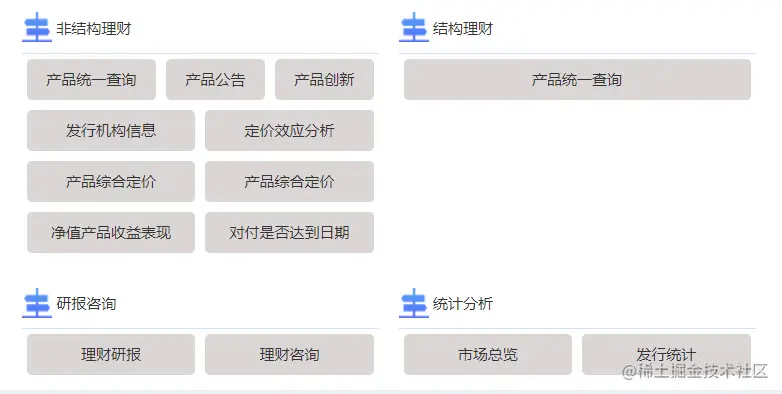
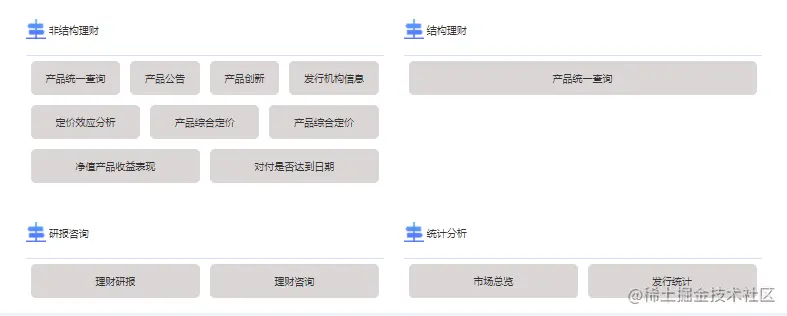
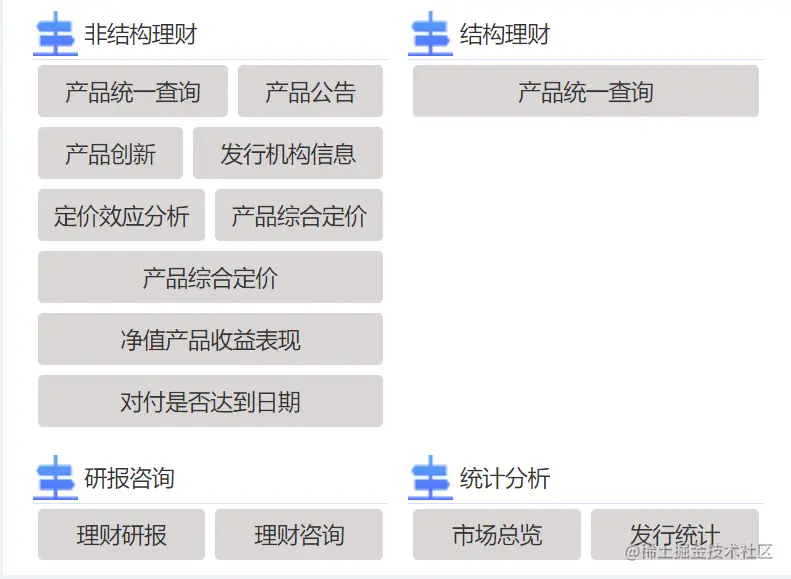
flex 中的精华
display: flex; 即是弹性盒,用来进行弹性布局
flex-wrap: wrap; 都排在一条线(又称”轴线”)上,换行,第一行在上方
justify-content: center; 属性定义了项目在主轴上的对齐方式(居中)
flex: auto; 自适应x轴,通过内容撑满当前行
<template>
  <div class="homeCompBtn">
    <div class="btn-top"
         v-for="item in linkList"
         :key="item.id">
      <div class="btn-top-box">
        <div class="btn-content">
          <img class="btn-content-pic"
               :src="item.img"
               alt="" />
          <span class="btn-content-title">{{ item.titleName }}</span>
        </div>
        <div class="btn-buttom">
          <div class="btn-buttom-center"
               v-for="(n, i) in item.button"
               :key="i">
            <p @click="goPage(n.src)">{{n.name}}</p>
          </div>
        </div>
      </div>
    </div>
  </div>
</template>

<script>
export default {
  name: "homeCompBtn",
  data() {
    return {
      linkList: [
        {
          id: 1,
          img: require("../../assets/images/icon_capital.png"),
          titleName: "非结构理财",
          button: [
            {
              name: "产品统一查询",
              src: "/productSearch",
            },
            {
              name: "产品公告",
              src: "/productNotice",
            },
            {
              name: "产品创新",
              src: "/productInnovate",
            },
            {
              name: "发行机构信息",
              src: "/issuerInfo",
            },
            {
              name: "定价效应分析",
              src: "/productMoney",
            },
            {
              name: "产品综合定价",
              src: "/productMoneyMath",
            },
            {
              name: "产品综合定价",
              src: "/productMoneyMath",
            },
            {
              name: "净值产品收益表现",
              src: "/productYiledCx",
            },
            {
              name: "对付是否达到日期",
              src: "",
            },
          ],
        },
        {
          id: 2,
          img: require("../../assets/images/icon_capital.png"),
          titleName: "结构理财",
          button: [
            {
              name: "产品统一查询",
              src: "/productSearch",
            },
          ],
        },
        {
          id: 3,
          img: require("../../assets/images/icon_capital.png"),
          titleName: "研报咨询",
          button: [
            {
              name: "理财研报",
              src: "",
            },
            {
              name: "理财咨询",
              src: "",
            },
          ],
        },
        {
          id: 4,
          img: require("../../assets/images/icon_capital.png"),
          titleName: "统计分析",
          button: [
            {
              name: "市场总览",
              src: "",
            },
            {
              name: "发行统计",
              src: "",
            },
          ],
        },
      ],
    };
  },
  methods: {
    goPage(src) {
      this.$router.push(src);
    },
  },
};
</script>

<style lang="less" scoped>
.homeCompBtn {
  display: flex;
  flex-wrap: wrap;
  justify-content: center;
  // box-shadow: 0px 0px 0.020833rem 0px rgba(160, 170, 199, 0.13);
  width: 100%;
  height: 100%;
  background: #fff;
  .btn-top {
    margin: 10px;
    width: 45%;
    .btn-top-box {
      .btn-content {
        text-align: left;
        border-bottom: 1px solid #d0e3fe;
        width: 100%;
        height: 50px;
        line-height: 50px;
        .btn-content-pic {
          margin-bottom: 5px;
        }
        .btn-content-title {
          margin-bottom: 5px;
        }
      }
      .btn-buttom {
        display: flex;
        flex-wrap: wrap;
        justify-content: center;
        .btn-buttom-center {
          margin: 5px;
          flex: auto;
          p {
            cursor: pointer;
            padding: 10px;
            border-radius: 5px;
            background: #dbd6d6;
            text-align: center;
          }
        }
      }
    }
  }
}
</style>

