Vuex 状态管理
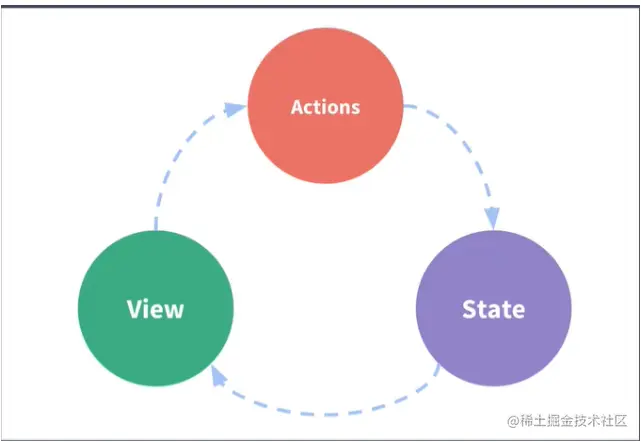
1)状态管理
- state,驱动应用的数据源
- view,以声明的方式将 state 映射到视图
- action,响应在 view 上的用户输入导致的状态变化
2)组件间通信方式回顾
- 父组件给子组件传值
- 子组件通过 props 接收数据
- 父组件中给子组件通过相应属性传值
- 子组件给父组件传值
- 不相干组件之间传值
- eventbus
- ref
- 在普通 HTML 标签上使用 ref, 获取到的是 DOM
- 在组件标签上使用 ref, 获取到的是组件实例
3)Vuex
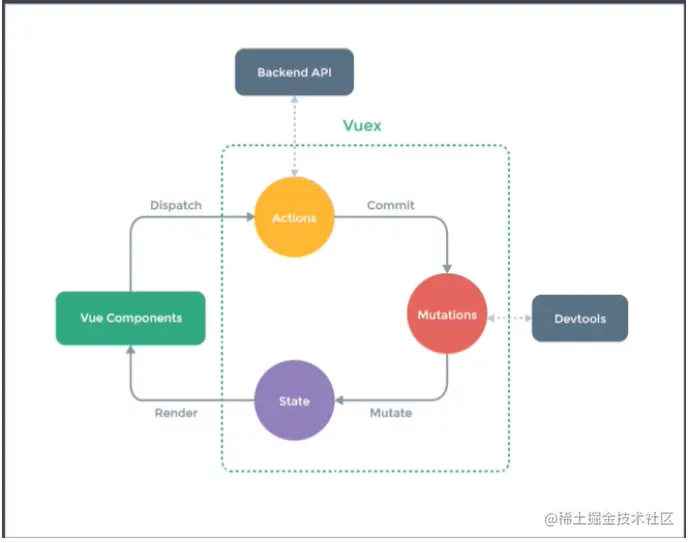
- Store
- State
- Getter
- Mutation
- Action
- Module
<template>
<div id="app">
<h1>Vuex - Demo</h1>
<!-- count:{{ $store.state.count }} <br>
msg: {{ $store.state.msg }} -->
<!-- count:{{ count }} <br>
msg: {{ msg }} -->
count:{{ num }} <br>
msg: {{ message }}
<h2>Getter</h2>
<!-- reverseMsg: {{ $store.getters.reverseMsg }} -->
reverseMsg: {{ reverseMsg }}
<h2>Mutation</h2>
<!-- <button @click="$store.commit('increate', 2)">Mutation</button> -->
<button @click="increate(3)">Mutation</button>
<h2>Action</h2>
<!-- <button @click="$store.dispatch('increateAsync', 5)">Action</button> -->
<button @click="increateAsync(6)">Action</button>
<h2>Module</h2>
<!-- products: {{ $store.state.products.products }} <br>
<button @click="$store.commit('setProducts', [])">Mutation</button> -->
products: {{ products }} <br>
<button @click="setProducts([])">Mutation</button>
<h2>strict</h2>
<button @click="$store.state.msg = 'Lagou'">strict</button>
</div>
</template>
<script>
import { mapState, mapGetters, mapMutations, mapActions } from 'vuex'
export default {
computed: {
// count: state => state.count
// ...mapState(['count', 'msg'])
...mapState({ num: 'count', message: 'msg' }),
...mapGetters(['reverseMsg']),
...mapState('products', ['products'])
},
methods: {
...mapMutations(['increate']),
...mapActions(['increateAsync']),
...mapMutations('products', ['setProducts'])
}
}
</script>
<style>
</style>
// store/index.js
import Vue from 'vue'
import Vuex from 'vuex'
import products from './modules/products'
import cart from './modules/cart'

Vue.use(Vuex)

export default new Vuex.Store({
  strict: process.env.NODE_ENV !== 'production',
  state: {
    count: 0,
    msg: 'Hello Vuex'
  },
  getters: {
    reverseMsg (state) {
      return state.msg.split('').reverse().join('')
    }
  },
  mutations: {
    increate (state, payload) {
      state.count += payload
    }
  },
  actions: {
    increateAsync (context, payload) {
      setTimeout(() => {
        context.commit('increate', payload)
      }, 2000)
    }
  },
  modules: {
    products,
    cart
  }
})


// store/modules/carts.js
const state = {}
const getters = {}
const mutations = {}
const actions = {}

export default {
  namespaced: true,
  state,
  getters,
  mutations,
  actions
}


// store/modules/products.js
const state = {
  products: [
    { id: 1, title: 'iPhone 11', price: 8000 },
    { id: 2, title: 'iPhone 12', price: 10000 }
  ]
}
const getters = {}
const mutations = {
  setProducts (state, payload) {
    state.products = payload
  }
}
const actions = {}

export default {
  namespaced: true,
  state,
  getters,
  mutations,
  actions
}
4)Vuex 插件
- Vuex 的插件就是一个函数
- 这个函数接收一个 store 的参数
const myPlugin = store = > {
store.subscribe((mutation, state) => {
if (mutation.type.startsWith('cart/')) {
window.localStorage.setItem('cart-products', JSON.stringify(state.cart.cartProducts))
}
})
}
const store = new Vuex.Store({
plugins: [myplugin]
})
5)模拟 Vuex
let _Vue = null
class Store {
constructor (options) {
const {
state = {},
getters = {},
mutations = {},
actions = {}
} = options
this.state = _Vue.observable(state)
this.getters = Object.create(null)
Object.keys(getters).forEach(key => {
Object.defineProperty(this.getters, key, {
get: () => getters[key](state)
})
})
this._mutations = mutations
this._actions = actions
}
commit (type, payload) {
this._mutations[type](this.state, payload)
}
dispatch (type, payload) {
this._actions[type](this, payload)
}
}
function install (Vue) {
_Vue = Vue
_Vue.mixin({
beforeCreate () {
if (this.$options.store) {
_Vue.prototype.$store = this.$options.store
}
}
})
}
export default {
Store,
install
}