背景:在做一个需求时,看到设计稿上有需要画一个圆环,一开始想用css直接实现的,看了网上各种攻略,想想还是算了。后来想要不要用echarts,鉴于种种原因,也放弃了。那就用canvas画好了,正好页面上的圆环个数不是很多,于是乎一顿操作,在测试工具上看着很完美,真的是无比的佩服自己(请先让我自恋下)。想想再用自己的手机看下效果,what’s this ?心里一慌,完蛋了,数值都是写死的,适配不了各种手机,怎么办怎么办?各种想办法,终于让我想到了以下方法,在各种手机上表现的都很完美,解决!笔个yeah!(请忽略我的表演!)
实现原理:主要是通过获取手机的系统信息,得知当前设备的宽度,然后根据设计稿中圆环占得百分比计算画布的长宽跟圆环的半径。
效果:
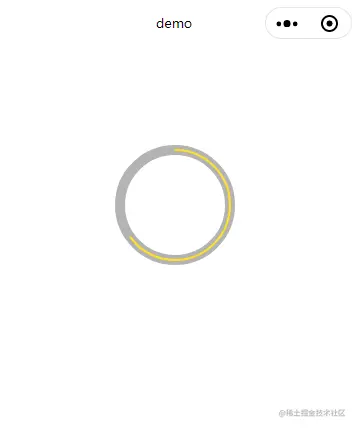
wxml代码:
<canvas class="opr-area__circle" style="width:{{width}}px;height:{{height}}px;" canvas-id="canvasCircle"></canvas>
wxss代码:
Page({
/**
* 页面的初始数据
*/
data: {
width: 0,
height: 0,
},
/**
* 生命周期函数--监听页面初次渲染完成
*/
onReady: function () {
//创建并返回绘图上下文context对象。
var that = this
try {
const res = wx.getSystemInfoSync()
that.setData({
width: res.windowWidth*0.32,
height: res.windowWidth*0.32,
})
var radius = res.windowWidth*0.32/2
var radiusbig = res.windowWidth*0.32/2-5
var radiussmall = res.windowWidth*0.32/2-5
} catch (e) {
// Do something when catch error
}
var cxt_arc = wx.createCanvasContext('canvasCircle')
cxt_arc.setLineWidth(10)
cxt_arc.setStrokeStyle('rgba(0,0,0,0.3)')
cxt_arc.setLineCap('round')
cxt_arc.beginPath()
cxt_arc.arc(radius, radius, radiusbig, 0, 2*Math.PI)
cxt_arc.stroke()
cxt_arc.closePath()
cxt_arc.setLineWidth(2)
cxt_arc.setStrokeStyle('
cxt_arc.setLineCap('round')
cxt_arc.beginPath()
cxt_arc.arc(radius, radius, radiussmall, 1.5*Math.PI, 2.8*Math.PI)
cxt_arc.stroke()
cxt_arc.closePath()
cxt_arc.draw()
}
})