先上效果图
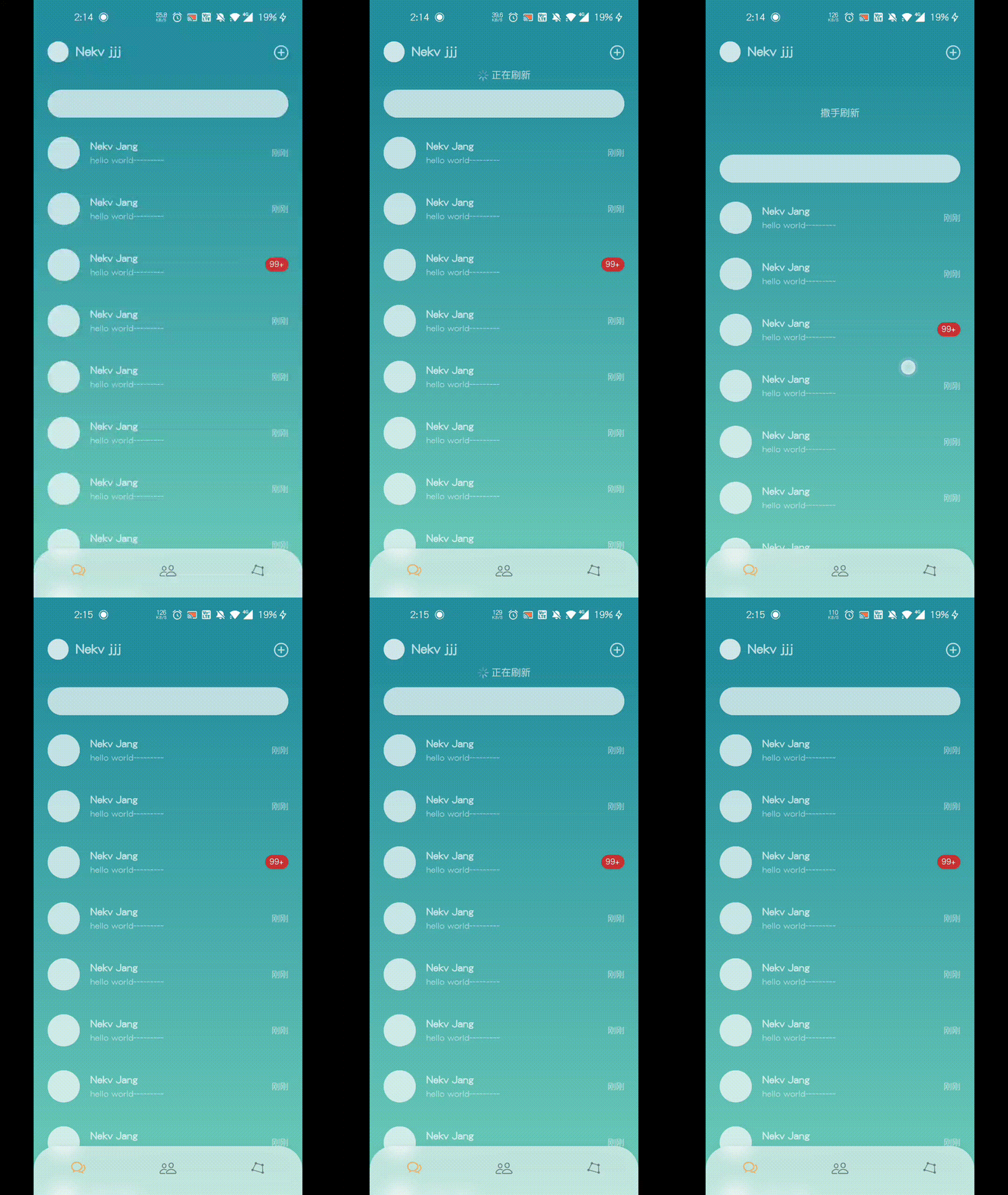
实现思路
- ListView实现可滚动列表
- ListView的physics设置为BouncingScrollPhysics让列表滚动有回弹效果
- 通过ScrollController监听滚动位置,实时控制下拉刷新文案以及位置
- 通过Listener监听抬起手势,根据滚动位置判断是否刷新(同理也可以进行触底判断
- end;
源码
import 'package:flutter/cupertino.dart';
import 'package:flutter/material.dart';
class ChatList extends StatefulWidget {
@override
State<StatefulWidget> createState() {
return _ChatListState();
}
}
class _ChatListState extends State {
final _controller = ScrollController();
double _top = 0;
bool _reloading = false;
void _pointerUp(PointerUpEvent event) {
if (_controller.offset <= 0) {
double top = -_top - 50;
if (top > 30) {
setState(() {
_reloading = true;
});
Future.delayed(Duration(milliseconds: 1000)).then((value) {
setState(() {
_reloading = false;
});
});
}
}
}
@override
void initState() {
_controller.addListener(() {
if (_controller.offset <= 0) {
setState(() {
_top = _controller.offset;
});
}
});
super.initState();
}
@override
Widget build(BuildContext context) {
double top = -_top - 50;
String desc = '下拉可刷新';
double iconOpacity = 1;
if (top > 30) {
top = 30;
iconOpacity = 0;
desc = '撒手刷新';
}
if (_reloading) {
top = top + 20;
if (top < 0) top = 0;
}
return Listener(
onPointerUp: _pointerUp,
child: Stack(
children: [
ListView.builder(
physics: BouncingScrollPhysics(),
itemCount: 30,
padding: EdgeInsets.fromLTRB(0, 10, 0, 120),
controller: _controller,
itemBuilder: (context, index) {
if (index == 0) {
return Container(
height: 40,
margin: EdgeInsets.fromLTRB(20, 20, 20, 10),
decoration: BoxDecoration(
color: Colors.white70,
borderRadius: BorderRadius.circular(20)),
);
}
final username = Text('Nekv Jang',
style: TextStyle(
fontSize: 14,
height: 1.5,
fontWeight: FontWeight.bold,
color: Colors.white70));
final message = Text(
'hello world~~~~~~~~~',
style:
TextStyle(fontSize: 12, height: 1.5, color: Colors.white54),
);
Widget time = Text(
'刚刚',
style:
TextStyle(fontSize: 12, height: 1.5, color: Colors.white54),
);
if (index == 3) {
time = Container(
height: 20,
padding: EdgeInsets.fromLTRB(6, 2, 6, 0),
decoration: BoxDecoration(
color: Color.fromARGB(255, 200, 50, 50),
boxShadow: [
BoxShadow(
color: Colors.black12,
offset: Offset(0, 1),
blurRadius: 1)
],
borderRadius: BorderRadius.circular(20)),
child: Center(
child: Text(
'99+',
style: TextStyle(
height: 1, fontSize: 12, color: Colors.white),
),
),
);
}
return Container(
child: Container(
margin: EdgeInsets.fromLTRB(20, 0, 20, 0),
child: Row(
children: [
ClipOval(
child: Container(
width: 46,
height: 46,
color: Color.fromARGB(180, 255, 255, 255),
),
),
Expanded(
child: Container(
padding: EdgeInsets.fromLTRB(0, 20, 0, 20),
margin: EdgeInsets.only(left: 15),
child: Row(
mainAxisAlignment: MainAxisAlignment.spaceBetween,
children: [
Column(
crossAxisAlignment: CrossAxisAlignment.start,
children: [username, message],
),
time,
],
),
decoration: index < 29
? BoxDecoration(
border: Border(
bottom: BorderSide(
color: Color.fromARGB(0, 0, 0, 0),
width: 1,
)))
: null,
),
)
],
),
),
);
},
),
Positioned(
top: top,
left: 0,
right: 0,
child: Visibility(
visible: !_reloading,
child: Column(
children: [
Opacity(
opacity: iconOpacity,
child: Icon(
Icons.arrow_downward_rounded,
color: Colors.white70,
),
),
Text(desc, style: TextStyle(color: Colors.white70)),
],
)),
),
Positioned(
top: -1,
left: 0,
right: 0,
child: Container(
height: 20,
decoration: BoxDecoration(
gradient: LinearGradient(
begin: Alignment.topCenter,
end: Alignment.bottomCenter,
colors: [
Color.fromARGB(255, 37, 143, 159),
Color.fromARGB(0, 37, 143, 159),
])),
),
),
Positioned(
top: top,
left: 0,
right: 0,
child: Visibility(
visible: _reloading,
child: Row(
mainAxisAlignment: MainAxisAlignment.center,
children: [
Theme(
data: ThemeData.dark(),
child: CupertinoActivityIndicator(
radius: 8,
),
),
Container(
padding: EdgeInsets.only(left: 4),
child: Text(
'正在刷新',
style: TextStyle(color: Colors.white70),
),
)
],
)),
),
],
),
);
}
}