在需要加载大量数据时,分页必不可少,一般来说,分页使得我们可以按需加载和显示一部分数据,这将减少网络带宽的使用量、缓解服务器的压力。
Paging属于Android Jetpack组件的一部分,用于实现分页,可以十分方便和优雅的将数据逐步加载至RecyclerView之中,下面我使用Paging 2.x版本,将对该库进行介绍,在此基础上,结合LiveData、ViewModel、RecyclerView、retrofit介绍其在MVVM架构中的使用方式。
1. 安装
def paging_version = "2.1.2"
implementation "androidx.paging:paging-runtime:$paging_version"
testImplementation "androidx.paging:paging-common:$paging_version"
2. 主要类介绍
2.1 PagedList
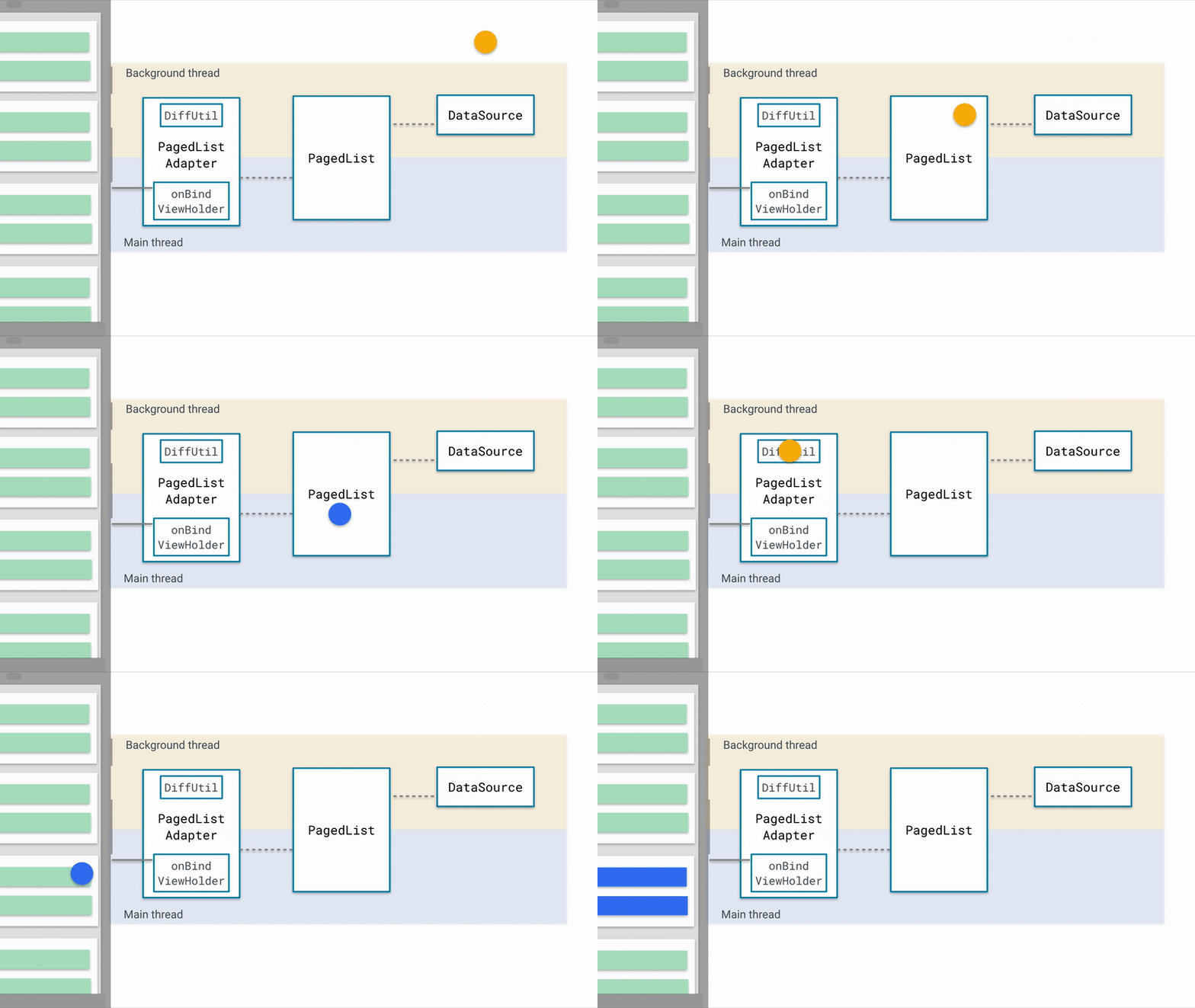
随着用户向下滑动,将访问数据源,加载更多的应用数据,这时,数据将被动态加载至受观测的PageList中(本文使用LiveData实现对PagedList的观测),其改变将会被动态地反映到应用界面之中,
2.2 DataSource
DataSource即数据源,可以是网络数据或本地数据库中的数据,在其中定义了分页的具体实现方法,其中还定义了Factory子类,用于生成DataSource,以初始化对应的PagedList,该数据源可能为网络数据库或本地数据库。
2.3 PagedListAdapter
PagedList使用PagedListAdapter将数据加载至RecyclerView进行显示,同时实现滚动到某特定区域时加载下一页数据,其中也定义了更新、删除、添加的动画效果,在其中还定义了DIFF_CALLBACK,使其能够实现自动处理分页和列表差异。
这是一张很形象的图。
3 Paging + LiveData + ViewModel + RecyclerView + Retrofit
dependencies:
implementation 'androidx.appcompat:appcompat:1.2.0'
implementation 'androidx.constraintlayout:constraintlayout:2.0.2'
implementation 'androidx.lifecycle:lifecycle-extensions:2.2.0'

def paging_version = "2.1.2"
implementation "androidx.paging:paging-runtime:$paging_version"

def retrofit_version = "2.9.0"
implementation "com.squareup.retrofit2:retrofit:$retrofit_version"
implementation "com.squareup.okhttp3:okhttp:4.8.1"
implementation "com.squareup.okhttp3:logging-interceptor:4.8.1"
implementation 'com.google.code.gson:gson:2.8.6'
implementation 'com.squareup.retrofit2:converter-gson:2.9.0' // retrofit关联

implementation 'androidx.lifecycle:lifecycle-extensions:2.2.0'
implementation "androidx.lifecycle:lifecycle-viewmodel:2.2.0"

implementation 'androidx.recyclerview:recyclerview:1.1.0'

implementation("com.github.bumptech.glide:glide:4.11.0") {
    exclude group: "com.android.support"
}
3.1 GitHub API
本次使用GitHub所提供的如下接口进行测试。
接口:https://api.github.com/search/repositories
搜索参数如下:
q: 搜索参数
sort: 排序参数
page: 页码
per_page: 每页个数
选择其中部分数据封装为类GithubRes:
public class GithubRes {
    @SerializedName("incomplete_results")
    public boolean complete;
    @SerializedName("items")
    public List<Item> items;
    @SerializedName("total_count")
    public int count;

    public static class Item {
        @SerializedName("id")
        public long id;
        @SerializedName("name")
        public String name;
        @SerializedName("owner")
        public Owner owner;
        @SerializedName("description")
        public String description;
        @SerializedName("stargazers_count")
        public int starCount;
        @SerializedName("forks_count")
        public int forkCount;

        public static class Owner {
            @SerializedName("login")
            public String name;
            @SerializedName("avatar_url")
            public String avatar;
        }

        @Override
        public boolean equals(Object o) {
            if (this == o) return true;
            if (o == null || getClass() != o.getClass()) return false;
            Item item = (Item) o;
            return id == item.id &&
                    starCount == item.starCount &&
                    forkCount == item.forkCount &&
                    Objects.equals(name, item.name) &&
                    Objects.equals(owner, item.owner) &&
                    Objects.equals(description, item.description);
        }

        @Override
        public int hashCode() {
            return Objects.hash(id, name, owner, description, starCount, forkCount);
        }
    }
}
3.2 定义Retrofit请求
这部分主要涉及到请求参数的定义及retrofit工厂类的构建。
GithubService:
public interface GithubService {

    @GET("search/repositories")
    Call<GithubRes> query(@Query("q") String query, @Query("sort") String sort,
                           @Query("page") int page, @Query("per_page") int size);
}
RetrofitServiceFactory:
public class RetrofitServiceFactory {
    private static final RetrofitServiceFactory INSTANCE = new RetrofitServiceFactory();
    private static Retrofit retrofit;

    private RetrofitServiceFactory() {
        OkHttpClient okHttpClient = new OkHttpClient().newBuilder()//
                .retryOnConnectionFailure(true)
                .build();
        retrofit = new Retrofit.Builder()
                .addConverterFactory(GsonConverterFactory.create())
                .client(okHttpClient)
                .baseUrl("https://api.github.com/")
                .build();
    }

    public static RetrofitServiceFactory getInstance() {
        return INSTANCE;
    }

    public GithubService getGithubService() {
        return retrofit.create(GithubService.class);
    }
}
需要注意实际项目中会频繁使用工厂类获取对应的service实例,因此应采用单例模式。
3.3 定义数据源
数据源有三种类型:
PageKeyedDataSource:如果提供上一页、下一页选项,可使用该数据源,它将一页页的从网络请求数据,填充到页面中;ItemKeyedDataSource:如果需要使用项目N中的数据来获取项目N+1,则使用该数据源;PositionalDataSource:如果需要从数据存储区的1任意位置获取数据,可选择该数据源。
本次使用PageKeyedDataSource数据源进行测试。
GithubDataSource:
public class GithubDataSource extends PageKeyedDataSource<Integer, GithubRes.Item> {
    private static final int FIRST_PAGE = 1;
    public static final int PAGE_SIZE = 10;
    private GithubService githubService;
    private String query;
    private String sort;

    public GithubDataSource(GithubService githubService, String query, String sort) {
        this.githubService = githubService;
        this.query = query;
        this.sort = sort;
    }

    @Override
    public void loadInitial(@NonNull LoadInitialParams<Integer> params, @NonNull LoadInitialCallback<Integer, GithubRes.Item> callback) {
        Call<GithubRes> call = githubService.query(query, sort, FIRST_PAGE, PAGE_SIZE);
        try {
            Response<GithubRes> resResponse = call.execute();
            GithubRes res = resResponse.body();

            if (res != null) {
                callback.onResult(res.items, null, FIRST_PAGE + 1);
            }
        } catch (IOException e) {
            e.printStackTrace();
        }
    }

    @Override
    public void loadBefore(@NonNull LoadParams<Integer> params, @NonNull LoadCallback<Integer, GithubRes.Item> callback) {
        Call<GithubRes> call = githubService.query(query, sort, params.key, PAGE_SIZE);
        try {
            Integer key = (params.key > 1) ? params.key - 1 : null;
            GithubRes res = call.execute().body();
            if (res != null) {
                callback.onResult(res.items, key);
            }
        } catch (IOException e) {
            e.printStackTrace();
        }
    }

    @Override
    public void loadAfter(@NonNull LoadParams<Integer> params, @NonNull LoadCallback<Integer, GithubRes.Item> callback) {
        Call<GithubRes> call = githubService.query(query, sort, params.key, PAGE_SIZE);
        try {
            GithubRes res = call.execute().body();
            if (res != null) {
                if (!res.complete)
                    callback.onResult(res.items, params.key + 1);
                else callback.onResult(res.items, null);
            }
        } catch (IOException e) {
            e.printStackTrace();
        }
    }
}
注意,在数据请求时应采用同步方法,不然刷新时会出现闪烁问题,这是因为Paging库已经为我们封装好了线程处理,无需再使用异步方法。
GithubDataSourceFactory:
public class GithubDataSourceFactory extends DataSource.Factory<Integer, GithubRes.Item> {
    // 用于获取到创建的最新的GithubDataSource实例
    private MutableLiveData<GithubDataSource> mGithubDataSource = new MutableLiveData<>();
    private String query;
    private String sort;

    public GithubDataSourceFactory(String query, String sort) {
        this.query = query;
        this.sort = sort;
    }

    @NonNull
    @Override
    public DataSource<Integer, GithubRes.Item> create() {
        GithubDataSource githubDataSource = new GithubDataSource(RetrofitServiceFactory.getInstance().getGithubService(),query,sort);
        mGithubDataSource.setValue(githubDataSource);
        return githubDataSource;
    }

    public MutableLiveData<GithubDataSource> getmGithubDataSource() {
        return mGithubDataSource;
    }
}
到这里,我们的数据源已经定义完毕,接下来需要把数据反映到界面上。
3.4 定义布局
我们需要一个整体的布局和针对recyclerview item的布局。
MainActivity:
<?xml version="1.0" encoding="utf-8"?>
<LinearLayout xmlns:android="http://schemas.android.com/apk/res/android"
    xmlns:tools="http://schemas.android.com/tools"
    android:id="@+id/container"
    android:layout_width="match_parent"
    android:layout_height="match_parent"
    tools:context=".MainActivity"
    android:orientation="vertical">
    <LinearLayout
        android:layout_width="match_parent"
        android:layout_height="wrap_content"
        android:orientation="horizontal">
        <EditText
            android:id="@+id/search_repo"
            android:layout_width="0dp"
            android:layout_height="wrap_content"
            android:layout_weight="1"
            android:hint="请输入搜索内容"
            android:imeOptions="actionSearch"
            android:inputType="textNoSuggestions"
            android:selectAllOnFocus="true"
            android:text="Android"/>
        <Button
            android:id="@+id/search"
            android:text="搜索"
            android:backgroundTint="@color/colorAccent"
            android:layout_width="wrap_content"
            android:layout_height="wrap_content"/>
    </LinearLayout>
    <androidx.recyclerview.widget.RecyclerView
        android:id="@+id/recycler_view"
        android:layout_width="match_parent"
        android:layout_height="match_parent"/>
</LinearLayout>
item:
<?xml version="1.0" encoding="utf-8"?>
<LinearLayout
    xmlns:android="http://schemas.android.com/apk/res/android" android:layout_width="match_parent"
    android:layout_height="wrap_content"
    android:orientation="horizontal"
    android:baselineAligned="false"
    android:padding="10dp">
    <LinearLayout
        android:layout_width="0dp"
        android:layout_height="wrap_content"
        android:orientation="vertical"
        android:layout_weight="1">
        <TextView
            android:id="@+id/project_name"
            android:layout_width="match_parent"
            android:layout_height="wrap_content"
            android:gravity="start"
            android:textSize="16sp"/>
        <TextView
            android:id="@+id/project_description"
            android:layout_width="match_parent"
            android:layout_height="wrap_content"
            android:gravity="start"
            android:textSize="14sp"/>
        <LinearLayout
            android:layout_width="match_parent"
            android:layout_height="wrap_content"
            android:orientation="horizontal"
            android:layout_marginTop="15dp">
            <ImageView
                android:layout_width="20dp"
                android:layout_height="20dp"
                android:src="@drawable/star"
                android:contentDescription="star" />
            <TextView
                android:id="@+id/star_count"
                android:layout_width="wrap_content"
                android:layout_height="wrap_content"
                android:textSize="14sp"
                android:textColor="@color/colorPrimary"
                android:layout_marginEnd="20dp"/>
            <ImageView
                android:layout_width="20dp"
                android:layout_height="20dp"
                android:src="@drawable/fork"
                android:contentDescription="fork" />
            <TextView
                android:id="@+id/fork_count"
                android:layout_width="wrap_content"
                android:layout_height="wrap_content"
                android:textSize="14sp"
                android:textColor="@color/colorPrimary"/>
        </LinearLayout>
    </LinearLayout>

    <LinearLayout
        android:layout_width="wrap_content"
        android:layout_height="wrap_content"
        android:orientation="vertical">
        <de.hdodenhof.circleimageview.CircleImageView
            android:id="@+id/owner_avatar"
            android:layout_width="60dp"
            android:layout_height="60dp"/>
        <TextView
            android:id="@+id/owner_name"
            android:layout_width="match_parent"
            android:layout_height="wrap_content"
            android:gravity="center"
            android:textSize="16sp"/>
    </LinearLayout>
</LinearLayout>
3.5 定义适配器
适配器需要继承PagedListAdapter,并定义DiffUtil.ItemCallback实现差异化回调,自动处理分页和列表差异,适配器会在有新的 PagedList 对象加载时自动检测这些项的更改。这样,适配器就会在 RecyclerView 对象内触发有效的项目动画。
public class GithubPagedAdapter extends PagedListAdapter<GithubRes.Item, RecyclerView.ViewHolder> {
    private final Context mContext;

    protected GithubPagedAdapter(Context context) {
        super(DIFF_CALLBACK);
        mContext = context;
    }

    @NonNull
    @Override
    public RecyclerView.ViewHolder onCreateViewHolder(@NonNull ViewGroup parent, int viewType) {
        View view = LayoutInflater.from(parent.getContext()).inflate(R.layout.item, parent, false);
        return new ContentViewHolder(view);
    }

    @Override
    public void onBindViewHolder(@NonNull RecyclerView.ViewHolder holder, int position) {
        GithubRes.Item item = getItem(position);
        if (item == null)
            return;
        ContentViewHolder contentViewHolder = (ContentViewHolder) holder;
        contentViewHolder.forkCount.setText(String.valueOf(item.forkCount));
        contentViewHolder.starCount.setText(String.valueOf(item.starCount));
        contentViewHolder.projectDescription.setText(String.valueOf(item.description));
        contentViewHolder.ownerName.setText(String.valueOf(item.owner.name));
        contentViewHolder.projectName.setText(String.valueOf(item.name));
        Glide.with(mContext).load(item.owner.avatar)
                .override(contentViewHolder.ownerAvatar.getWidth(), contentViewHolder.ownerAvatar.getHeight())
                .into(contentViewHolder.ownerAvatar);
    }

    public static class ContentViewHolder extends RecyclerView.ViewHolder {
        public ImageView ownerAvatar;
        public TextView projectName;
        public TextView ownerName;
        public TextView projectDescription;
        public TextView starCount;
        public TextView forkCount;

        public ContentViewHolder(@NonNull View itemView) {
            super(itemView);
            ownerAvatar = itemView.findViewById(R.id.owner_avatar);
            projectName = itemView.findViewById(R.id.project_name);
            ownerName = itemView.findViewById(R.id.owner_name);
            projectDescription = itemView.findViewById(R.id.project_description);
            starCount = itemView.findViewById(R.id.star_count);
            forkCount = itemView.findViewById(R.id.fork_count);
        }
    }

    private final static DiffUtil.ItemCallback<GithubRes.Item> DIFF_CALLBACK =
            new DiffUtil.ItemCallback<GithubRes.Item>() {
                @Override
                public boolean areItemsTheSame(@NonNull GithubRes.Item oldItem, @NonNull GithubRes.Item newItem) {
                    return oldItem.id == newItem.id;
                }

                @Override
                public boolean areContentsTheSame(@NonNull GithubRes.Item oldItem, @NonNull GithubRes.Item newItem) {
                    return oldItem.equals(newItem);
                }
            };
}
3.6 构建PagedList
下面,只需要在ViewModel中构建PagedList即可,并使用LiveData进行观察。
public class MainViewModel extends ViewModel {
    private LiveData<PagedList<GithubRes.Item>> itemPagedList;

    public void setItemPagedList(String query, String sort) {
        GithubDataSourceFactory factory = new GithubDataSourceFactory(query, sort);
        PagedList.Config myPagingConfig = new PagedList.Config.Builder()
                .setPageSize(10)
                .setPrefetchDistance(30)
                .setEnablePlaceholders(true)
                .build();
        itemPagedList = new LivePagedListBuilder<>(factory, myPagingConfig)
                .build();
    }

    public LiveData<PagedList<GithubRes.Item>> getItemPagedList() {
        return itemPagedList;
    }
}
3.7 加载至activity
public class MainActivity extends AppCompatActivity {
    private MainViewModel mainViewModel;
    private GithubPagedAdapter mGithubPagedAdapter;

    @Override
    protected void onCreate(Bundle savedInstanceState) {
        super.onCreate(savedInstanceState);
        setContentView(R.layout.main_activity);
        mainViewModel = new ViewModelProvider(this).get(MainViewModel.class);
        EditText editText = findViewById(R.id.search_repo);
        Button button = findViewById(R.id.search);
        button.setOnClickListener(v -> {
            mainViewModel.setItemPagedList(editText.getText().toString(), "stars");
            setRecyclerView();
        });

    }

    private void setRecyclerView() {
        mGithubPagedAdapter = new GithubPagedAdapter(this);
        mainViewModel.getItemPagedList().observe(this, items -> {
            mGithubPagedAdapter.submitList(items);
        });
        RecyclerView.LayoutManager layoutManager = new LinearLayoutManager(this);
        RecyclerView recyclerView = findViewById(R.id.recycler_view);
        recyclerView.setLayoutManager(layoutManager);
        recyclerView.setAdapter(mGithubPagedAdapter);
    }
}
运行结果:
结果看起来还不错!但如果在实际项目中使用时,我们还需要添加刷新功能并考虑对请求错误的处理,关于这点我将在下一篇Android Paging组件错误处理中完成。
4 源码
源码已经上传至github,欢迎star。