

1.设计要爬取的字段,设计数据库表
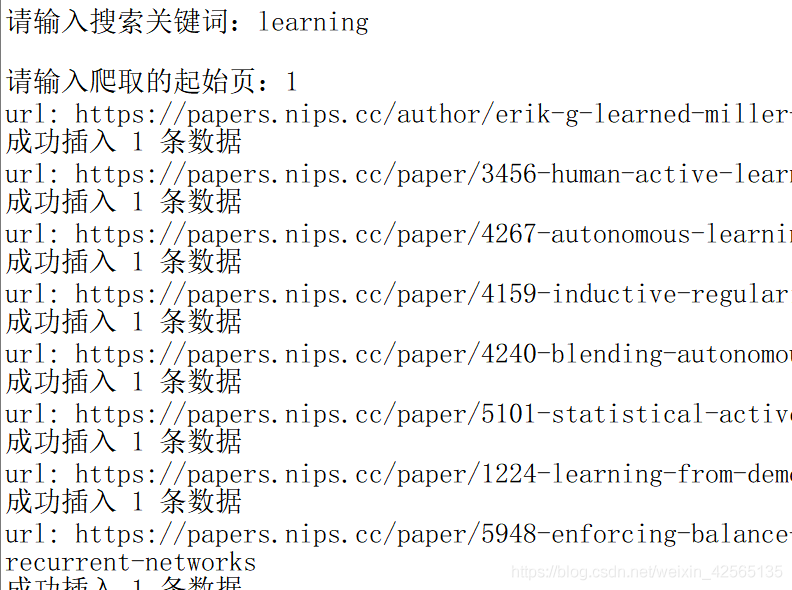
2.进行爬取,在控制台可以看到爬取的结果
3.将爬取的结果保存到数据库中
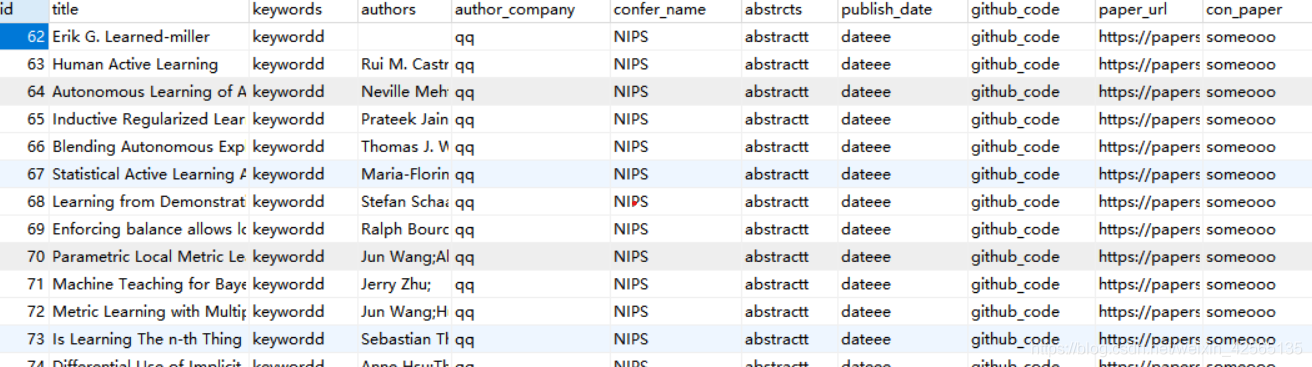
4.查看数据库
这里只爬取NIPS上论文的题目、作者、摘要做测试,后续将涉及所有字段的爬取。
代码
craw_db.py:

import pymysql
import requests
from bs4 import BeautifulSoup

def parse_html(url):
    #使用beautifulSoup进行解析

    response = requests.get(url)
    soup = BeautifulSoup(response.text,'html.parser')
    #题目
    title = soup.find('h2',{'class':"subtitle"})
    title=title.text+""
    # 作者
    author = soup.find_all('li',{'class':"author"})
    authors=""
    for  author_a in author:
          authors= authors+author_a.find('a').text+';'
    # 第一作者单位
    author_company= "qq"
    # 关键词
    keywords ="keywordd"

    #摘要
    abstrcts = soup.find('h3',{'class':"abstract"})
    if abstrcts:
        abstrcts = abstrcts.text.strip()
    else:
        abstrcts="abstractt"
    #会议名称
    confer_name = "NIPS"

    #会议时间
    publish_date ="dateee"

    github_code="github_code"
    paper_url=url
    con_paper="someooo"
    connect = pymysql.Connect(
    host='localhost',
    port=3306,
    user='root',
    passwd='自己的数据库密码',
    db='craw_con',
    charset='utf8')

# 获取游标
    cursor = connect.cursor()

# 插入数据
    sql = "INSERT INTO huiyi(title,keywords,authors,author_company,confer_name,abstrcts,publish_date,github_code,paper_url,con_paper) VALUES ( '%s','%s','%s','%s','%s','%s','%s','%s','%s','%s')"
    data = (title,keywords,authors,author_company,confer_name,abstrcts,publish_date,github_code,paper_url,con_paper)
    cursor.execute(sql % data)
    connect.commit()
    print('成功插入', cursor.rowcount, '条数据')

# 关闭连接
    cursor.close()
    connect.close()

def main(url):
    #发送请求、获取响应
    #解析响应
    parse_html(url)

craw_todb.py

import re
import time
from bs4 import BeautifulSoup
import requests
from requests import RequestException
import craw_db
from lxml import etree
def get_page(url):
    try:
        # 添加User-Agent,放在headers中,伪装成浏览器
        headers = {
            'User-Agent': 'Mozilla/5.0 (Macintosh; Intel Mac OS X 10_14_5) AppleWebKit/537.36 (KHTML, like Gecko) Chrome/75.0.3770.100 Safari/537.36'
        }
        response = requests.get(url, headers=headers)
        if response.status_code == 200:
            response.encoding = response.apparent_encoding
            return response.text
        return None
    except RequestException as e:
        print(e)
        return None

def get_url(html):
    url_list = []
    soup = BeautifulSoup(htm1.content, 'html.parser')

    ids=soup.find('div',{'class':"main wrapper clearfix"}).find_all("li")

    for id in ids:
     a=id.find('a')
     url_list.append(a.attrs.get('href'))
    return url_list

def get_info(url):
        craw_db.main(url)
if __name__ == '__main__':
        headers = {
            'User-Agent': 'Mozilla/5.0 (Macintosh; Intel Mac OS X 10_14_5) AppleWebKit/537.36 (KHTML, like Gecko) Chrome/75.0.3770.100 Safari/537.36'
        }
        key_word = input('请输入搜索关键词:')  # 可以交互输入 也可以直接指定
        # 从哪一页开始爬 爬几页
        start_page = int(input('请输入爬取的起始页:'))
        base_url = 'https://papers.nips.cc/search/?q={}&page={}'
        first_url=base_url.format(key_word,start_page)
        htm1 = requests.get(first_url, headers=headers)
        soup = BeautifulSoup(htm1.text, 'html.parser')

        # 总页数
        #pagesum = soup.find('span', class_='searchPageWrap_all').get_text()
        pagesum=5
        for page in range(int(start_page), int(pagesum)):

            new_url = base_url.format(key_word,page)
            # 爬取当前页面 发送请求、获取响应
            html = get_page(new_url)
            # 解析响应 提取当前页面所有论文的url
            url_list = get_url(html)
            for url in url_list:
                # 获取每篇论文的详细信息
                urll="https://papers.nips.cc"+url
                print("url:",urll)
                get_info(urll)
                time.sleep(2)  # 间隔2s
结果
剩下的你知道该怎么做了吧,这个不需要教你吧!
PS:如遇到解决不了问题的小伙伴可以加点击下方链接自行获取

