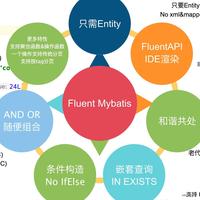
上篇FluentMybatis入门介绍一,介绍了框架提供的Mapper方法,其中有几个重要的方法用到了IQuery和IUpdate对象。 这2个对象是FluentMybatis实现复杂和动态sql的构造类,通过这2个对象fluent mybatis可以不用写具体的xml文件,直接通过java api可以构造出比较复杂的业务sql语句,做到代码逻辑和sql逻辑的合一。
Fluent Mybatis, 原生Mybatis, Mybatis Plus三者功能对比
下面这篇接着介绍如何通过IQuery和IUpdate定义强大的动态SQL语句。
先构造一个业务场景
- 表结构 假如有学生成绩表结构如下:
create table `student_score`
(
    id           bigint auto_increment comment '主键ID' primary key,
    student_id   bigint            not null comment '学号',
    gender_man   tinyint default 0 not null comment '性别, 0:女; 1:男',
    school_term  int               null comment '学期',
    subject      varchar(30)       null comment '学科',
    score        int               null comment '成绩',
    gmt_create   datetime          not null comment '记录创建时间',
    gmt_modified datetime          not null comment '记录最后修改时间',
    is_deleted   tinyint default 0 not null comment '逻辑删除标识'
) engine = InnoDB default charset=utf8;
- 需求 现在有需求: 统计2000年到2019年, 三门学科('英语', '数学', '语文')分数按学期,学科统计最低分,最高分和平均分,统计结果按学期和学科排序 实现这个需求的SQL语句如下
select school_term, subject, count(score), min(score), max(score), avg(score)
from student_score
where school_term between 2000 and 2019
  and subject in ('英语', '数学', '语文')
  and is_deleted = 0
group by school_term, subject
order by school_term, subject
现在我们通过FluentMybatis来进行具体实现
- 在StudentScoreDao类上定义接口
@Data
public class ScoreStatistics {
    private int schoolTerm;
    private String subject;
    private long count;
    private Integer minScore;
    private Integer maxScore;
    private BigDecimal avgScore;
}
public interface StudentScoreDao extends IBaseDao<StudentScoreEntity> {
    /**
     * 统计从fromYear到endYear年间学科subjects的统计数据
     *
     * @param fromYear 统计年份区间开始
     * @param endYear  统计年份区间结尾
     * @param subjects 统计的学科列表
     * @return 统计数据
     */
    List<ScoreStatistics> statistics(int fromYear, int endYear, String[] subjects);
}
- 在StudentScoreDaoImpl上实现业务逻辑
@Repository
public class StudentScoreDaoImpl extends StudentScoreBaseDao implements StudentScoreDao {
    @Override
    public List<ScoreStatistics> statistics(int fromSchoolTerm, int endSchoolTerm, String[] subjects) {
        return super.listPoJos(ScoreStatistics.class, super.query()
            .select.schoolTerm().subject()
            .count("count")
            .min.score("min_score")
            .max.score("max_score")
            .avg.score("avg_score")
            .end()
            .where.isDeleted().isFalse()
            .and.schoolTerm().between(fromSchoolTerm, endSchoolTerm)
            .and.subject().in(subjects)
            .end()
            .groupBy.schoolTerm().subject().end()
            .orderBy.schoolTerm().asc().subject().asc().end()
        );
    }
}
DaoImpl实现中,除了根据条件返回统计结果,还讲结果按照下划线转驼峰的规则自动转换为ScoreStatistics对象返回。
- 写个测试验证下
@RunWith(SpringRunner.class)
@SpringBootTest(classes = QuickStartApplication.class)
public class StudentScoreDaoImplTest {
    @Autowired
    private StudentScoreDao dao;

    @Test
    public void statistics() {
        List<ScoreStatistics> list = dao.statistics(2000, 2019, new String[]{"语文", "数学", "英语"});
        System.out.println(list);
    }
}
- 查看控制台输出结果
DEBUG - ==>  Preparing: SELECT school_term, subject, count(*) AS count, MIN(score) AS min_score, MAX(score) AS max_score, AVG(score) AS avg_score
    FROM student_score
    WHERE is_deleted = ?
    AND school_term BETWEEN ? AND ?
    AND subject IN (?, ?, ?)
    GROUP BY school_term, subject
    ORDER BY school_term ASC, subject ASC
DEBUG - ==> Parameters: false(Boolean), 2000(Integer), 2019(Integer), 语文(String), 数学(String), 英语(String)
DEBUG - <==      Total: 30
[ScoreStatistics(schoolTerm=2000, subject=数学, count=17, minScore=1, maxScore=93, avgScore=36.0588),
 ...
 ScoreStatistics(schoolTerm=2009, subject=语文, count=24, minScore=3, maxScore=100, avgScore=51.2500)]
上面通过例子大致预览了FluentMybatis动态构造查询的逻辑,下面我们具体讲解
where条件构造
一般where条件构造
where条件设置语法形式如下, 以where开头,以end()方法结束 在内置变量where后面,可以自动列出可以设置的表字段(方法), 在字段后可以紧跟着比较符和比较值。
    .where
    .字段().条件(条件参数)
    .end()
eq: 等于 = ?
- 相等条件设置示例
@Test
public void column_eq_value() {
    UserQuery query = new UserQuery()
        .where.userName().eq("darui.wu")
        .and.eMail().eq("darui.wu@163.com").end();
    mapper.findOne(query);
}
- 使用带条件判断方法: eq(Object value, Predicate when)
当预言when为真时, 才会执行 eq(value)判断
示例:
    /**
     * 根据条件查询用户列表
     * 如果设置了积分, 加上积分条件
     * 如果设置了状态, 加上状态条件
     *
     * @return
     */
    @Override
    public List<UserEntity> findByBirthdayAndBonusPoints(Date birthday, Long points, String status) {
        UserQuery query = super.query()
            .where.birthday().eq(birthday)
            .and.bonusPoints().ge(points, If::notNull)
            .and.status().eq(status, If::notBlank).end();
        return mapper.listEntity(query);
    }
上面的示例,相当于下面常见的java条件设置
    public List<UserEntity> findByBirthdayAndBonusPoints(Date birthday, Long points, String status) {
        UserQuery query = super.query();
        query.where.birthday().eq(birthday);
        if (points != null) {
            query.where.bonusPoints().ge(points);
        }
        if (status != null && !status.trim().isEmpty()) {
            query.where.status().eq(status).end();
        }
        return mapper.listEntity(query);
    }
或者,使用mybatis的条件设置
<select id="findByBirthdayAndBonusPoints" parameterType="java.util.Map" resultMap="UserEntity">
    SELECT ... FROM user
    WHERE birthday = #{birthday}
    <if test="bonus_points != null ">
        AND bonus_points = #{bonusPoints}
    </if>
    <if test="status != null and status != '' ">
        AND status = #{status}
    </if>
</select>
使用fluent mybatis的条件语句可以达到上面java判断和xml判断的同样效果,同时,如果birthday如果传入一个空串,还会进行判空,抛出异常, 防止传参错误,导致的非预期条件查询。
ne: 不等于 <> ?
@Test
public void ne() {
    UserQuery query = new UserQuery()
        .where
        .age().ne(34)
        .end();
    mapper.count(query);
}
gt: 大于 > ?
@Test
public void gt() {
    UserQuery query = new UserQuery()
        .where.age().gt(34).end();
    mapper.count(query);
}
ge: 大于等于 >= ?
@Test
public void ge() {
    UserQuery query = new UserQuery()
        .where.age().ge(34).end();
    mapper.count(query);
}
lt: 小于 < ?
@Test
public void lt() {
    UserQuery query = new UserQuery()
        .where.age().lt(34).end();
    mapper.count(query);
}
le: 小于等于 <= ?
@Test
public void le() {
    UserQuery query = new UserQuery()
        .where.age().le(34).end();
    mapper.count(query);
}
between: BETWEEN ? AND ?
@Test
public void between() {
    UserQuery query = new UserQuery()
        .where.age().between(23, 40).end();
    mapper.count(query);
}
notBetween: NOT BETWEEN ? AND ?
@Test
public void not_between() {
    UserQuery query = new UserQuery()
        .where.age().notBetween(23, 40).end();
    mapper.count(query);
}
like: LIKE ?, ? 为 "%value%"
@Test
void like() {
    mapper.listEntity(new UserQuery()
        .where
        .userName().like("abc") // like '%abc%'
        .end()
    );
}
notLike: NOT LIKE ?, ? 为 "%value%"
@Test
void not_like() {
    mapper.listEntity(new UserQuery()
        .where
        .userName().notLike("abc") // not like '%abc%'
        .end()
    );
}
likeLeft: LIKE ?, ? 为 "value%"
likeRight: LIKE ?, ? 为 "%value"
isNull: column IS NULL
@Test
void isNull() {
    mapper.listEntity(new UserQuery()
        .where.age().isNull().end()
    );
}
isNotNull: column IS NOT NULL
@Test
void isNotNull() {
    mapper.listEntity(new UserQuery()
        .where.age().isNotNull().end()
    );
}
in: 在...之中 IN (?, ..., ?)
@Test
public void in_collection() {
    UserQuery query = new UserQuery()
        .where
        .age().in(Arrays.asList(34, 35))
        .end();
    mapper.count(query);
}

@Test
public void in_array() {
    UserQuery query = new UserQuery()
        .where
        .age().in(new int[]{34, 35})
        .end();
    mapper.count(query);
}
notIn: 不在...之中 NOT IN (?, ..., ?)
嵌套条件构造
FluentMybatis还支持嵌套条件的构造
in (select 子查询)
- 嵌套查询表和主查询表一样的场景
.column().in( query-> {对query设置条件})
只需要在in里面引用一个lambda表达式,lambda表达式入参是一个同名的Query。对这个入参可以设置where参数。
@DisplayName("嵌套查询和主查询的表是同一个")
@Test
void test_in_same_table_query() {
    UserQuery query = new UserQuery()
        .where.id().in(q -> q.selectId()
            .where.id().eq(3L).end())
        .and.userName().like("user")
        .and.age().gt(23).end();

    List list = mapper.listEntity(query);
}
上面逻辑执行下面SQL语句
SELECT id, gmt_create, gmt_modified, is_deleted, account, age, avatar, birthday, bonus_points, e_mail, password, phone, status, user_name
FROM user WHERE id IN (SELECT id FROM user WHERE id = ?)
AND user_name LIKE ?
AND age > ?
- 嵌套查询表是另外表的场景 .column().in(new XyzQuery(){对query设置条件})
如果嵌套查询的不是同表一张表,需要在in方法里面显式声明一下Query对象的class类型, 后面用法同方法一。
@DisplayName("嵌套查询和主查询的表是不同")
@Test
void test_in_difference_table_query() {
    UserQuery query = new UserQuery()
        .selectId()
        .where.addressId().in(new ReceivingAddressQuery().selectId()
            .where.id().in(new int[]{1, 2}).end())
        .end();
    mapper.listEntity(query);
}
执行sql语句
SELECT id FROM user
WHERE address_id IN (SELECT id
    FROM receiving_address WHERE id IN (?, ?)
)
- not in嵌套查询: 使用方法同 in 嵌套查询
exists (select子查询)
- 嵌套查询表和主查询表一样的场景 Exists查询不需要指定字段,直接在query where中可以引用exists方法。
-
exists( query-> {对query设置条件}) 如果exists查询的表和主查询一致,直接在lambada表达式中使用同类型query参数即可,参数用法同in方法。
-
exists(new XyzQuery{对query设置条件}) 如果exists查询的表和主查询不一致,在exists方法第一个参数指定query类型,第二个参数同方法1。
具体示例
@DisplayName("EXISTS查询")
@Test
void test_exists_query() {
    UserQuery query = new UserQuery()
        .where.exists(new ReceivingAddressQuery()
            .where.detailAddress().like("杭州")
            .and.id().apply(" = user.address_id").end())
        .end();
    mapper.listEntity(query);
}
执行sql语句
SELECT id, gmt_create, gmt_modified, is_deleted, account, address_id, age, avatar, birthday, bonus_points, e_mail, password, phone, status, user_name
FROM user
WHERE EXISTS (SELECT * FROM receiving_address
    WHERE detail_address LIKE ?
    AND id = user.address_id
)
group by条件构造
groupBy条件设置语法形式如下, 以groupBy开头,以end()方法结束
    .groupBy.column1().column2()
    .end()
示例1:
@Test
public void test_groupBy() throws Exception {
    UserQuery query = new UserQuery()
        .selectId()
        .where.id().eq(24L).end()
        .groupBy.userName().age().end();
    mapper.listEntity(query);
}
执行sql语句
SELECT id FROM t_user WHERE id = ? GROUP BY user_name, age
having条件
    .groupBy.column1().column2().end().end()
    .having
    .聚合函数1.column1().条件(条件值)
    .聚合函数2.column2().条件(条件值)
    .end()
这里的条件和where部分类似, 支持eq, ge, gt等,示例
    .where.id().eq(24L).end()
    .groupBy.id().end()
    .having.sum.age().between(2, 10)
    .and.count.id().gt(2)
    .and.avg.age().in(new int[]{2, 3})
    .and.min.age().gt(10)
    .and.max.age().lt(20)
    .end();
对应sql语句
GROUP BY id
HAVING SUM(age) BETWEEN ? AND ?
AND COUNT(id) > ?
AND AVG(age) IN (?, ?)
AND MIN(age) > ?
AND MAX(age) < ?
order by条件构造
orderBy条件设置语法形式如下, 以orderBy开头,以end()方法结束
    .orderBy
    .字段().asc()
    .字段().desc()
    .end()
示例代码1
@Test
public void test_orderBy() throws Exception {
    UserQuery query = new UserQuery()
        .selectId()
        .where.id().eq(24L).end()
        .orderBy.id().asc().age().desc().end();
    mapper.listEntity(query);
}
对应sql语句
SELECT id FROM t_user WHERE id = ? ORDER BY id ASC, age DESC
设置update值
语法:以set开头,更新对应的字段值,以end()结束
    .set.字段1().is(设置值)
    .set.字段2().is(设置值)
    .set.字段3().is(设置值)
    .end()
    .where.条件设置.end()
示例代码
@Test
void test_update() {
    mapper.updateBy(new UserUpdate()
        .set.age().is(34).end()
        .where.id().eq(2).end()
    );
}
对应sql语句
UPDATE t_user SET gmt_modified = now(), age = ? WHERE id = ?
说明: 示例显式指定字段age的更新值, 但gmt_modified字段设置了默认更新值now(), 所以在执行语句时同时更新了gmt_modified字段 控制台log输出
...UserMapper.updateBy - ==>  Preparing: UPDATE t_user SET gmt_modified = now(), age = ? WHERE id = ?
...UserMapper.updateBy - ==> Parameters: 34(Integer), 2(Integer)