- 开发背景:公司业务需要画消防逃生路线
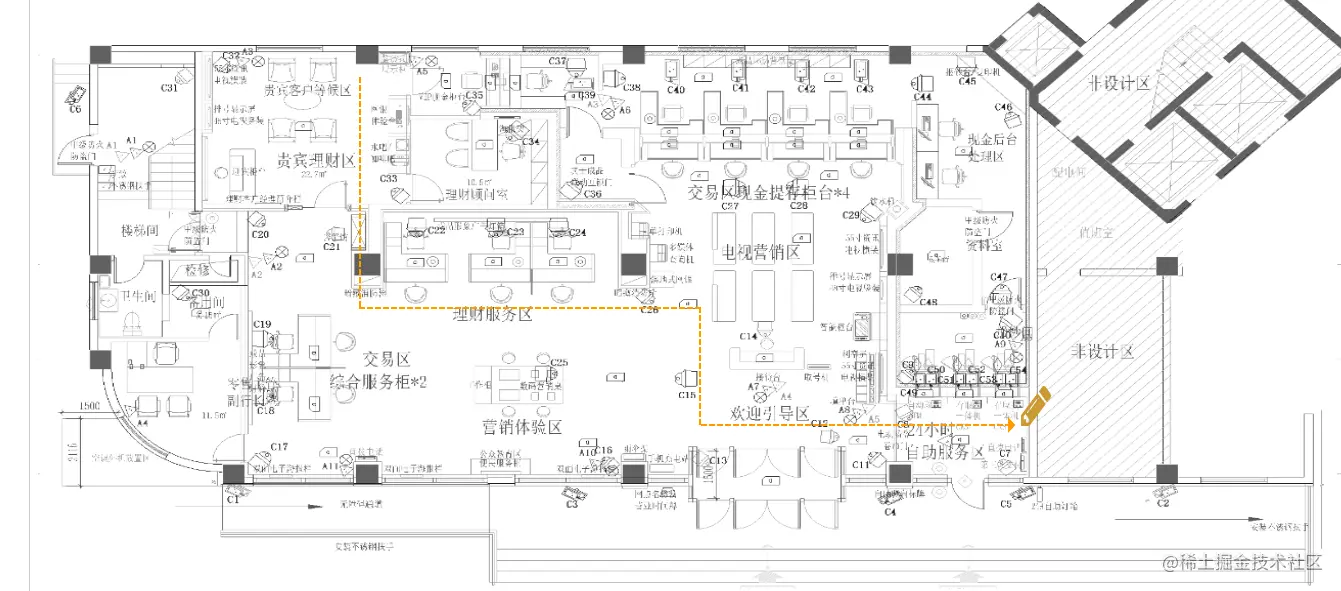
- 图片展示
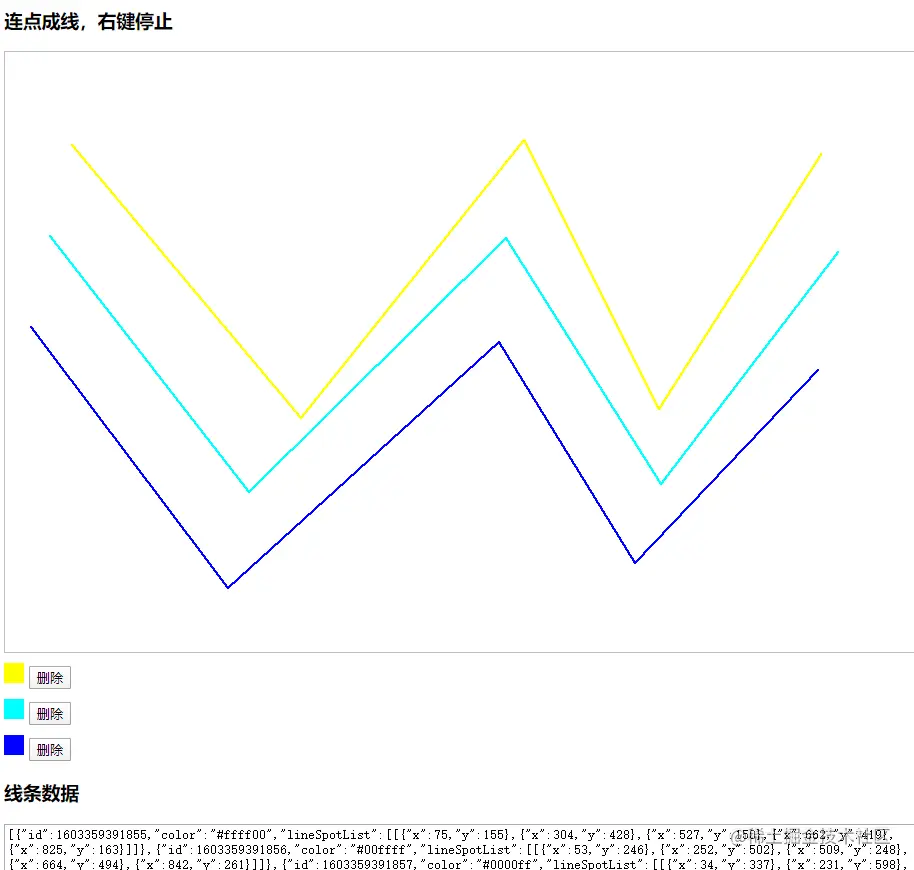
- HMTL 源码
<!DOCTYPE html
PUBLIC "-//W3C//DTD XHTML 1.0 Transitional//EN" "http://www.w3.org/TR/xhtml1/DTD/xhtml1-transitional.dtd">
<html xmlns="http://www.w3.org/1999/xhtml">
<head>
<meta http-equiv="Content-Type" content="text/html; charset=utf-8" />
<title>连点成线</title>
<style type="text/css">
.picker {
display: inline-block;
width: 20px;
height: 20px;
margin-top: 10px;
background-color: red;
}
.line {
background-color: red;
}
</style>
</head>
<body>
<h3>连点成线,右键停止</h3>
<div id="container" style="width: 100%; height: 600px; border:1px #bfbfbf solid;"></div>
<div id="lineList"></div>
<div>
<h3>线条数据</h3>
<textarea id="initData" style="width: 100%;height: 200px;"></textarea>
</div>
<script src="https://cdn.bootcdn.net/ajax/libs/jquery/3.5.1/jquery.min.js"></script>
<script src="./colorpicker.js"></script>
<script type="text/javascript">
$(document).ready(function () {
lineInfoPropertyList = [{ color: "#ffff00", id: 5, lineSpotList: [{ x: 174, y: 193 }, { x: 610, y: 182 }] }, { color: "#0000ff", id: 2, lineSpotList: [{ x: 221, y: 347 }, { x: 764, y: 331 }] }, { color: "#9900ff", id: 6, lineSpotList: [{ x: 325, y: 465 }, { x: 805, y: 431 }] }];
$("#initData").val(JSON.stringify(lineInfoPropertyList).toString());
initDrawingBoard();
showOldLine();
});
var lineInfoPropertyList = [];
function initDrawingBoard() {
$("#container").click(function (event) {
recordPoint(event);
}).contextmenu(function (event) {
event.preventDefault();
}).mousedown(function (e) {
if (e.button == 2) {
oldPoint = null;
let id = getlineId();
if (lineSpotList.length> 1) {
lineInfoPropertyList.push({
id: id,
color: "red",
lineSpotList: [lineSpotList]
});
lineSpotList = [];
addlineInfo(id);
$("#initData").val(JSON.stringify(lineInfoPropertyList).toString());
}
}
});
}
function showOldLine() {
if (lineInfoPropertyList.length > 0) {
for (const lineInfoProperty of lineInfoPropertyList) {
let id = lineInfoProperty.id;
var oldLineInfo = null;
for (let lineInfo of lineInfoProperty.lineSpotList) {
if (oldLineInfo != null) {
line(oldLineInfo.x, oldLineInfo.y, lineInfo.x, lineInfo.y, id);
}
oldLineInfo = lineInfo;
}
addlineInfo(id, lineInfoProperty.color);
}
}
}
function addlineInfo(id, color) {
$("#lineList").append(' <div id="lineInfo' + id + '"><div class="picker" id="line-color-picker' + id + '"></div> <button id="deleteLine' + id + '" >删除</button></div>');
new Colorpicker({
el: "line-color-picker" + id,
color: color == undefined || null ? "red" : color,
change: function (elem, hex) {
elem.style.backgroundColor = hex;
$('.line' + id).css("background-color", hex);
console.log(id, getLineInfoPropertyIndex(id));
lineInfoPropertyList[getLineInfoPropertyIndex(id)].color = hex;
$("#initData").val(JSON.stringify(lineInfoPropertyList).toString());
}
})
$("#deleteLine" + id).click(function () {
$("#lineInfo" + id).remove();
$(".line" + id).remove();
console.log(id, getLineInfoPropertyIndex(id));
lineInfoPropertyList.splice(getLineInfoPropertyIndex(id), 1);
$("#initData").val(JSON.stringify(lineInfoPropertyList).toString());
});
}
function getLineInfoPropertyIndex(id) {
let index = 0;
for (const lineInfoProperty of lineInfoPropertyList) {
if (id == lineInfoProperty.id) {
return index;
};
index++;
}
}
function makedot(x, y, index) {
pointDiv = "<div style='height:2px;position:absolute;left:" + x +
"px;top:" + y + "px;width:2px;overflow:hidden;background-color: red;' class='line" + index + "'></div>";
return pointDiv;
}
function line(x1, y1, x2, y2, index) {
var slope;
var direction;
var tx = x2 - x1;
var ty = y2 - y1;
if (tx == 0 && ty == 0) return;
var points = "";
var axis;
if (Math.abs(tx) >= Math.abs(ty)) {
direction = tx > 0 ? 1 : -1;
tx = Math.abs(tx);
slope = ty / tx;
axis = x1;
for (i = 0; i < tx; i++) {
points += makedot(axis, y1 + i * slope, index);
axis += direction;
}
} else {
direction = ty > 0 ? 1 : -1;
ty = Math.abs(ty);
slope = tx / ty;
axis = y1;
for (i = 0; i < ty; i++) {
points += makedot(x1 + i * slope, axis, index);
axis += direction;
}
}
var container = document.getElementById("container");
container.innerHTML += points;
}
var oldPoint = null;
function mousePosition(ev) {
ev = ev || window.event;
if (ev.pageX || ev.pageY) {
return { x: ev.pageX, y: ev.pageY };
}
var doc = document.documentElement, body = document.body;
var pageX = event.clientX + (doc && doc.scrollLeft || body && body.scrollLeft || 0) - (doc && doc.clientLeft || body && body.clientLeft || 0);
var pageY = event.clientY + (doc && doc.scrollTop || body && body.scrollTop || 0) - (doc && doc.clientTop || body && body.clientTop || 0);
return { x: pageX, y: pageY };
}
var lineSpotList = [];
function recordPoint(ev) {
var point = mousePosition(ev);
if (oldPoint != null) {
lineSpotList.push(point);
line(oldPoint.x, oldPoint.y, point.x, point.y, getlineId());
} else {
if (point != null) {
lineSpotList.push(point);
}
}
oldPoint = point;
}
function getlineId(){
if(lineInfoPropertyList.length>0){
return lineInfoPropertyList[lineInfoPropertyList.length-1].id+1;
}else{
return 1;
}
}
</script>
</body>
</html>
class Colorpicker {
util = {
css: function (elem, obj) {
for (var i in obj) {
elem.style[i] = obj[i];
}
},
hasClass: function (elem, classN) {
var className = elem.getAttribute("class");
return className.indexOf(classN) != -1;
}
}
constructor(opt) {
this.init(opt)
}
init(opt) {
let { el, initColor = "rgb(255,0,0)", allMode = ['hex', 'rgb'], color = '' } = opt;
var elem = document.getElementById(el);
if (!(elem && elem.nodeType && elem.nodeType === 1)) {
throw `Colorpicker: not found ID:${el} HTMLElement,not ${{}.toString.call(el)}`;
}
this.Opt = {
...opt,
el,
initColor,
allMode,
color
}
this.bindElem = elem; // 绑定的元素
this.elem_wrap = null; // 最外层容器
this.fixedBg = null; // 拾色器后面固定定位的透明div 用于点击隐藏拾色器
this.elem_colorPancel = null; // 色彩面板
this.elem_picker = null; // 拾色器色块按钮
this.elem_barPicker1 = null; // 颜色条
this.elem_hexInput = null; // 显示hex的表单
this.elem_showColor = null; // 显示当前颜色
this.elem_showModeBtn = null; // 切换输入框模式按钮
this.elem_inputWrap = null; // 输入框外层容器
this.pancelLeft = 0;
this.pancelTop = 0;
this.downX = 0;
this.downY = 0;
this.moveX = 0;
this.moveY = 0;
this.pointLeft = 0;
this.pointTop = 0;
this.current_mode = 'hex'; // input框当前的模式
this.rgba = { r: 0, g: 0, b: 0, a: 1 };
this.hsb = { h: 0, s: 100, b: 100 };
var _this = this, rgb = initColor.slice(4, -1).split(",");
this.rgba.r = parseInt(rgb[0]);
this.rgba.g = parseInt(rgb[1]);
this.rgba.b = parseInt(rgb[2]);
var body = document.getElementsByTagName("body")[0],
div = document.createElement("div");
div.innerHTML = this.render();
body.appendChild(div);
this.elem_wrap = div;
this.fixedBg = div.children[0];
this.elem_colorPancel = div.getElementsByClassName("color-pancel")[0];
this.pancel_width = this.elem_colorPancel.offsetWidth;
this.pancel_height = this.elem_colorPancel.offsetHeight;
this.elem_picker = div.getElementsByClassName("pickerBtn")[0];
this.elem_colorPalette = div.getElementsByClassName("color-palette")[0];
this.elem_showColor = div.getElementsByClassName("colorpicker-showColor")[0];
this.elem_barPicker1 = div.getElementsByClassName("colorBar-color-picker")[0];
this.elem_hexInput = div.getElementsByClassName("colorpicker-hexInput")[0];
this.elem_showModeBtn = div.getElementsByClassName("colorpicker-showModeBtn")[0];
this.elem_inputWrap = div.getElementsByClassName("colorpicker-inputWrap")[0];
// var rect = this.bindElem.getBoundingClientRect();
var elem = this.bindElem;
var top = elem.offsetTop;
var left = elem.offsetLeft;
while (elem.offsetParent) {
top += elem.offsetParent.offsetTop;
left += elem.offsetParent.offsetLeft;
elem = elem.offsetParent;
}
this.pancelLeft = left + this.elem_colorPalette.clientWidth;
this.pancelTop = top + this.bindElem.offsetHeight;
this.util.css(div, {
"position": "absolute",
"z-index": 2,
"display": 'none',
"left": left + "px",
"top": top + this.bindElem.offsetHeight + "px"
});
this._bindMove(this.elem_colorPancel, this._setPosition, true);
this._bindMove(this.elem_barPicker1.parentNode, this._setBar, false);
this.bindElem.addEventListener("click", function () {
_this.show();
}, false);
this.fixedBg.addEventListener("click", function (e) {
_this.hide();
}, false)
this.elem_showModeBtn.addEventListener("click", function () {
_this.switch_current_mode();
}, false)
this.elem_wrap.addEventListener("input", function (e) {
var target = e.target, value = target.value;
_this._setColorByInput(value);
}, false);
this.elem_colorPalette.addEventListener("click", function (e) {
if (e.target.tagName.toLocaleLowerCase() == "p") {
let colorStr = e.target.style.background;
let rgb = colorStr.slice(4, -1).split(",");
let rgba = {
r: parseInt(rgb[0]),
g: parseInt(rgb[1]),
b: parseInt(rgb[2])
}
switch (_this.current_mode) {
case "hex":
_this._setColorByInput("#" + _this._rgbToHex(rgba))
break;
case 'rgb':
let inputs = _this.elem_wrap.getElementsByTagName("input")
inputs[0].value = rgba.r;
inputs[1].value = rgba.g;
inputs[2].value = rgba.b;
_this._setColorByInput(colorStr)
break;
}
}
}, false);
(color != '' && this._setColorByInput(color));
}
render() {
var tpl =
`<div style="position: fixed; top: 0px; right: 0px; bottom: 0px; left: 0px;"></div>
<div style="position: inherit;z-index: 100;display: flex;box-shadow: rgba(0, 0, 0, 0.3) 0px 0px 2px, rgba(0, 0, 0, 0.3) 0px 4px 8px;">
<div style='width:180px;padding:10px;background: #f9f9f9;display: flex;flex-flow: row wrap;align-content: space-around;justify-content: space-around;' class='color-palette'>
${this._getPaletteColorsItem()}
</div>
<div class="colorpicker-pancel" style="background: rgb(255, 255, 255);box-sizing: initial; width: 225px; font-family: Menlo;">
<div style="width: 100%; padding-bottom: 55%; position: relative; border-radius: 2px 2px 0px 0px; overflow: hidden;">
<div class="color-pancel" style="position: absolute; top: 0px; right: 0px; bottom: 0px; left: 0px; background: rgb(${this.rgba.r},${this.rgba.g},${this.rgba.b})">
<style>
.saturation-white {background: -webkit-linear-gradient(to right, #fff, rgba(255,255,255,0));background: linear-gradient(to right, #fff, rgba(255,255,255,0));}
.saturation-black {background: -webkit-linear-gradient(to top, #000, rgba(0,0,0,0));background: linear-gradient(to top, #000, rgba(0,0,0,0));}
</style>
<div class="saturation-white" style="position: absolute; top: 0px; right: 0px; bottom: 0px; left: 0px;">
<div class="saturation-black" style="position: absolute; top: 0px; right: 0px; bottom: 0px; left: 0px;">
</div>
<div class="pickerBtn" style="position: absolute; top: 0%; left: 100%; cursor: default;">
<div style="width: 12px; height: 12px; border-radius: 6px; box-shadow: rgb(255, 255, 255) 0px 0px 0px 1px inset; transform: translate(-6px, -6px);">
</div>
</div>
</div>
</div>
</div>
<div style="padding: 0 16px 20px;">
<div class="flexbox-fix" style="display: flex;align-items: center;height: 40px;">
<div style="width: 32px;">
<div style="width: 16px; height: 16px; border-radius: 8px; position: relative; overflow: hidden;">
<div class="colorpicker-showColor" style="position: absolute; top: 0px; right: 0px; bottom: 0px; left: 0px; border-radius: 8px; box-shadow: rgba(0, 0, 0, 0.1) 0px 0px 0px 1px inset; background:rgb(${this.rgba.r},${this.rgba.g},${this.rgba.b}); z-index: 2;"></div>
<div class="" style="position: absolute; top: 0px; right: 0px; bottom: 0px; left: 0px; background: url("data:image/png;base64,iVBORw0KGgoAAAANSUhEUgAAABAAAAAQCAYAAAAf8/9hAAAAMUlEQVQ4T2NkYGAQYcAP3uCTZhw1gGGYhAGBZIA/nYDCgBDAm9BGDWAAJyRCgLaBCAAgXwixzAS0pgAAAABJRU5ErkJggg==") left center;"></div>
</div>
</div>
<div style="-webkit-box-flex: 1; flex: 1 1 0%;"><div style="height: 10px; position: relative;">
<div style="position: absolute; top: 0px;right: 0px; bottom: 0px; left: 0px;">
<div class="hue-horizontal" style="padding: 0px 2px; position: relative; height: 100%;">
<style>
.hue-horizontal {background: linear-gradient(to right, #f00 0%, #ff0 17%, #0f0 33%, #0ff 50%, #00f 67%, #f0f 83%, #f00 100%);background: -webkit-linear-gradient(to right, #f00 0%, #ff0 17%, #0f0 33%, #0ff 50%, #00f 67%, #f0f 83%, #f00 100%);}
.hue-vertical {background: linear-gradient(to top, #f00 0%, #ff0 17%, #0f0 33%,#0ff 50%, #00f 67%, #f0f 83%, #f00 100%);background: -webkit-linear-gradient(to top, #f00 0%, #ff0 17%,#0f0 33%, #0ff 50%, #00f 67%, #f0f 83%, #f00 100%);}
</style>
<div class="colorBar-color-picker" style="position: absolute; left: 0%;">
<div style="width: 12px; height: 12px; border-radius: 6px; transform: translate(-6px, -1px); background-color: rgb(248, 248, 248); box-shadow: rgba(0, 0, 0, 0.37) 0px 1px 4px 0px;">
</div>
</div>
</div>
</div>
</div>
</div>
</div>
<div class="flexbox-fix" style="display: flex;">
<div class="flexbox-fix colorpicker-inputWrap" style="-webkit-box-flex: 1; flex: 1 1 0%; display: flex; margin-left: -6px;">
${this._getInputTpl()}
</div>
<div class="colorpicker-showModeBtn" style="width: 32px; text-align: right; position: relative;">
<div style="margin-right: -4px; cursor: pointer; position: relative;">
<svg viewBox="0 0 24 24" style="width: 24px; height: 24px; border: 1px solid transparent; border-radius: 5px;"><path fill="#333" d="M12,5.83L15.17,9L16.58,7.59L12,3L7.41,7.59L8.83,9L12,5.83Z"></path><path fill="#333" d="M12,18.17L8.83,15L7.42,16.41L12,21L16.59,16.41L15.17,15Z"></path></svg>
</div>
</div>
</div>
</div>
</div>
</div>`;
return tpl;
}
_getInputTpl() {
var current_mode_html = "";
switch (this.current_mode) {
case 'hex':
var hex = "#" + this._rgbToHex(this._HSBToRGB(this.hsb));
current_mode_html += `
<div style="padding-left: 6px; width: 100%;">
<div style="position: relative;">
<input class="colorpicker-hexInput" value="${hex}" spellcheck="false" style="font-size: 11px; color: rgb(51, 51, 51); width: 100%; border-radius: 2px; border: none; box-shadow: rgb(218, 218, 218) 0px 0px 0px 1px inset; height: 21px; text-align: center;">
<span style="text-transform: uppercase; font-size: 11px; line-height: 11px; color: rgb(150, 150, 150); text-align: center; display: block; margin-top: 12px;">hex</span>
</div>
</div>`;
break;
case 'rgb':
for (var i = 0; i < 3; i++) {
current_mode_html +=
`<div style="padding-left: 6px; width: 100%;">
<div style="position: relative;">
<input class="colorpicker-hexInput" value="${this.rgba['rgb'[i]]}" spellcheck="false" style="font-size: 11px; color: rgb(51, 51, 51); width: 100%; border-radius: 2px; border: none; box-shadow: rgb(218, 218, 218) 0px 0px 0px 1px inset; height: 21px; text-align: center;">
<span style="text-transform: uppercase; font-size: 11px; line-height: 11px; color: rgb(150, 150, 150); text-align: center; display: block; margin-top: 12px;">${'rgb'[i]}</span>
</div>
</div>`;
}
default:
}
return current_mode_html;
}
_getPaletteColorsItem() {
let str = '';
let palette = ["rgb(0, 0, 0)", "rgb(67, 67, 67)", "rgb(102, 102, 102)", "rgb(204, 204, 204)", "rgb(217, 217, 217)", "rgb(255, 255, 255)", "rgb(152, 0, 0)", "rgb(255, 0, 0)", "rgb(255, 153, 0)", "rgb(255, 255, 0)", "rgb(0, 255, 0)", "rgb(0, 255, 255)", "rgb(74, 134, 232)", "rgb(0, 0, 255)", "rgb(153, 0, 255)", "rgb(255, 0, 255)", "rgb(230, 184, 175)", "rgb(244, 204, 204)", "rgb(252, 229, 205)", "rgb(255, 242, 204)", "rgb(217, 234, 211)", "rgb(208, 224, 227)", "rgb(201, 218, 248)", "rgb(207, 226, 243)", "rgb(217, 210, 233)", "rgb(234, 209, 220)", "rgb(221, 126, 107)", "rgb(234, 153, 153)", "rgb(249, 203, 156)", "rgb(255, 229, 153)", "rgb(182, 215, 168)", "rgb(162, 196, 201)", "rgb(164, 194, 244)", "rgb(159, 197, 232)", "rgb(180, 167, 214)"]
palette.forEach(item => str += `<p style='width:20px;height:20px;background:${item};margin:0 5px;border: solid 1px #d0d0d0;'></p>`)
return str;
}
_setPosition(x, y) {
var LEFT = parseInt(x - this.pancelLeft),
TOP = parseInt(y - this.pancelTop);
this.pointLeft = Math.max(0, Math.min(LEFT, this.pancel_width));
this.pointTop = Math.max(0, Math.min(TOP, this.pancel_height));
this.util.css(this.elem_picker, {
left: this.pointLeft + "px",
top: this.pointTop + "px"
})
this.hsb.s = parseInt(100 * this.pointLeft / this.pancel_width);
this.hsb.b = parseInt(100 * (this.pancel_height - this.pointTop) / this.pancel_height);
this._setShowColor();
this._setValue(this.rgba);
}
_setBar(elem, x) {
var elem_bar = elem.getElementsByTagName("div")[0],
rect = elem.getBoundingClientRect(),
elem_width = elem.offsetWidth,
X = Math.max(0, Math.min(x - rect.x, elem_width));
if (elem_bar === this.elem_barPicker1) {
this.util.css(elem_bar, {
left: X + "px"
});
this.hsb.h = parseInt(360 * X / elem_width);
} else {
this.util.css(elem_bar, {
left: X + "px"
});
this.rgba.a = X / elem_width;
}
this._setPancelColor(this.hsb.h);
this._setShowColor();
this._setValue(this.rgba);
}
_setPancelColor(h) {
var rgb = this._HSBToRGB({ h: h, s: 100, b: 100 });
this.util.css(this.elem_colorPancel, {
background: 'rgba(' + rgb.r + ',' + rgb.g + ',' + rgb.b + ',' + this.rgba.a + ')'
});
}
_setShowColor() {
var rgb = this._HSBToRGB(this.hsb);
this.rgba.r = rgb.r;
this.rgba.g = rgb.g;
this.rgba.b = rgb.b;
this.util.css(this.elem_showColor, {
background: 'rgba(' + rgb.r + ',' + rgb.g + ',' + rgb.b + ',' + this.rgba.a + ')'
});
}
_setValue(rgb) {
var hex = "#" + this._rgbToHex(rgb);
this.elem_inputWrap.innerHTML = this._getInputTpl();
this.Opt.change(this.bindElem, hex);
}
_setColorByInput(value) {
var _this = this;
switch (this.current_mode) {
case "hex":
value = value.slice(1);
if (value.length == 3) {
value = '#' + value[0] + value[0] + value[1] + value[1] + value[2] + value[2];
this.hsb = this._hexToHsb(value);
} else if (value.length == 6) {
this.hsb = this._hexToHsb(value);
}
break;
case 'rgb':
var inputs = this.elem_wrap.getElementsByTagName("input"),
rgb = {
r: inputs[0].value ? parseInt(inputs[0].value) : 0,
g: inputs[1].value ? parseInt(inputs[1].value) : 0,
b: inputs[2].value ? parseInt(inputs[2].value) : 0
};
this.hsb = this._rgbToHsb(rgb);
}
this._changeViewByHsb();
}
_changeViewByHsb() {
this.pointLeft = parseInt(this.hsb.s * this.pancel_width / 100);
this.pointTop = parseInt((100 - this.hsb.b) * this.pancel_height / 100);
this.util.css(this.elem_picker, {
left: this.pointLeft + "px",
top: this.pointTop + "px"
});
this._setPancelColor(this.hsb.h);
this._setShowColor();
this.util.css(this.elem_barPicker1, {
left: this.hsb.h / 360 * (this.elem_barPicker1.parentNode.offsetWidth) + "px"
});
var hex = '#' + this._rgbToHex(this._HSBToRGB(this.hsb));
this.Opt.change(this.bindElem, hex);
}
switch_current_mode() {
this.current_mode = this.current_mode == 'hex' ? 'rgb' : 'hex';
this.elem_inputWrap.innerHTML = this._getInputTpl();
}
_bindMove(elem, fn, bool) {
var _this = this;
elem.addEventListener("mousedown", function (e) {
_this.downX = e.pageX;
_this.downY = e.pageY;
bool ? fn.call(_this, _this.downX, _this.downY) : fn.call(_this, elem, _this.downX, _this.downY);
document.addEventListener("mousemove", mousemove, false);
function mousemove(e) {
_this.moveX = e.pageX;
_this.moveY = e.pageY;
bool ? fn.call(_this, _this.moveX, _this.moveY) : fn.call(_this, elem, _this.moveX, _this.moveY);
e.preventDefault();
}
document.addEventListener("mouseup", mouseup, false);
function mouseup(e) {
document.removeEventListener("mousemove", mousemove, false)
document.removeEventListener("mouseup", mouseup, false)
}
}, false);
}
show() {
this.util.css(this.elem_wrap, {
"display": "block"
})
}
hide() {
this.util.css(this.elem_wrap, {
"display": "none"
})
}
_HSBToRGB(hsb) {
var rgb = {};
var h = Math.round(hsb.h);
var s = Math.round(hsb.s * 255 / 100);
var v = Math.round(hsb.b * 255 / 100);
if (s == 0) {
rgb.r = rgb.g = rgb.b = v;
} else {
var t1 = v;
var t2 = (255 - s) * v / 255;
var t3 = (t1 - t2) * (h % 60) / 60;
if (h == 360) h = 0;
if (h < 60) { rgb.r = t1; rgb.b = t2; rgb.g = t2 + t3 }
else if (h < 120) { rgb.g = t1; rgb.b = t2; rgb.r = t1 - t3 }
else if (h < 180) { rgb.g = t1; rgb.r = t2; rgb.b = t2 + t3 }
else if (h < 240) { rgb.b = t1; rgb.r = t2; rgb.g = t1 - t3 }
else if (h < 300) { rgb.b = t1; rgb.g = t2; rgb.r = t2 + t3 }
else if (h < 360) { rgb.r = t1; rgb.g = t2; rgb.b = t1 - t3 }
else { rgb.r = 0; rgb.g = 0; rgb.b = 0 }
}
return { r: Math.round(rgb.r), g: Math.round(rgb.g), b: Math.round(rgb.b) };
}
_rgbToHex(rgb) {
var hex = [ rgb.r.toString(16), rgb.g.toString(16), rgb.b.toString(16) ];
hex.map(function (str, i) {
if (str.length == 1) {
hex[i] = '0' + str;
}
});
return hex.join('');
}
_hexToRgb(hex) {
var hex = parseInt(((hex.indexOf('#') > -1) ? hex.substring(1) : hex), 16);
return { r: hex >> 16, g: (hex & 0x00FF00) >> 8, b: (hex & 0x0000FF) };
}
_hexToHsb(hex) {
return this._rgbToHsb(this._hexToRgb(hex));
}
_rgbToHsb(rgb) {
var hsb = { h: 0, s: 0, b: 0 };
var min = Math.min(rgb.r, rgb.g, rgb.b);
var max = Math.max(rgb.r, rgb.g, rgb.b);
var delta = max - min;
hsb.b = max;
hsb.s = max != 0 ? 255 * delta / max : 0;
if (hsb.s != 0) {
if (rgb.r == max) hsb.h = (rgb.g - rgb.b) / delta;
else if (rgb.g == max) hsb.h = 2 + (rgb.b - rgb.r) / delta;
else hsb.h = 4 + (rgb.r - rgb.g) / delta;
} else hsb.h = -1;
hsb.h *= 60;
if (hsb.h < 0) hsb.h += 360;
hsb.s *= 100 / 255;
hsb.b *= 100 / 255;
return hsb;
}
}
- 后期修改优化,将存储线条的数组改为Map,防止删除时取不到正确的数组下标