管道的作用就是在视图上提供便利的值变化的方法,如:Date --> 5天前,1.234.56 -->1,234.56
内置管道
常用内置管道:
- DatePipe:根据本地环境中的规则格式化日期值
- UpperCasePipe:把文本全部转换成大写
- lowerCasePipe:把文本全部转换成小写
- TitleCasePipe:把文本首字母转换成大写
- CurrencyPipe:把数字转换成货币字符串,根据本地环境中的规格进行格式化
- DecimalPipe:把数字转换成带小数点的字符串,根据本地环境中的规格进行格式化
- PercentPipe:把数字转换成百分比字符串,根据本地环境转中的规则进行格式化
- JsonPipe:以JSON格式显示同一份数据
app.component.ts
export class AppComponent{
   ...
   obj = {
      productID: 1,
      model: 's',
      name: '某米手机',
      type: '全面屏'
  };
  date = new Date();
  str = 'hello WORLD';
  price = 1234.56;
  arr = [12,3,4,5];
}
注册中文信息,在app.module.ts中
import localZh from '@angular/common/locales/zh-Hans';
import { LOCALE_ID, NgModule } from '@angular/core';
@NgModule({
  ...
  providers: [
    {
      provide: LOCALE_ID,
      useValue: 'zh-Hans'
    }
  ],
});
export class AppModule {
  constructor(){
    registerLocaleData(localZh, 'zh');
  }
 }
app.component.html
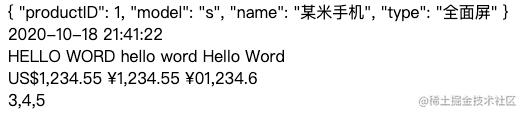
<div>
{{obj | json}}
</div>
<div>
{{date | date: 'yyyy-MM-dd HH:mm:ss'}}
</div>
<div>
{{str | uppercase}}
{{str | lowercase}}
{{str | titlecase}}
</div>
<div>
{{price | currency}}
{{price | currency: 'CNY'}}
{{price | currency: 'CNY':'symbol':'5.0-1'}}
</div>
<div>
{{arr | slice:1:4}}
</div>
``
自定义管道
pipes/ago.pipe.ts
import { Pipe, PipeTransform } from '@angular/core';

@Pipe({name: 'appAgo'})
export class AppAgoipe implements PipeTransform {
    transform(value: any): any {
        if(value){
            const seconds = Math.floor((+new Date() - +new Date(value)) / 1000 );
            if(seconds < 30){
                return '刚刚'
            }
            const intervals = {
                '年':  3600 * 24 * 365,
                '月': 3600 * 24 * 30,
                '周': 3600 * 24 * 7,
                '天': 3600 * 24,
                '时': 3600,
                '分': 60,
                '秒': 1,
            };
            let counter = 0;
            for(let key of Object.keys(intervals)){
                counter = Math.floor(seconds / intervals[key]);
                if(counter > 0){
                    return `${counter} ${key}前`
                }
            }
        }
        return value;
    }
}
在app.module.ts中声明这个管道
@NgModule({
  declarations: [
    ...
    AppAgoipe
  ]
});
export class AppModule {}
在app.component.ts
export class AppComponent{
   date = new Date('2017-09-10');
   ...
}
在app.component.html中使用
<div>
    {{date | appAgo}}
  </div>