创建项目 自带 scss
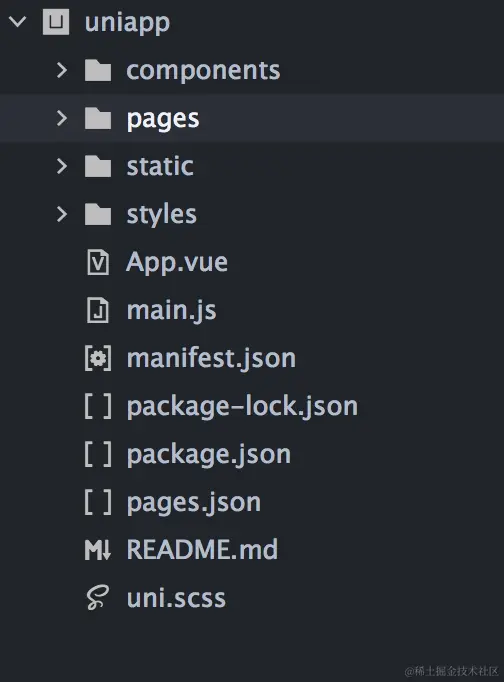
pages
插件市场安装的插件都在 components 下面   ( 如果没这个目录 自己创建同名即可 )
**pages.json 常用配置 (包含隐藏某些页面导航栏)**
{
	"pages": [ //pages数组中第一项表示应用启动页,参考:https://uniapp.dcloud.io/collocation/pages
		{
			"path": "pages/home/home"
			// "style": {
			// 	// 可以单独隐藏某一页的导航栏
			// 	"navigationStyle": "custom",
			// 	"app-plus": {
			// 		"titleNView": false
			// 	}
			// }
		}, {
			"path": "pages/hengping/hengping"
		}, {
			"path": "pages/shipin/shipin",
			"style": {
				"navigationBarTitleText": "视频"
			}
		}, {
			"path": "pages/sousuo/sousuo",
			"style": {
				"navigationBarTitleText": "搜索"
			}
		}, {
			"path": "pages/wode/wode",
			"style": {
				"navigationBarTitleText": "我的"
			}
		}
	],
	"globalStyle": {
		"navigationBarTextStyle": "white",
		"navigationBarTitleText": "懂你找图",
		"navigationBarBackgroundColor": "#000",
		"backgroundColor": "#F8F8F8"
		// 可以在这里设置全局隐藏导航栏 (也可以单个页面设置)
		// "navigationStyle":"custom",
		// "app-plus":{
		// 	"titleView":false
		// }
	},
	"tabBar": {
		"color": "#7A7E83",
		"selectedColor": "#3cc51f",
		"borderStyle": "black",
		"backgroundColor": "#ffffff",
		"height": "50px",
		"fontSize": "10px",
		"iconWidth": "24px",
		"spacing": "3px",
		"list": [{
			"pagePath": "pages/home/home",
			"iconPath": "static/image/icon_component.png",
			"selectedIconPath": "static/image/icon_component_HL.png",
			"text": "首页"
		}, {
			"pagePath": "pages/hengping/hengping",
			"iconPath": "static/image/icon_API.png",
			"selectedIconPath": "static/image/icon_API_HL.png",
			"text": "横屏"
		}, {
			"pagePath": "pages/shipin/shipin",
			"iconPath": "static/image/icon_component.png",
			"selectedIconPath": "static/image/icon_component_HL.png",
			"text": "视频"
		}, {
			"pagePath": "pages/sousuo/sousuo",
			"iconPath": "static/image/icon_API.png",
			"selectedIconPath": "static/image/icon_API_HL.png",
			"text": "搜索"
		}, {
			"pagePath": "pages/wode/wode",
			"iconPath": "static/image/icon_component.png",
			"selectedIconPath": "static/image/icon_component_HL.png",
			"text": "我的"
		}],
		"midButton": {
			"width": "80px",
			"height": "50px",
			"text": "文字",
			"iconPath": "static/image/midButton_iconPath.png",
			"iconWidth": "24px",
			"backgroundImage": "static/image/midButton_backgroundImage.png"
		}
	}
}
2.项目中使用字体图标 (本地下载的方式)
在阿里图表库 下载到本地
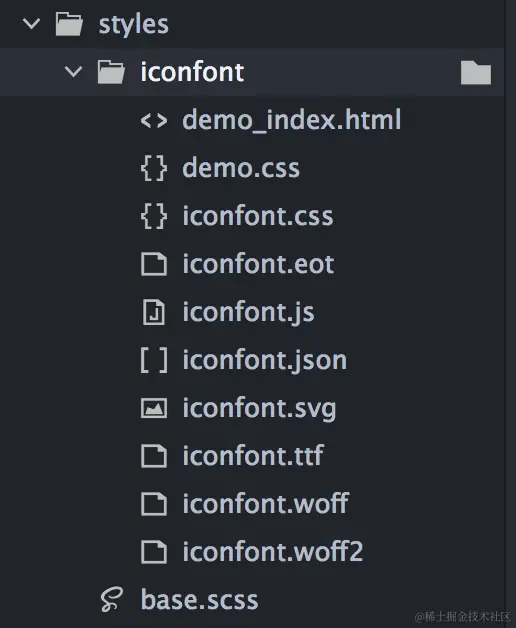
- 新建一个文件夹存放
- 在main.js中引入 css 和 js
import './styles/iconfont/iconfont.css'
import './styles/iconfont/iconfont.js'
<i class="iconfont iconbianzu2"></i>
<text class="iconfont iconyanzhengma icon1"></text>
添加样式
.icon1{
color: red
font-size: 50rpx
}