

前言
最近一直捣鼓NuxtJs项目开发,项目中用到了顶部导航/底部tabbar功能,由于底部Tab需要实现类似咸鱼App凸起效果,于是自己就弄了个自定义组件来实现。
Nuxt自定义顶部导航+底部Tab标签栏
创建组件
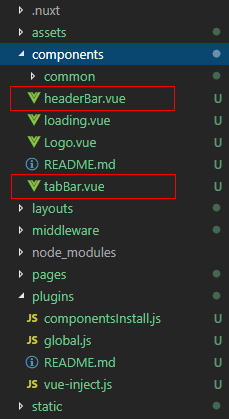
在components目录下新建 headerBar.vue 和 tabBar.vue 页面。
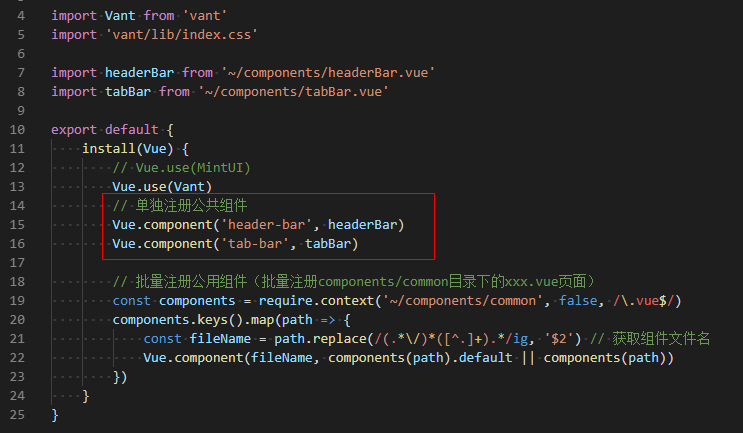
然后,在 plugins 目录下新建 componentsInstall.js 文件并引入即可。
如上图:在Nuxt.js实例中的应用效果
自定义headerBar组件
<template>
    <div class="header-bar" :class="{'fixed': fixed, 'transparent fixed': transparent}">
        <div class="header-bar__wrap flexbox flex-alignc" :style="{'background': bgcolor, 'color': color, 'z-index': zIndex}">
            <!-- >>返回 -->
            <div class="action hdbar-action__left isback" v-if="back && back!='false'" @click="$router.go(-1)">
                <slot name="backIco" /><slot name="backText" />
            </div>

            <!-- >>标题 -->
            <div class="hdbar-title" :class="{'center': center}">
                <slot name="title" />
            </div>

            <!-- >>搜索框 -->
            <div class="action hdbar-action__search">
                <slot name="search" />
            </div>

            <!-- >>右侧 -->
            <div class="action hdbar-action__right">
                <slot name="right" />
            </div>
        </div>
    </div>
</template>

<script>
    export default {
        props: {
            // 是否返回
            back: { type: [Boolean, String], default: true },
            // 标题
            title: { type: String, default: '' },
            // 标题颜色
            color: { type: String, default: '#fff' },
            // 背景颜色
            bgcolor: { type: String, default: '#22d59c' },
            // 标题是否居中
            center: { type: [Boolean, String], default: false },
            // 搜索框
            search: { type: [Boolean, String], default: false },
            // 是否固定
            fixed: { type: [Boolean, String], default: false },
            // 背景透明
            transparent: { type: [Boolean, String], default: false },
            // 设置层级
            zIndex: { type: [Number, String], default: '2021' },
        },
        data() {
            return {}
        },
        methods: {},
    }
</script>
<header-bar :back="true" :bgcolor="linear-gradient(to right, #f726ff, #2acfff)" color="#ff0" center transparent>
    <template #backIco><i class="iconfont icon-close"></i></template>

    <div slot="title">
    <img src="~/assets/img/logo.png" height="14" /> <em>Nuxt</em>
    </div>

    <div slot="right" class="ml-20" @click="$toast('搜索~~')"><i class="iconfont icon-search"></i></div>
    <div slot="right" class="ml-20"><i class="iconfont icon-choose"></i></div>
    <div slot="right" class="ml-20"><van-button type="primary" size="mini" @click="saveData">保存</van-button></div>
</header-bar>
<header-bar :back="true" bgcolor="linear-gradient(to right, #6126ff, #ff21ee)" color="#ff0" center>
    <div slot="backIco"><i class="iconfont icon-close"></i></div>
    <div slot="search" class="flex-c flex1">
        <input class="ipt flex1" placeholder="搜索关键字..." />
    </div>
    <div slot="right" class="ml-30"> <i class="iconfont icon-shoucang"></i></div>
    <div slot="right" class="ml-30"> <i class="iconfont icon-female"></i></div>
</header-bar>
另外根据项目需要,还支持自定义红点提示等功能。
自定义Tabbar组件
<template>
    <div class="tab-bar" :class="{'fixed': fixed}">
        <div class="tab-bar__wrap flexbox flex-alignc" :style="{'background': bgcolor}">
            <div v-for="(item,index) in tabs" :key="index" class="navigator" :class="currentTabIndex == index ? 'on' : ''" @click="switchTabs(index, item)">
                <div class="ico" :class="{'dock': item.dock}">
                    <i v-if="item.dock" class="dock-bg" :style="{'background': item.dockBg ? item.dockBg : activeColor}"></i>
                    <i v-if="item.icon" class="iconfont" :class="item.icon" :style="{'color': (currentTabIndex == index && !item.dock ? activeColor : color), 'font-size': item.iconSize}"></i>
                    <img v-if="item.iconImg" class="iconimg" :src="currentTabIndex == index && !item.dock ? item.selectedIconImg : item.iconImg" :style="{'font-size': item.iconSize}" />
                    <em v-if="item.badge" class="nuxt__badge">{{item.badge}}</em>
                    <em v-if="item.dot" class="nuxt__badge-dot"></em>
                </div>
                <div class="txt" :style="{'color': (currentTabIndex == index ? activeColor : color)}">{{item.text}}</div>
            </div>
        </div>
    </div>
</template>

/**
 * @Desc     Vue自定义Tabbar组件
 * @Time     andy by 2020-10-06
 * @About    Q:282310962  wx:xy190310
 */
<script>
  export default {
    props: {
        current: { type: [Number, String], default: 0 },
        // 背景颜色
        bgcolor: { type: String, default: '#fff' },
        // 颜色
        color: { type: String, default: '#999' },
        // 点击后颜色
        activeColor: { type: String, default: '#22d59c' },
        // 是否固定
        fixed: { type: [Boolean, String], default: false },
        // tab选项
        tabs: {
            type: Array,
            default: () => null
        }
    },
    data() {
      return {
          currentTabIndex: this.current
      }
    },
    created() {
        const _pagePath = this.$route.path
        this.tabs.map((val, index) => {
            if(val.pagePath == _pagePath) {
                this.currentTabIndex = index
            }
        })
    },
    methods: {
        switchTabs(index, item) {
            this.currentTabIndex = index
            this.$emit('click', index)
            if(item.pagePath) {
                this.$router.push(item.pagePath)
            }
        }
    },
  }
</script>
<tab-bar bgcolor="#b6ffff" @click="tabbarClicked" :tabs="[    {        icon: 'icon-tianjia',        text: 'Home',    },    {        icon: 'icon-shezhi',        text: 'Manage',        badge: 1    },    {        icon: 'icon-male',        text: 'Ucenter',        dot: true    },    ]"
/>

tabbarClicked(index) {
    this.$toast('tabbar索引值:' + index);
},
如上图:给tab选项配置 dock: true 即可实现类似咸鱼凸起按钮效果。
<tab-bar bgcolor="#7fa1ff" color="#fff" activeColor="#fb4e30" :tabs="[    {        icon: 'icon-face',        text: 'Face',        dot: true,        iconSize: '24px',    },    {        //icon: 'icon-tianjia',        iconImg: 'https://gw.alicdn.com/tfs/TB1CoEwVrvpK1RjSZFqXXcXUVXa-185-144.png?getAvatar=1',        text: '咸鱼',        dock: true,        dockBg: '#fb4e30',        iconSize: '.64rem',    },    {        icon: 'icon-search',        text: '搜索',    },    ]"
/>
好了,运用Nuxt/Vue自定义导航栏组件就分享这么多。希望对大家有些帮助哈~~😕
最后附上个最近实例项目
