这篇应该是pandas最详细的用法了!没有之一!

708 阅读2分钟

介绍

在Python中,pandas是基于numpy数组构建的,使数据预处理、清洗、分析工作变得更快更简单。pandas是专门为处理表格和混杂数据设计的,而numpy更适合处理统一的数值数组数据。
使用下面格式约定,引入pandas包:import pandas as pd

pandas有两个主要数据结构:Series 和 DataFrame

一、Series(一维,带标签数组)

Series是一种类似于一维数组的对象,它由一组数据(各种NumPy数据类型)以及一组与之相关的 **数据标签(即索引)**组成,即index和values两部分,可以通过索引的方式选取Series中的单个或一组值。

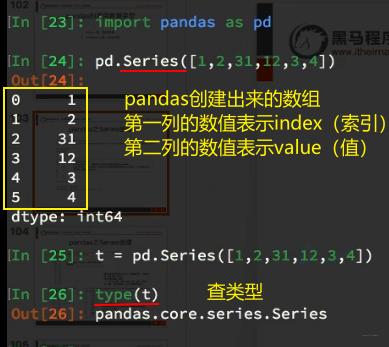
1、Series的创建:
![](https://p26-tt.byteimg.com/large/pgc-image/73417548168948b2a0a9b4f4d3eeea5d)

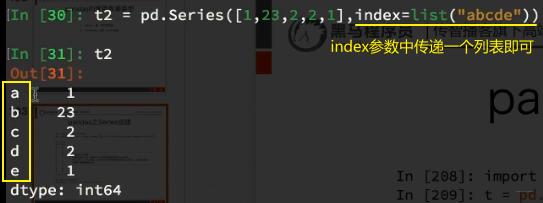
2、修改index:

![](https://p3-tt-ipv6.byteimg.com/large/pgc-image/7610ca141c9641dfb0460cedddefbb7c)

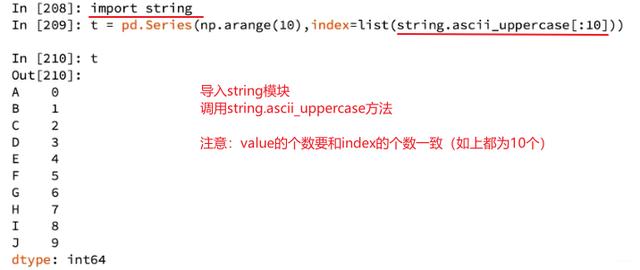
3、用string方法,给index属性传递字母:

![](https://p6-tt-ipv6.byteimg.com/large/pgc-image/7e64c3eaa37c4a05987d84474f3d0a3e)

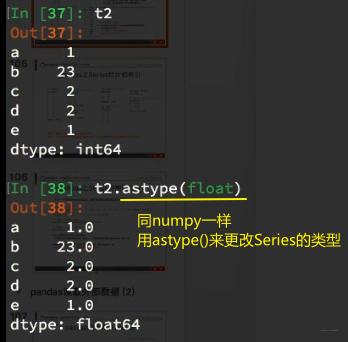
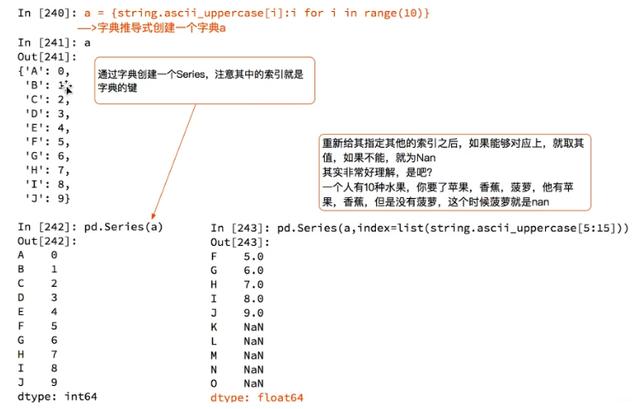
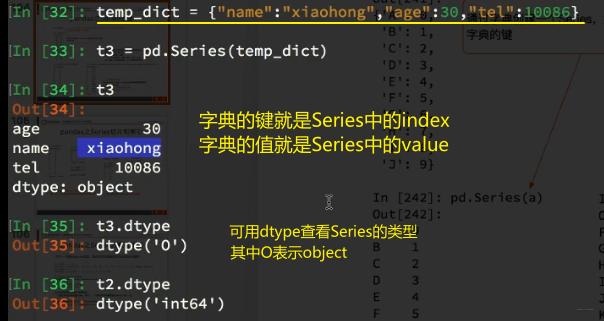
4、Series还可以用字典的格式来表示【dtype()查类型,astype()改类型】
![](https://p1-tt-ipv6.byteimg.com/large/pgc-image/69dd04d627ea4061ad3d403a9a968093)
![](https://p6-tt-ipv6.byteimg.com/large/pgc-image/b3c9d8fb116b43ddae07665c9b3adf17)
![](https://p1-tt-ipv6.byteimg.com/large/pgc-image/63d5b361837b48278f0f8c7ce8f7c349)

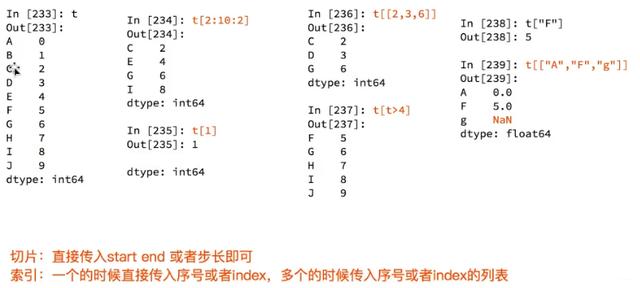
5、Series切片和索引

![](https://p26-tt.byteimg.com/large/pgc-image/5befba4a84b84dc08f8eb59234d7da29)

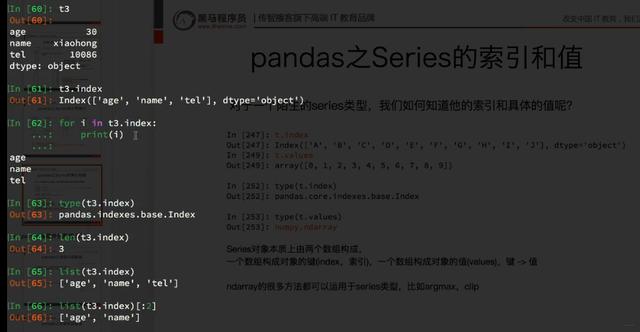
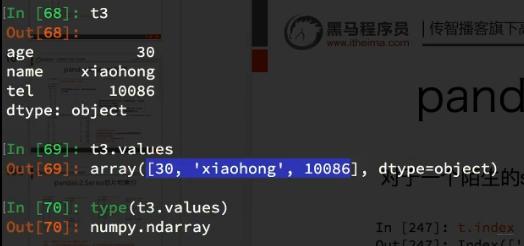
6、Series的索引和值

![](https://p26-tt.byteimg.com/large/pgc-image/8928731776c340a1baeeee7a2b02d301)
![](https://p6-tt-ipv6.byteimg.com/large/pgc-image/31696363661245d5a94879b1c54307b4)

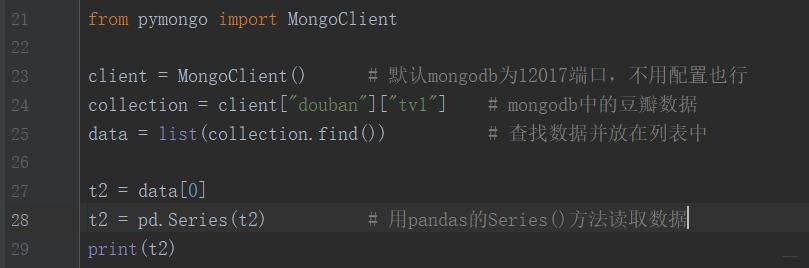
7、用Series()方法读取mongodb数据【pandas没有自带获取mongodb的方法】
![](https://p6-tt-ipv6.byteimg.com/large/pgc-image/f5ee80f7cb184ccf8586d8603caac1b1)

二、DataFrame(二维,Series容器)

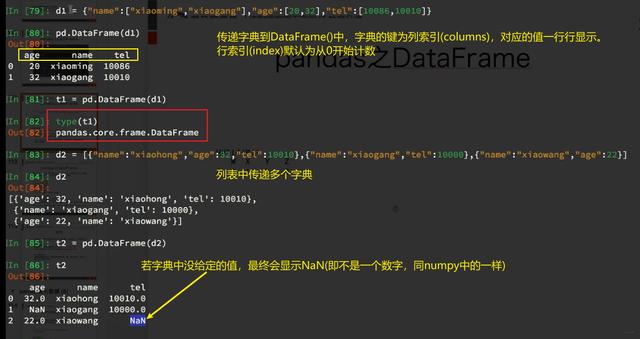
DataFrame是一个表格型的数据类型,每列值类型可以不同,是最常用的pandas对象。
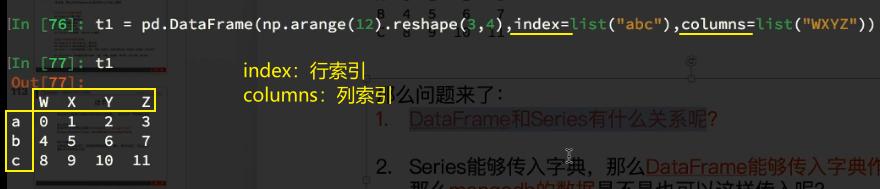
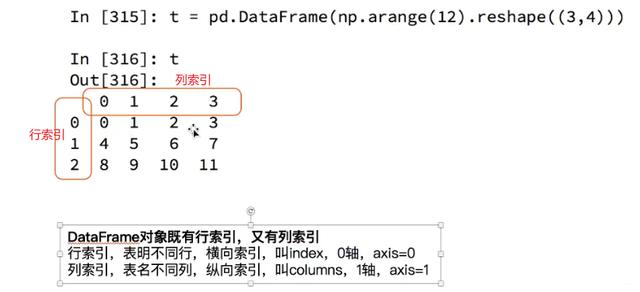
DataFrame既有行索引,也有列索引,它可以被看做由Series组成的字典(共用同一个索引)。
DataFrame中的数据是以一个或多个二维块存放的(而不是列表、字典或别的一维数据结构)。

1、DataFrame的创建:
![](https://p6-tt-ipv6.byteimg.com/large/pgc-image/717c213b540046f69582a8905f444079)

2、更改行、列索引

![](https://p26-tt.byteimg.com/large/pgc-image/4ba6c09b547e4ee4b2060349efcc4106)

3、DataFrame还可以用字典的格式来表示

![](https://p26-tt.byteimg.com/large/pgc-image/0dbfbf860dd441f0a8a8c44975c8e3b9)

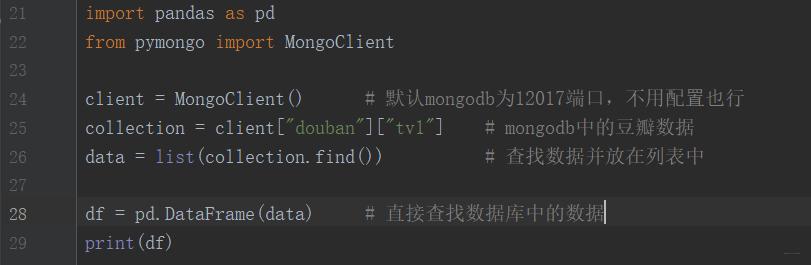
4、用DataFrame()方法读取mongodb数据【pandas没有自带获取mongodb的方法】
![](https://p26-tt.byteimg.com/large/pgc-image/b66838175199424e9bd5af322dadb0a1)

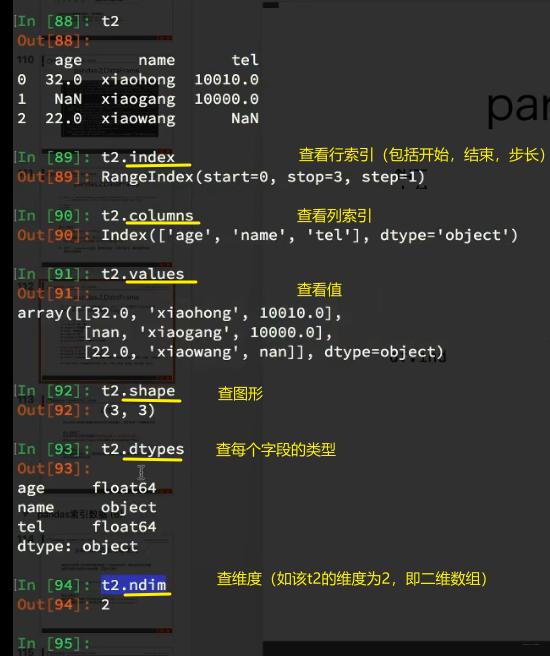
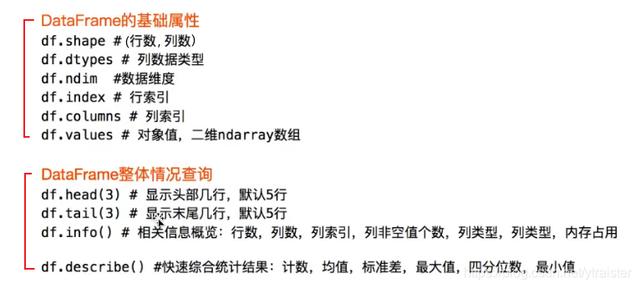
5、DataFrame的属性、用法 和 描述信息

![](https://p3-tt-ipv6.byteimg.com/large/pgc-image/f1f50b83efb244d5ad0a5ed2bd1797f2)
![](https://p9-tt-ipv6.byteimg.com/large/pgc-image/69a780aedcb04b579229d38c1c867295)

》另外记住一个常用查询方法:sort_values()【用于对DataFrame数据进行排序】

df.sort_values(by="xxx", ascending=False) 	
# by参数传递“需要按照哪个列排序”;ascending参数表示升序或降序,True为升序,False为降序。
12

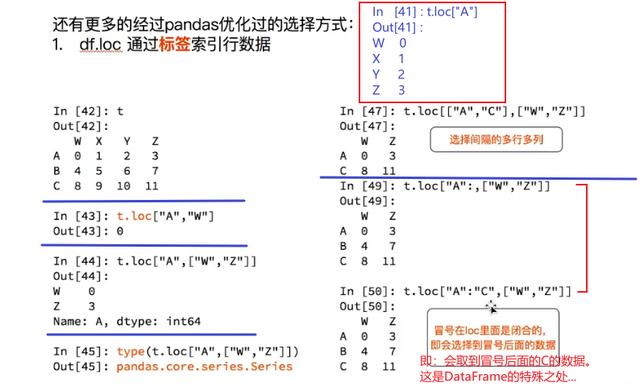
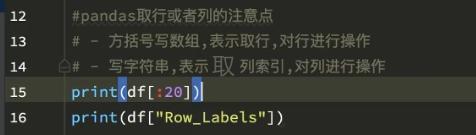
6、DataFrame取值、取索引
》 取值:
![](https://p26-tt.byteimg.com/large/pgc-image/4e99bb8627d94601a4a7533f5144b033)

》① loc方法:

![](https://p26-tt.byteimg.com/large/pgc-image/edc84f0ec9464cd49b8d0dc814ff3d8a)

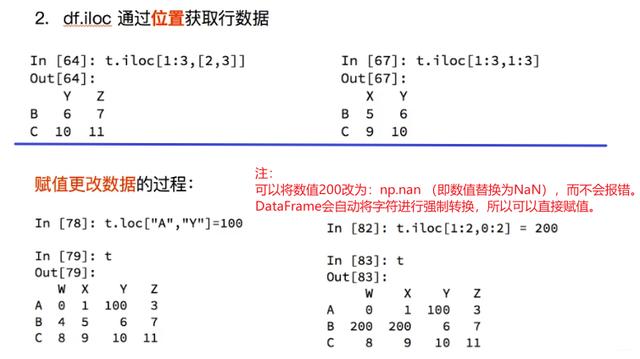
》 ② iloc方法:

![](https://p26-tt.byteimg.com/large/pgc-image/c8412ff93bf546b69f2ebecb9330b3af)

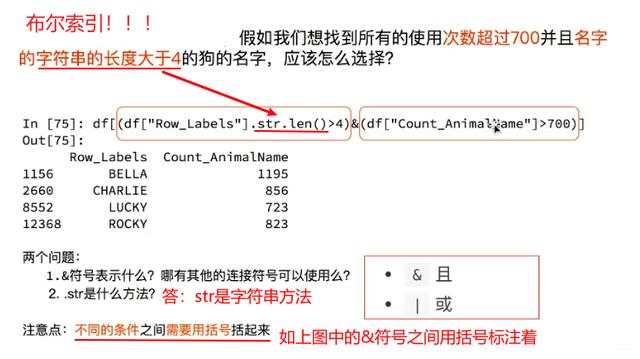
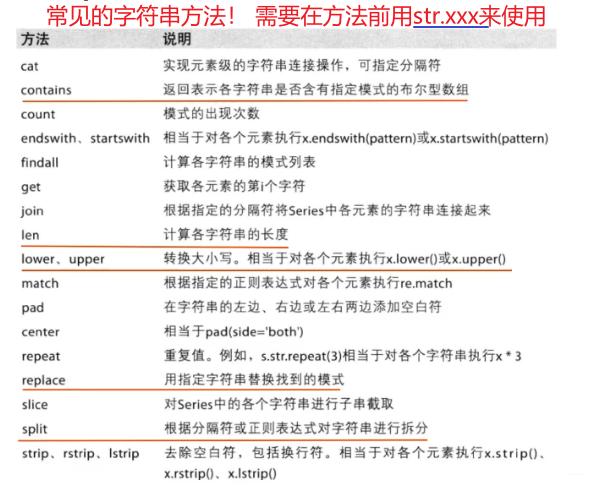
7、DataFrame布尔索引

![](https://p6-tt-ipv6.byteimg.com/large/pgc-image/c713e0c59ae7475180be67ef9fccf5a7)
![](https://p3-tt-ipv6.byteimg.com/large/pgc-image/052f6e596acf4c009438f373824f6c46)

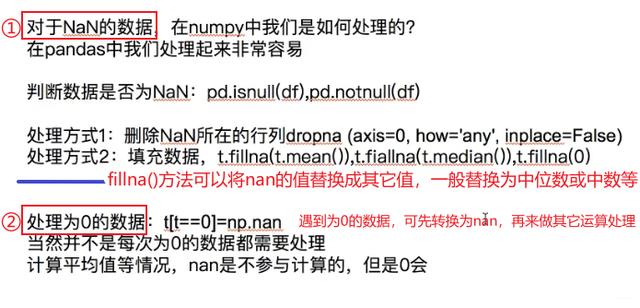
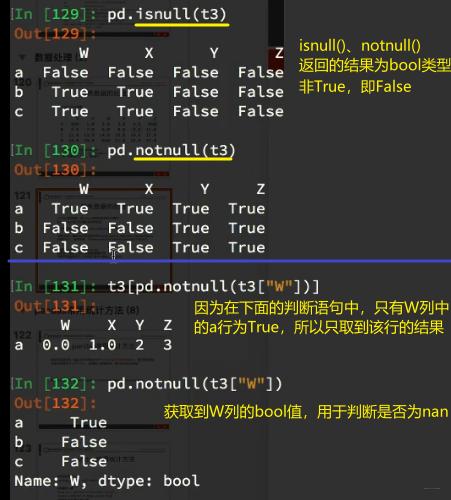
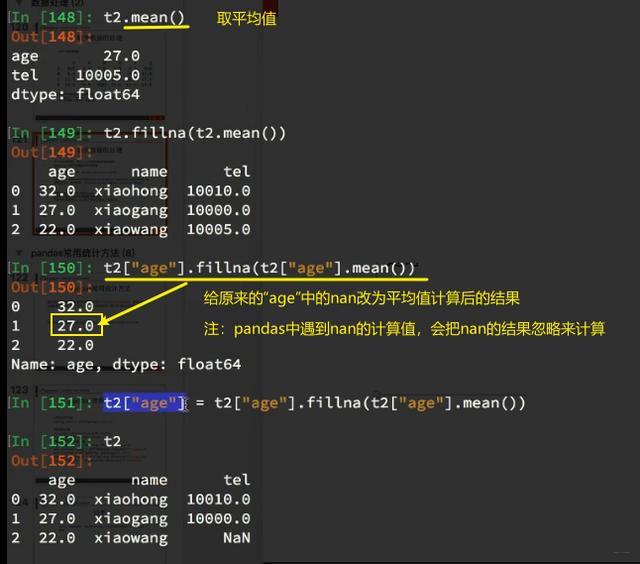
三、pandas中缺失数据的处理

![](https://p1-tt-ipv6.byteimg.com/large/pgc-image/a33ab27394e143fa85a4a72b5f9a10d8)
![](https://p6-tt-ipv6.byteimg.com/large/pgc-image/7c27cbf09db04875840498c516f09c21)
![](https://p9-tt-ipv6.byteimg.com/large/pgc-image/677c6365cb3e45b388b15877d6a26b3b)

四、pandas读写文本格式的数据

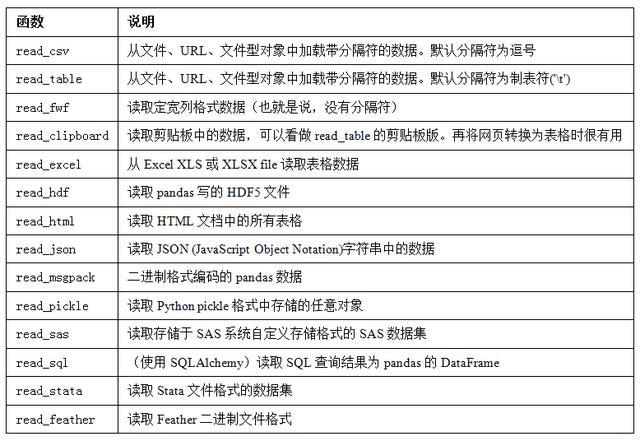
pandas提供了一些用于将表格型数据读取为DataFrame对象的函数。下表对它们进行了总结,其中read_csv()、read_table()、to_csv()是用得最多的。
![](https://p1-tt-ipv6.byteimg.com/large/pgc-image/fe49b3daf79c488e8dbabcc8a75d751f)

工作中实际碰到的数据可能十分混乱,一些数据加载函数(尤其是read_csv)的参数非常多(read_csv有超过50个参数)。

完整教程视频点这里获取