先看一下我们的vue实例(页面 组件)生命周期:
1.想看有没有el 绑定的模板(
)
- 没有就看一下有没有自定义的template
3.有没有render (template 和el 最终都是编译成render 函数)
三者都存在的时候:
优先级: render() > template> el
```
<!DOCTYPE html>
<html lang="en">
<head>
<meta charset="UTF-8">
<meta name="viewport" content="width=device-width, initial-scale=1.0">
<title>Document</title>
</head>
<body>
<div id="app">
{{message}}
</div>
<script src="https://cdn.jsdelivr.net/npm/vue/dist/vue.js"></script>
<!-- <script >Vue.config.productionTip = false</script> -->
<script>
var app = new Vue({
el: '#app',
data() {
return {
message: 'Hello world'
}
},
template: '<div>hello template!!!</div>',
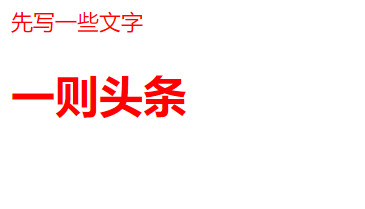
render(h) {
// return h('div',{},'hellow render')
return h('div',
{
style: {
// width: '100px'
color: 'red'
},
},
[
'先写一些文字',
h('h1', '一则头条')
]
)
// h(
// // {String | Object | Function} => 'p' | 'Select' | (h, p) => {}
// // 一个 HTML 标签名、组件选项对象,或者
// // resolve 了上述任何一种的一个 async 函数。必填项。
// 'div',
// // {Object}
// // 一个与模板中属性对应的数据对象。可选。
// {
// style: {
// // width: '100px'
// color:'red'
// },
// },
// // {String | Array}
// // 子级虚拟节点 (VNodes),一般是数组: 由 `h()` 构建而成,参数: ('标签|组件', {attrs}, text)
// // 也可以使用字符串来生成“文本虚拟节点”。可选。
// // [
// // '先写一些文字',
// // h('h1', '一则头条'),
// // // h(MyComponent, {
// // // props: {
// // // someProp: 'foobar'
// // // }
// // // })
// // ]
// 'hellow render'
// )
},
})
</script>
</body>
</html>
```