Solr具有高度的可靠性,可伸缩性和容错性,可提供分布式索引,复制和负载平衡查询,自动故障转移和恢复,集中式配置等。
Solr为许多世界上最大的互联网站点提供搜索和导航功能。
官网
下载地址
lucene.apache.org/solr/downlo…
**安装 **解压 启动
my@macPro /usr/local/solr-8.6.1/bin ./solr restart
Waiting up to 180 seconds to see Solr running on port 8983 [-]
Started Solr server on port 8983 (pid=17109). Happy searching!
启动成功!
浏览器打开
这样就安装完成了
进入安装目录 创建 core
@macPro /usr/local/solr-8.6.1/bin ./solr create -c abcd
WARNING: Using _default configset with data driven schema functionality. NOT RECOMMENDED for production use.
To turn off: bin/solr config -c abcd -p 8983 -action set-user-property -property update.autoCreateFields -value false
Created new core 'abcd'
创建 abcd 成功
刷新页面可以看到已经创建成功
默认情况下是没有中文分词的,如图所示,通过点击左边的how2java->Analysis 然后输入 四川省成都市动物园,得到是按照每个字的分词效果
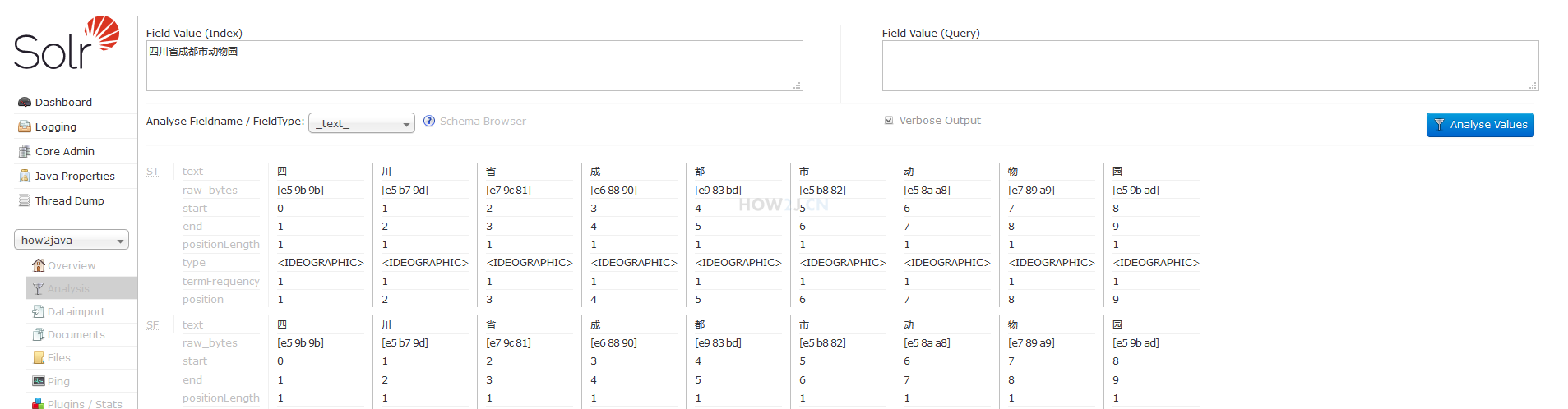
[](https://how2j.cn/frontstepImage?stepid=7339 "点击全屏观看")
接下来为 Solr 准备中文分词
下载 IKAnalyzer6.5.0.jar,然后复制到如下目录:

重启 solr
分词成功!
[创建(abcd)Core](https://how2j.cn/k/search-engine/search-engine-create-core/1680.html) 中的(abcd)Core就相当于表,那么接下来就要为这个表设置字段,用于存放数据
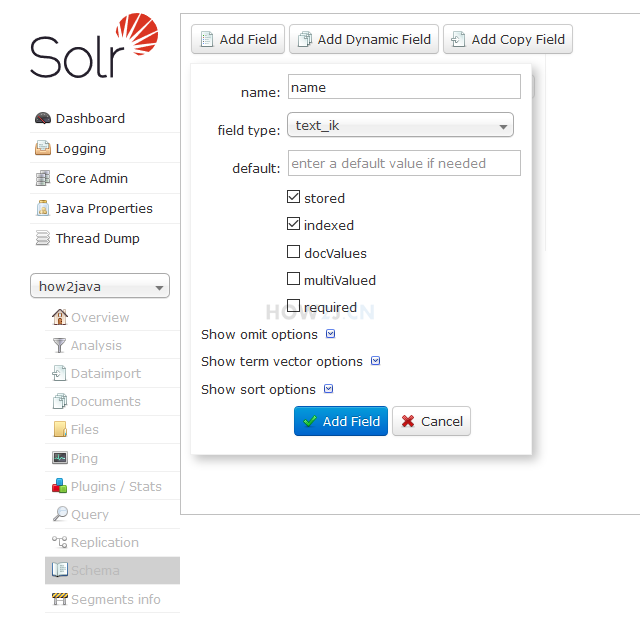
按照[创建name字段](https://how2j.cn/k/search-engine/search-engine-add-fields/1681.html#step7347) 的方式,继续所需要的字段
id字段是默认就有的,无需自己创建
Product.java
public class Product {
   @Field   int id;
   @Field   String name;
   @Field   String category;
   @Field   float price;
   @Field   String place;
   @Field   String code;
 public int getId() {      return id;   }
 public void setId(int id) {      this.id = id;   }
 public String getName() {      return name;   }
 public void setName(String name) {      this.name = name;   }
 public String getCategory() {      return category;   }
 public void setCategory(String category) {      this.category = category;   }
 public float getPrice() {      return price;   }
 public void setPrice(float price) {      this.price = price;   }
 public String getPlace() {      return place;   }
 public void setPlace(String place) {      this.place = place;   }
 public String getCode() {      return code;   }
 public void setCode(String code) {      this.code = code;   }
 @Override
 public String toString() {
  return "Product [id=" + id + ", name=" + name + ", category=" + category + ", price=" + price + ", place=" + place + ", code=" + code + "]";
  }
ProductUtil
import java.awt.AWTException;
import java.io.File;
import java.io.IOException;
import java.util.ArrayList;
import java.util.List;
import org.apache.commons.io.FileUtils;
import org.apache.solr.client.solrj.SolrServerException;
public class ProductUtil {
  public static void main(String[] args) throws IOException, InterruptedException, AWTException {
  String fileName = "140k_products.txt";
  List<Product> products = file2list(fileName);
    System.out.println(products.size());
  try {
          ProductUtil.file2list("140k_products.txt");
          SolrUtil.batchSaveOrUpdate(products);
      } catch (SolrServerException e) {
           e.printStackTrace();      }
      }
 public static List<Product> file2list(String fileName) throws IOException {
    File f = new File(fileName);
    List<String> lines = FileUtils.readLines(f,"UTF-8");
    List<Product> products = new ArrayList<>();
     for (String line : lines) {
       Product p = line2product(line);
       products.add(p);
        }
    return products;
 }
 private static Product line2product(String line) {
     Product p = new Product();
     String[] fields = line.split(",");
     p.setId(Integer.parseInt(fields[0]));
     p.setName(fields[1]);
     p.setCategory(fields[2]);
     p.setPrice(Float.parseFloat(fields[3]));
     p.setPlace(fields[4]);
     p.setCode(fields[5]);
 return p;
 }
}
SolrUtil
import java.io.IOException;
import java.util.List;
import org.apache.solr.client.solrj.SolrClient;
import org.apache.solr.client.solrj.SolrQuery;
import org.apache.solr.client.solrj.SolrServerException;
import org.apache.solr.client.solrj.beans.DocumentObjectBinder;
import org.apache.solr.client.solrj.impl.HttpSolrClient;
import org.apache.solr.client.solrj.response.QueryResponse;
import org.apache.solr.common.SolrDocument;
import org.apache.solr.common.SolrDocumentList;
import org.apache.solr.common.SolrInputDocument;
import org.apache.solr.common.util.NamedList;

public class SolrUtil {
    public static SolrClient client;
    private static String url;
    static {
        url = "http://localhost:8983/solr/test_core";
        client = new HttpSolrClient.Builder(url).build();
    }

    /**
     * 添加数据
     * @param entities
     * @param <T>
     * @return
     * @throws SolrServerException
     * @throws IOException
     */
    public static <T> boolean batchSaveOrUpdate(List<T> entities) throws SolrServerException, IOException {

        DocumentObjectBinder binder = new DocumentObjectBinder();
		int total = entities.size();
		int count=0;
        for (T t : entities) {
            SolrInputDocument doc = binder.toSolrInputDocument(t);
            client.add(doc);
            System.out.printf("添加数据到索引中,总共要添加 %d 条记录,当前添加第%d条 %n",total,++count);
		}
        client.commit();
        return true;
    }

    /**
     * 分页查询
     * @param keywords
     * @param startOfPage
     * @param numberOfPage
     * @return
     * @throws SolrServerException
     * @throws IOException
     */
    public static QueryResponse query(String keywords,int startOfPage, int numberOfPage) throws SolrServerException, IOException {
        SolrQuery query = new SolrQuery();
        query.setStart(startOfPage);
        query.setRows(numberOfPage);

        query.setQuery(keywords);
        QueryResponse rsp = client.query(query);
        return rsp;
    }

    /**
     * 根据关键字 查询结果高亮显示
     * @param keywords
     * @throws SolrServerException
     * @throws IOException
     */
    public static void queryHighlight(String keywords) throws SolrServerException, IOException {
        SolrQuery q = new SolrQuery();
        //开始页数
        q.setStart(0);
        //每页显示条数
        q.setRows(10);
        // 设置查询关键字
        q.setQuery(keywords);
        // 开启高亮
        q.setHighlight(true);
        // 高亮字段
        q.addHighlightField("name");
        // 高亮单词的前缀
        q.setHighlightSimplePre("<span style='color:red'>");
        // 高亮单词的后缀
        q.setHighlightSimplePost("</span>");
        //摘要最长100个字符
        q.setHighlightFragsize(100);
        //查询
        QueryResponse query = client.query(q);
        //获取高亮字段name相应结果
        NamedList<Object> response = query.getResponse();
        NamedList<?> highlighting = (NamedList<?>) response.get("highlighting");
        for (int i = 0; i < highlighting.size(); i++) {
            System.out.println(highlighting.getName(i) + ":" + highlighting.getVal(i));
        }

        //获取查询结果
        SolrDocumentList results = query.getResults();
        for (SolrDocument result : results) {
            System.out.println(result.toString());
        }
    }

    /**
     * 保存更新
     * @param entity
     * @param <T>
     * @return
     * @throws SolrServerException
     * @throws IOException
     */
    public static <T> boolean saveOrUpdate(T entity) throws SolrServerException, IOException {
        DocumentObjectBinder binder = new DocumentObjectBinder();
        SolrInputDocument doc = binder.toSolrInputDocument(entity);
        client.add(doc);
        client.commit();
        return true;
    }

    /**
     * 根据id删除
     * @param id
     * @return
     */
    public static boolean deleteById(String id) {
        try {
            client.deleteById(id);
            client.commit();
        } catch (Exception e) {
            e.printStackTrace();
            return false;
        }
        return true;
    }
}

public class TestSolr4j {

	public static void main(String[] args) throws SolrServerException, IOException {

		//查询
		QueryResponse queryResponse = SolrUtil.query("name:手机",0,10);
		SolrDocumentList documents=	queryResponse.getResults();
		System.out.println("累计找到的条数:"+documents.getNumFound());
		if(!documents.isEmpty()){

			Collection<String> fieldNames = documents.get(0).getFieldNames();
			for (String fieldName : fieldNames) {
				System.out.print(fieldName+"\t");
			}
			System.out.println();
		}

		for (SolrDocument solrDocument : documents) {

			Collection<String> fieldNames= solrDocument.getFieldNames();

			for (String fieldName : fieldNames) {
				System.out.print(solrDocument.get(fieldName)+"\t");

			}
			System.out.println();

		}
		System.out.println("--------------------------------------------");
		QueryResponse query = SolrUtil.query("手机", 1, 10);
		SolrDocumentList results = query.getResults();
		Iterator<SolrDocument> iterator = results.iterator();
		while (iterator.hasNext()){
			SolrDocument next = iterator.next();
			Object name = next.getFieldValue("name");
			System.out.println("name:"+name);
		}
		System.out.println("--------------------------------------------");
		SolrUtil.queryHighlight("name:手机");

	}

}

数据地址 https://how2j.cn/frontdownload?bean.id=1688
导入数据后
左边点击 Query -> 点击 Execute Query 查询之后,可以看到右侧显示查询结果,总数是 147939 条
[](https://how2j.cn/frontstepImage?stepid=7354 "点击全屏观看")
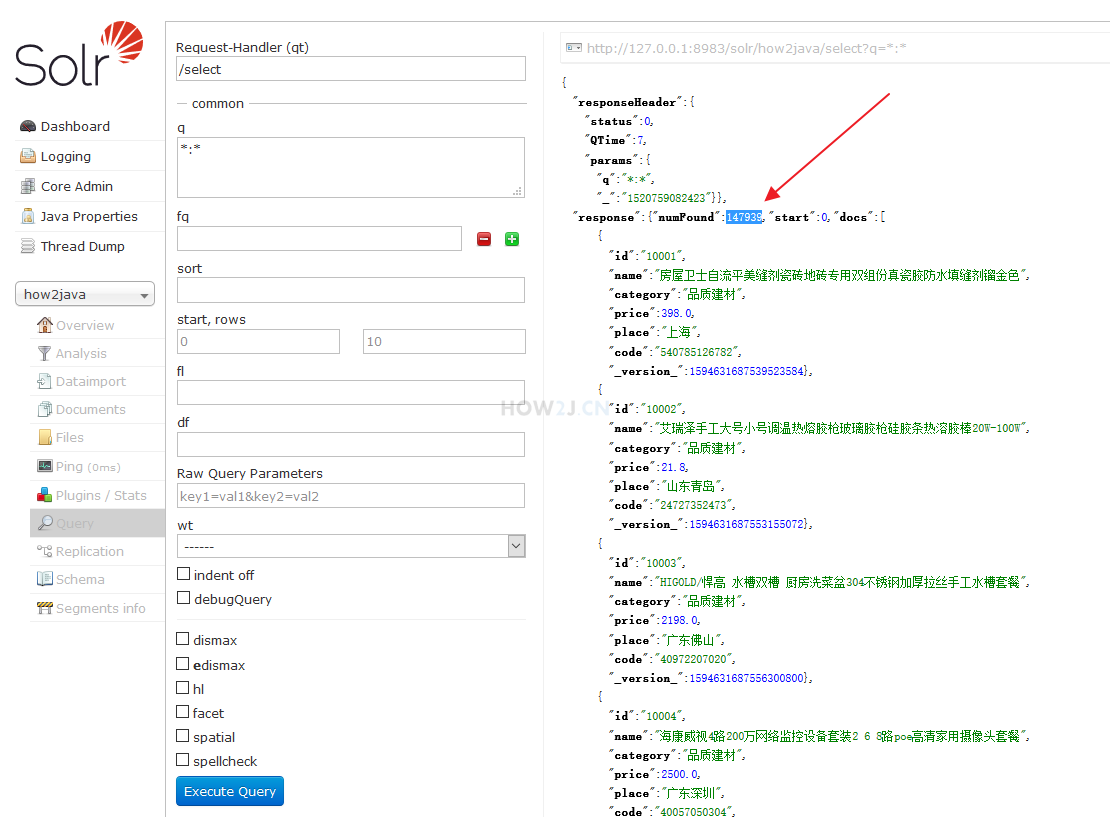
下载运行项目,配置运行起来,确认可用之后,再学习做了哪些步骤以达到这样的效果。
运行TestSolr4j,可以看到如图所示的查询了10条出来的效果
[](https://how2j.cn/frontstepImage?stepid=7363 "点击全屏观看")
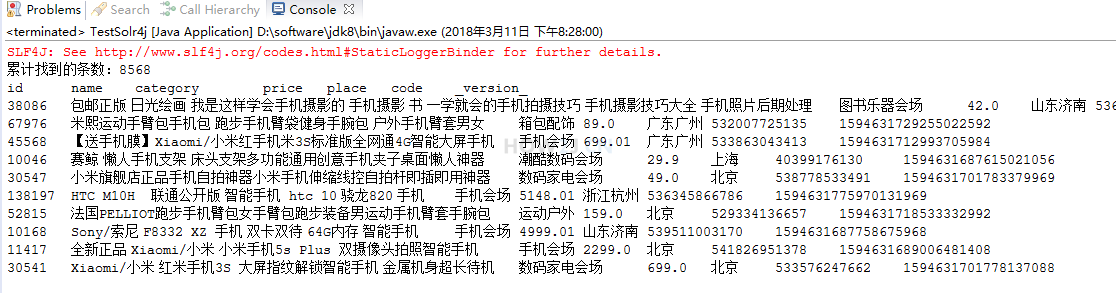
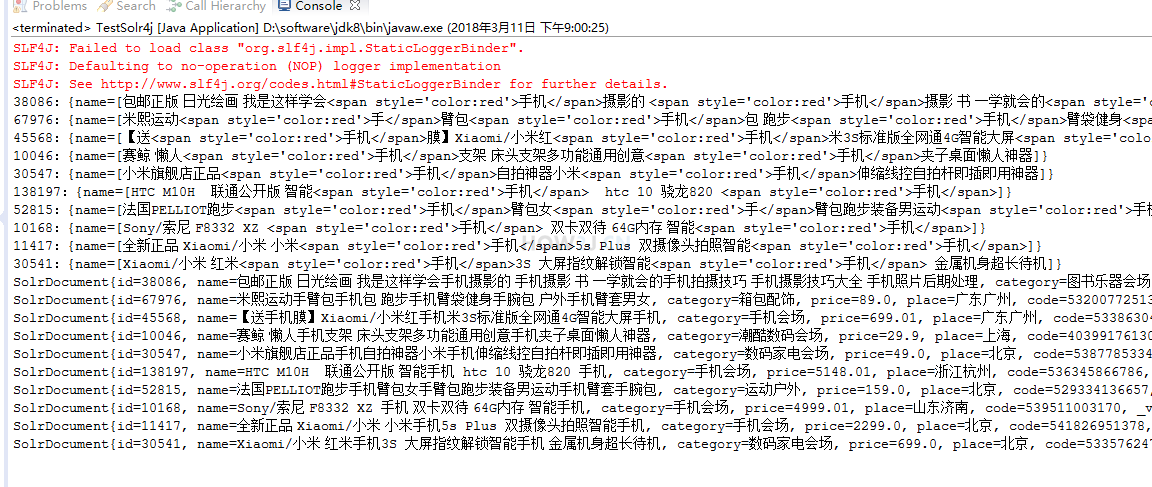
查询高亮显示
运行TestSolr4j 看到如图所示的效果,手机 这个关键字被高亮出来了
[](https://how2j.cn/frontstepImage?stepid=7367 "点击全屏观看")
增加queryHighlight 方法
增加queryHighlight 方法
public static void queryHighlight(String keywords) throws SolrServerException, IOException {
     SolrQuery q = new SolrQuery();        //开始页数
     q.setStart(0);        //每页显示条数
     q.setRows(10);        // 设置查询关键字
     q.setQuery(keywords);         // 开启高亮
     q.setHighlight(true);         // 高亮字段
     q.addHighlightField("name");         // 高亮单词的前缀
     q.setHighlightSimplePre("<span style='color:red'>");         // 高亮单词的后缀
     q.setHighlightSimplePost("</span>");         //摘要最长100个字符
     q.setHighlightFragsize(100);        //查询
     QueryResponse query = client.query(q);        //获取高亮字段name相应结果
     NamedList<Object> response = query.getResponse();
     NamedList<?> highlighting = (NamedList<?>) response.get("highlighting");
     for (int i = 0; i < highlighting.size(); i++) {
         System.out.println(highlighting.getName(i) + ":" + highlighting.getVal(i));
    }                //获取查询结果
    SolrDocumentList results = query.getResults();
    for (SolrDocument result : results) {
          System.out.println(result.toString());
      }
  }
文章整理来自
经过测试运行正确无误学习记录一下