**在得到网页的响应之后,就要开始把得到的响应进行相应的操作来提取相应的数据,这个也是Spider工作的目的之一。**
xpath一些最常用语法
在得到网页的响应之后(一般返回页面的html文档字符),需要选中需要提取的页面的数据,这个过程一般用xpath或者css选择器。
|
表达式
|
描述
|
|
nodename
|
选取此节点的所有子节点。
|
|
/
|
从根节点选取。
|
|
//
|
从匹配选择的当前节点选择文档中的节点,而不考虑它们的位置。
|
|
.
|
选取当前节点。
|
|
..
|
选取当前节点的父节点。
|
|
@
|
选取属性。
|
表格来源:[https://www.w3school.com.cn/xpath/xpath_syntax.ASP](https://www.w3school.com.cn/xpath/xpath_syntax.ASP)
创建Selector对象
只需要把参数传递到Selector构造器,参数可以是网页的html文档,也可以是一个Response对象。
from scrapy.selector import Selector
text="""<html>
... 	<head>
... 		<meta charset="utf-8" />
... 		<link rel="stylesheet" href="./css/new_file.css" type="text/css">
... 		<title></title>
... 	</head>
... 	<body>
... 		<div class="color_new">
... 			<h1><i>c++</i><ins>是</ins>什么
... 			<br>python
... 			<code>PHP</code>
... 			<kbd>Java</kbd>
... 			<hr >
... 			</h1>
... 		</div>
... 		<div style="color:blue;margin-left:20px;">
... 			<p>第二段文字</p>
... 			<img src="./img/6baa0c32b53eb98abb3d8e40e7444257.jpg" alt="图片丢失" usemap="#mymap">
... 			<map name="mymap">
... 				<area shape="rect" href="new_file.html" coords="0,0,50,50">
... 			</map>
... 		</div>
... 	</body>
... </html>"""
selector=Selector(text=text)
response参数
from scrapy.http import HtmlResponse
response=HtmlResponse(url='www.baidu.com',body=text,encoding='utf-8')
selector_1=Selector(response=response)
选中数据
在上面调用Selector构造器构造生成一个Selector对象,Selector对象有xpath和css方法来对需要的数据标签进行选中。
list=selector.xpath('//h1')
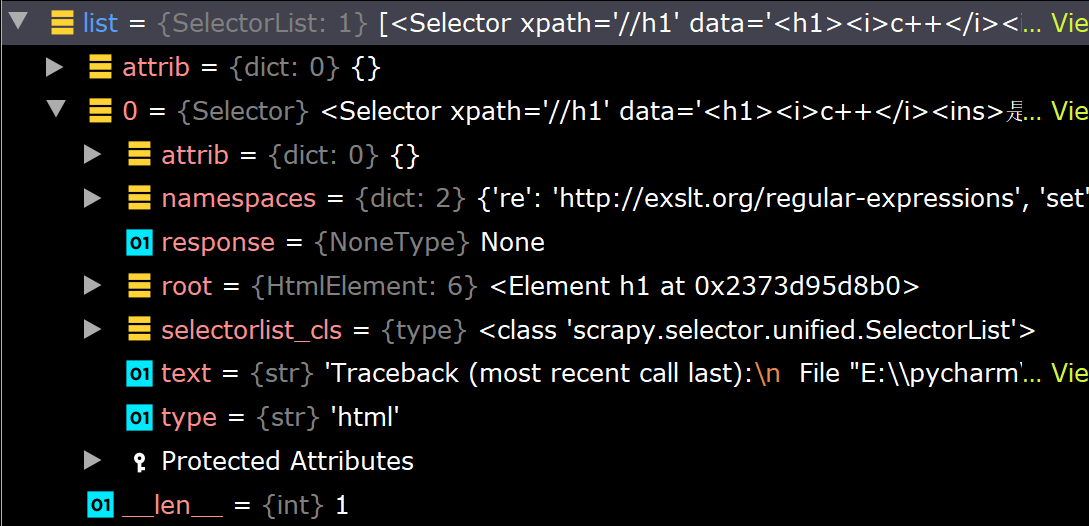
返回的值是一个由Selector对象构成的SelecyorList对象,也就是Selector的列表。
提取数据
在选定了html标签之后,可以使用extract和re正则表达式把需要的信息提取出来。
list=selector.xpath('//h1')
list[0].extract()
'c++是什么\n\t\t\tpython\n\t\t\tPHP\n\t\t\tJava\n\t\t\t\n\t\t\t

'
list=selector.xpath('//h1/text()')
list[0].extract()
'什么\n\t\t\t'