数学函数与常量
public class Note {
    public static void main(String[] args) {
//平方根计算
        System.out.println(Math.sqrt(4));
        System.out.println(Math.sqrt(12));
        System.out.println(Math.sqrt(0));
        System.out.println(Math.sqrt(-12));
//输出结果:2.0
//3.4641016151377544
//0.0
//NaN
//pow为表示a的b次幂,幂函数算法涉及到高中部分的知识,幂可为正数和负数,0,请不要考虑虚数...
//pow返回的是double类型
        System.out.println(Math.pow(4,2));//4的2次方=16
        System.out.println(Math.pow(0,0));//任何数的0次幂都是1
        System.out.println(Math.pow(4,-2));//由于a=4,即a!=0,则此相当于1.0/16
//输出结果:16.0
//1
//0.0625
//三角函数计算
        System.out.println(Math.sin(90));
        System.out.println(Math.sin(Math.PI/2));
        System.out.println(Math.cos(30));
        System.out.println(Math.cos(0));
        System.out.println(Math.tan(45));
        System.out.println(Math.tan(Math.PI/4));
//输出结果
//0.8939966636005579
//1.0
//0.15425144988758405
//1.0
//1.6197751905438615
//0.9999999999999999
    }
}
数值类型之间的转换
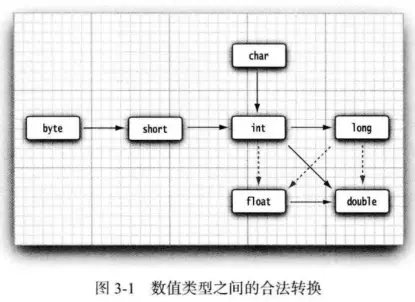
6个实箭头,3个虚箭头,实箭头表示没有精度损失,虚箭头表示有精度损失当两个或多个不同的操作数进行运算,会先转换为同一个类型,然后计算
-
如果两个操作数中有一个是double类型,另一个操作数就会转换为double类型。
-
否则,如果其中-一个操作数是float类型,另一个操作数将会转换为float类型。
-
否则,如果其中-一个操作数是long类型,另一个操作数将会转换为long类型。
否则,两个操作数都将被转换为int类型。
类型转换操作符
类型转换(cast)的原意是"模型铸造"窄化类型:将能容纳的更多信息的数据类型转换成无法容纳那么多信息的类型(危险,信息丢失)
扩展类型:不会照成任何信息的丢失
public class Note {
    public static void main(String[] args) {
        int i = 200;
        long lng = (long)i;
        lng = i; // 扩展类型无需强制转换
        long lng2 = (long)200;
        lng2 = 200;
        i = (int)lng2; //窄化类型必须强制转换,危险
    }
}
强制类型转换
强制类型转换(cast) 圆括号里面表示需要转换后的类型,也可以叫窄化转换
-
只要类型比int小(即byte或者short),那么运算之前这些会自动转换成int,最终结果就是int类型,如果赋值给较小类型就需要窄化转换
-
表达式中出现的最大的数据类型决定了表达式最终的结果的数据类型
-
如果将一个float值与double值相乘,结果就是double如果将一个int值与long值相加,结果就是long
public class Note {
    public static void main(String[] args) {
//强制转换,小数部分会被截掉变为整数
        double x = 9.997;
        int nx = (int) x;//double转换为int,需要强制转换
        System.out.println(nx);
        nx = (int) Math.round(x);//round返回为long类型,long转换为int,需要强制转换
        System.out.println(nx);
//输出结果:
//9
//10
//如果转换的值超过所需要转换后的类型最大值,会得到完全不同的一个值
        byte b = (byte) 300;
        System.out.println(Byte.MAX_VALUE);//byte类型最大值127
        System.out.println(b);
//输出结果
//127
//44
//极少数情况下需要boolean参与转换
        boolean is = Math.random() + 2 <= 2.5;
        double i = is ? 0 : 1;
        System.out.println(i);
//输出结果
//随机,可能为1也可能为1
    }
}
截尾和舍入
窄化转换必须注意截尾和舍入的问题截尾实现代码
public class Note {
    public static void main(String[] args) {
        double above = 0.7, below = 0.4;
        float fabove = 0.7f, fbelow = 0.4f;
        System.out.println(("(int)above: " + (int) above));
        System.out.println("(int)below: " + (int) below);
        System.out.println("(int)fabove: " + (int) fabove);
        System.out.println("(int)fbelow: " + (int) fbelow);
//输出结果
//(int)above: 0
//(int)below: 0
//(int)fabove: 0
//(int)fbelow: 0
    }
}
舍入实现代码
public class Note {
    public static void main(String[] args) {
        double above = 0.7, below = 0.4;
        float fabove = 0.7f, fbelow = 0.4f;
        System.out.println("Math.round(above): " + Math.round(above));
        System.out.println("Math.round(below): " + Math.round(below));
        System.out.println("Math.round(fabove): " + Math.round(fabove));
        System.out.println("Math.round(fbelow): " + Math.round(fbelow));
//输出结果
//Math.round(above): 1
//Math.round(below): 0
//Math.round(fabove): 1
//Math.round(fbelow): 0
    }
}
结合赋值和运算符
+(加) -(减) *(乘) /(除) %(取模)%:它从整除法中产生余数,如果得到小数,则去除小数部分
import java.util.Random;
public class Note {
    public static void main(String[] args) {
        /*需要导入包:import java.util.Random;*/
// 创建一个Random
//通过在创建Random对象时提供种子(用于随机数生成器的初始化值,随机数生成器对于特定的种子值总是产生相同的随机数序列)
        Random rand = new Random(47);
        int i, j, k;
// 通过种子生成数字59
        j = rand.nextInt(100) + 1;
        System.out.println("j :" + j);
// 通过种子生成数字56
        k = rand.nextInt(100) + 1;
        System.out.println("k :" + k);
        i = j + k;
//59+56=115
        System.out.println("j + k : " + i);
        i = j - k;
//59-56=3
        System.out.println("j - k :" + i);
        i = k / j;
//在整数除法会去除小数点部分 56/59 0.9491525423728814  得到0
        System.out.println("k / j :" + i);
        i = k * j;
//59*56=3304
        System.out.println("k*j :" + i);
        i = k % j;
//56%59   余数为56
        System.out.println("k%j :" + i);
        j %= k;
//j=59%56 余数为3
        System.out.println("j %= k :" + j);
        float u, v, w;
        v = rand.nextFloat();
//返回 0.5309454
        System.out.println("v : " + v);
        w = rand.nextFloat();
//返回 0.0534122
        System.out.println("w : " + w);
        u = v + w;
//0.5309454+0.0534122=0.5843576
        System.out.println("v + w :" + u);
        u = v - w;
//0.5309454-0.0534122=0.47753322
        System.out.println("v - w :" + u);
        u = v * w;
//0.5309454*0.0534122=0.028358962
        System.out.println("v * w :" + u);
        u = v / w;
//0.5309454/0.0534122=9.940527
        System.out.println("v / w :" + u);
        u += v;
//9.940527+0.5309454=10.471473  10.4714724  精度问题会导致最终结果有误差,我们以输出结果为准就行
        System.out.println("u += v :" + u);
        u -= v;
//10.471473-0.5309454=9.940527  9.9405276  精度问题会导致最终结果有误差,我们以输出结果为准就行
        System.out.println("u -= v :" + u);
        u *= v;
//9.940527*0.5309454=5.2778773  5.2778770842258  精度问题会导致最终结果有误差,我们以输出结果为准就行
        System.out.println("u *= v :" + u);
        u /= v;
//5.2778773/0.5309454=9.940527  9.94052740639621  精度问题会导致最终结果有误差,我们以输出结果为准就行
        System.out.println("u /= v :" + u);
    }
}
简写
public class Note {
    public static void main(String[] args) {
//使用二元运算符,很简洁的方式
        int x = 4;
        x += 4;
        System.out.println(x);
        x = 4;
        x = x + 4;
        System.out.println(x);
//输出结果
//8
//8
//同理-=,*=,/=%=等
    }
}
自增与自减运算符
-
自动递增:操作符"++",增加一个单位
-
自动递减:操作符"--",减少一个单位
-
前缀式:先执行运算再生成值
-
后缀式:先生成值再执行运算
public class Note {
    public static void main(String[] args) {
        int i = 1;
        System.out.println("i:" + i);
//先加1后赋值 2
        System.out.println("++i:" + ++i);
//先赋值再加1 2 下一次使用变量时值为3
        System.out.println("i++:" + i++);
//输出3
        System.out.println("i:" + i);
//先减1再赋值 2
        System.out.println("--i:" + --i);
//先赋值再减1 2 下一次使用变量值为1
        System.out.println("i--:" + i--);
//输出1
        System.out.println("i:" + i);
    }
}
关系和boolean运算符
关系操作符包括:大于(>),小于(<),大于或等于(>=),小于或等于(<=),等于(==),不等于(!=)
//<,>,<=,>=,!=,== 这些常用操作符和数学表达等式或不等式含义一致
//&& || 位运算符也是很常用的关系运算符
//关系操作符生成的是一个boolean(布尔)结果
//可以用于操作数的值之间的关系,如果是真的就返回true(真),否则返回false(假)
三目(元)运算(操作)符
condition?expression1?expression2
//三元操作符 condition ? expression1 : expression2 如 x < y ? x : y 如果x
int x=1,y=9;
boolean is=x < y ? x : y;
boolean-exp ? value0:value1
//如果boolean-exp的结果为true,则计算value0
//如果boolean-exp的结果为false,则计算value1
public class Note {
    static int ternary(int i) {
        return i < 10 ? i * 100 : i * 10;
    }
    static int standardIfElse(int i) {
        if (i < 10)
            return i * 100;
        else
            return i * 10;
    }
    public static void main(String[] args) {
        System.out.println(ternary(9));
        System.out.println(ternary(10));
        System.out.println(standardIfElse(9));
        System.out.println(standardIfElse(10));
//输出结果
//900
//100
//900
//100
    }
}
测试对象的等价性
关系操作符==和!=也适用于对象
public class Note {
    public static void main(String[] args) {
//内容为47
        Integer n1 = new Integer(47);
//内容为47
        Integer n2 = new Integer(47);
//==,!= 即会判断内容,还会判断对象的引用,如果对象的引用不一致则返回false
        System.out.println(n1 == n2);
        System.out.println(n1 != n2);
//n1,n2对象对应的Integer类重写了equals()方法,所以只会比较内容是否一致,不会比较对象的引用是否一致
//重写Object的equals 方法 内容为: value == ((Integer)obj).intValue();  //比较内容
        System.out.println(n1.equals(n2));
        Value v1 = new Value();
        Value v2 = new Value();
        v1.i = v2.i = 100;
//v1,v2对象没有重写equals()方法,所以会比较对象的引用
//继承Object的equals 方法 内容为: this == obj  //比较引用
        System.out.println(v1.equals(v2));
//equals(参数) 方法默认对象引用的比较
//即是否为同一个对象
    }
    static class Value {
        int i;
    }
}
位运算符
也叫逻辑操作符
-
两个参数中对应的执行布尔代数运算,并最终生成一个结果
-
位运算符较少使用
-
与(&),非(!)
//掩码技术
//位运算符 &("and") |("or") ^("Xor")  ~("not")
// |和&也可以单独使用,但不采用"短路",换句话说尽量使用 &&或|| 避免不必要的多余运算和操作,|和&之间组成的表达式会都进行无意义判断,结果与&&,||一定是一样的
//<<,>>,>>> 位模式左移和右移,需要建立位模式进行掩码
位运算符例子
import java.util.Random;
public class Note {
    public static void main(String[] args) {
        /*需要导入包:import java.util.Random;*/
//与 (&&) 或(||) 非(!)
        Random random = new Random(47);
        int i = random.nextInt(100);
        int j = random.nextInt(100);
        System.out.println("i:" + i);
        System.out.println("j:" + j);
        System.out.println("i>j is " + (i > j));
        System.out.println("i<j is " + (i < j));
        System.out.println("i>=j is " + (i >= j));
        System.out.println("i<=j is " + (i <= j));
        System.out.println("i==j is " + (i == j));
        System.out.println("i!=j is " + (i != j));
//以下是错误的操作
//System.out.println("i$$j is " + (i && j));
//System.out.println("i||j is " + (i || j));
//System.out.println("!i is " + (!i);
        System.out.println("(i<10)&&(j<10) is " + ((i < 10) && (j < 10)));
        System.out.println("(i<10)||(j<10) is " + ((i < 10) || (j < 10)));
    }
}
短路
相比位运算符(与(&),或(|),异或(),非(!)),短路更较多使用
public class Note {
    public static void main(String[] args) {
//test2(2)得到false后后续的运算或方法不再被使用或调用,这种现象就是短路
//不必计算有利于性能的提升
        boolean b = test1(0) && test2(2) && test3(2);
        System.out.println("expression is " + b);
//输出结果   没有test3的运行结果,test3没有被执行
//test1(0)
//request:true
//test1(2)
//request:false
//expression is false
    }
    private static boolean test1(int val) {
        System.out.println("test1(" + val + ")");
        System.out.println("request:" + (val < 1));
        return val < 1;
    }
    private static boolean test2(int val) {
        System.out.println("test1(" + val + ")");
        System.out.println("request:" + (val < 2));
        return val < 2;
    }
    private static boolean test3(int val) {
        System.out.println("test1(" + val + ")");
        System.out.println("request:" + (val < 3));
        return val < 3;
    }
}
移位运算符
此操作符可以处理整数类型(基本类型的一种)
- 有符号
左移位操作符(<<) 操作符右侧指定的位数将操作符左边的操作数向左移动(低位补0)右移位操作符(>>) 操作符右侧指定的位数将操作符左边的操作数向右移动 "符号
扩展" 符号为正,则高位插入0,符号为负,高位插入1
-
无符号
-
右移位操作符(>>>)
import java.util.Random;
public class Note {
    public static void main(String[] args) {
        Random rand = new Random(47);
        int i = rand.nextInt();
        int j = rand.nextInt();
        //-1, int: -1, binary:11111111111111111111111111111111
        printBinaryInt("-1", -1);
        //+1, int: 1, binary:1
        printBinaryInt("+1", +1);
        int maxpos = 2147483647;
        //maxpos, int: 2147483647, binary:1111111111111111111111111111111
        printBinaryInt("maxpos", maxpos);
        int maxneg = -2147483648;
        //maxneg, int: -2147483648, binary:10000000000000000000000000000000
        printBinaryInt("maxneg", maxneg);
        //i, int: -1172028779, binary:10111010001001000100001010010101
        printBinaryInt("i", i);
        //~i, int: 1172028778, binary:1000101110110111011110101101010
        printBinaryInt("~i", ~i);
        //-i, int: 1172028779, binary:1000101110110111011110101101011
        printBinaryInt("-i", -i);
        //j, int: 1717241110, binary:1100110010110110000010100010110
        printBinaryInt("j", j);
        //i & j, int: 570425364, binary:100010000000000000000000010100
        printBinaryInt("i & j", i & j);
        //i | j, int: -25213033, binary:11111110011111110100011110010111
        printBinaryInt("i | j", i | j);
        //i ^ j, int: -595638397, binary:11011100011111110100011110000011
        printBinaryInt("i ^ j", i ^ j);
        //i << 5, int: 1149784736, binary:1000100100010000101001010100000
        printBinaryInt("i << 5", i << 5);
        //i >> 5, int: -36625900, binary:11111101110100010010001000010100
        printBinaryInt("i >> 5", i >> 5);
        //(~i) >> 5, int: 36625899, binary:10001011101101110111101011
        printBinaryInt("(~i) >> 5", (~i) >> 5);
        //i >>> 5, int: 97591828, binary:101110100010010001000010100
        printBinaryInt("i >>> 5", i >>> 5);
        //(~i) >>> 5, int: 36625899, binary:10001011101101110111101011
        printBinaryInt("(~i) >>> 5", (~i) >>> 5);
        long l = rand.nextLong();
        long m = rand.nextLong();
        //-1L, long: -1, binary:1111111111111111111111111111111111111111111111111111111111111111
        printBinaryLong("-1L", -1L);
        //+1L, long: 1, binary:1
        printBinaryLong("+1L", +1L);
        long ll = 9223372036854775807L;
        //maxpos, long: 9223372036854775807, binary:111111111111111111111111111111111111111111111111111111111111111
        printBinaryLong("maxpos", ll);
        long lln = -9223372036854775808L;
        //maxneg, long: -9223372036854775808, binary:1000000000000000000000000000000000000000000000000000000000000000
        printBinaryLong("maxneg", lln);
        //l, long: -8652529054300476342, binary:1000011111101100000010101010101100001101101011000110110001001010
        printBinaryLong("l", l);
        //~l, long: 8652529054300476341, binary:111100000010011111101010101010011110010010100111001001110110101
        printBinaryLong("~l", ~l);
        //-l, long: 8652529054300476342, binary:111100000010011111101010101010011110010010100111001001110110110
        printBinaryLong("-l", -l);
        //m, long: 2955289354441303771, binary:10100100000011010011000000001010010011111101111010011011011011
        printBinaryLong("m", m);
        //l & m, long: 72066398748419146, binary:100000000000010000000001000000001101001000010010001001010
        printBinaryLong("l & m", l & m);
        //l | m, long: -5769306098607591717, binary:1010111111101111010011101010101110011111111111111110111011011011
        printBinaryLong("l | m", l | m);
        //l ^ m, long: -5841372497356010863, binary:1010111011101111010001101010100110011110010110111100101010010001
        printBinaryLong("l ^ m", l ^ m);
        //l << 5, long: -179768631971968704, binary:1111110110000001010101010110000110110101100011011000100101000000
        printBinaryLong("l << 5", l << 5);
        //l >> 5, long: -270391532946889886, binary:1111110000111111011000000101010101011000011011010110001101100010
        printBinaryLong("l >> 5", l >> 5);
        //(~l) >> 5, long: 270391532946889885, binary:1111000000100111111010101010100111100100101001110010011101
        printBinaryLong("(~l) >> 5", (~l) >> 5);
        //l >>> 5, long: 306069219356533602, binary:10000111111011000000101010101011000011011010110001101100010
        printBinaryLong("l >>> 5", l >>> 5);
        //(~l) >>> 5, long: 270391532946889885, binary:1111000000100111111010101010100111100100101001110010011101
        printBinaryLong("(~l) >>> 5", (~l) >>> 5);
    }
    static void printBinaryInt(String s, int i) {
        System.out.println(s + ", int: " + i + ", binary:" + Integer.toBinaryString(i));
    }
    static void printBinaryLong(String s, long l) {
        System.out.println(s + ", long: " + l + ", binary:" + Long.toBinaryString(l));
    }
}
括号与运算符级别
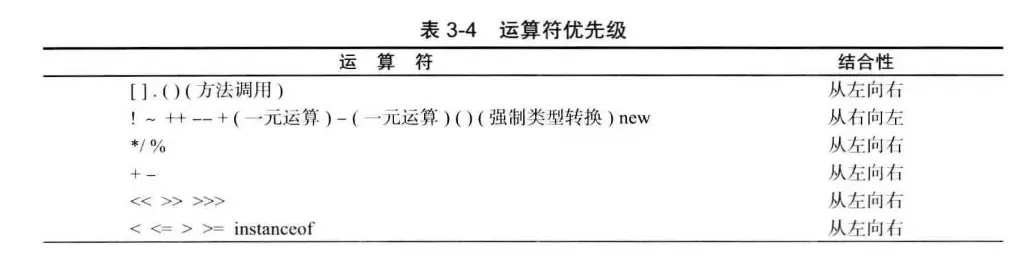
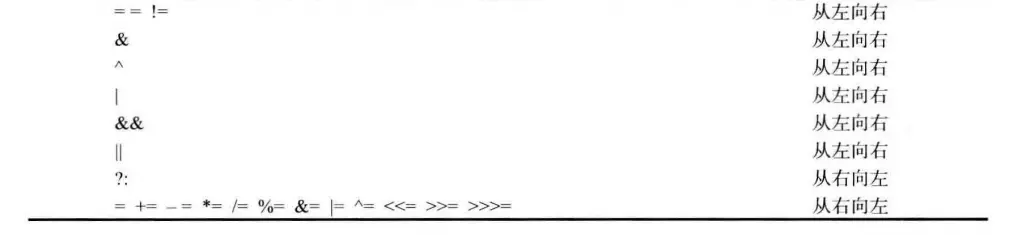
一般更多表达式应当多使用()小括号的方式,以此避免考虑优先级导致结果判断或分析失误的情况当一个表达式中存在多个操作符,操作符的
优先级决定各部分的计算顺 序使用括号可以明确规定计算顺序
public class Note {
    public static void main(String[] args) {
        int x = 1, y = 2, z = 3;
//操作符接受 +(加) -(减) *(乘) /(除) =(赋值)  用于操作数值,生成新的数值,
// 也可以改变自身的值,称为"副作用"
//几乎所有的操作符只能操作"基本类型",除了操作符"=","=="和"!="还可以操作对象
//String 支持"+"和"+="
//即 1+2-1+3=5
        int a = x + y - 2 / 2 + z;
//即 1+(2-2)/(2+3)=1
        int b = x + (y - 2) / (2 + z);
//"+"为"字符串连接"操作符
//a,b转换为字符串,即非字符串通过连接符"+"转换成字符串String类型
        System.out.println("a = " + a + " b = " + b);
//输出结果
//a = 5 b = 1
    }
}
枚举类型
枚举类型可以避免变量中取值隐患,例如类型的不一致,取值不正确枚举类型包括有限个命名的值。
例如, e_ Size { SMALL, MEDIUM, LARGE, EXTRA.LARCE };
现在,可以声明这种类型的变量:Size s = Size.MEDIUM;
Size 类型的变量只能存储这个类型声明中给定的某个枚举值,或者 null 值,null 表示这个变量没有设置任何值