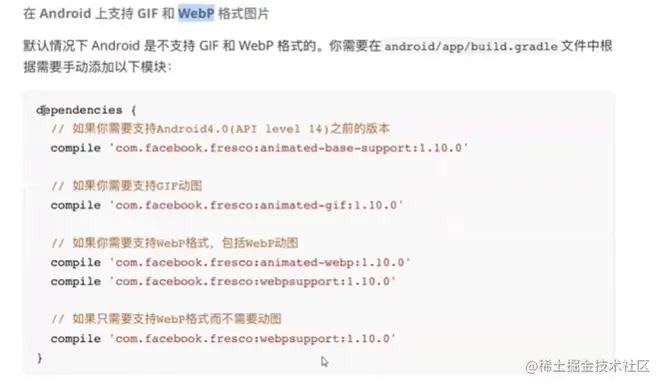
问题1 安卓不支持GIF和WebP的解决方案
状态栏
<StatusBar barStyle="dark-content" />
<StatusBar barStyle="light-content" />
标签说明
<SafeAreaView>
</SafeAreaView>
webview
yarn add react-native-webview
react-native link react-native-webview
pod install
按钮
const App = () => {
  return (
    <>
      <View style={styles.box}>
        <TouchableWithoutFeedback
          onPress={
            () => {
              console.log('点击');
            }}

          onPressIn={
            () => {
              console.log('按下');
            }}
          onPressOut={
            () => {
              console.log('松开');
            }}
          onLongPress={
            () => {
              console.log('长按');
            }
          }
        >
          <View style={styles.button}>

          </View>
        </TouchableWithoutFeedback>
      </View>
    </>
  );
};
样式对象
 <View style={[styles.view, {backgroundColor: 'blue'}]}>
    <Text>Hello Word</Text>
</View>
<View style={{marginTop: 8, padding: 9, backgroundColor: "blue"}}>
    <Text style={{color: 'red'}}>老陈嘛</Text>
</View>
样式
textShadowColor:
textShadowOffset: { width: 2, height: 2}
textShadowRadius: 1   模糊度
本地存储
yarn add @react-native-community/async-storage
使用iconfont字体库
yarn add react-native-iconfont-cli --dev
yarn add react-native-svg
npx iconfont-init
此时项目根目录会生成一个iconfont.json的文件,内容如下:
{
"symbol_url": "请参考README.md,复制官网提供的JS链接",
"use_typescript": false,
"save_dir": "./src/iconfont",
"trim_icon_prefix": "",
"default_icon_size": 18,
"local_svgs": "."
}