Guideline 3.1.2 - Business - Payments - Subscriptions
原文
We noticed that your app did not fully meet the terms and conditions for auto-renewing subscriptions, as specified in Schedule 2, section 3.8(b) of the Paid Applications agreement:
"3.8 You may offer auto-renewing subscriptions in select Territories using the In-App Purchase API subject to the terms of this Schedule 2, provided that:
[…]
(b) You clearly and conspicuously disclose to users the following information regarding your auto-renewing subscription:
- Title of auto-renewing subscription, which may be the same as the in-app product name
- Length of subscription
- Price of subscription, and price per unit if appropriate"
App Store Information We were unable to find all of the required information within your metadata. Specifically, we were unable to find a link to your Terms of Use in either the app description or the License Agreement section of App Store Connect.
Next Steps
To resolve this issue, please revise your app to include this missing information. If the above information is in your app, please reply to this message in Resolution Center to provide details on where to locate it.
To add your license agreement text to appear on the App Store page for your app:
- Open your app in App Store connect
- Select the App Information page from the left hand menu
- In the General Information section, choose “Edit” next to “License Agreement”
- Click the option to apply a custom EULA
- Copy and paste your custom EULA into the Custom License Agreement box
Resources
The Apple Developer website includes detailed resources on how to offer auto-renewable subscriptions in your app. You can learn more about creating a positive onboarding experience for your customers in the Subscriptions Human Interface Guidelines.
原文分析
准则3.1.2-业务-付款-订阅
我们注意到您的应用未完全符合付费应用协议附表2第3.8(b)节中指定的自动续订订阅的条款:
“ 3.8您可以在不违反本附表2条款的前提下,使用应用内购买API在某些地区提供自动续订服务:
[…]
(b)您明确且显眼地向用户披露有关您的自动续订订阅的以下信息:
- 自动续订的标题,可能与应用内商品名称相同
- 订阅时间
- 订阅价格,以及相应的每单位价格”
应用商店信息 我们无法在您的元数据中找到所有必需的信息。具体来说,我们无法在App Store Connect的应用说明或许可协议部分中找到指向您的使用条款的链接。
下一步
要解决此问题,请修改您的应用程序以包含此丢失的信息。如果您的应用程序中包含上述信息,请在解决方案中心中回复此消息,以提供有关在何处查找的详细信息。
要添加您的许可协议文本以显示在您的应用程序的“应用程序商店”页面上,请执行以下操作:
- 在App Store Connect中打开您的应用
- 从左侧菜单中选择“应用信息”页面
- 在“常规信息”部分中,选择“许可协议”旁边的“编辑”
- 单击选项以应用自定义EULA
- 将您的自定义EULA复制并粘贴到“自定义许可协议”框中
解决方案
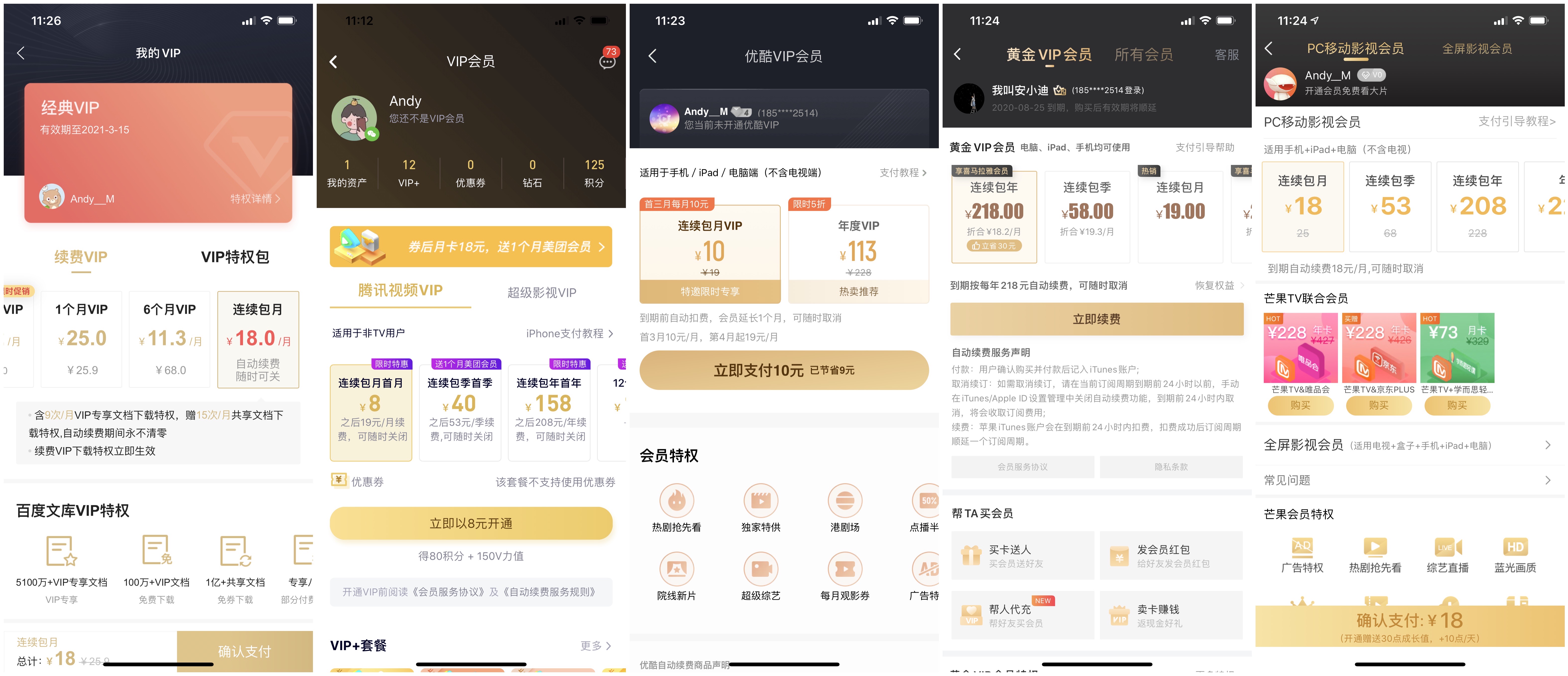
- 优化连续包月商品的描述,突出“订阅时间、订阅价格,以及相应的每单位价格”,如:
- 到期自动续费18月/月,可随时取消
-
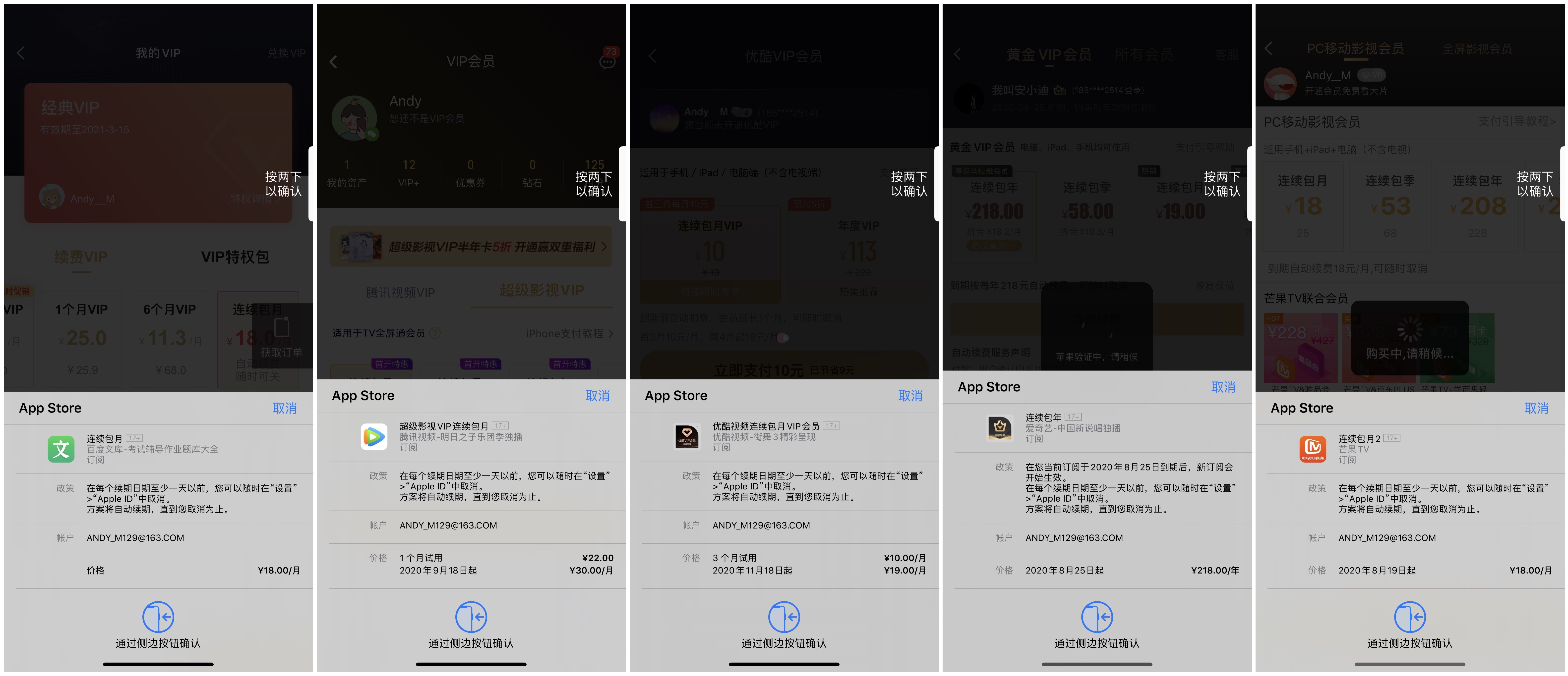
优化连续包月商品,在付费弹窗上的标题、描述,如:
文库VIP 连续包月- 价格 xxxx年xx月xx日起 ¥xx/月
- 优化APP描述信息,添加付费相关说明,
其中包含:自动订阅必须填写9大信息(详见 原文截图),总结起来就是:订阅名称、周期时长、价格、用户如何取消、使用iTunes account进行确认购买、提醒用户在下次自动订阅生成的24小时之前可以取消订阅,不足24小时就会接着续订,提供用户服务、隐私等协议以及免费订阅之后的注意事项。
具体可参考下图:
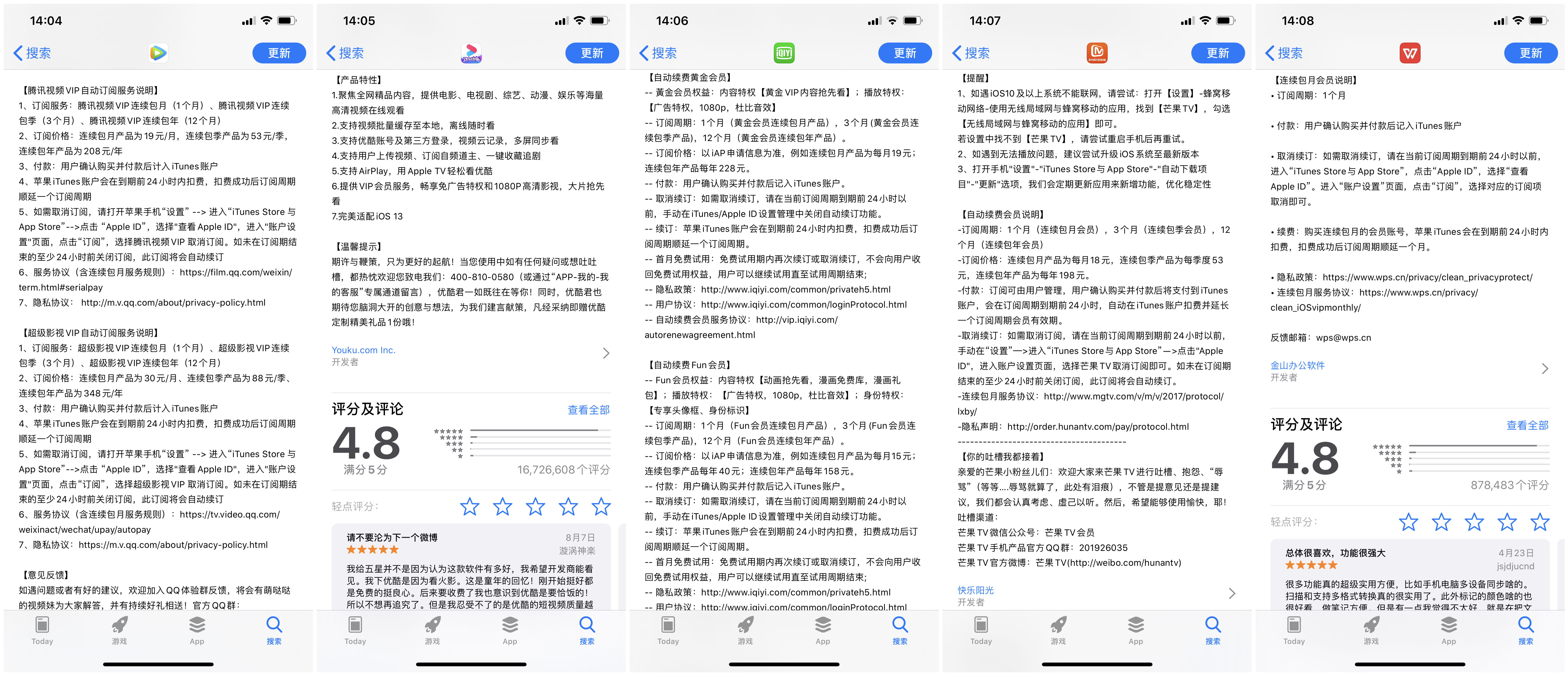
文案如下:
【自动订阅服务说明】
1、订阅服务:文库VIP连续包月(1个月)。
2、订阅价格:以IAP申请信息为准,例如连续包月产品为每月18元。
3、付款:订阅可由用户管理,用户确认购买并付款后计入iTunes账户。
4、续订:苹果iTunes账户会在到期前24小时内扣费,扣费成功后订阅周期顺延一个订阅周期。
5、取消续订:如需取消订阅,请打开苹果手机“设置” --> 进入“iTunes Store 与 App Store” --> 点击 “Apple ID”,选择“查看 Apple ID”, 进入"账户设置"页面,点击“订阅”,选择“文库大学生版”取消订阅即可。如未在订阅期结束的至少24小时前关闭订阅,此订阅将会自动续订。
6、用户协议:tanbi.baidu.com/san-home/us…
7、隐私协议:tanbi.baidu.com/san-home/pr…
8、文库会员服务协议:tanbi.baidu.com/san-home/vi…
9、连续包月服务协议:tanbi.baidu.com/san-home/au…
- 优化本地化相关内容
将所有可本地化的信息,都本地化处理,避免出现
注意事项
审核时如果被拒了一次,App 内购买项目的状态应该会变成“需要开发人员操作”,这个时候只需要进去修改下里面的文字重新保存下即可,App 内购买项目的状态自动会变成“正在等待审核”;然后下次只需要提交App审核即可。(详见原文)