1/背景
    一出好戏》讲述人性,使用Python抓取猫眼近10万条评论并分析,一起揭秘“这出好戏”到底如何?
    黄渤首次导演的电影《一出好戏》自8月10日在全国上映,至今已有10天,其主演阵容强大,相信许多观众也都是冲着明星们去的。
    目前《一出好戏》在猫眼上已经获得近60万个评价,评分为8.2分,票房已破10亿。

2/ 步骤
    整个数据分析的过程分为四步:
        获取数据
        处理数据
        存储数据
        数据可视化

3/ 准备知识
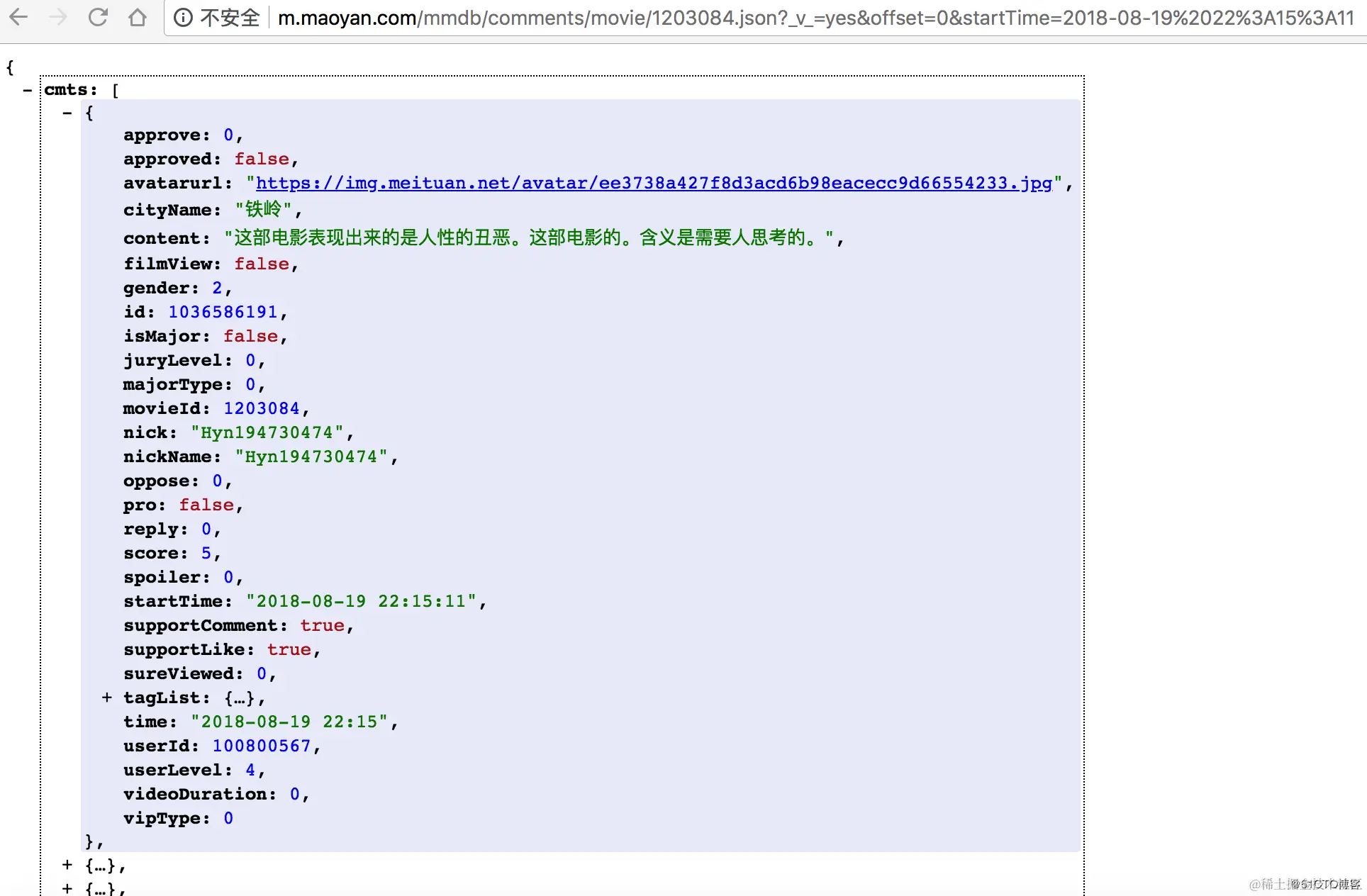
通过对评论数据进行分析,得到如下信息:
返回的是json格式数据
1200486表示电影的专属id;offset表示偏移量;startTime表示获取评论的起始时间,从该时间向前取数据,即获取最新的评论
cmts表示评论,每次获取15条,offset偏移量是指每次获取评论时的起始索引,向后取15条
hcmts表示热门评论前10条
total表示总评论数
4/ 代码实现
from urllib import request
import json
import time
from datetime import datetime
from datetime import timedelta
def get_data(url):
headers = {
'User-Agent': 'Mozilla/5.0 (Windows NT 6.1
req = request.Request(url,headers=headers)
response = request.urlopen(req)
if response.getcode() == 200:
return response.read()
else:
return None
if __name__ == '__main__':
url = 'http://m.maoyan.com/mmdb/comments/movie/1200486.json?_v_=yes&offset=0&startTime=2018-07-28%2022%3A25%3A03'
html = get_data(url)
print(html)
def parse_data(html):
data = json.loads(html)['cmts']
comments = []
for item in data:
comment = {
'id': item['id'],
'nickName': item['nickName'],
'cityName': item['cityName'] if 'cityName' in item else '',
'content': item['content'].replace('\n', ' ', 10),
'score': item['score'],
'startTime': item['startTime']
}
comments.append(comment)
return comments
if __name__ == '__main__':
url = 'http://m.maoyan.com/mmdb/comments/movie/1200486.json?_v_=yes&offset=0&startTime=2018-07-28%2022%3A25%3A03'
html = get_data(url)
comments = parse_data(html)
print(comments)
为了能够获取到所有评论数据,方法是:从当前时间开始,向前获取数据,根据url每次获取15条,然后得到末尾评论的时间,从该时间继续向前获取数据,直到影片上映日期(2018-08-10)为止,获取这之间的所有数据。
def save_to_txt():
start_time = datetime.now().strftime('%Y-%m-%d %H:%M:%S')
end_time = '2018-08-10 00:00:00'
while start_time > end_time:
url = 'http://m.maoyan.com/mmdb/comments/movie/1203084.json?_v_=yes&offset=0&startTime=' + start_time.replace(' ', '%20')
html = None
try:
html = get_data(url)
except Exception as e:
time.sleep(0.5)
html = get_data(url)
else:
time.sleep(0.1)
comments = parse_data(html)
print(comments)
start_time = comments[14]['startTime']
start_time = datetime.strptime(start_time, '%Y-%m-%d %H:%M:%S') + timedelta(seconds=-1)
start_time = datetime.strftime(start_time, '%Y-%m-%d %H:%M:%S')
for item in comments:
with open('comments.txt', 'a', encoding='utf-8') as f:
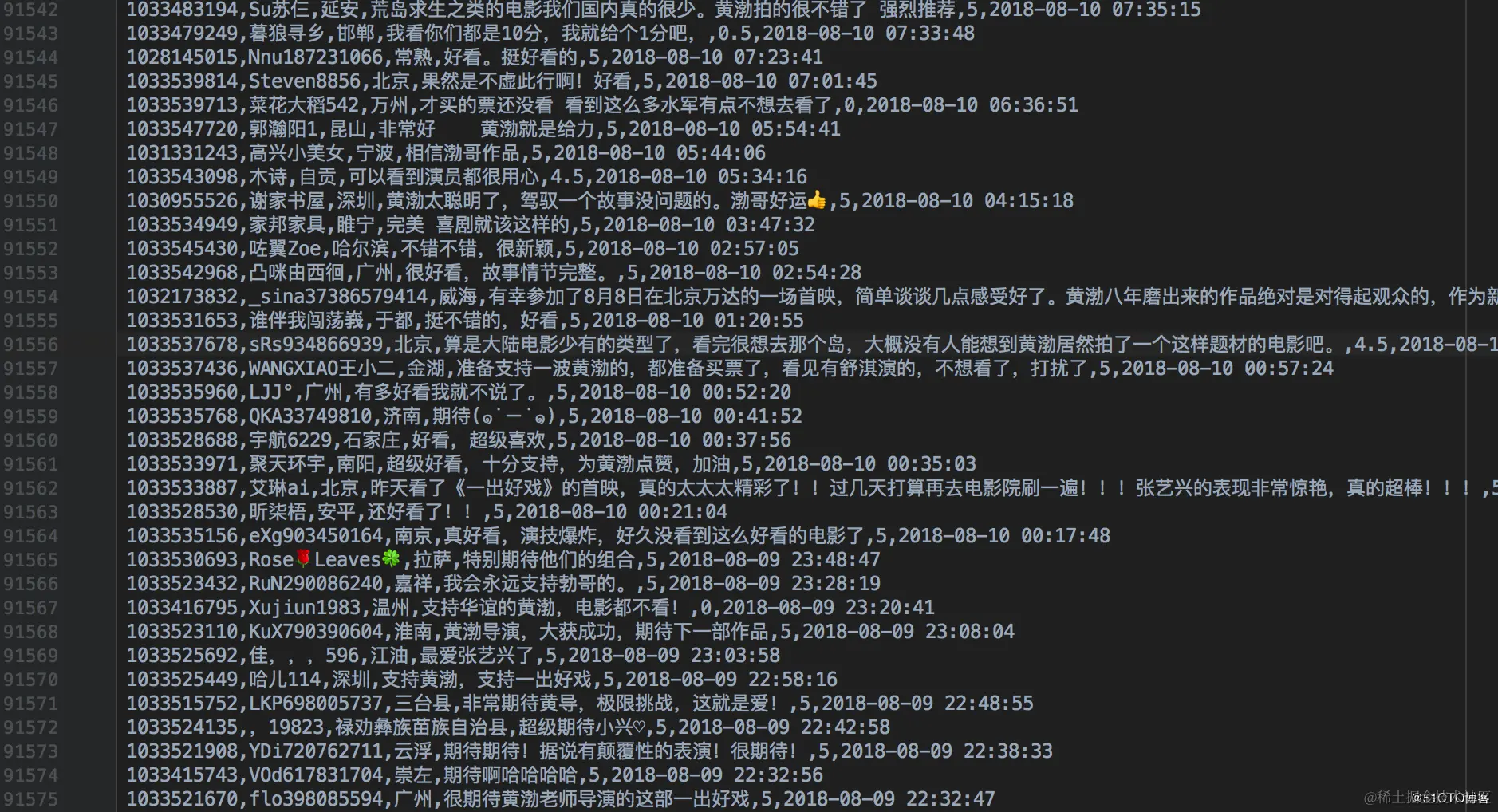
f.write(str(item['id'])+','+item['nickName'] + ',' + item['cityName'] + ',' + item['content'] + ',' + str(item['score'])+ ',' + item['startTime'] + '\n')
if __name__ == '__main__':
url = 'http://m.maoyan.com/mmdb/comments/movie/1200486.json?_v_=yes&offset=0&startTime=2018-07-28%2022%3A25%3A03'
html = get_data(url)
comments = parse_data(html)
print(comments)
save_to_txt()
有两点需要说明:
服务器一般都有反爬虫策略,当请求过于频繁时,服务器会拒绝部分连接,我这里是通过增加每个请求间延时来解决,只是一种简单的解决方案,还望各位看客理解包涵
根据数据量的多少,抓取数据所需时间会有所不同,我抓取的是2018-8-19到2018-8-10(上映当天)之间的数据,大概花了2个小时,共抓取约9.2万条评论数据
第四步:数据可视化
这里使用的是pyecharts,pyecharts是一个用于生成Echarts图表的类库,便于在Python中根据数据生成可视化的图表。
Echarts是百度开源的一个数据可视化JS库,主要用于数据可视化。
pip install pyecharts
pyecharts v0.3.2以后,pyecharts 将不再自带地图 js 文件。如用户需要用到地图图表,可自行安装对应的地图文件包。
pip install echarts-china-provinces-pypkg
pip install echarts-china-cities-pypkg
pip install echarts-china-counties-pypkg
pip install echarts-china-misc-pypkg
pip install echarts-countries-pypkg
pip install echarts-united-kingdom-pypkg
https://www.cnblogs.com/mylovelulu/p/9511369.html